
Important Safety Information
Always follow the assembly instructions carefully. Keep fingers and other body parts away from moving parts when adjusting the chair's features. Do not exceed the maximum weight capacity of the chair. Ensure all components are securely fastened before use. Regular inspection for wear and tear is recommended to maintain safety and performance.
Product Overview
The SIHOO Doro S300 is an advanced ergonomic office chair designed to provide comprehensive body support and comfort. It features a coordinated support system, precise elastic adjustment, bionic dynamic lumbar support, a shock-absorbing suspension system, and industry-leading 6D armrests. This chair is engineered for optimal posture and comfort during extended periods of sitting.
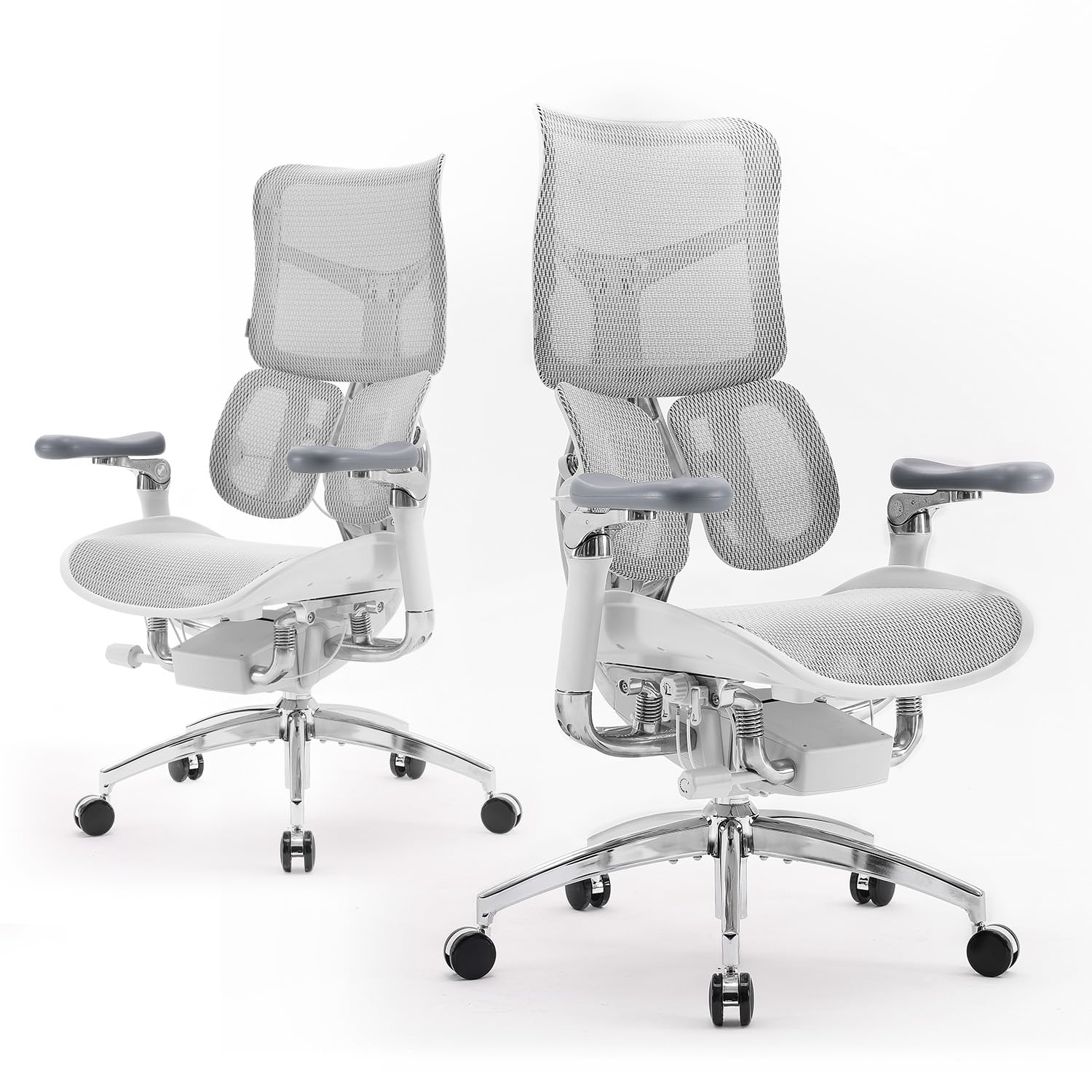
Image: The SIHOO Doro S300 Ergonomic Office Chair, showcasing its design in a modern office environment.
Video: Official product overview for the SIHOO Doro S300 ergonomic office chair, showcasing its design and features.
Key Features
- Coordinated Support System: This system utilizes a four-axis linkage that works during recline to evenly distribute pressure across the hips and back, promoting healthy spinal support.
- Precise Elastic Adjustment System: The chair's mechanism incorporates aerospace-grade elastic plates. A tension adjustment handle allows users to fine-tune the elasticity for customized smoothness based on body weight, reducing back pressure and offering a zero-gravity sensation.
- Bionic Dynamic Lumbar Support System: Designed to mimic the natural curve of the human lumbar region, this system provides 6D automatic deformation movement for comprehensive lumbar support, adapting to various body shapes and preventing fatigue during prolonged sitting.
- Shock-Absorbing Suspension System: This system provides a soft, balanced sitting experience, automatically adjusting to changes in sitting position for optimal support whether working or resting.
- 6D Coordinated Armrests: These advanced armrests offer support in six directions, alleviating strain on the arms and shoulders in any posture.
- Premium Independent Backrest: The backrest is adjustable in 5 levels to accommodate various user heights, ensuring personalized comfort and support.
- Ultra-Wide Integrated Headrest: Provides extra-soft, comfortable, and spacious support for the head and neck.
- Seat Depth Adjustment: Allows for a bigger and deeper seat, accommodating a wider range of body shapes for enhanced comfort.

Image: Illustration of the coordinated seat and back movement during recline.

Image: Detailed view of the under-seat controls for precise adjustments.

Image: Close-up of the dual dynamic lumbar support system.

Image: Illustration of the multi-directional adjustment of the 6D armrests.

Image: Demonstrating the 5-level height adjustment for the backrest.

Image: A user resting their head on the integrated headrest.

Image: Visual representation of the seat depth adjustment.
Assembly Instructions
The SIHOO Doro S300 chair requires assembly. Please refer to the detailed assembly manual included in the product packaging for step-by-step instructions. Ensure all parts are present and undamaged before beginning assembly. It is recommended to assemble the chair on a soft, clean surface to prevent scratches. If you encounter any difficulties, please contact customer support.
Operating Instructions
- Seat Height Adjustment: Locate the large lever underneath the right side of the seat. Pull the lever upwards to raise the seat. To lower the seat, remain seated and pull the lever upwards. Release the lever at the desired height.
- Recline and Tension Adjustment: The recline function is controlled by a lever on the left side of the seat. Pull the lever outwards to unlock the recline. Lean back to your desired angle and push the lever inwards to lock the position. The recline tension can be adjusted using the round knob located at the front-right underside of the seat. Turn clockwise to increase tension (requiring more force to recline) and counter-clockwise to decrease tension.
- Lumbar Support Adjustment: The bionic dynamic lumbar support automatically adapts to your back. For additional adjustment, some models may feature a knob or lever on the backrest to fine-tune the intensity or position of the lumbar support.
- Armrest Adjustment: The 6D armrests offer multiple adjustment points. Use the buttons or levers on the armrests to adjust height, pivot angle, and forward/backward position.
- Backrest Height Adjustment: To adjust the height of the backrest, grasp the backrest and lift it upwards. It will click into different positions. To lower it, lift it to its highest point, and it will then release to its lowest position, allowing you to re-adjust.
- Seat Depth Adjustment: Locate the lever or button on the left underside of the seat. Activate it and slide the seat forward or backward to achieve your preferred depth. Release the lever/button to lock the seat in place.
Maintenance and Care
- Cleaning: Wipe clean with a damp cloth. For mesh areas, use a mild soap solution and a soft brush, then wipe with a clean, damp cloth and allow to air dry. Avoid harsh chemicals or abrasive cleaners.
- Inspection: Periodically check all screws and bolts to ensure they are tight. Re-tighten if necessary. Inspect casters for debris and clean if needed to ensure smooth movement.
- Lubrication: Moving parts generally do not require lubrication. If squeaking occurs, consult customer support.
Troubleshooting
- Chair Squeaks: Check all connections and tighten any loose screws. If the issue persists, contact customer support.
- Difficulty Adjusting Height: Ensure the gas lift lever is fully engaged. If the chair does not raise or lower smoothly, the gas lift cylinder may need replacement.
- Unstable Chair: Verify that all legs are properly attached and that the casters are securely inserted. Ensure the chair is on a flat, even surface.
- Armrests Move Too Easily: While 6D armrests offer extensive movement, if they feel excessively loose, check their attachment points and ensure they are tightened according to the assembly instructions.
Specifications
| Brand | SIHOO |
| Model Name | Doro S300 (S-Line) |
| Color | White |
| Material | Mesh, Italian Velvet Mesh, Aluminum Frame |
| Product Dimensions (D x W x H) | 17.1"D x 20"W x 40"H |
| Item Weight | 45 pounds |
| Seat Depth | 18.11 inches |
| Chair Backrest Width | 17.7 inches |
| Additional Features | Adjustable Backrest, Adjustable Height, Adjustable Lumbar, Ergonomic, 6D Armrests, Suspension Seat, Adjustable Recline Tension |
| Certifications | BIFMA, SGS |
Warranty and Support
The SIHOO Doro S300 Ergonomic Office Chair comes with a 3-year warranty. SIHOO is committed to providing efficient after-sales service to address any issues you may encounter. For warranty claims, technical assistance, or any product-related inquiries, please refer to the contact information provided in your product packaging or visit the official SIHOO website.