
Introduction
Welcome to the PRUNUS J-25S AM FM Portable Radio user manual. This guide provides essential information for setting up, operating, maintaining, and troubleshooting your new radio. The PRUNUS J-25S is a versatile portable radio featuring AM, FM, and Shortwave bands, multiple power supply options including USB-C and solar charging, and a clear, loud speaker for an enjoyable listening experience.
Safety Information
- Do not expose the radio to water, moisture, or extreme temperatures.
- Avoid disassembling or modifying the device, as this will void the warranty and may cause damage.
- Use only the specified charging methods and cables to prevent damage to the battery or radio.
- Keep the radio away from strong magnetic fields or electronic devices that may cause interference.
- Dispose of batteries responsibly according to local regulations.
Package Contents
Please check the box for the following items:
- PRUNUS J-25S Radio
- Owner's Manual
- Quick Start Guide
- USB C Chargeable Cable
Product Overview
The PRUNUS J-25S is designed for ease of use and portability. Familiarize yourself with its components:

Figure 1: Front view of the PRUNUS J-25S Portable Radio, showing the speaker grille, tuning dial, and controls. The antenna is extended, and the solar panel is folded.
- Speaker: High-performance speaker for clear and rich sound.
- Tuning Dial: Large, easy-to-read frequency display for AM, FM, SW1, and SW2 bands.
- Tuning Knob: Used to precisely select radio stations.
- Power/Volume Wheel: Controls power on/off and adjusts audio volume.
- Band Selector: Switch between FM, AM, SW1, and SW2 frequency bands.
- Telescopic Antenna: Extendable antenna for improved reception, especially for FM and Shortwave bands.
- Foldable Handle: Integrated handle for easy portability.
- Solar Panel: Located on the back, provides supplementary charging.
- USB-C Port: For charging the internal rechargeable battery.

Figure 2: Detailed view of the radio's side controls, highlighting the Tuning Knob and the combined Power/Volume Wheel for intuitive operation.

Figure 3: The PRUNUS J-25S radio demonstrating its compact size and lightweight design, featuring a convenient foldable handle for easy transport.
Setup
Power Supply Options
The PRUNUS J-25S offers three ways to power your device:
- USB-C Charging: Connect the provided USB-C cable to the radio's USB-C port and a compatible USB power adapter (not included). This charges the internal 1800mAh rechargeable battery.
- Internal 1800mAh Battery: The radio comes with a built-in rechargeable battery for portable use.
- Solar Charging: The integrated solar panel on the back of the radio can provide supplementary charging when exposed to direct sunlight. While it helps maintain battery life, it is not intended for full charging from empty.
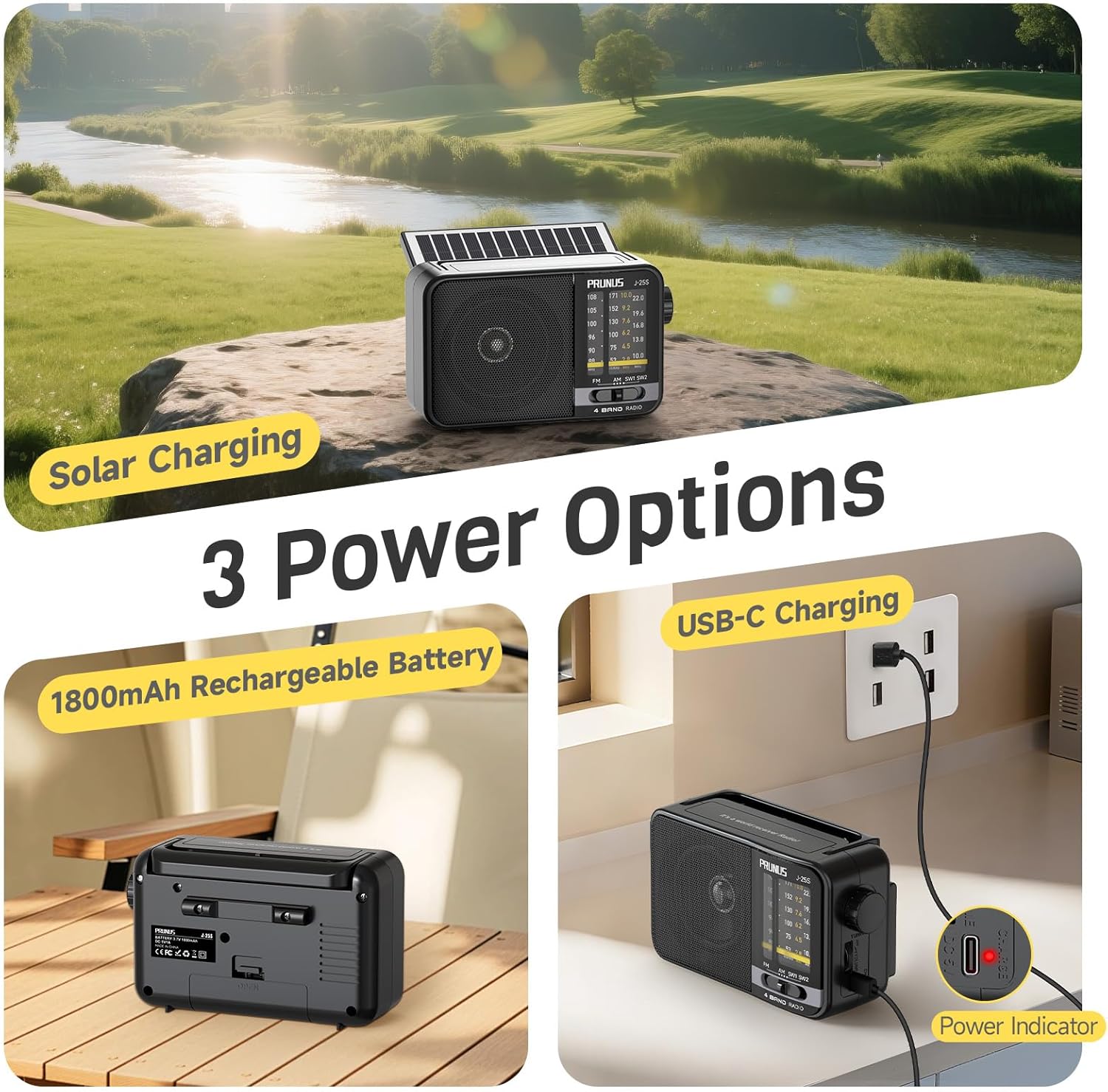
Figure 4: Illustration of the three power supply options for the PRUNUS J-25S: internal 1800mAh battery, USB-C charging via a wall adapter, and solar charging using the integrated panel.
Video 1: An official product video from Prunus Store demonstrating the USB-C and solar charging capabilities of the J-25S radio, highlighting its versatile power options.
Operating Instructions
Turning On/Off and Volume Control
To turn the radio on, rotate the Power/Volume wheel clockwise. Continue rotating to increase the volume. To turn off the radio, rotate the Power/Volume wheel counter-clockwise until it clicks.
Tuning to Stations
- Extend the Antenna: For optimal reception, especially on FM and Shortwave bands, fully extend the telescopic antenna.
- Select Band: Use the band selector switch to choose between FM, AM, SW1, or SW2.
- FM: 88–108 MHz
- AM: 530–1710 KHz
- SW1: 2.8–10.0 MHz
- SW2: 10.3–22 MHz
- Tune to Station: Slowly rotate the large Tuning Knob to scan through frequencies until you find your desired station. The tuning dial will indicate the current frequency.

Figure 5: Demonstrates extending the 12.2-inch telescopic antenna to enhance signal reception across FM, AM, SW1, and SW2 bands, ensuring clear audio for various programs.
Reception Tips
- For best FM and SW reception, fully extend and adjust the angle of the telescopic antenna.
- For AM reception, the radio has a built-in ferrite bar antenna. Rotate the radio for optimal signal strength.
- Move away from electronic devices (computers, TVs, mobile phones) that may cause interference.
- In areas with weak signals, holding the radio in your hand may temporarily improve reception due to human body induction, but reception may weaken again when the hand is removed. This is a common phenomenon with portable radios.
Maintenance
- Clean the radio with a soft, dry cloth. Do not use abrasive cleaners or solvents.
- If the radio will not be used for an extended period, store it in a cool, dry place.
- To prolong battery life, avoid fully discharging the battery frequently and charge it regularly, even if not in use.
Troubleshooting
| Problem | Possible Cause | Solution |
|---|---|---|
| No power | Battery is depleted. | Charge the radio using the USB-C cable or expose it to sunlight for solar charging. |
| Poor reception / Static | Antenna not extended or positioned correctly; interference from other devices; weak signal area. | Fully extend and adjust the telescopic antenna. Rotate the radio for AM. Move away from electronic interference. Try a different location. |
| No sound | Volume is too low; radio is off; station not tuned correctly. | Increase the volume. Ensure the radio is powered on. Retune to a clear station. |
Specifications
| Feature | Detail |
|---|---|
| Brand | PRUNUS |
| Model | J-25S |
| Product Dimensions | 6.7 x 2.9 x 4.3 inches (17 x 7.4 x 10.9 cm) |
| Item Weight | 1 pound (approx. 450g) |
| Power Source | Battery Powered (1 Lithium Ion battery included), USB-C, Solar |
| Battery Capacity | 1800mAh (internal) |
| Radio Bands Supported | AM, FM, SW1, SW2 |
| FM Frequency Range | 88–108 MHz |
| AM Frequency Range | 530–1710 KHz |
| SW1 Frequency Range | 2.8–10.0 MHz |
| SW2 Frequency Range | 10.3–22 MHz |
| Special Features | Lightweight, Portable, Rechargeable, Large Knob, Loud Speaker, DSP Chip |
| Antenna Length | 12.2 inches (approx. 31 cm) |
Warranty and Support
PRUNUS products are designed for reliability and performance. For warranty information or technical support, please refer to the contact details provided in your Quick Start Guide or visit the official PRUNUS website. PRUNUS offers 24/7 customer support to assist with any inquiries.


