Introduction
This manual provides instructions for the setup, operation, and maintenance of your PAPIFEED Automatic Pet Feeder with Camera and Water Fountain. This device is designed to provide scheduled feeding and hydration for your pets, offering convenience and peace of mind.
Safety Information
- Ensure the feeder is placed on a stable, level surface to prevent tipping.
- Keep the power adapter and cable away from water and out of reach of pets to prevent chewing or electrical hazards.
- Use only the provided power adapter.
- Do not immerse the main unit of the feeder in water. Only removable parts are washable.
- The camera does not have night vision. Ensure adequate lighting for monitoring.
- The battery backup is for emergency use only and does not support internet connectivity.
Package Contents
- PAPIFEED Automatic Pet Feeder with Camera
- Automatic Pet Drinking Fountain (84 oz/2.5L)
- Stainless Steel Food Bowl
- Silicone Mat
- Power Adapter (DC 5V)
- User Manual
Product Overview
The PAPIFEED Automatic Pet Feeder and Water Fountain system provides a comprehensive solution for pet feeding and hydration. The feeder features a 3.5L (approximately 15 cups) food hopper, a 480P adjustable camera, and two-way audio. The water fountain has an 84 oz (2.5L) capacity.

Image: Assembled PAPIFEED Automatic Pet Feeder and Water Fountain.
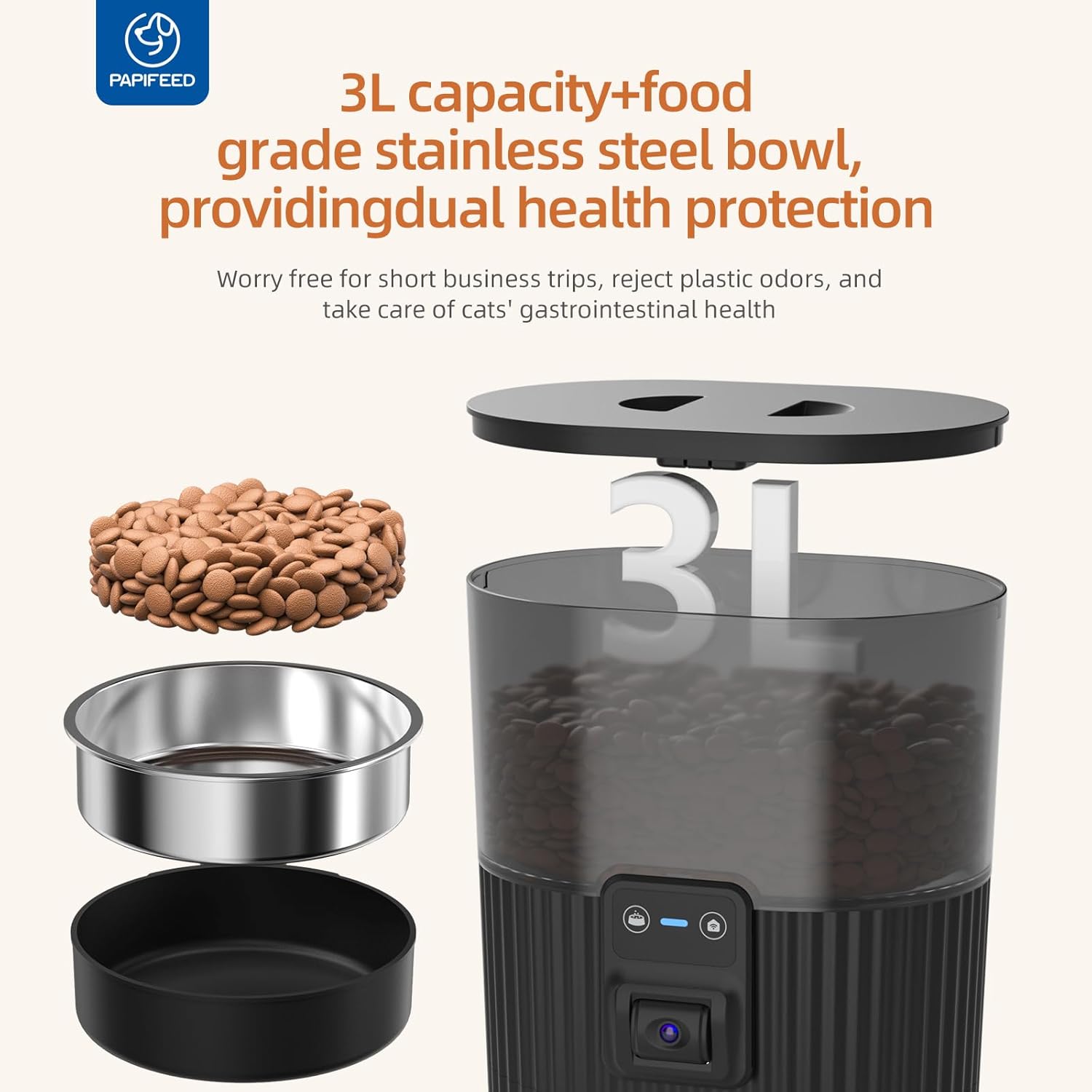
Image: Exploded view showing the 3L food container, stainless steel bowl, and base of the feeder.
Setup
1. Feeder Assembly
- Place the stainless steel bowl into the designated slot at the base of the feeder.
- Fill the food hopper with dry pet food. The hopper has a 3.5L capacity.
- Secure the lid on top of the food hopper. Ensure the safety lock strap is engaged to prevent pets from opening it.
- Connect the DC 5V power adapter to the feeder and plug it into a wall outlet.
- (Optional) For battery backup, insert 4 AA batteries (not included) into the battery compartment at the bottom of the feeder.

Image: A cat eating from the feeder, demonstrating the camera's field of view.
2. Water Fountain Assembly
- Assemble the water fountain components as shown in the diagram.
- Fill the water tank with fresh water (84 oz/2.5L capacity).
- Connect the water fountain's power cable and plug it into a wall outlet.

Image: The automatic pet drinking fountain with a transparent water tank, showing water level visibility.
3. App Download and Connection
- Download the "Smart Lyn" app from your device's app store (Google Play or Apple App Store).
- Register or log in to your account.
- Ensure your phone's Wi-Fi and Bluetooth are enabled.
- In the app, click "Add Device" and allow the app to discover the feeder.
- Select your 2.4GHz Wi-Fi network and enter the password. (Note: The feeder only supports 2.4GHz Wi-Fi, not 5GHz).
- Wait for the device to connect. Once connected, you can rename the device.
Video: This video demonstrates the process of connecting the PAPIFEED Automatic Cat Feeder to the Smart Lyn app, including downloading the app, enabling Wi-Fi and Bluetooth, adding the device, and setting up feeding schedules and avatar.
Operating Instructions
1. Scheduling Feeds
- Through the "Smart Lyn" app, navigate to the "Feeding Plan" section.
- Set desired feeding times and days of the week.
- Customize the serving size for each meal (1 to 6 servings per meal). The feeder supports up to 10 meals per day.
- Confirm and save your feeding schedule.
2. Manual Feeding
- To dispense food immediately, use the "Feed Now" button in the app. You can select the number of servings.
- Alternatively, press the manual feed button on the feeder itself to dispense a single serving.
3. Camera and Two-Way Audio
- The integrated 480P camera allows you to monitor your pet's activity. Note that the camera angle is manually adjustable and does not have night vision.
- Use the two-way audio feature in the app to communicate with your pet.
- Adjust the speaker volume through the app if your pet is sensitive to sound.
- Record personalized meal call voices to remind your pet to eat.
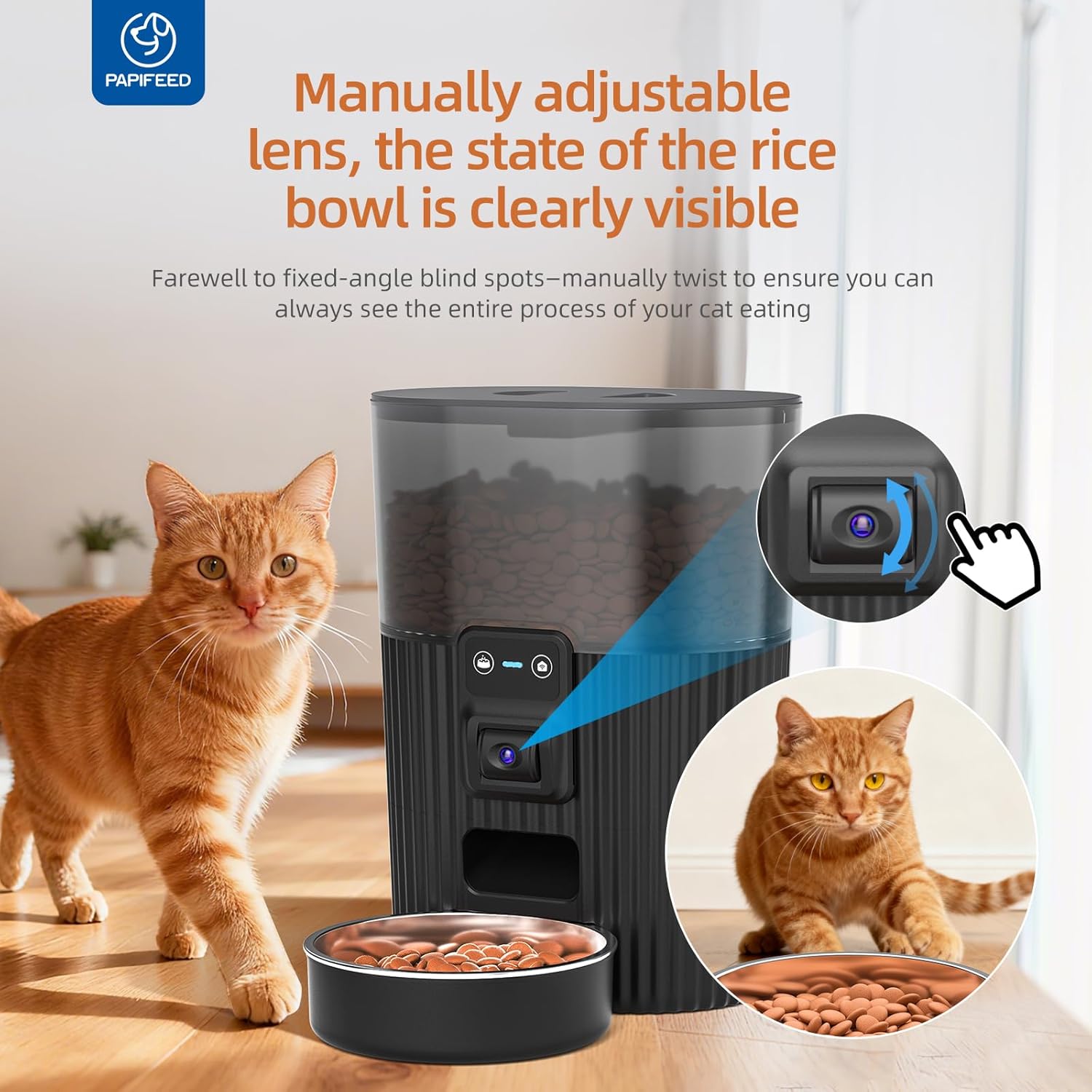
Image: The feeder showing the manually adjustable camera lens for optimal viewing of the food bowl.
4. Slow Feeder & Portion Control
- Utilize the portion control settings (1-6 servings per meal) to manage your pet's food intake and prevent overeating.
- For pets that eat too quickly, scheduling multiple smaller meals throughout the day can promote healthier eating habits.
Maintenance
- The stainless steel food bowl is removable and dishwasher-safe for easy cleaning.
- The food hopper and other removable components can be hand-washed with mild soap and water. Ensure all parts are completely dry before reassembly.
- Do not wash the main base unit of the feeder, as it contains electronic components. Wipe it clean with a damp cloth.
- The airtight design of the lid helps keep dry food fresh. Regularly check the freshness of the food in the hopper.
- For the water fountain, regularly clean the pump and filter to ensure optimal water quality.

Image: Detachable parts of the feeder, including the stainless steel bowl and food container, being cleaned in a sink.
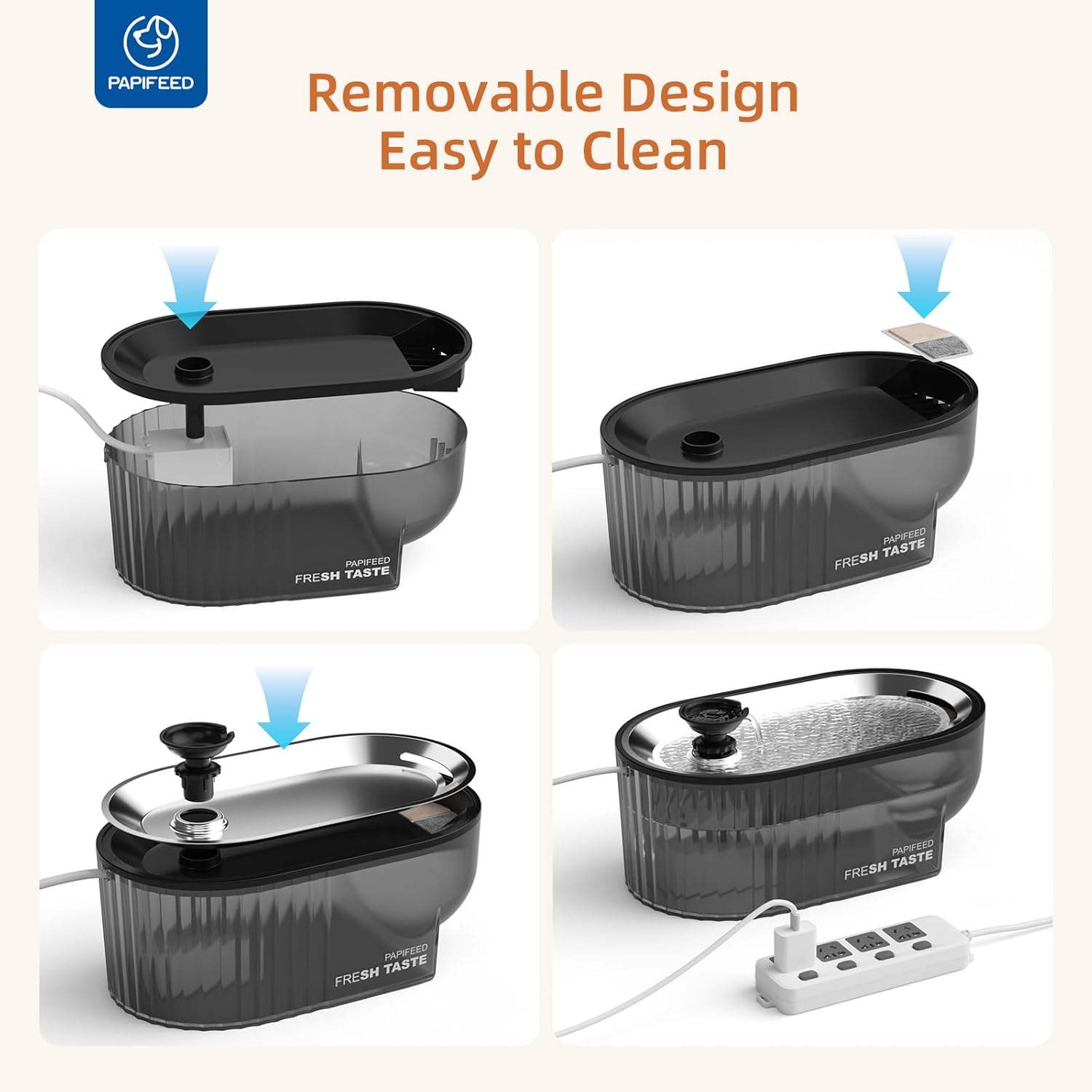
Image: The automatic pet drinking fountain disassembled, showing components for cleaning.
Troubleshooting
| Problem | Possible Cause | Solution |
|---|---|---|
| Feeder not connecting to Wi-Fi | Incorrect Wi-Fi password; 5GHz Wi-Fi network; weak signal. | Ensure correct 2.4GHz Wi-Fi password. Move feeder closer to router. Check router settings to ensure 2.4GHz is enabled. |
| Food not dispensing | Food hopper empty; food jammed; power outage. | Refill food hopper. Check for food blockages in the dispenser mechanism. Ensure power adapter is securely plugged in or batteries are functional. |
| Camera image unclear | Insufficient lighting; dirty lens. | Ensure the area around the feeder is well-lit. Gently clean the camera lens. |
| Water fountain not flowing | Water tank empty; pump clogged; power issue. | Refill water tank. Disassemble and clean the pump and filter. Check power connection. |
Specifications
- Model Name: PPATFD-XRZ
- Feeder Capacity: 3.5L / 15 Cups
- Water Fountain Capacity: 84 oz / 2.5L
- Camera Resolution: 480P (Manual Adjustable Angle, No Night Vision)
- Connectivity: 2.4G WiFi (Not compatible with 5GHz)
- Power Source: DC 5V Adapter or 4 AA Batteries (Battery not included, for emergency backup only)
- Max Meals per Day: 10
- Servings per Meal: 1-6
- Item Dimensions (LxWxH): 6.36 x 11.8 x 6.36 inches
- Item Weight: 4.64 pounds
- Target Species: Cat & Dog
Warranty and Support
This PAPIFEED product comes with a 1 Year Manufacturer Warranty.
For support, please refer to the contact information provided in your product packaging or visit the official PAPIFEED website.


