
Introduction
The Wildgame Innovations Encounter Trail Cellular Camera is designed to capture high-quality 20-megapixel images and transmit them via cellular network. This manual provides detailed instructions for setting up, operating, maintaining, and troubleshooting your camera to ensure optimal performance in the field.
The Encounter Cell camera works nationwide on any cellular network and features a new-and-improved onboarding setup via QR code for a quick and seamless user experience. It is engineered to help you scout smarter, not harder, by providing immediate access to captured images on your mobile device or desktop computer.
What's Included
Your Wildgame Innovations Encounter Trail Cellular Camera package includes the following components:
- Wildgame Innovations Encounter 20MP Cell Trail Camera
- Cellular Antenna
- Mounting Strap
Note: Batteries and SD card are not included and must be purchased separately.
Setup
Follow these steps to set up your Encounter Trail Cellular Camera:
- Install Batteries and SD Card: Open the camera housing and insert the required batteries (not included) into the battery compartment. Ensure correct polarity. Insert a compatible SD card (up to 32GB, not included) into the SD card slot.
- Attach Cellular Antenna: Screw the cellular antenna securely into the designated port on the camera.

Figure 1: Front view of the Encounter Trail Cellular Camera with antenna attached.
- Download HuntSmart App: Download the HuntSmart app on your mobile device. It is available on both the App Store and Google Play.
- QR Code Activation: Use the HuntSmart app to scan the QR code located on the camera. This new and improved QR code setup provides a quick and seamless user experience for activating your camera and connecting it to your account.

Figure 2: Side view of the Encounter Trail Cellular Camera, highlighting the QR code for activation.
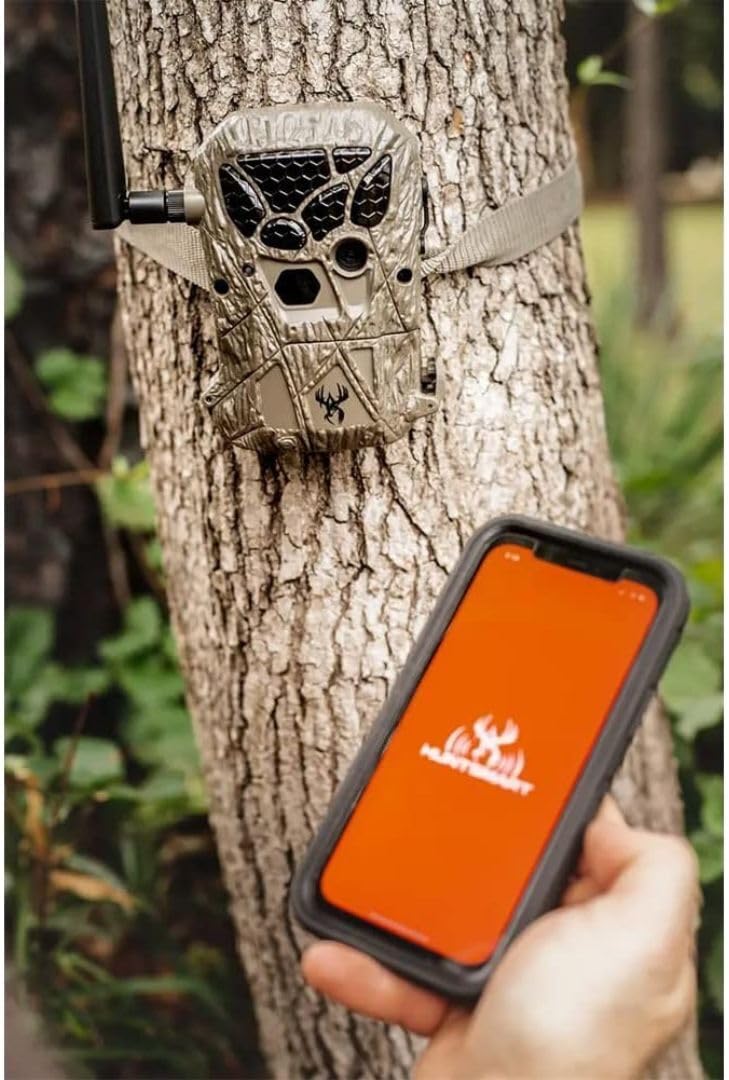
Figure 3: A user interacting with the Encounter Trail Cellular Camera and the HuntSmart app on a smartphone, demonstrating the QR code setup process.
- Mount the Camera: Use the provided mounting strap to secure the camera to a tree or other suitable structure. Ensure the camera is stable and pointed towards the desired monitoring area.
Operating Instructions
Once set up, your Encounter Trail Cellular Camera is ready for operation. The camera is designed to automatically detect motion and capture images or videos, then transmit them to your HuntSmart app.
- Power On: Turn the camera ON using the power switch.
- Cellular Signal Indicator: Observe the red, yellow, and green indicator lights on the camera. These lights reflect the camera’s cellular signal strength.
- Green: Strong signal
- Yellow: Medium signal
- Red: Weak or no signal (one red bar indicates no signal)
Ensure you have adequate signal strength for reliable image transmission.
- Remote Image Reception: Images captured by the camera will be immediately sent to your mobile device or desktop computer via the HuntSmart app.
- HuntSmart App Features: Utilize the advanced features within the HuntSmart app to enhance your scouting:
- Species Recognition: The app can help identify species in your captured images.
- Advanced Filtering: Filter images based on various criteria for easier organization and review.
- Data Plan Management: Remotely monitor and manage your data plan and SD card capacity.
- External Power: The camera includes an input jack for use with an external battery source and/or solar panel (sold separately) for extended operation.
Maintenance
Proper maintenance will extend the life and performance of your camera:
- Battery Replacement: Replace batteries when the low battery indicator appears in the app or on the camera. Always use fresh, high-quality batteries.
- SD Card Management: Regularly check the SD card capacity via the app. Format the SD card periodically to maintain optimal performance and prevent data corruption.
- Lens Cleaning: Gently clean the camera lens and PIR sensor window with a soft, lint-free cloth. Avoid abrasive materials that could scratch the surfaces.
- Housing Inspection: Periodically inspect the camera housing for any cracks or damage that could compromise its weather resistance. Ensure all latches are securely closed.
- Antenna Check: Ensure the cellular antenna remains securely attached and undamaged for optimal signal reception.
Troubleshooting
If you encounter issues with your camera, refer to the following common troubleshooting tips:
| Problem | Possible Cause / Solution |
|---|---|
| No Images Received in App |
|
| Poor Image Quality |
|
| Camera Not Detecting Motion |
|
| App Connectivity Issues |
|
For further assistance, please contact Wildgame Innovations customer support.
Specifications
| Feature | Detail |
|---|---|
| Model Name | Wildgame Innovations Encounter Cellular Game Camera |
| Model Number | WGI-WGICM0712 |
| Effective Still Resolution | 20 MP |
| Connectivity Technology | Wireless, Cellular |
| Compatible Devices | Desktop, Smartphone |
| Power Source | AC/DC (external battery/solar panel compatible) |
| Controller Type | Android (via HuntSmart App) |
| Mounting Type | Wall Mount (strap included) |
| Color | Brown |
| Item Dimensions (L x W x H) | 1 x 1 x 1 inches |
| Item Weight | 0.01 Ounces |
| Low Light Technology | Night Color |
| Light Source Type | LED |
| International Protection Rating | IP54 |
| Recommended Uses | Game & Trail |
Warranty and Support
The Wildgame Innovations Encounter Trail Cellular Camera comes with a 1-Year Warranty from the date of purchase. This warranty covers defects in materials and workmanship under normal use.
For warranty claims, technical support, or any questions regarding your product, please contact Wildgame Innovations customer service. Keep your proof of purchase for warranty validation.
For more information and support resources, visit the official Wildgame Innovations website or refer to the contact information provided in your product packaging.


