
1. Introduction
This manual provides detailed instructions for the LIGE Smartwatch Model EF14-I. It covers setup, operation, maintenance, and troubleshooting to ensure optimal performance and user experience. Please read this manual thoroughly before using your device.

Image 1: LIGE Smartwatch Model EF14-I, showcasing its design, interchangeable straps, and multiple digital watch faces.
2. Setup
2.1 Charging the Device
Before initial use, fully charge your smartwatch. The device features a 730mAh polymer battery. Use the provided magnetic charging cable. A full charge typically takes approximately 2.5 hours. The watch offers 5-7 days of daily use and up to 50 days in standby mode.

Image 2: The LIGE Smartwatch connected to its magnetic charger, illustrating its 730mAh battery capacity and extended battery life.
2.2 App Installation (FitCloudPro)
To unlock the full functionality of your smartwatch, download and install the FitCloudPro application on your smartphone. The app is compatible with Android 5.0+ and iOS 11.0+ devices.
- Scan the QR code provided in the watch packaging or on the watch screen to download the app.
- Alternatively, search for "FitCloudPro" in the Apple App Store (for iOS) or Google Play Store (for Android).
- Install the application on your smartphone.
2.3 Device Pairing
Ensure your smartphone's Bluetooth is enabled. Open the FitCloudPro app and follow the on-screen instructions to pair your smartwatch. The device uses Bluetooth 5.0 for a stable connection.
3. Operating Instructions
3.1 Basic Navigation
- Touch Screen: Swipe left, right, up, or down to navigate through menus and features. Tap to select.
- Side Buttons: Use the physical buttons on the side of the watch for quick access to functions or to return to the home screen.
3.2 Bluetooth Calls and Notifications
Once paired with your smartphone, the smartwatch supports Bluetooth 5.3 for direct calls from your wrist. You can also receive instant notifications for messages, calls, and various applications.
- Making/Receiving Calls: Access the call log or dial pad on the watch to initiate calls. Answer incoming calls directly on the watch.
- Message Notifications: View incoming messages from SMS and social media apps.
- App Notifications: Receive alerts from compatible applications.

Image 3: The smartwatch interface showing Bluetooth call functionality, message alerts, and voice assistant interaction.
3.3 Health Monitoring
The smartwatch provides comprehensive health tracking features:
- Heart Rate: Continuous heart rate monitoring throughout the day.
- Blood Oxygen (SpO2): Measures blood oxygen saturation levels.
- Sleep Tracking: Monitors sleep patterns, including sleep duration and quality.
- Pedometer: Tracks steps taken, distance covered, and calories burned.

Image 4: Health monitoring features of the smartwatch, including heart rate, daily activity, sleep analysis, and guided breath training.
3.4 Sport Modes
The device supports over 110 professional sport modes, accurately tracking your activity data.
- Select your desired sport mode from the watch menu.
- The watch will record data such as steps, calories burned, and distance.
- All fitness data synchronizes with the FitCloudPro app for detailed analysis.

Image 5: The smartwatch tracking a running activity, demonstrating its multi-sport mode capabilities for various physical activities.
3.5 Additional Functions
- LED Light: A powerful LED flashlight for emergencies or low-light conditions.
- Music Control: Control music playback on your smartphone.
- Camera Control: Use the watch as a remote shutter for your phone's camera.
- Voice Assistant: Access your smartphone's voice assistant.
- Weather: View current weather information.
- Reminders: Set alarms, sedentary reminders, and drink water reminders.
- Find Phone: Locate your paired smartphone.
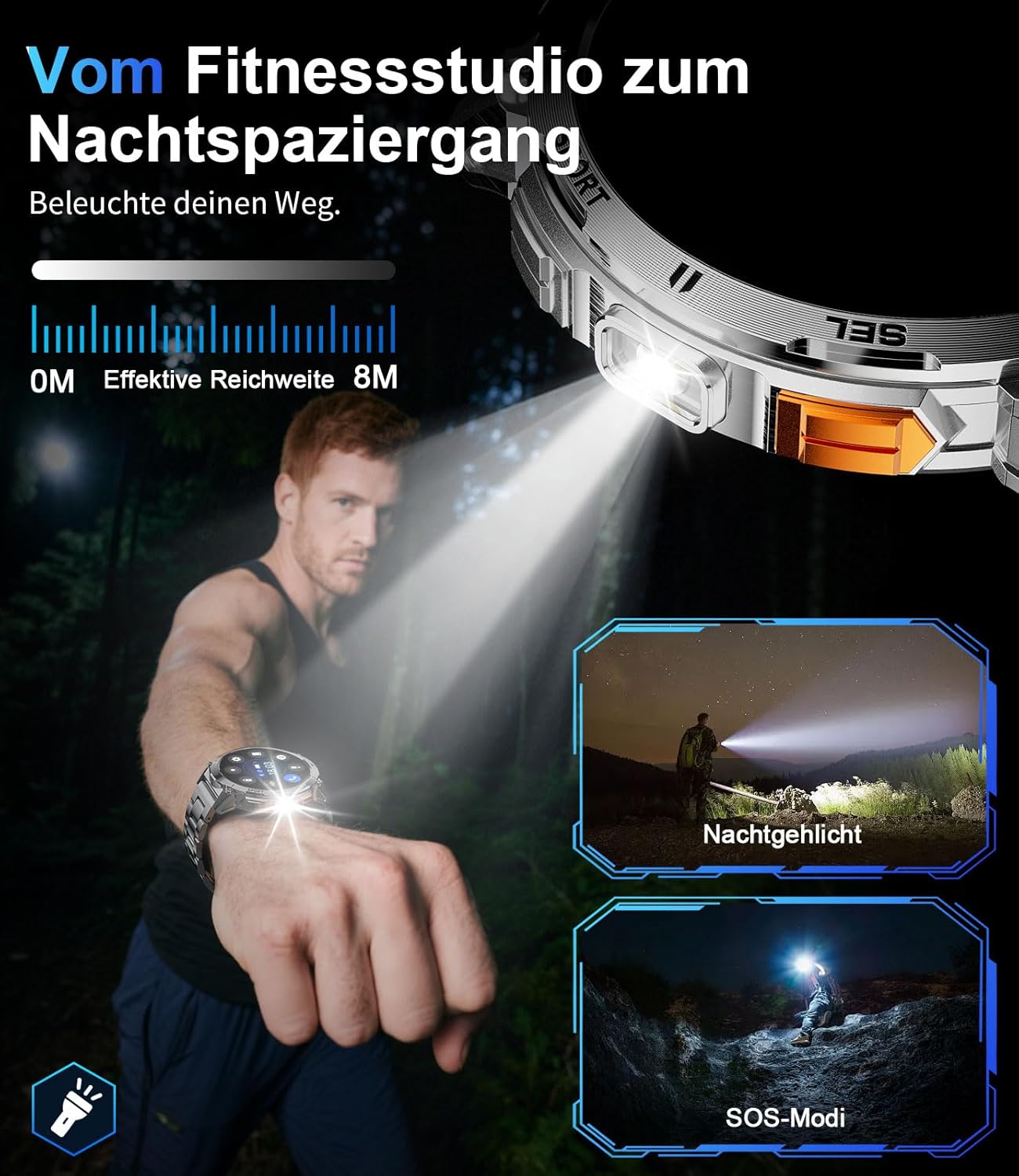
Image 6: The smartwatch's integrated LED flashlight in use, providing illumination in a dark environment.
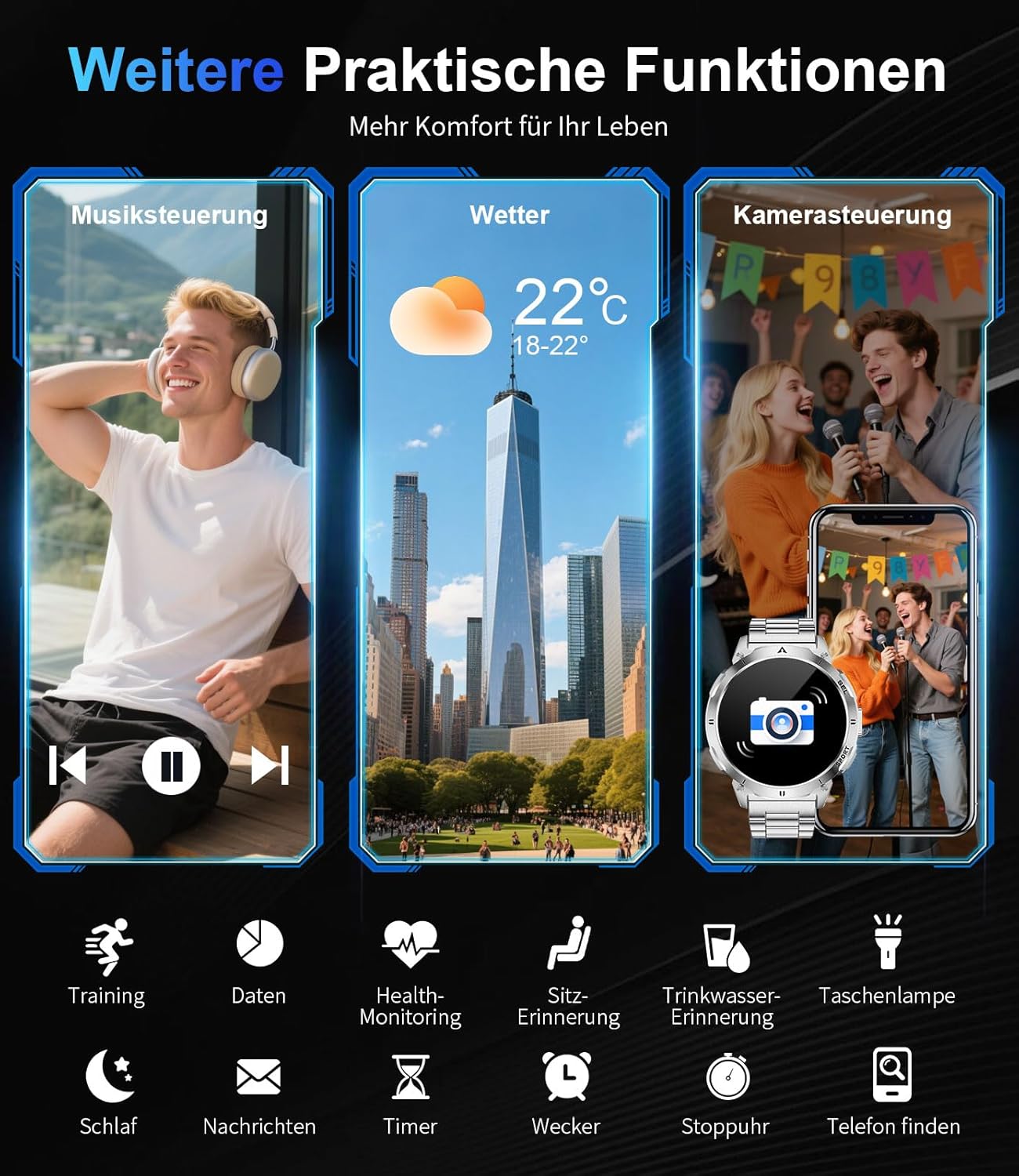
Image 7: Overview of additional practical functions including music control, weather display, and remote camera operation.
4. Features Overview
4.1 AMOLED Display
The smartwatch features a 1.62-inch AMOLED display with 480x480 pixels and 850 nits brightness, ensuring clear visuals even in direct sunlight. The ONCELL touch panel provides precise and responsive control.
4.2 Durable Design
Constructed with a zinc alloy casing and a robust polycarbonate back, the smartwatch is lightweight (83g) and durable. It is 3 ATM waterproof, making it resistant to rain, sweat, and suitable for swimming.

Image 8: Visual representation of the smartwatch's durability, highlighting its resistance to shock, extreme temperatures, dust, scratches, and impacts.
4.3 Customizable Watch Faces
Personalize your smartwatch with over 200 watch faces available through the FitCloudPro app. You can also create custom watch faces to match your style.

Image 9: The smartwatch's extensive watch face customization options, including a preview of a custom background being set via the app.
5. Maintenance
5.1 Water Resistance
The LIGE Smartwatch Model EF14-I is 3 ATM waterproof. This means it can withstand splashes, rain, and brief immersion in water, such as during swimming. It is not recommended for diving or high-pressure water activities.
5.2 Cleaning
To clean your smartwatch, wipe it with a soft, damp cloth. Avoid using harsh chemicals or abrasive materials, as these can damage the device. Ensure the charging contacts are clean and dry before charging.
5.3 Battery Care
To prolong battery life, avoid exposing the watch to extreme temperatures. Charge the device regularly, but avoid leaving it fully discharged for extended periods.
6. Troubleshooting
- Device not turning on: Ensure the watch is fully charged. Connect it to the charger and wait a few minutes before attempting to power it on.
- Cannot pair with smartphone: Make sure Bluetooth is enabled on your phone and the watch is within range. Restart both the watch and your phone, then try pairing again through the FitCloudPro app.
- Inaccurate health data: Ensure the watch is worn snugly on your wrist, not too tight or too loose. Clean the sensor on the back of the watch.
- Notifications not received: Check app notification settings in the FitCloudPro app and your phone's system settings to ensure permissions are granted.
- Short battery life: Reduce screen brightness, disable unnecessary features, and ensure background app usage is optimized.
7. Specifications
| Feature | Specification |
|---|---|
| Brand | LIGE |
| Model Number | EF14-I |
| Display | 1.62-inch AMOLED, 480x480 pixels, 850 nits |
| Battery Capacity | 730 mAh Lithium-Polymer |
| Battery Life | 5-7 days (daily use), up to 50 days (standby) |
| Charging Time | Approx. 2.5 hours (magnetic charging) |
| Water Resistance | 3 ATM |
| Connectivity | Bluetooth 5.0 / 5.3 |
| Operating System | Wear OS (compatible with Android 5.0+, iOS 11.0+) |
| Memory Storage | 256 MB |
| Special Features | LED Light, Pedometer, Fitness Tracker, Heart Rate Monitor, SpO2, Sleep Tracker, Bluetooth Calls, Music Player, Voice Assistant, Reminders, Alarms, Notifications, Sedentary Reminder, Calculator |
| Compatible Devices | Smartphone |
| Weight | 83g |
8. Warranty and Support
The LIGE Smartwatch Model EF14-I comes with a 2-year warranty. Additionally, a 30-day return policy is typically offered. For technical support or warranty claims, please refer to the contact information provided with your purchase or visit the official LIGE support website.


