
1. Introduction
Welcome to the ENGWE ease3 Mobility Scooter instruction manual. This guide provides essential information for the safe assembly, operation, maintenance, and troubleshooting of your new 4-wheel powered mobility scooter. Please read this manual thoroughly before using the scooter to ensure optimal performance and user safety.
The ENGWE ease3 is designed to provide reliable and comfortable mobility for seniors and individuals with mobility challenges, offering a maximum range of 12.4 miles and an adjustable speed of 0-5.6 MPH. Its robust design supports up to 330 lbs (150 kg) and features an easy-folding mechanism for convenient transport.
2. Safety Information
Your safety is paramount. Always adhere to the following guidelines:
- Weight Limit: Do not exceed the maximum weight capacity of 330 lbs (150 kg).
- Terrain: Operate the scooter on stable, level surfaces. While designed for various terrains, avoid excessively rough or steep inclines (maximum climbing ability 10°).
- Braking: The scooter features an intelligent electromagnetic braking system. It will stop automatically when the throttle lever is released.
- Visibility: Use headlights and taillights when operating in low-light conditions. Ensure rearview mirrors are properly adjusted.
- Stability: Always maintain a balanced posture. Avoid sudden turns at high speeds.
- Children: Keep children away from the scooter during operation and charging.
- Charging: Only use the provided charger. Do not operate the scooter while charging.
3. Package Contents
Before assembly, verify that all components are present and undamaged:
- ENGWE ease3 Mobility Scooter Main Body
- Adjustable Seat with Armrests
- Front Basket
- Foldable and Detachable Rear Basket
- Rearview Mirrors (2)
- Cup Holder
- Battery Charger
- Keys (2)
- Instruction Manual
4. Setup and Assembly
The ENGWE ease3 scooter comes largely pre-assembled. Follow these steps for final setup:
4.1 Unfolding the Scooter
- Place the folded scooter on a flat, stable surface.
- Loosen the fixing knob on the standpipe (tiller) and lift the tiller to an upright position. Tighten the knob to secure it.
- Pull the seat upwards until it locks into the standard position. The seat safety buckle will automatically unlock.
4.2 Installing the Seat and Armrests
- Insert the seat post into the receiver on the scooter base. Ensure it is fully seated.
- Rotate the armrests on both sides of the seat upward and lock them into place on the handguard frame.
- Adjust the seat height and width as desired using the levers and knobs beneath the seat. The seat can also rotate 360° for easy access.

Figure 1: Adjustable seat and dimensions of the ENGWE ease3 mobility scooter.
4.3 Attaching Accessories
- Front Basket: Slide the front basket onto the mounting bracket on the tiller until it clicks securely into place.
- Rear Basket: Attach the foldable rear basket to the designated mounting points behind the seat.
- Rearview Mirrors: Screw the rearview mirrors into the threaded holes on the tiller. Adjust for optimal visibility.
- Cup Holder: Secure the cup holder to the tiller as desired.

Figure 2: Various accessories for the ENGWE ease3 mobility scooter.
4.4 Assembly Videos
Video 1: Product Installation Instructions. This video demonstrates the step-by-step process of assembling the mobility scooter, including attaching the seat, armrests, and other components.
Video 2: EASE3 Mobility Scooter Unboxing & Assembly. This video provides a detailed guide on unboxing and assembling the EASE3 scooter, showing how to prepare it for first use.
5. Operating Instructions
Familiarize yourself with the control panel and operating modes before riding.
5.1 Control Panel Overview

Figure 3: U-shaped easy control panel.
- Key Switch: Insert the key and turn to the 'ON' position to power on the scooter.
- Power Indicator: Displays battery level.
- Speed Adjustment Dial: Adjusts the maximum speed from 0 to 5.6 MPH.
- Forward/Backward Levers: Press the right thumb throttle to move forward; press the left thumb throttle to move backward. Release to engage the electromagnetic brake.
- Front Light Switch: Turns the headlights on/off.
- Horn: Press to activate the horn.
5.2 Drive and Manual Modes
The scooter offers two modes for operation:
- Drive Mode: Engages the motor for powered movement. Activated by moving the brake lever backward.
- Manual Mode (Freewheel): Disengages the motor, allowing the scooter to be pushed manually. Activated by pushing the brake lever forward. The power indicator shows a flashing blue light in freewheel mode.
Video 3: EASE3 Scooter - Electric & Manual Mode. This video illustrates how to switch between electric drive mode and manual freewheel mode on the EASE3 scooter.
5.3 Charging the Battery
The scooter is equipped with a removable 24V/250W1 motor and a battery offering a maximum range of 12.4 miles. To charge:
- Locate the charging port on the scooter.
- Connect the charger to the scooter's charging port and then to a standard wall outlet.
- The charger indicator light will show charging status (e.g., red for charging, green for fully charged).
- Do not overcharge the battery. Disconnect once fully charged.

Figure 4: Battery compartment and charging port.
6. Features
The ENGWE ease3 Mobility Scooter is designed with user comfort, safety, and convenience in mind:
- Heavy-Duty & Stable Structure: Overall size of 43.3*19.7*35.8 inches, supporting up to 330 lbs (150 kg). Heaviest piece is only 21.2 lbs for easy handling.
- Powerful Performance: 24V/250W motor, 12.4 miles max range, 10° climbing ability, and 8*3 inch tires for excellent grip on various terrains.
- Intelligent & Safe Features: Electromagnetic braking system (≤1500mm braking distance), adjustable speed (0-5.6 MPH), easy-to-operate control panel, headlights, taillights, and horn.
- Adjustable Comfort Seat: 11*19.3~28.4 inches in width and depth, fully adjustable in height and width, and 360° rotatable.
- Versatile Accessories: Includes front basket, foldable and detachable rear basket, rearview mirrors, and cup holder.

Figure 5: ENGWE ease3 in use, highlighting key features.
7. Maintenance
Regular maintenance ensures the longevity and safe operation of your scooter:
- Cleaning: Wipe down the scooter with a damp cloth. Avoid using harsh chemicals or excessive water.
- Battery Care: Charge the battery regularly, even if not in frequent use, to maintain its lifespan. Store the scooter in a cool, dry place.
- Tires: Periodically check tire pressure and tread for wear.
- Fasteners: Ensure all nuts, bolts, and fasteners are tight.
- Storage: When storing for extended periods, ensure the battery is fully charged and disconnect it if possible. Fold the scooter for compact storage.
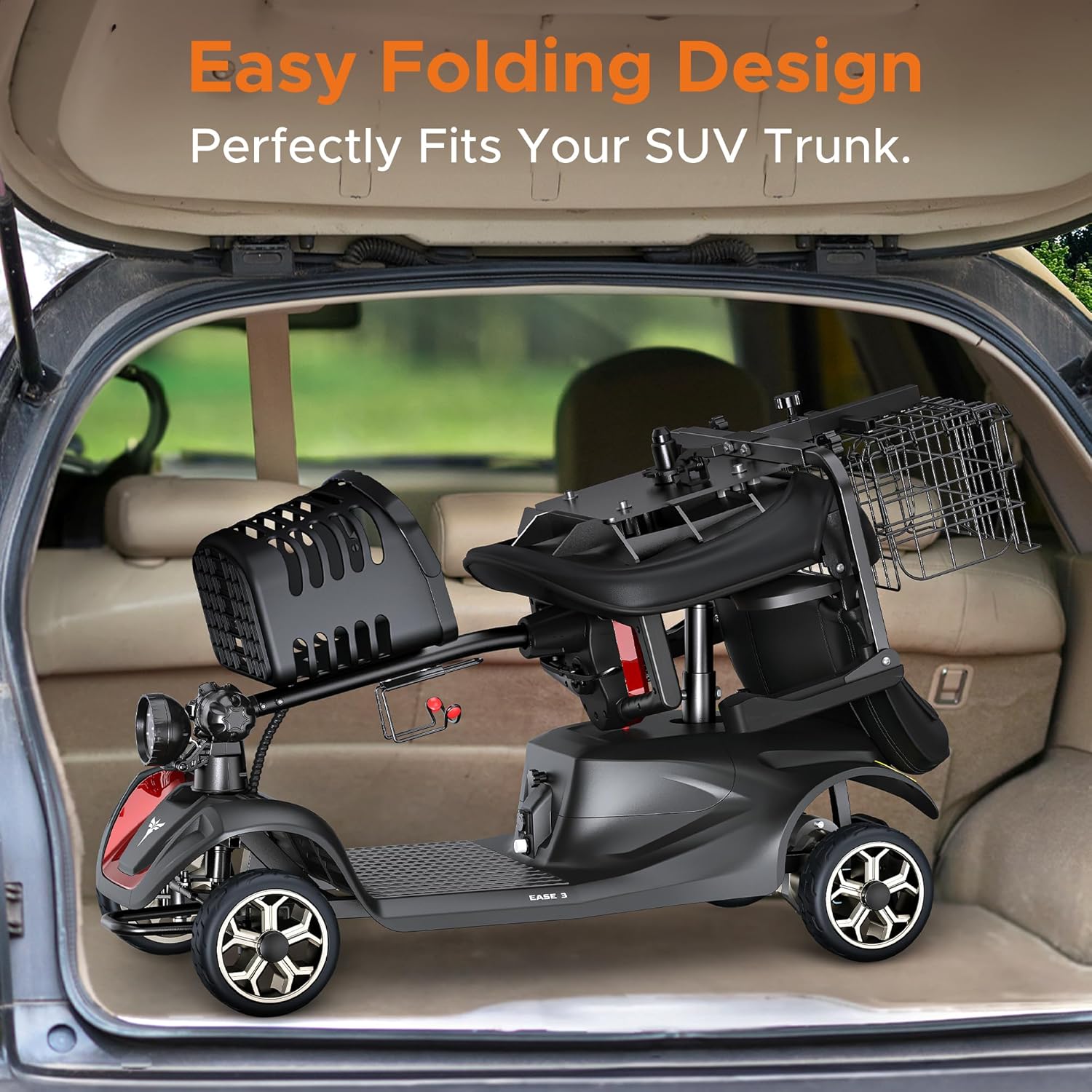
Figure 6: Easy folding design for convenient storage and transport.
8. Troubleshooting
If you encounter issues with your ENGWE ease3 scooter, refer to the table below for common problems and solutions:
| Problem | Possible Cause | Solution |
|---|---|---|
| Scooter does not power on. | Battery is low or discharged. Key is not in 'ON' position. | Charge the battery. Ensure key is turned to 'ON'. |
| Scooter does not move in Drive Mode. | Scooter is in Manual Mode. Brake lever not fully engaged. | Switch to Drive Mode. Ensure brake lever is fully backward. |
| Speed is inconsistent. | Speed adjustment dial set too low. | Adjust the speed dial clockwise to increase speed. |
| Lights are not working. | Light switch is off. | Turn on the front light switch on the control panel. |
9. Specifications
| Feature | Specification |
|---|---|
| Model | ease3 |
| Brand | ENGWE |
| Item Weight | 130 Pounds |
| Max Load Capacity | 330 lbs (150 kg) |
| Motor | 24V/250W1 |
| Max Range | 12.4 Miles |
| Adjustable Speed | 0-5.6 MPH |
| Climbing Ability | 10° |
| Tire Size | 8*3 inches |
| Braking System | Intelligent Electromagnetic Braking |
| Braking Distance | ≤1500mm |
| Overall Size | 43.3*19.7*35.8 inches |
| Folded Size | 43.3*19.7*15 inches |
| Seat Dimensions | 11*19.3~28.4 inches (width & depth) |
| Material | Alloy Steel, Aluminum |
10. Warranty and Support
For warranty information, technical support, or service inquiries, please contact ENGWE customer service through the retailer where you purchased your scooter. Keep your proof of purchase for warranty claims.


