
Introduction
Thank you for purchasing the Fisher Portable Bluetooth Speaker SBT294. This manual provides important information regarding the setup, operation, and maintenance of your speaker. Please read it thoroughly before use and retain it for future reference.
The Fisher SBT294 is a compact, IPX5 waterproof and dustproof portable speaker featuring Bluetooth 5.3 connectivity, 10W peak power, and an integrated FM radio. It is designed for versatile use, both indoors and outdoors.
What's in the Box
Verify that all items are present in the package:
- Fisher Portable Bluetooth Speaker SBT294
- USB-C Charging Cable
- User Manual (this document)
- Warranty Card

Image: Contents of the product packaging.
Product Overview
Familiarize yourself with the speaker's components and controls.
Speaker Components
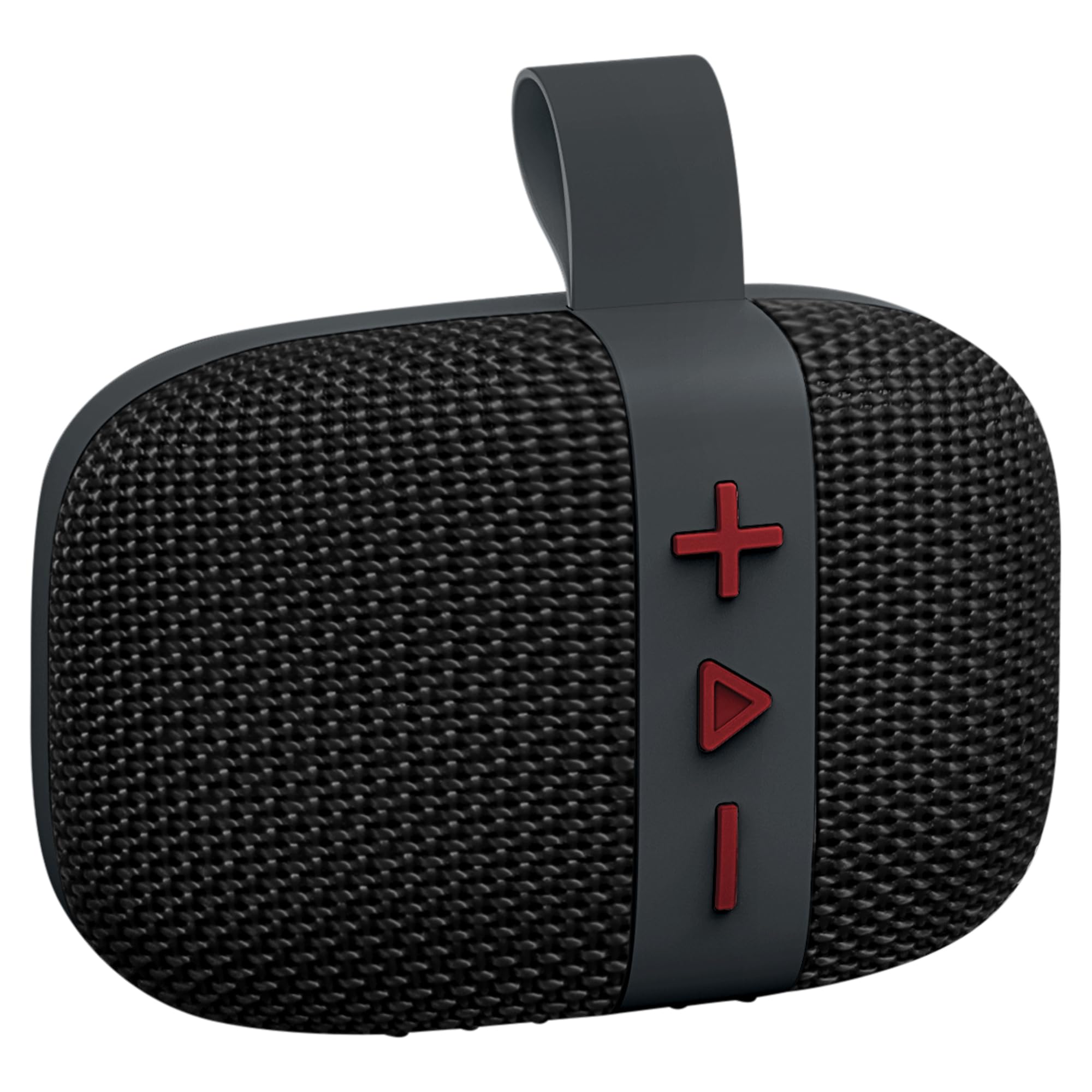
Image: Front view of the Fisher SBT294 speaker.
- Speaker Grille: Protects the internal speaker driver.
- Control Buttons: For power, volume, track control, and mode selection.
- Carrying Strap: For easy portability and attachment.
- USB-C Port: For charging the speaker.
Control Buttons

Image: Detailed view of the speaker's control buttons.
- '+' Button: Short press for next track, long press to increase volume.
- 'Play/Pause' Button: Short press to play/pause, long press for power on/off. Short press to answer/end calls. Double press to switch modes (Bluetooth/FM).
- '-' Button: Short press for previous track, long press to decrease volume.
Setup
1. Charging the Speaker
Before first use, fully charge the speaker. A full charge takes approximately 2 hours.
- Connect the supplied USB-C charging cable to the speaker's USB-C port.
- Connect the other end of the cable to a USB power adapter (not included) or a computer's USB port.
- The charging indicator light will illuminate during charging and turn off when fully charged.

Image: Speaker connected to a USB-C charging cable.
2. Power On/Off
- To Power On: Long press the 'Play/Pause' button until you hear a power-on tone.
- To Power Off: Long press the 'Play/Pause' button until you hear a power-off tone.
3. Bluetooth Pairing
Pair your speaker with a Bluetooth-enabled device.
- Ensure the speaker is powered on and in Bluetooth pairing mode (indicated by a flashing LED). If not, double press the 'Play/Pause' button to switch modes.
- On your device (smartphone, tablet, laptop), enable Bluetooth and search for available devices.
- Select "SBT294" from the list of devices.
- Once paired, the speaker will emit a confirmation tone, and the LED will stop flashing.

Image: Bluetooth pairing with a smartphone.
4. True Wireless Stereo (TWS) Pairing
For an enhanced stereo experience, you can pair two SBT294 speakers together.
- Ensure both SBT294 speakers are powered on and not connected to any other Bluetooth device.
- On one speaker (this will be the primary speaker), long press the 'Play/Pause' button until you hear a TWS pairing tone. The speaker will search for another SBT294.
- The two speakers will automatically connect to each other. A confirmation tone will sound once connected.
- Now, connect your device to the primary speaker via Bluetooth as described in step 3. Both speakers will play audio in stereo.

Image: Two speakers paired for True Wireless Stereo with a laptop.
Operating Instructions
Music Playback
- Play/Pause: Short press the 'Play/Pause' button.
- Next Track: Short press the '+' button.
- Previous Track: Short press the '-' button.
- Volume Up: Long press the '+' button.
- Volume Down: Long press the '-' button.
FM Radio Mode
To switch to FM radio mode:
- Double press the 'Play/Pause' button to cycle through modes until you hear the FM radio prompt.
- In FM mode, short press the 'Play/Pause' button to auto-scan and save available stations.
- Use the '+' and '-' buttons to navigate between saved stations.
Hands-Free Calling
When connected to a smartphone via Bluetooth:
- Answer Call: Short press the 'Play/Pause' button when an incoming call rings.
- End Call: Short press the 'Play/Pause' button during a call.
- Reject Call: Long press the 'Play/Pause' button when an incoming call rings.
Maintenance
- Cleaning: Wipe the speaker with a soft, damp cloth. Do not use abrasive cleaners or solvents.
- Water Resistance: The speaker is IPX5 waterproof, meaning it can resist a sustained, low-pressure water jet spray. Do not submerge the speaker in water. Ensure the charging port cover is securely closed before exposure to water.
- Storage: Store the speaker in a cool, dry place away from extreme temperatures and direct sunlight.
- Battery Care: To prolong battery life, charge the speaker regularly, even if not in use for extended periods. Avoid fully discharging the battery frequently.

Image: Speaker in an outdoor, poolside environment, highlighting its waterproof design.
Troubleshooting
| Problem | Possible Solution |
|---|---|
| Speaker does not power on. | Ensure the speaker is charged. Connect it to a power source using the USB-C cable. |
| Cannot pair via Bluetooth. |
|
| No sound or low volume. |
|
| FM radio reception is poor. |
|
| TWS pairing fails. |
|
Specifications
| Feature | Detail |
|---|---|
| Model Number | SBT294 |
| Brand | Fisher |
| Connectivity Technology | Bluetooth 5.3, USB |
| Speaker Output Power | 5W RMS, 10W Peak |
| Audio Driver Size | 45 mm |
| Frequency Response | 13 KHz |
| Waterproof Rating | IPX5 |
| Battery Capacity | 1200 mAh |
| Battery Life | Up to 5-6 hours (at 50% volume) |
| Charging Time | Approximately 2 hours |
| Bluetooth Range | Up to 33 feet (10 meters) |
| Dimensions (W x H x D) | 4.44" x 3.04" x 1.76" |
| Weight | 0.55 lbs |
| Additional Features | FM Radio, True Wireless Stereo (TWS) Pairing |
Safety Information
- Do not expose the speaker to extreme temperatures, direct sunlight, or open flames.
- Do not attempt to disassemble or modify the speaker. This will void the warranty and may cause damage.
- Keep the speaker away from strong magnetic fields.
- Use only the provided USB-C cable for charging.
- Avoid listening at high volumes for extended periods to prevent hearing damage.
- Dispose of the speaker and its battery responsibly according to local regulations.
Warranty and Support
This product comes with a limited warranty. Please refer to the included Warranty Card for details regarding coverage and terms.
For technical support or customer service, please contact the manufacturer, Migear Intl, LLC, or refer to the contact information provided on your warranty card or the official Fisher website.
Manufacturer: Migear Intl, LLC
Warranty Type: Limited


