
1. Introduction
This manual provides essential instructions for the safe and efficient operation, installation, and maintenance of the Bitmain Antminer APW11 Hydro Power Supply, model APW111721C. This power supply unit is designed for use with Bitmain Antminer hydro-cooled mining systems, including the S19hyd 198T, S21 hyd 335T, and S21 XPhyd 473T models. Please read this manual thoroughly before installation and use.
2. Safety Information
- Electrical Hazard: Ensure all power connections are secure and correctly rated. Disconnect power before performing any maintenance or installation.
- Water Cooling System: This power supply is designed for hydro-cooling. Ensure the liquid cooling system is properly installed and free of leaks before operation.
- Ventilation: Although hydro-cooled, ensure adequate airflow around the unit to prevent overheating of other components.
- Professional Installation: Installation should be performed by qualified personnel familiar with high-power electrical and liquid cooling systems.
- Operating Environment: Operate the unit within specified temperature and humidity ranges to ensure longevity and performance.
3. Package Contents
Verify that all items are present and undamaged upon unpacking.
- Bitmain Antminer APW11 Hydro Power Supply (APW111721C)
- Associated power cables (if included with purchase)
- Mounting hardware (if included with purchase)
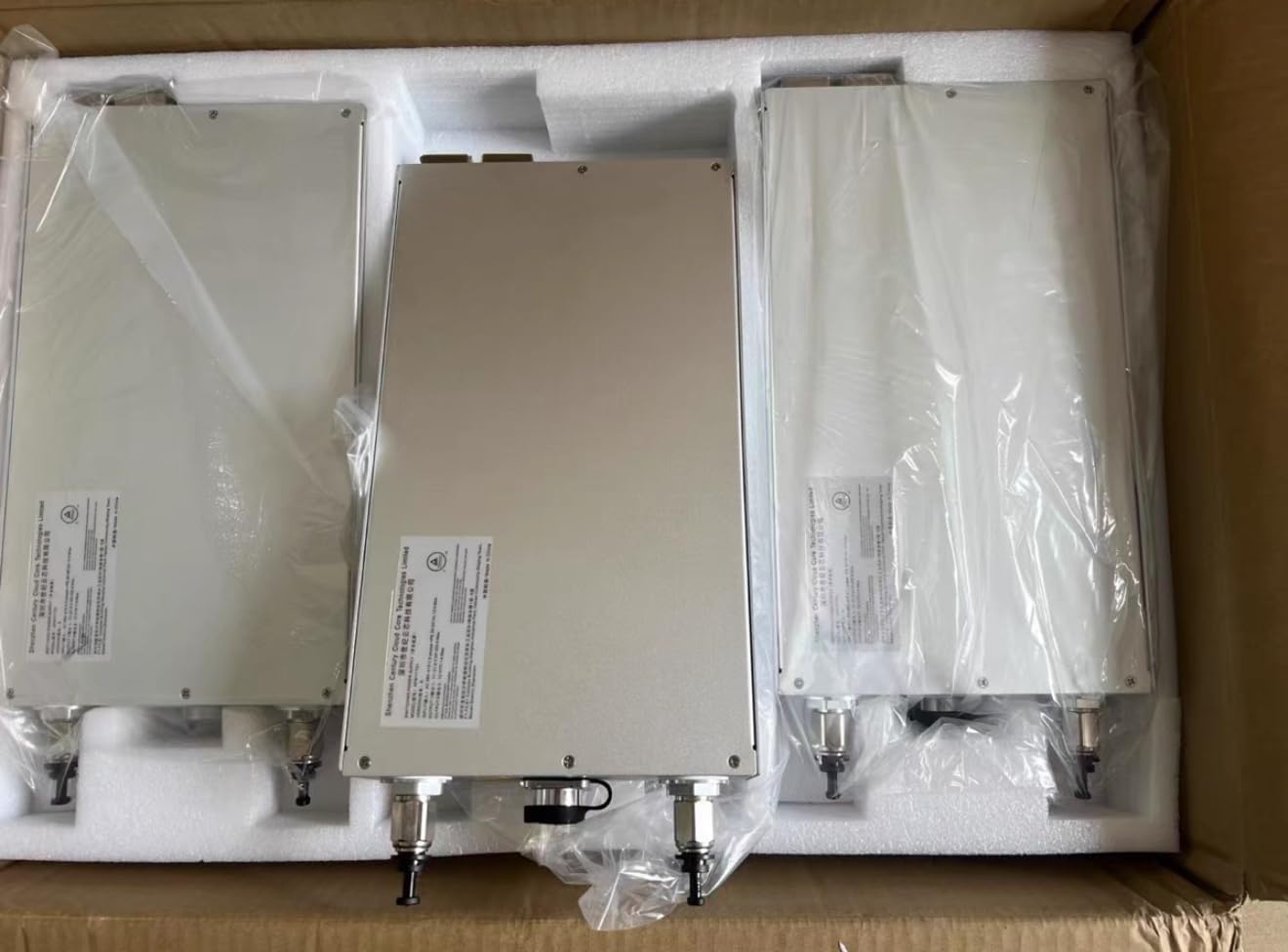
Figure 3.1: Three APW11 Hydro Power Supplies in their packaging, showing the units ready for installation.
4. Specifications
| Feature | Detail |
|---|---|
| Model Number | APW111721C |
| Output Wattage | 4000 Watts |
| Product Dimensions (L x W x H) | 12.99 x 7.87 x 2.76 inches (330 x 200 x 70 mm) |
| Item Weight | 13.2 pounds (6 Kilograms) |
| Form Factor | ATX (Specialized for Hydro Cooling) |
| Compatibility | Bitmain Antminer S19hyd 198T, S21 hyd 335T, S21 XPhyd 473T |
5. Setup and Installation
Proper installation is crucial for the performance and safety of your APW11 Hydro Power Supply. Follow these steps carefully:
- Mounting: Securely mount the APW11 power supply in a stable location, ensuring it is compatible with your Antminer hydro-cooling system's chassis.
- Liquid Cooling Connection: Connect the liquid cooling lines to the designated ports on the power supply. Ensure all connections are tight and leak-free. Refer to your Antminer's manual for specific liquid cooling system setup.
- Power Input Connection: Connect the appropriate high-voltage power input cable to the power supply. Ensure the power source meets the unit's voltage and current requirements.
- Power Output Connection: Connect the power output cables from the APW11 to your Antminer mining rig. Verify all connections are correct and secure.
- System Integration: Integrate the power supply with the overall mining system, ensuring all data and control cables (if any) are connected.
- Pre-Power Check: Before applying power, double-check all connections, especially liquid cooling lines for leaks and electrical connections for proper seating.

Figure 5.1: Top view of the APW11 Hydro Power Supply, highlighting the liquid cooling ports and power input connector. This view is crucial for understanding connection points.

Figure 5.2: Detailed view of the APW11 Hydro Power Supply's connection panel, displaying the model number (APW111721C) and a warning label, indicating critical connection points and safety information.
6. Operation
Once installed, operating the APW11 Hydro Power Supply is straightforward, as it integrates with your Antminer system.
- Power On: After verifying all connections, apply power to the system. The power supply will initiate and provide power to the connected Antminer.
- Monitoring: Monitor the power supply's status through your Antminer's management interface. Ensure stable voltage and current delivery.
- Normal Operation: The APW11 is designed for continuous operation in a hydro-cooled environment.
- Power Off: To shut down the system, follow the proper shutdown procedure for your Antminer, then disconnect the main power to the APW11.
7. Maintenance
Regular maintenance ensures the longevity and optimal performance of your power supply.
- Liquid Cooling System Check: Periodically inspect the liquid cooling lines and connections for any signs of leaks or blockages. Ensure the coolant level is adequate.
- Dust Removal: While hydro-cooled, dust can still accumulate on external surfaces. Gently clean the exterior of the power supply with a soft, dry cloth. Do not open the unit.
- Connection Integrity: Annually, or as needed, check all electrical and liquid cooling connections to ensure they remain secure.
- Environmental Monitoring: Ensure the operating environment remains within specified temperature and humidity limits.
8. Troubleshooting
This section addresses common issues you might encounter with the APW11 Hydro Power Supply.
| Problem | Possible Cause | Solution |
|---|---|---|
| No Power Output | Main power not connected; faulty power cable; internal fault. | Check main power connection. Test with a different power cable. If issue persists, contact support. |
| System Overheating | Liquid cooling system malfunction; insufficient coolant; blocked lines. | Inspect liquid cooling system for leaks or blockages. Ensure proper coolant levels. Refer to Antminer manual for cooling system diagnostics. |
| Unstable Power Delivery | Loose connections; power source instability; internal fault. | Verify all electrical connections are secure. Check the stability of your main power source. Contact support if the problem continues. |
9. Warranty and Support
For warranty information and technical support, please refer to the official Bitmain website or contact your authorized reseller. Keep your purchase receipt and product serial number (found on the unit's label) for warranty claims.
Manufacturer: Bitmain
Model: APW111721C


