
Introduction
Thank you for choosing the VGR 001 Professional Cordless Hair Clippers. This manual provides essential information for the safe and effective use, maintenance, and care of your new hair clipper. Please read these instructions thoroughly before first use and keep them for future reference.

Image: The VGR 001 Professional Cordless Hair Clippers, showcasing its sleek design and LED display.
Setup
1. Unboxing and Components
Carefully remove all items from the packaging. Ensure all components are present:
- 1 Hair Clipper
- 10 Limiting Combs (1.5/3/4.5/6/9/12/15/18/21/24 mm)
- 1 Oil bottle
- 1 Charging Base
- 1 Cleaning Brush
- 1 Charging Cable
- 1 US Standard Charging Head
- 1 User Manual

Image: All included accessories for the VGR 001 Hair Clipper, including combs, oil, brush, charging base, and cables.
2. Initial Charging
Before first use, fully charge the hair clipper. The device is equipped with a 4600mAh rechargeable lithium-ion battery.
- Connect the charging cable to the charging base and plug the US standard charging head into a power outlet.
- Place the hair clipper onto the charging base.
- The LED display will indicate charging status. A full charge takes approximately 3 hours.
- Once fully charged, the display will show the maximum operating time (e.g., 260 minutes) and emit 3 beeping sounds.

Image: Diagram showing charging instructions and estimated charging times for the VGR 001 Hair Clipper.
3. Attaching Guide Combs
Select the desired limiting comb (1.5mm to 24mm) and securely attach it to the clipper blade. Ensure it clicks into place.

Image: The VGR 001 Hair Clipper shown with its 10 limiting combs, illustrating the range of cutting lengths available.
Operating Instructions
1. Powering On/Off
Press the ON/OFF button located on the front of the clipper to turn the device on or off. The LED display will activate upon powering on.
2. Adjusting Speed (RPM)
The VGR 001 features a high-performance motor with speeds ranging from 7,000 RPM to 9,000 RPM. Turn the center rotary knob to adjust the speed in 100 RPM increments. The LED display will show the current RPM.

Image: The VGR 001 Hair Clipper highlighting its powerful motor and the rotary knob for speed adjustment, with RPM displayed on the screen.
3. Adjusting Taper Lever
The clipper has a 5-position adjustable taper lever, allowing for fine-tuning of cutting lengths from 1.0 mm to 3.0 mm without a comb. This is ideal for blending and fading.
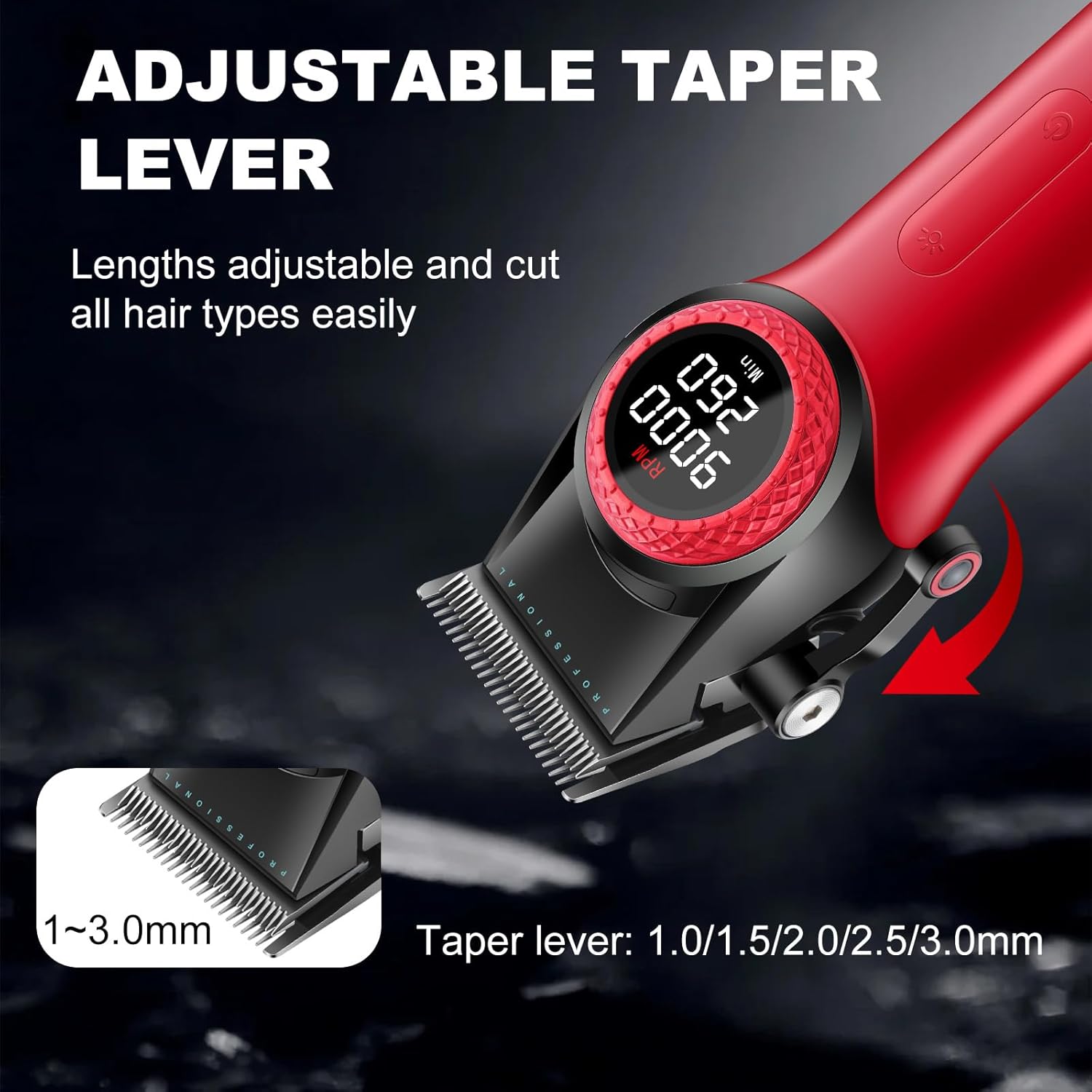
Image: The VGR 001 Hair Clipper showing the adjustable taper lever and its five settings for precise cutting lengths.
4. Using the LED Light
Press the front lighting button to activate a light directly above the blade. This feature assists in precise haircutting, especially in dimly lit conditions.

Image: The VGR 001 Hair Clipper with its LED light activated, illuminating the blade area for improved visibility during use.
5. General Hair Cutting Tips
- Ensure hair is clean and dry before cutting.
- Always start with a longer comb length than desired and gradually reduce it.
- Move the clipper against the direction of hair growth for an even cut.
- Overlap strokes to avoid missed spots.
- Use the taper lever for blending and detailing around the ears and neckline.
Maintenance
1. Cleaning the Blades
Regular cleaning ensures optimal performance and extends the life of your clipper.
- Turn off and unplug the clipper before cleaning.
- Use the provided cleaning brush to remove loose hairs from the blades.
- For a more thorough cleaning, the blades can be carefully detached (refer to the diagram in the manual for blade removal).
- Ensure blades are completely dry before reattaching.
2. Oiling the Blades
Apply a few drops of the included lubricating oil to the blades after each use, or as needed, to maintain sharpness and smooth operation.
- Apply 1-2 drops of oil across the top of the blades.
- Turn the clipper on for a few seconds to distribute the oil evenly.
- Wipe off any excess oil with a soft cloth.
3. Battery Care
- Avoid completely draining the battery frequently to prolong its lifespan.
- Store the clipper in a cool, dry place when not in use.
- If storing for an extended period, charge the battery to about 50% every few months.
Troubleshooting
| Problem | Possible Cause | Solution |
|---|---|---|
| Clipper does not turn on. | Battery is depleted. | Charge the clipper for 3 hours. |
| Poor cutting performance or pulling hair. | Blades are dull, dirty, or not oiled. | Clean and oil the blades. If issues persist, consider blade replacement. |
| Clipper gets hot during use. | Extended use or dirty blades. | Allow the clipper to cool down. Clean and oil the blades. |
| LED display not working. | Device malfunction. | Contact customer support for assistance. |
Specifications
- Model Name: VGR 001
- Blade Material: Carbon Steel
- Motor Speed: 7,000 - 9,000 RPM (21 speed adjustments)
- Battery: 4600mAh Lithium-ion
- Charging Time: Approximately 3 hours (fast charge)
- Operating Time: Up to 260 minutes
- Minimum Cutting Length: 1 mm
- Maximum Cutting Length: 27 mm (with guide combs)
- Taper Lever Settings: 5 positions (1.0mm, 1.5mm, 2.0mm, 2.5mm, 3.0mm)
- Display: Large LED Digital Display (shows RPM, remaining operating time)
- Special Features: Cordless operation, LED light, Smart Clip technology
- Included Components: Hair clipper, 10 guide combs, oil, cleaning brush, charging base, charging cable, US standard charging head.
Warranty and Support
The VGR 001 Professional Cordless Hair Clippers come with a one-year warranty from the date of purchase. For any issues or inquiries, please contact VGR customer support. We offer 24-hour support to assist you.
For further assistance, please visit the official VGR store or contact your retailer.
Product Overview Video
Video: An official product video showcasing the features and operation of the VGR 001 Professional Hair Clippers.


