
1. Introduction
Thank you for choosing the Baseus 45W USB C Charger Block. This device is designed to provide efficient and rapid charging for a wide range of compatible electronic devices. This manual contains important information regarding the safe operation, setup, maintenance, and troubleshooting of your charger. Please read it thoroughly before use and retain it for future reference.
Package Contents:
- 2 x Baseus 45W USB C Charger Blocks
- 2 x USB C to USB C Cables (3.3ft / 1m)
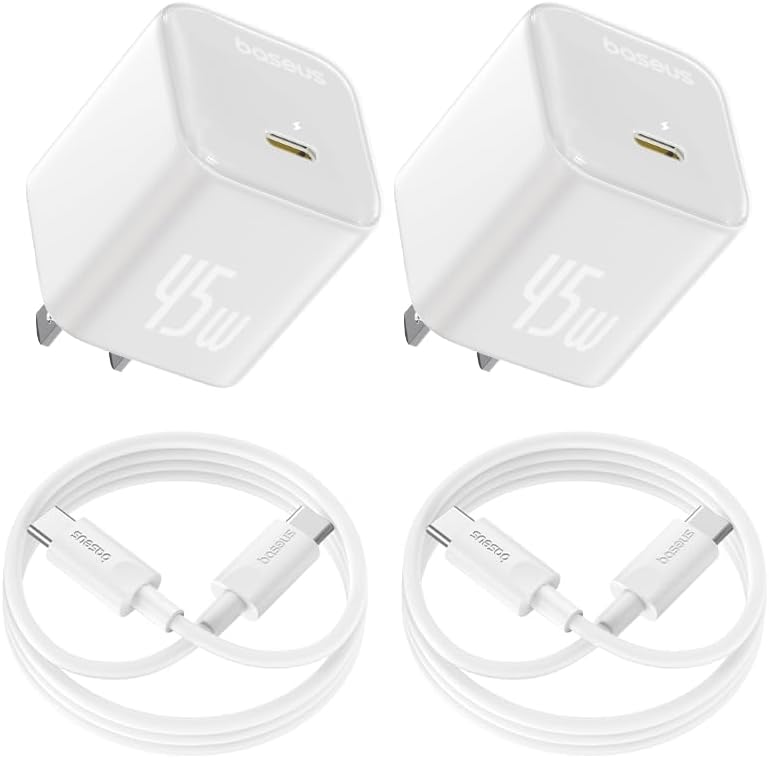
Image: Two Baseus 45W USB-C charger blocks and two USB-C to USB-C cables, as included in the package.
2. Safety Information
To ensure safe operation and prevent damage to the device or connected electronics, please observe the following safety guidelines:
- Do not expose the charger to water, moisture, or extreme temperatures.
- Avoid dropping or subjecting the charger to strong impacts.
- Do not attempt to disassemble, repair, or modify the charger.
- Use only compatible cables and devices.
- Ensure proper ventilation during use to prevent overheating.
- Unplug the charger from the power outlet when not in use or during electrical storms.
Integrated Safety Protections:
The Baseus 45W USB C Charger Block incorporates a 10-Point Safety Protection system to safeguard your devices:
- Short Circuit Protection
- Lightning Surge Protection
- Electrostatic Protection
- Over-Current Protection
- Overload Protection
- Over-Voltage Protection
- Low Leakage Current Protection
- Flame-Retardant Shell
- Voltage Stabilization Protection
- Low EMI Protection

Image: An infographic illustrating the 10-Point Safety Protection features integrated into the charger.
3. Setup
Setting up your Baseus 45W USB C Charger Block is straightforward:
- Unpack the charger and the included USB-C to USB-C cable.
- Insert the charger into a standard wall power outlet.
- Connect one end of the USB-C cable to the USB-C port on the charger.
- Connect the other end of the USB-C cable to the charging port of your compatible device.
- The device should begin charging automatically.
The compact design of the charger allows it to fit into various outlets without obstructing adjacent ports.
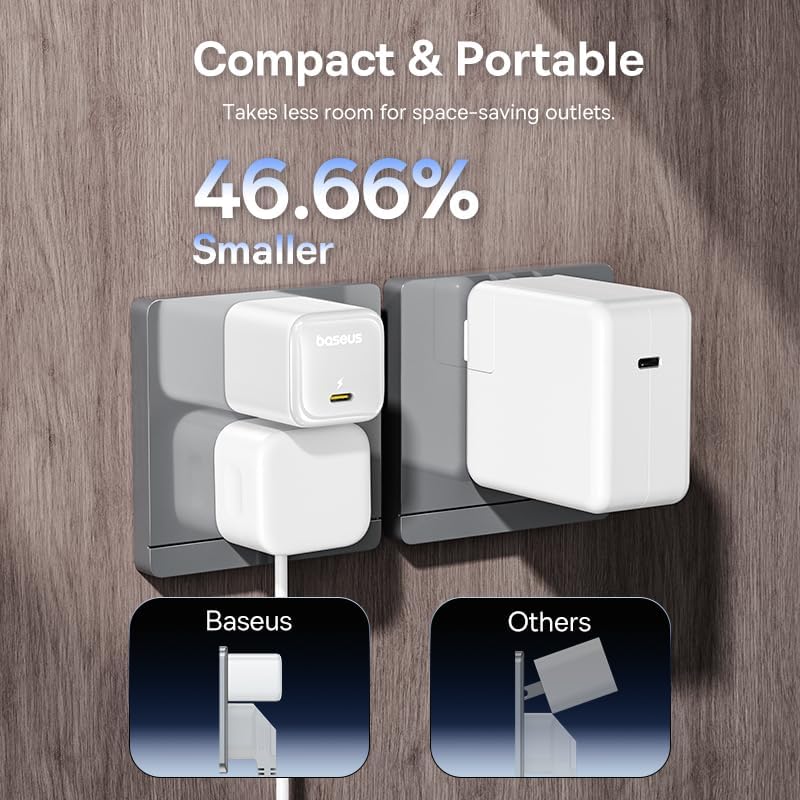
Image: A size comparison showing the compact Baseus 45W USB-C charger next to a larger, older 30W charger, demonstrating its space-saving design.
4. Operating Instructions
Fast Charging Capabilities:
The Baseus 45W USB C Charger supports advanced fast charging protocols, including PPS and PD 3.0. This enables rapid power delivery to compatible devices. For example, it can charge an iPhone 16 series device up to 56% and a Galaxy S24 up to 61% in approximately 30 minutes. To achieve Super Fast Charge 2.0 with compatible Samsung devices, a 5A charging cable is required.

Image: A Baseus 45W USB-C charger connected to an iPhone 16, demonstrating its rapid charging performance, achieving 56% charge in 30 minutes.
Quad Thermal Management:
The charger features Quad Thermal Management to maintain optimal operating temperatures and enhance device protection. This system includes:
- Advanced Stacking Tech: A scientific thermal layout designed to prevent overheating.
- Polymer Silicon-Based Design: Full coverage of internal components to increase heat dissipation area.
- Efficient Graphene Application: Utilizes graphene for high thermal conductivity and improved heat dissipation.
- BCT Smart Temperature Control: Monitors charging status up to 720,000 times per hour for precise temperature regulation.

Image: A diagram illustrating the four key components of the Quad Thermal Management system for effective heat dissipation.
GaN6 Technology:
Powered by GaN6 (Gallium Nitride) chip technology, this charger achieves a high energy conversion rate of 92%. GaN technology allows for a smaller charger size, lower operating temperatures, and increased charging efficiency compared to traditional silicon-based chargers.

Image: An internal view of the Baseus 45W charger, highlighting the integrated GaN6 chip and its role in achieving a 92% energy conversion rate.
Wide Compatibility:
The charger supports multiple protocols including PD3.0, PPS, QC3.0, FCP, SCP, and AFC, ensuring compatibility with a broad range of devices. This includes various models of iPhone (12-17 series), Galaxy (S20-S24 series), other Android phones, iPads, MacBooks, Microsoft Surface, Lenovo ThinkPad, Dell XPS, Apple Watch, and AirPods.

Image: The Baseus USB-C charger shown with icons of various compatible devices, including iPhones, Samsung phones, Google Pixel, iPads, MacBooks, Apple Watch, and AirPods.
5. Care and Maintenance
Proper care ensures the longevity and optimal performance of your charger:
- Cleaning: Disconnect the charger from the power outlet and your device before cleaning. Use a soft, dry cloth to wipe the surface. Do not use liquid cleaners or aerosols.
- Storage: Store the charger in a cool, dry place away from direct sunlight and extreme temperatures.
- Handling: Avoid bending or twisting the cable excessively, as this can damage internal wires. Do not pull the cable to unplug the charger; always grasp the plug itself.
6. Troubleshooting
If you encounter issues with your Baseus 45W USB C Charger Block, refer to the following common problems and solutions:
| Problem | Possible Cause | Solution |
|---|---|---|
| Device not charging | Loose connection, faulty cable, incompatible device, power outlet issue. | Ensure cable is securely connected to both charger and device. Try a different USB-C cable. Test the charger in a different power outlet. Verify device compatibility. |
| Slow charging | Non-fast charging cable, device not supporting fast charge, background apps consuming power. | Use the included USB-C to USB-C cable or another certified fast-charging cable. Close unnecessary background applications on your device. Ensure your device supports the fast charging protocols (PD/PPS). |
| Charger feels warm | Normal operation during high power output, poor ventilation. | It is normal for chargers to generate some heat during operation. Ensure the charger is in a well-ventilated area and not covered. If it becomes excessively hot, disconnect it immediately and contact support. |
| Charger making unusual noises | Internal component issue. | Immediately discontinue use and unplug the charger. Contact customer support for assistance. |
If the problem persists after attempting these solutions, please contact Baseus customer support.
7. Specifications
Detailed technical specifications for the Baseus 45W USB C Charger Block (Model CCGAN45SECS):
| Feature | Detail |
|---|---|
| Model Number | CCGAN45SECS |
| Wattage | 45W |
| Input Voltage | 240 Volts |
| Output Current | 2.24 Amps |
| Connector Type | USB-C (2-Pin plug) |
| Special Features | Fast Charging (PD3.0, PPS, QC3.0, FCP, SCP, AFC), GaN6 Technology, Quad Thermal Management |
| Compatible Devices | iPhone 12-17 Series, Galaxy S20-S24 Series, OnePlus 8 Pro, Google Pixel 6-8, Sony Xperia 5, iPad, Air Pods 2-4, Macbook Pro 2023, Lenovo ThinkPad T14, Dell XPS 13, and more. |
| Package Dimensions | 6.77 x 4.37 x 1.65 inches |
| Item Weight | 8.4 ounces |
| Manufacturer | Shenzhen Baseus Technology Co., Ltd. |
8. Warranty and Support
Baseus products are manufactured to high-quality standards. For warranty information, technical support, or any inquiries regarding your Baseus 45W USB C Charger Block, please refer to the official Baseus website or contact their customer service directly. Contact details can typically be found on the product packaging or the official brand website.


