
1. Product Overview
The Elitech IPT-100S is a versatile digital Bluetooth hygrometer and thermometer designed for accurate monitoring of temperature and humidity. It features both internal and external sensors, a large 4.5-inch display, and seamless integration with a mobile application for real-time data viewing, historical data analysis, and report generation. This device is suitable for a wide range of applications, from household use to industrial environments.

Figure 1: Elitech IPT-100S device and app interface.
2. Package Contents
Upon opening the package, verify that all items listed below are present and in good condition:
- 1 x Elitech IPT-100S Digital Bluetooth Hygrometer Thermometer
- 1 x External Temperature Probe
- 3 x AAA Batteries (pre-installed or included separately)
- 1 x User Manual (this document)
3. Key Features
- Dual High-Precision Sensors: Equipped with both internal and external temperature and humidity sensors for accurate monitoring.
- Dual Data Recording Modes: Supports online recording via APP and offline recording on the device (up to 5,000 data sets locally).
- Convenient Data Review: Quick access to historical data (2/4/6/8/10/12 hours) directly on the device and real-time viewing via the APP.
- Smart Data Analysis and Export: View temperature change curves and export data reports in EXCEL and PDF formats via the APP.
- Long Battery Life: Operates for over 6 months in always-on mode and up to 500 days in total with 3 AAA batteries.
- Large 4.5" Display: Clear and easy-to-read display showing temperature, humidity, clock, comfort level, and alarm status.
4. Getting Started
4.1 Battery Installation
The device requires 3 AAA batteries. If not pre-installed, open the battery compartment on the back of the device, insert the batteries according to the polarity markings, and close the compartment. If pre-installed, remove the insulating tab from the battery compartment to power on the device.

Figure 2: Battery compartment and installation.
4.2 App Download and Installation
To utilize the full features of the IPT-100S, download the Elitech Tools application on your smartphone:
- For iOS devices, search for "Elitech Tools" on the App Store.
- For Android devices, search for "Elitech Tools" on Google Play Store.
4.3 Initial Device Pairing
- Ensure Bluetooth is enabled on your smartphone.
- On the IPT-100S device, long press the Bluetooth icon button to enter Bluetooth pairing mode. The Bluetooth icon on the display will flash.
- Open the Elitech Tools app and search for nearby devices. Select "IPT-100S" from the list to connect.
- Once connected, the Bluetooth icon on the device display will become solid.

Figure 3: Connection steps for the IPT-100S.
5. Operation
5.1 Understanding the Display
The 4.5-inch large display provides comprehensive information at a glance:
- Top Left: Battery indicator, Bluetooth status, MAX/MIN indicator.
- Middle Left: Current time.
- Bottom Left: External probe temperature (if connected).
- Right Side: Internal temperature and humidity readings, comfort level indicator.
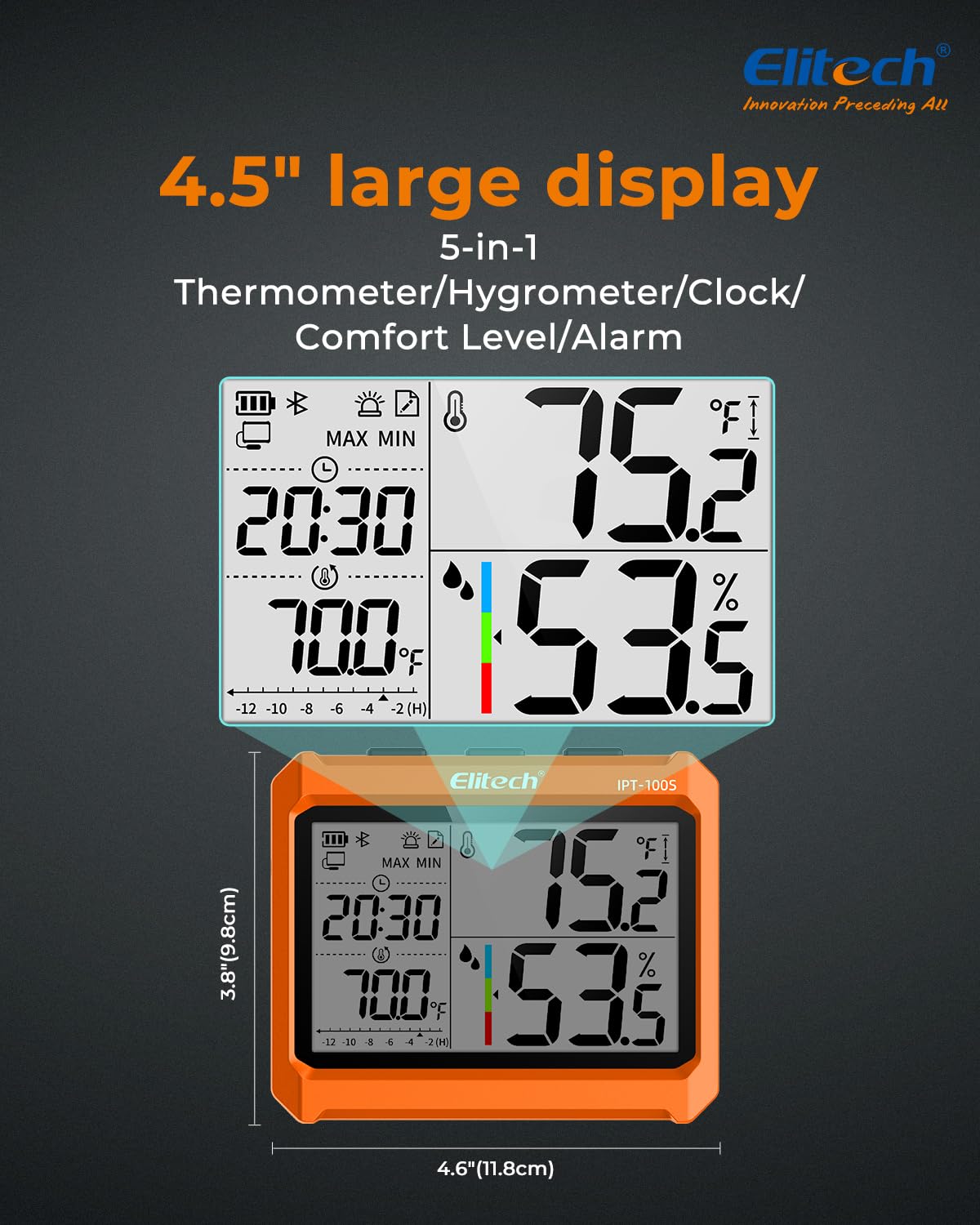
Figure 4: Detailed view of the 4.5-inch display.
5.2 Switching Sensor Types (Internal/External)
The device can display readings from either the internal sensor or the external probe. To switch between them, short press the sensor switch button (often indicated by an icon with two arrows or a probe symbol).

Figure 5: Switching between internal and external sensors.
5.3 Viewing Historical Data (MAX/MIN)
The device stores maximum and minimum temperature and humidity values. Short press the MAX/MIN button to cycle through current, maximum, and minimum readings. To reset the MAX/MIN values, long press the MAX/MIN button.

Figure 6: Displaying MAX, MIN, and Current values.
5.4 Changing Temperature Units (°C/°F)
To switch the temperature unit between Celsius (°C) and Fahrenheit (°F), long press the °C/°F button.

Figure 7: Switching temperature units.
5.5 Humidity Comfort Level
The device indicates the humidity comfort level based on the measured relative humidity. The default comfort range is 40% to 60% RH, which can be customized via the Elitech Tools APP.
- Wet: Above 60% RH
- Comfort: 40% - 60% RH
- Dry: Below 40% RH

Figure 8: Humidity comfort level indicator.
6. App Functionality
The Elitech Tools app enhances the functionality of your IPT-100S, providing advanced monitoring and data management capabilities.

Figure 9: Overview of Elitech Tools app features.
6.1 Real-time Monitoring
Once connected via Bluetooth, the app displays real-time temperature and humidity readings from the device. You can monitor conditions remotely within the Bluetooth range (approximately 30 meters or 98.5 feet).

Figure 10: Remote real-time data viewing via app.
6.2 Data Graphing
The app allows you to visualize temperature and humidity trends over time through interactive graphs. This helps in identifying patterns and anomalies in environmental conditions.
6.3 Data Export (PDF/CSV)
You can export recorded data from the app in both PDF and CSV (Excel) formats. This feature is useful for detailed analysis, record-keeping, and sharing data.

Figure 11: Data export functionality.
6.4 Adjusting Recording Interval
The default recording interval for offline data storage is 30 minutes. This can be adjusted within the app from 30 seconds to 1 hour to suit specific monitoring needs.
6.5 Presetting Scenes
The app offers the ability to preset various monitoring scenes (e.g., Life and Office, Laboratory, Industrial Warehouses, Pharmacy Freezers, Family Farming, Hospital Wards). This allows for quick configuration of parameters based on typical requirements for different environments.

Figure 12: Preset multi-scenes in the app.
7. Maintenance
7.1 Battery Replacement
When the battery indicator on the display shows low power, replace the 3 AAA batteries. Refer to section 4.1 for battery installation instructions.
7.2 Cleaning and Care
To ensure accurate readings and prolong the life of your device:
- Wipe the device with a soft, dry cloth. Do not use abrasive cleaners or immerse the device in water.
- Keep the external probe clean and free from debris.
- Avoid exposing the device to extreme temperatures, direct sunlight, or high humidity for extended periods.
8. Troubleshooting
- Device not turning on:
Check if the insulating tab has been removed from the battery compartment. Ensure batteries are inserted correctly with the correct polarity and are not depleted. Replace batteries if necessary. - Bluetooth connection issues:
Ensure Bluetooth is enabled on your smartphone and the device is in pairing mode (Bluetooth icon flashing). Make sure the device is within the effective Bluetooth range (approx. 30m/98.5ft) and there are no significant obstructions. Restart both the device and the app, then try pairing again. - Inaccurate readings:
Ensure the sensors (internal and external) are clean and unobstructed. Avoid placing the device near heat sources, vents, or in direct sunlight, which can affect readings. Allow the device to stabilize in the environment for a few minutes after placement. - Data not logging or exporting:
Verify that the device is connected to the app. Check the recording interval settings in the app. Ensure sufficient storage space on your smartphone for exported files. - No power switch to turn off:
The IPT-100S is designed for continuous monitoring with low power consumption. To turn it off completely, you must remove the batteries.
9. Specifications
| Feature | Specification |
|---|---|
| Model Number | US-IPT-100S |
| Product Dimensions | 4.6"W x 3.8"H (11.8cm x 9.8cm) |
| Internal Sensor Temperature Range | -10℃ to 60℃ (14℉ to 140℉) |
| External Sensor Temperature Range | -20℃ to 70℃ (-4℉ to 158℉) |
| Temperature Resolution | 0.1℃ / 0.1℉ |
| Humidity Range | 0% to 99% RH |
| Humidity Accuracy | ±5% RH |
| Data Storage Capacity | 5,000 data sets (offline) |
| Recording Interval | Adjustable from 30 seconds to 1 hour (default 30 minutes) |
| Connectivity | Bluetooth |
| Power Supply | 3 x AAA Batteries (included) |
| Battery Life | Over 6 months (always-on mode), up to 500 days total |
| Display Size | 4.5 inches |
| Mounting Type | Wall Mount, Adjustable Bracket, Strong Magnet |
10. Warranty and Support
Elitech products are designed for reliability and performance. For warranty information, technical support, or service inquiries, please visit the official Elitech website or contact Elitech customer service. Keep your purchase receipt as proof of purchase for warranty claims.
You can find more information and support resources on the Elitech Brand Store on Amazon.


