
Fanttik K2 Ultra
Fanttik K2 Ultra Power Drill User Manual
Model: K2 Ultra
Introduction
The Fanttik K2 Ultra Power Drill is a versatile and intelligent cordless drill/driver designed for a wide range of home DIY tasks, light repairs, and construction projects. Featuring a VoltiPulse brushless motor, innovative dual-screen display, and TapSwitch electronic gear shifting, it offers powerful performance and intuitive operation. This manual provides essential information for safe and effective use of your new tool.
Safety Information
Always observe basic safety precautions when using power tools to reduce the risk of fire, electric shock, and personal injury.
- Wear appropriate personal protective equipment, including safety glasses, gloves, and hearing protection.
- Keep your work area clean and well-lit. Cluttered or dark areas invite accidents.
- Do not operate power tools in explosive atmospheres, such as in the presence of flammable liquids, gases, or dust.
- Keep children and bystanders away while operating a power tool. Distractions can cause you to lose control.
- Ensure the tool is switched off before making any adjustments, changing accessories, or storing power tools.
- Use the correct tool for your application. Do not force the tool.
- Store idle power tools out of the reach of children and do not allow persons unfamiliar with the power tool or these instructions to operate the power tool.
What's in the Box
Your Fanttik K2 Ultra Power Drill package includes the following components:
- NEX K2 Ultra 7.4V Power Drill Driver
- 360° Storage Stand
- 10x Screwdriver Bits
- 5x Metal Drills
- 5x Wood Drills
- Storage Bag
- USB-C Cable
- User Manual
- Quick Start Guide

Image: The Fanttik K2 Ultra Power Drill, its 360° storage stand, various screwdriver and drill bits, storage bag, USB-C cable, and documentation.
Setup
Charging the Battery
The K2 Ultra is equipped with a 2500mAh high-capacity lithium battery. Before first use, fully charge the drill. Use the provided USB-C cable to connect the drill to a compatible 5V 2A power source. The battery level indicator on the main screen will show charging progress.

Image: An internal view of the Fanttik K2 Ultra highlighting its 2500mAh battery and Type-C charging port.
Attaching/Changing Bits
The K2 Ultra features a 3/8'' keyless chuck for easy bit changes. To insert a bit, twist the chuck counter-clockwise to open the jaws, insert the desired screwdriver or drill bit, and then twist clockwise to securely tighten the chuck around the bit. Ensure the bit is firmly seated before operation.
Using the Storage Stand
The included 360° storage stand not only provides a convenient resting place for your drill but also features a built-in accessory box. Press the button on the back of the stand to open the compartment and access the 10 screwdriver bits and 10 drill bits (5 metal, 5 wood) for daily household use.
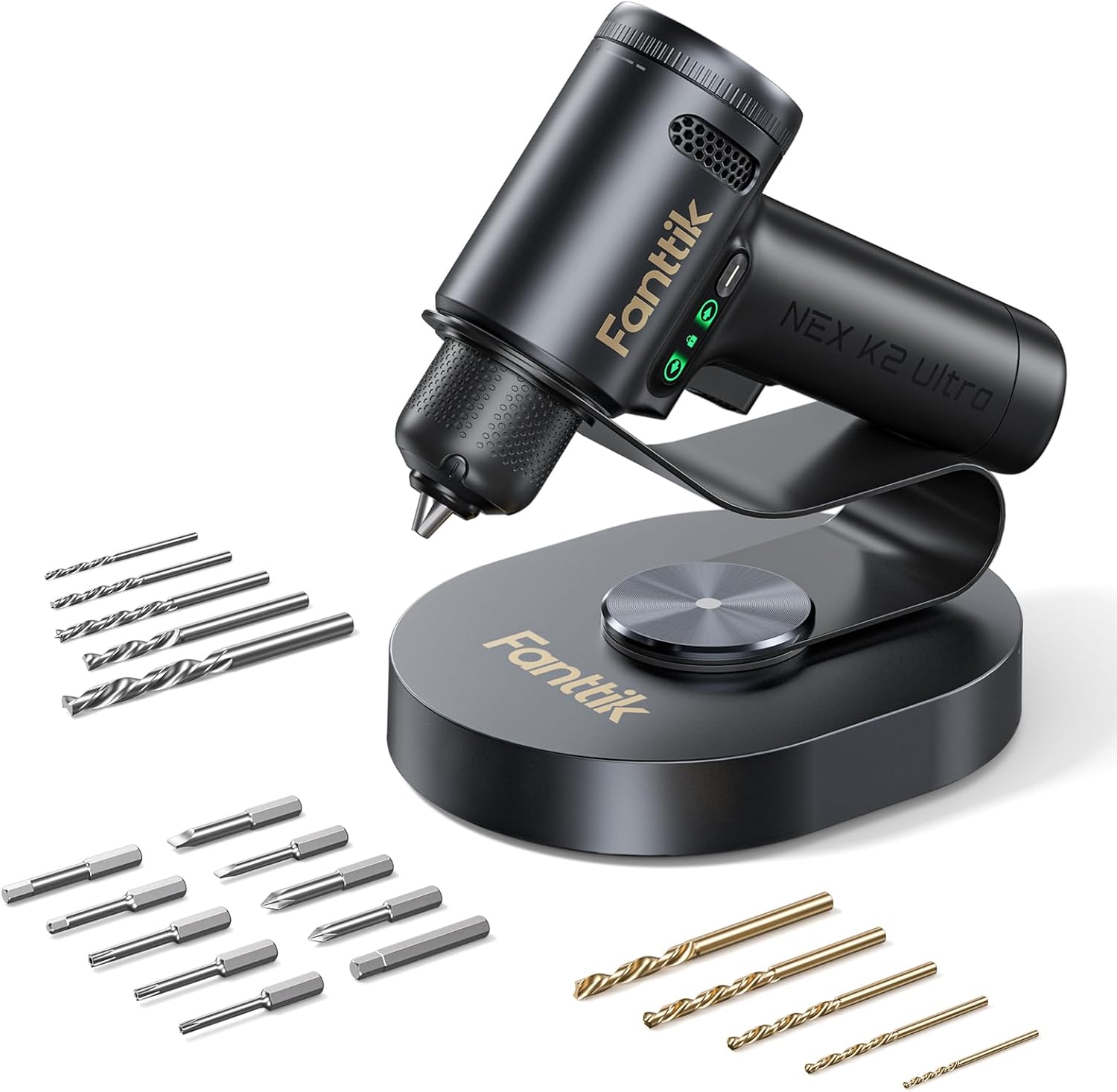
Image: The Fanttik K2 Ultra Power Drill resting on its stand, with an assortment of drill and screwdriver bits displayed around it.
Operating Instructions
Powering On/Off
To power on the drill, simply press the trigger. The main screen will illuminate, displaying the current mode and settings. Release the trigger to power off.
TapSwitch Electronic Gear Shifting System
The K2 Ultra features an intuitive TapSwitch system for seamless mode changes. The main screen clearly displays the current mode (Electric Screwdriver or Drill Mode) along with corresponding torque or speed settings.
- Short Press Function Button: Switch between Electric Screwdriver mode and Drill mode.
- Long Press Function Button: Activate or deactivate the AutoAssist function.

Image: A detailed view of the Fanttik K2 Ultra's digital display, illustrating the TapSwitch gear change system and its intuitive controls.
Adjusting Torque and RPM
In Electric Screwdriver mode, you can adjust the torque setting from 1 to 20, with a maximum of 30 N.m, to prevent stripping screws. In Drill mode, the speed can be set to 500, 800, or 1250 RPM, suitable for various materials like wood, metal, or plastic.
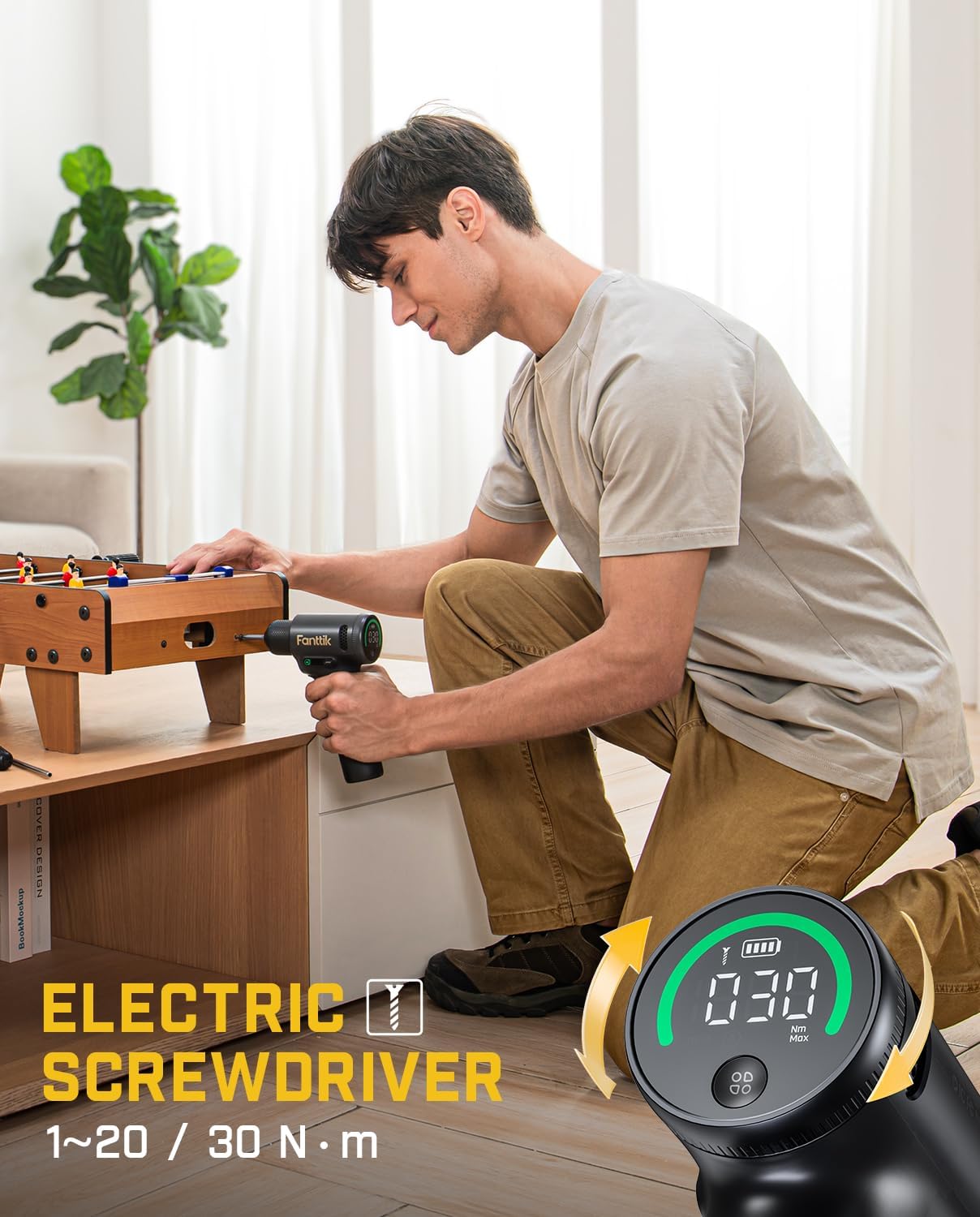
Image: A user demonstrating the Fanttik K2 Ultra in Electric Screwdriver mode, highlighting its compact size and ease of use for furniture assembly.

Image: A user demonstrating the Fanttik K2 Ultra in Power Drill mode, showcasing its capability for drilling into wood.
Electric Direction Switch
The side screen of the drill provides real-time information, including the rotation direction. Use the directional switch to select between "Drill In" (forward), "Drill Out" (reverse), or "Locked" (long press to activate/deactivate) for safety and precise control.

Image: A visual guide to the Electric Direction Switch on the Fanttik K2 Ultra, demonstrating its three states: Drill In, Locked, and Drill Out.
Built-in LED Working Light
The K2 Ultra features a built-in LED working light that illuminates your workspace, providing better visibility in dimly lit areas. This light activates automatically when the trigger is pressed.
Maintenance
- Cleaning: Regularly wipe the tool with a soft, damp cloth. Do not use harsh chemicals or abrasive cleaners. Keep ventilation openings clear of dust and debris.
- Storage: Store the drill and its accessories in a dry, cool place, away from direct sunlight and moisture. Utilize the provided storage stand and bag for organized storage.
- Battery Care: For optimal battery life, avoid fully discharging the battery frequently. Recharge the battery when the indicator shows low power. If storing for extended periods, charge the battery to about 50% every 3-6 months.
Troubleshooting
| Problem | Possible Cause | Solution |
|---|---|---|
| Drill does not turn on. | Low battery; Tool is locked. | Charge the battery; Check the Electric Direction Switch and ensure it's not in the "Locked" position. |
| Bit slips in chuck. | Chuck not tightened sufficiently; Incorrect bit size. | Retighten the keyless chuck firmly; Ensure the bit shank matches the chuck capacity. |
| Reduced power/speed. | Low battery; Incorrect mode/torque setting. | Recharge the battery; Adjust torque/speed settings via the TapSwitch system. |
| Overheating during use. | Continuous heavy use; Blocked ventilation. | Allow the tool to cool down; Clear any obstructions from ventilation openings. |
Specifications
| Feature | Detail |
|---|---|
| Brand | Fanttik |
| Model | K2 Ultra |
| Power Source | Battery Powered |
| Battery Type | Lithium Ion (2500mAh) |
| Charging Interface | USB-C (5V 2A) |
| Voltage | 7.4 Volts |
| Maximum Rotational Speed | 1250 RPM |
| Maximum Torque | 30 Newton Meters |
| Chuck Size | 3/8'' Keyless Chuck |
| Special Features | Brushless Motor, Built-In LED Working Light, TapSwitch Gear Change, Dual-Screen Display, Variable Speed |
| Product Dimensions | 5.51"L x 2.23"W x 7.52"H |
| Item Weight | 4.05 pounds |

Image: An X-ray view of the Fanttik K2 Ultra, highlighting its VoltiPulse Brushless Motor and key performance metrics like Max. 30 N.m torque and Max. 1250 RPM speed.
Warranty and Support
Fanttik products are manufactured to high-quality standards and are warranted against defects in materials and workmanship. For specific warranty details, product support, or to inquire about repairs, please refer to the warranty card included with your product or visit the official Fanttik website. Keep your purchase receipt as proof of purchase.
For further assistance, you may contact Fanttik customer service through their official channels. Please have your model number (K2 Ultra) and purchase date ready when contacting support.
Related documentsK2 Ultra


Ask a question about this manual
Ask about setup, troubleshooting, compatibility, parts, safety, or missing instructions. Manuals+ will review the question and use this page’s manual context to help answer it.