
1. Introduction
The Marea Smartwatch B63005/1 is a versatile and stylish wearable device designed to enhance your daily life with advanced connectivity and comprehensive health monitoring features. It combines modern design with practical functionality, making it an ideal companion for various activities.
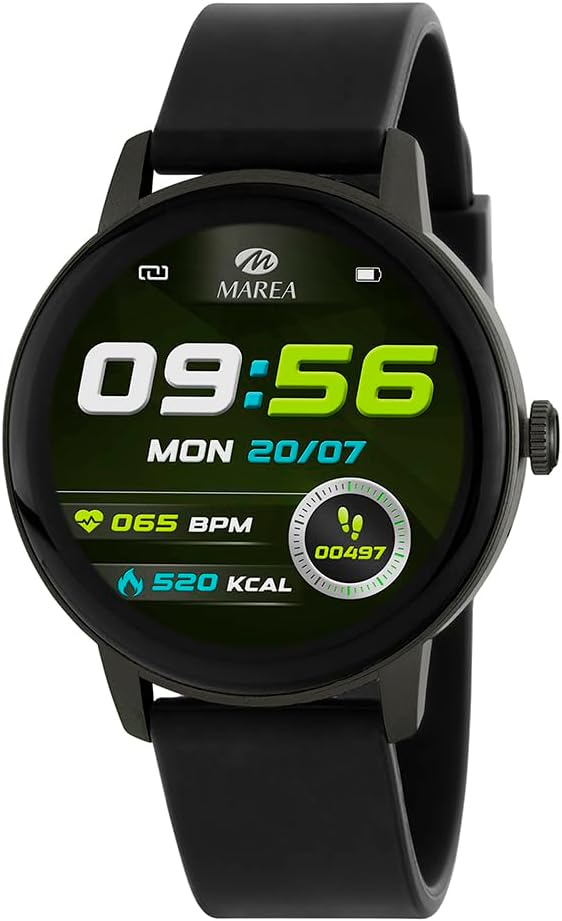
Figure 1.1: The Marea Smartwatch B63005/1, featuring a black strap and a round display showing time (09:56), date (MON 20/07), heart rate (065 BPM), steps (00497), and calories burned (520 KCAL).
2. Setup Guide
2.1. Package Contents
Ensure all items are present in the package:
- Marea Smartwatch B63005/1
- Charging Cable
- User Manual (this document)
2.2. Initial Charging
Before first use, fully charge your smartwatch.
- Connect the provided charging cable to the charging port on the back of the smartwatch.
- Plug the other end of the cable into a standard USB power adapter (not included) or a computer's USB port.
- The watch display will indicate charging status. A full charge typically takes approximately 2 hours.
- The 220 mAh battery provides up to 2 days of autonomy, depending on usage.
2.3. App Installation and Pairing
To unlock the full potential of your Marea Smartwatch, download and install the companion application on your smartphone.
- Scan the QR code in the manual (if provided) or search for the "Marea Smart" app in your smartphone's app store (Google Play Store for Android, Apple App Store for iOS).
- Install the application.
- Ensure your smartphone's Bluetooth is enabled.
- Open the Marea Smart app and follow the on-screen instructions to create an account or log in.
- Within the app, navigate to the device pairing section and select "Add Device" or similar.
- The app will search for nearby devices. Select "Marea B63005/1" from the list.
- Confirm the pairing request on both your smartphone and the smartwatch.
- The smartwatch is compatible with Android 8.0 or higher and iOS 13.0 or higher, utilizing Bluetooth BLE 5.3 for stable connection.
3. Operating Instructions
3.1. Navigating the Display
The Marea B63005/1 features a 1.3-inch IPS touchscreen with a resolution of 320 x 320 pixels, offering a clear and comfortable visual experience.
- Swipe Up/Down: Scroll through menus and notifications.
- Swipe Left/Right: Access quick functions or different data screens.
- Tap: Select an item or confirm an action.
- Press Side Button: Return to the home screen or power on/off.
3.2. Health Monitoring Features
The smartwatch offers comprehensive health tracking capabilities:
- Step, Distance, and Calorie Tracking: Automatically records your daily activity.
- Heart Rate Monitoring: Real-time heart rate measurement.
- Blood Pressure Monitoring: Provides estimated blood pressure readings.
- Blood Oxygen (SpO2) Monitoring: Measures blood oxygen saturation levels.
- Menstrual Cycle Tracking: Supports tracking for female users.
- Sleep Monitoring: Analyzes sleep patterns and quality.
Note: Health data provided by this device is for reference only and should not be used for medical diagnosis or treatment. Consult a healthcare professional for any health concerns.
3.3. Sports Modes
Integrated sports modes allow you to track specific workouts. Select the desired sport from the activity menu to record data such as duration, calories burned, and heart rate during exercise.
3.4. Smart Notifications and Communication
- Call Notifications: Receive incoming call alerts on your wrist.
- Message Notifications: View SMS and app messages (e.g., WhatsApp, social media) directly on the watch.
- Bluetooth Calling: Make and receive calls directly from the watch when connected to your phone.
- Voice Assistant: Access your phone's voice assistant through the watch.
3.5. Additional Features
The Marea B63005/1 includes several convenient tools:
- Alarms: Set multiple alarms.
- Stopwatch & Countdown: Timing functions for various needs.
- Music Control: Remotely control music playback on your smartphone.
- Camera Remote: Use the watch as a remote shutter for your phone's camera.
- World Clock: View time in different time zones.
- Stock Market: Access stock information (requires app configuration).
- Screen Protector: (Likely refers to a screen lock or always-on display setting).
- Anti-Loss: Alerts you if your phone goes out of Bluetooth range.
- Find Phone: Helps locate your paired smartphone by making it ring.
- Customizable Watch Faces: Personalize your watch display through the app.
4. Maintenance
4.1. Water and Dust Resistance
The Marea B63005/1 has an IP67 rating, meaning it is protected against dust ingress and can withstand immersion in water up to 1 meter for 30 minutes. It is suitable for daily use, including hand washing and light rain.
Important: Do not use the watch in hot water, saunas, or during diving. The IP67 rating does not guarantee protection against high-pressure water jets or prolonged immersion. Avoid contact with chemical solvents.
4.2. Cleaning and Care
- Wipe the watch and strap regularly with a soft, damp cloth.
- For stubborn dirt, use a mild soap solution and rinse thoroughly with clean water.
- Ensure the charging contacts are clean and dry before charging.
- Avoid exposing the watch to extreme temperatures or direct sunlight for extended periods.
4.3. Battery Care
- To prolong battery life, avoid fully discharging the battery frequently.
- Charge the watch regularly, even if not in daily use.
- Store the watch in a cool, dry place if not used for an extended period.
5. Troubleshooting
| Problem | Possible Solution |
|---|---|
| Watch does not turn on. | Ensure the watch is fully charged. Connect it to the charger for at least 30 minutes. |
| Cannot pair with smartphone. |
|
| Notifications are not received. |
|
| Inaccurate health data. |
|
| Short battery life. |
|
6. Specifications
| Feature | Detail |
|---|---|
| Brand | Marea |
| Model | B63005/1 |
| Display Type | IPS Touchscreen |
| Display Size | 1.3 inches |
| Display Resolution | 320 x 320 pixels |
| Processor | AC7012/F6 |
| RAM | 640 KB |
| Battery Capacity | 220 mAh |
| Battery Life | Up to 2 days (depending on usage) |
| Connectivity | Bluetooth BLE 5.3 |
| Compatibility | Android 8.0+ / iOS 13.0+ |
| Water Resistance | IP67 (Dust and Splash Proof) |
| Case Material | Plastic (Grey) |
| Strap Material | Rubber / Silicone (Black) |
| Dimensions | 38 x 45 mm (watch case) |
| Weight | 160 g (package weight) |
| Included Accessories | Charging Cable |
7. Warranty & Support
7.1. Warranty Information
Your Marea Smartwatch B63005/1 is covered by a manufacturer's warranty against defects in materials and workmanship. The specific terms and duration of the warranty may vary by region and retailer. Please refer to the warranty card included with your purchase or contact your point of sale for detailed information.
This warranty does not cover damage caused by misuse, accident, unauthorized modification, or failure to follow the instructions in this manual.
7.2. Customer Support
For technical assistance, troubleshooting, or warranty claims, please contact Marea customer support or the authorized retailer where you purchased the product. Have your product model number (B63005/1) and proof of purchase ready when contacting support.


