Important Safety Information
Please read and understand all instructions before operating this evaporative cooler. Failure to follow these instructions may result in electric shock, fire, or serious personal injury.
- Always unplug the unit from the power source before performing any maintenance or cleaning.
- Do not operate the cooler with a damaged cord or plug.
- Do not immerse the unit, cord, or plug in water or other liquids.
- Keep the unit away from open flames, heat sources, and flammable materials.
- Ensure the unit is placed on a stable, level surface to prevent tipping.
- This appliance is not intended for use by persons (including children) with reduced physical, sensory or mental capabilities, or lack of experience and knowledge, unless they have been given supervision or instruction concerning use of the appliance by a person responsible for their safety.
- Do not block air inlets or outlets.
- Use only clean water in the water tank.
Product Overview
The Hessaire DC18 Mobile Evaporative Cooler is designed to provide portable cooling by evaporating water. It can be powered by an included AC adapter or compatible 18V/20V tool batteries (battery not included).
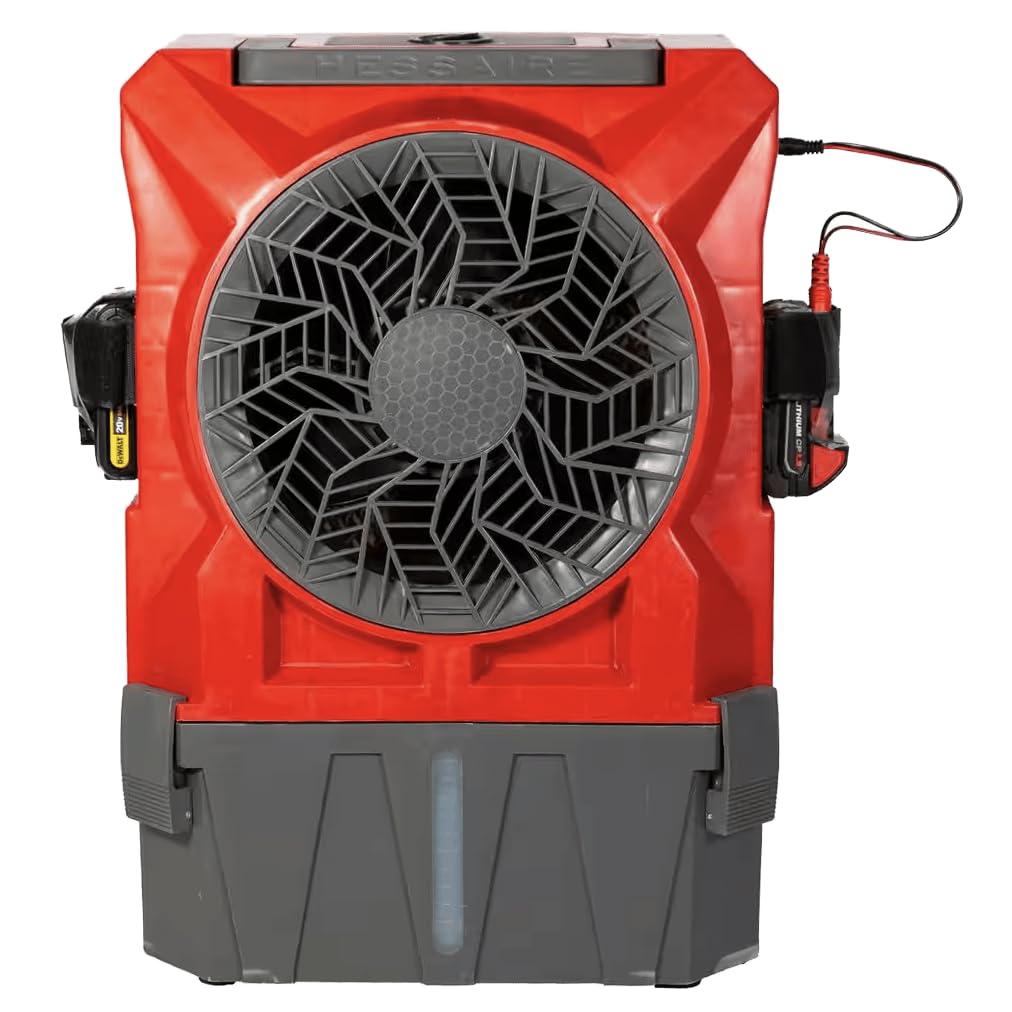
Figure 1: Front view of the Hessaire DC18 Mobile Evaporative Cooler. The image shows the red and gray unit with a large central fan, a water level indicator at the bottom, and battery ports on the sides. A power cable is visible on the right side.
Key Components:
- Fan Grille: Protects the fan blades and directs airflow.
- Control Dial: Adjusts fan speed and power.
- Water Tank: Holds up to 2.8 gallons of water for evaporation. Features a visible water level indicator.
- Battery Ports: Located on both sides, compatible with major brand 18V or 20V tool battery platforms.
- AC Adapter Port: For connecting the included 115V AC adapter.
- Cooling Pad: Internal component responsible for water evaporation (not visible externally).
Setup
- Unpacking: Carefully remove the cooler from its packaging. Inspect for any damage. Retain packaging for future storage or transport.
- Placement: Place the cooler on a firm, level surface. Ensure there is adequate space around the unit for proper airflow (at least 12 inches from walls or obstructions).
- Filling the Water Tank:
- Locate the water fill opening, typically at the top or rear of the unit.
- Pour clean, fresh water into the tank. Do not overfill; observe the water level indicator. The tank capacity is 2.8 gallons.
- For optimal cooling, ensure the water level is sufficient before operation.
- Power Connection:
- AC Power: Insert the included 115V AC adapter into the AC adapter port on the unit, then plug the adapter into a standard electrical outlet.
- Battery Power: If using battery power, insert a compatible 18V or 20V tool battery (not included) into one of the battery ports until it clicks into place. Ensure the battery is fully charged.
Operation
The Hessaire DC18 Mobile Evaporative Cooler features a simple control dial for operation.
- Turning On: Rotate the control dial clockwise from the "OFF" position. The fan will start.
- Adjusting Fan Speed: Continue rotating the control dial clockwise to increase the fan speed. Rotate counter-clockwise to decrease the fan speed. The cooler offers variable speed control.
- Cooling Function: The evaporative cooling function will activate automatically when the fan is running and water is present in the tank. The unit draws air through the wet cooling pad, causing water to evaporate and cool the air.
- Turning Off: Rotate the control dial counter-clockwise until it reaches the "OFF" position.
Note: This unit is an evaporative cooler, not an air conditioner. It reduces heat stress by adding moisture to the air, which can lower the perceived temperature. Its effectiveness depends on ambient humidity levels.
Maintenance
Regular maintenance ensures optimal performance and extends the life of your evaporative cooler. Always unplug the unit before cleaning or maintenance.
Daily/Weekly Maintenance:
- Water Tank: Drain and refill the water tank with fresh water regularly, especially if the unit is used frequently. This prevents algae and mineral buildup.
- Exterior Cleaning: Wipe the exterior surfaces with a soft, damp cloth. Do not use abrasive cleaners or solvents.
Monthly/Seasonal Maintenance:
- Cooling Pad Cleaning: Refer to the specific instructions for accessing and cleaning the cooling pad. Mineral deposits can reduce efficiency. Gently rinse the pad with water. If heavily soiled, a mild detergent solution may be used, followed by thorough rinsing.
- Drain Plug: Ensure the drain plug (if applicable) is clear of debris.
- Storage: Before long-term storage, drain all water from the tank and allow the cooling pad to dry completely to prevent mold and mildew growth. Store the unit in a cool, dry place.
Troubleshooting
If you experience issues with your Hessaire DC18 Mobile Evaporative Cooler, consult the following table before contacting customer support.
| Problem | Possible Cause | Solution |
|---|---|---|
| Unit does not turn on. |
|
|
| No cooling effect. |
|
|
| Unpleasant odor. |
|
|
Specifications
- Model Name: Mobile (DC18)
- Brand: Hessaire
- Air Flow Capacity: 900 Cubic Feet Per Minute (CFM)
- Area Coverage: Approximately 300 sq. Ft.
- Water Tank Capacity: 2.8 gallons
- Power Source: 115V AC Adapter (included) or 18V/20V Tool Batteries (not included)
- Controls Type: Knob (Variable Speed)
- Mounting Type: Freestanding
- Product Dimensions: 17 x 11 x 23 inches (Length x Width x Height)
- Item Weight: 42 pounds
- Country of Origin: USA
- UPC: 818015029189
Warranty and Support
Warranty: This Hessaire DC18 Mobile Evaporative Cooler comes with a 1-year warranty from the date of shipment from the vendor. Please retain your proof of purchase for warranty claims.
For technical support, parts, or warranty inquiries, please contact Hessaire customer service. Refer to the official Hessaire website or your purchase documentation for the most current contact information.
Online Resources: For additional information, FAQs, or instructional videos, visit the official Hessaire website. You can also visit the Hessaire Store on Amazon.


