Introduction
This instruction manual provides essential information for the proper use and care of your MINISO Stitch Cartoon Print Makeup Bag. Please read this manual thoroughly to ensure optimal performance and longevity of your product.
Product Features
- Design: Adorable Stitch cartoon print with a secure zipper closure.
- Versatile Storage: Spacious interior compartment for organizing makeup, skincare products, and daily toiletries.
- Travel-Friendly: Compact and lightweight construction for easy portability during travel or daily commutes.
- Practical Features: Durable zipper and easy-to-clean material for long-lasting use and maintenance.
- Ideal Size: Dimensions suitable for fitting into handbags or luggage while accommodating essential beauty items.
Setup
1. Unpacking
Carefully remove the makeup bag from its packaging. Inspect the bag for any signs of damage or manufacturing defects. If any issues are found, please refer to the 'Warranty and Support' section.
2. Initial Preparation
Before first use, it is recommended to wipe the interior and exterior surfaces with a clean, damp cloth to remove any dust or residue from manufacturing. Allow the bag to air dry completely before storing any items.
Operating Instructions
1. Opening and Closing the Bag
To open the bag, grasp the zipper pull and gently slide it along the zipper track. To close, align the zipper teeth and slide the pull back to the starting position. Ensure the zipper is fully closed to secure contents.
2. Organizing Contents
The spacious main compartment is designed to hold various cosmetic and toiletry items. Arrange items neatly to maximize space and prevent damage. Avoid overfilling the bag, as this may strain the zipper and seams.

An open view of the makeup bag revealing its spacious interior, designed to accommodate various items.
3. Travel Use
Due to its compact and lightweight design, this bag is suitable for travel. It can be placed inside larger luggage or carried in a handbag for easy access to essentials.

This image illustrates the compact storage capabilities of the bag, suitable for various cosmetic items such as liquid foundation, mascara, hand cream, lipstick, and makeup brushes.
Maintenance
Cleaning Instructions
The bag is made from an easy-to-clean material. For general cleaning, wipe the exterior and interior with a soft, damp cloth and mild soap if necessary. Avoid using harsh chemicals or abrasive cleaners, as these may damage the material or print. Allow the bag to air dry completely before reuse or storage.
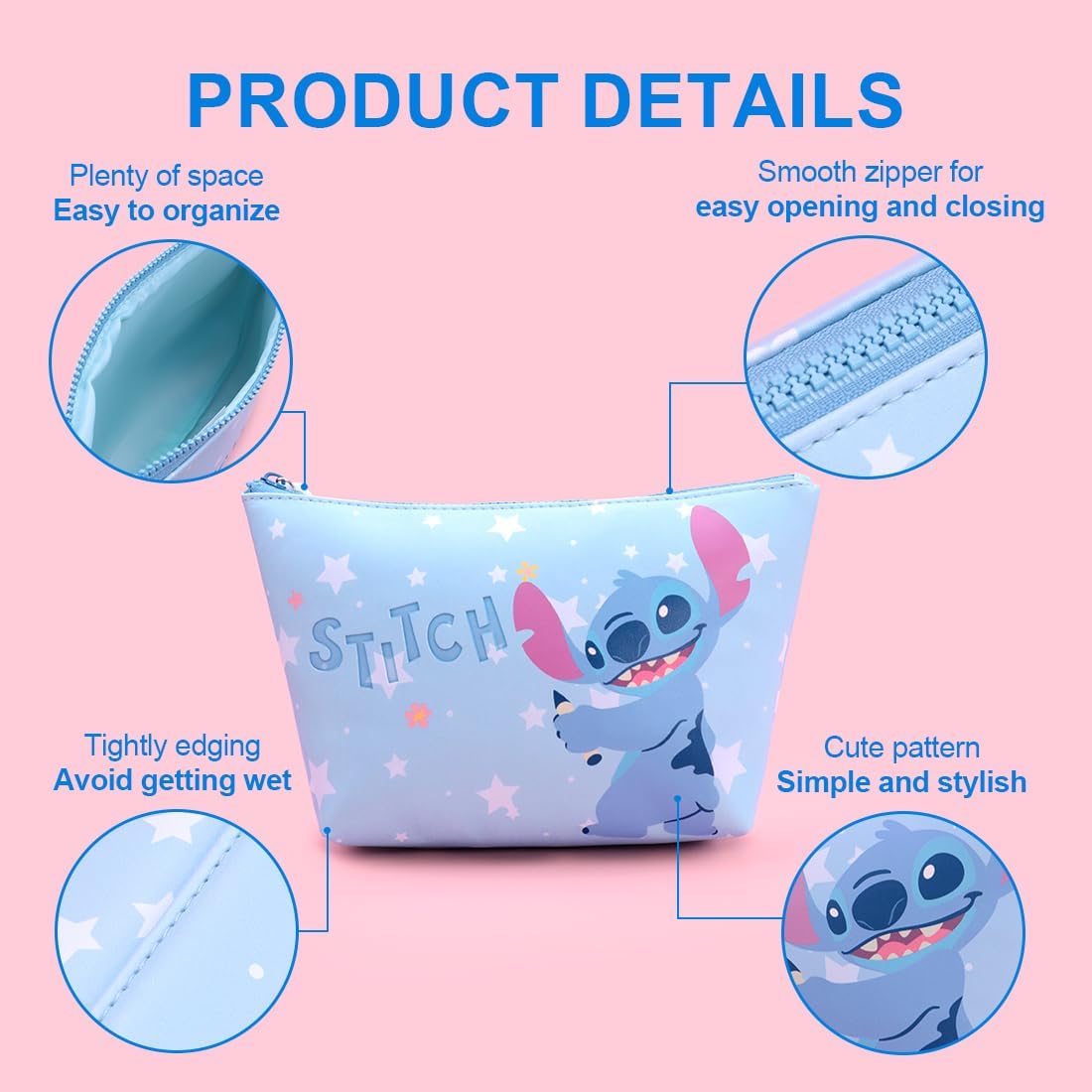
Close-up views demonstrating key product details: the smooth-gliding zipper for easy access, the tightly stitched edging for durability, and the simple yet stylish Stitch pattern.
Troubleshooting
Zipper Sticking
If the zipper becomes difficult to move, ensure no fabric or items are caught in the teeth. Gently try to move the zipper back and forth. If it remains stiff, a small amount of zipper lubricant or graphite (from a pencil tip) can be applied to the teeth to improve movement.
Stains or Spills
For minor stains or spills, immediately wipe the affected area with a damp cloth. For more stubborn stains, a mild soap solution can be used. Always test any cleaning solution on an inconspicuous area first.
Safety Information
- This product is intended for organizing personal items and is not a toy.
- Keep away from open flames or extreme heat sources.
- Do not allow small children to play with the bag unsupervised, especially if it contains small items that could pose a choking hazard.
Specifications

This image displays the product dimensions, indicating a length of 21cm (8.3 inches), a height of 16cm (6.3 inches), and a width of 8cm (3.1 inches).
| Attribute | Detail |
|---|---|
| Product Dimensions | 10.24 x 2.36 x 5.91 inches |
| Item Weight | 3.84 ounces |
| Department | Womens |
| Manufacturer | Miniso |
| ASIN | B0F6MVN2KX |
| Item Model Number | 6931604327931 |
Warranty and Support
Specific warranty information for this product is not provided in the available details. For any product-related inquiries, support, or warranty claims, please contact the manufacturer, MINISO, directly through their official customer service channels. Retain your proof of purchase for any potential claims.


