
Important Safety Information
Always assemble the chair according to the provided instructions. This chair is designed for adults and has a maximum weight capacity of 330 pounds. Exceeding this weight limit may result in instability or damage to the chair. Keep the chair away from heat sources and sharp objects to prevent damage to the material.
Package Contents
Before assembly, ensure all components are present and undamaged. Refer to the packing list included in your box. If any parts are missing or damaged, please contact customer support.

Image: The GTPLAYER ACE-PRO Gaming Chair in Ivory, showcasing its design and presence in a typical gaming or office environment.
Assembly Instructions
Assembly is required for this chair. All necessary tools and hardware are included in the package. Please follow the step-by-step instructions provided in the separate assembly guide for quick setup, typically completed within 25 minutes.
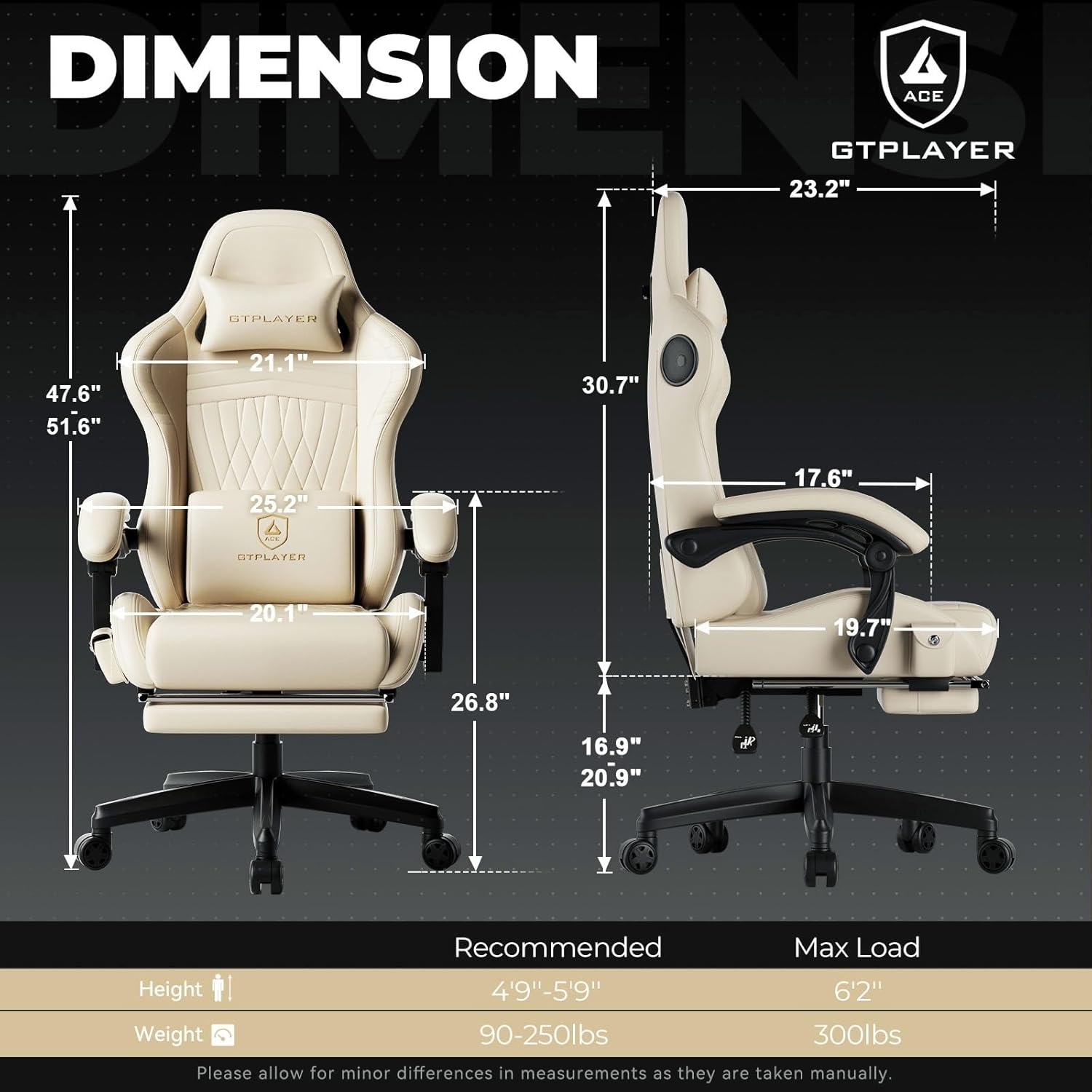
Image: A detailed diagram illustrating the dimensions and key components of the GTPLAYER ACE-PRO Gaming Chair, useful for assembly and understanding its structure.
Operating Your GTPLAYER ACE-PRO Gaming Chair
Adjusting Chair Features
- Recline System: The chair features a 150-degree full-body recline system, allowing smooth transitions from an upright 90-degree typing position to a near-flat napping position. Use the recline lever located on the side of the chair to adjust the backrest angle.
- Retractable Footrest: Extend the footrest for added comfort when reclining. The footrest is designed to move in harmony with your body.
- Linkage Armrests: The synchronized armrests move with the recline of the chair, providing continuous support for your arms at various angles.
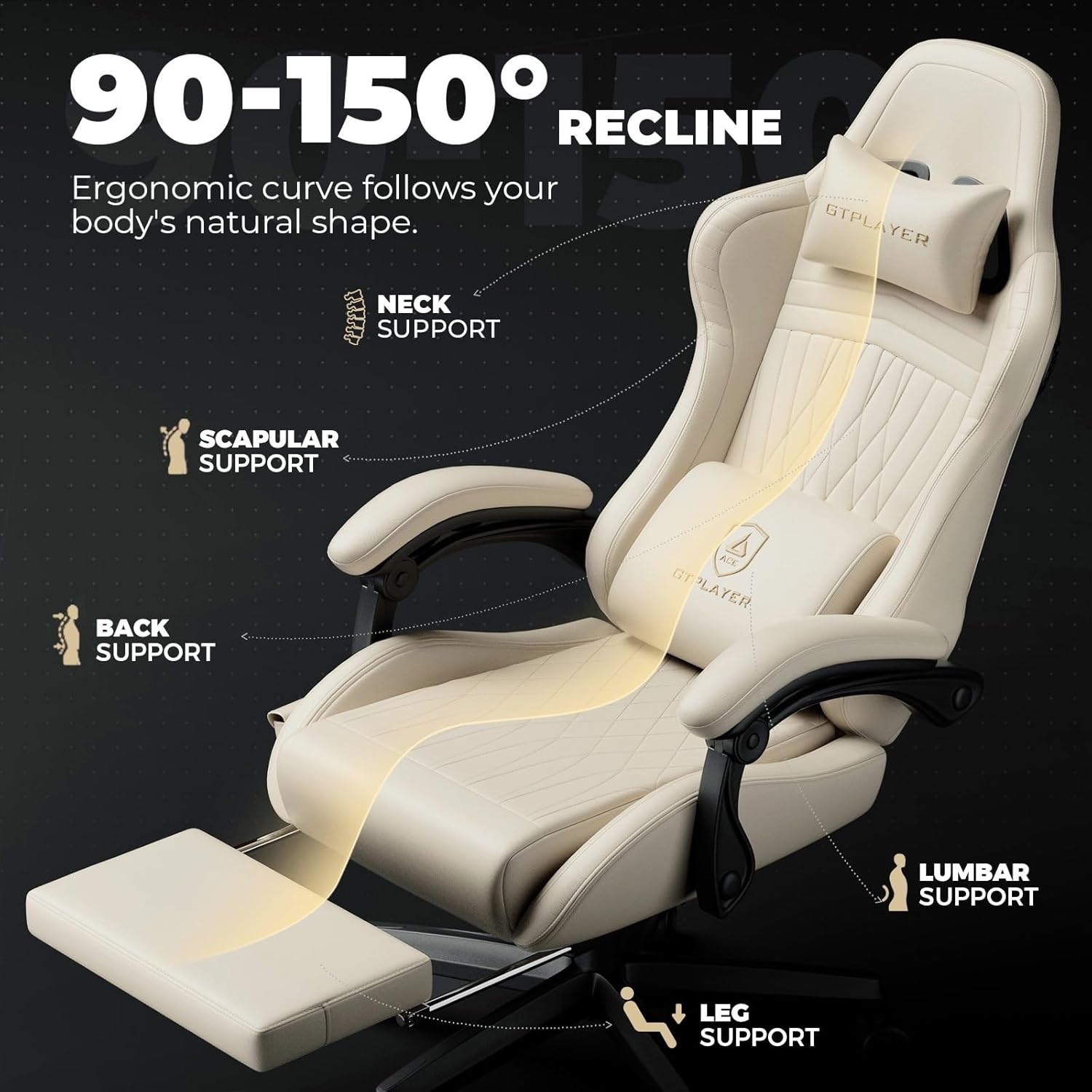
Image: This diagram highlights the ergonomic curve of the chair, showing neck, scapular, back, lumbar, and leg support, along with the 90-150 degree recline range.

Image: A detailed view of the dynamic linkage armrests, demonstrating how they auto-adapt with every angle adjustment of the chair.
Audio System Operation
- Bluetooth Speakers: The chair features patented speakers for immersive 360-degree surround sound. To activate, tap the Bluetooth button.
- Bluetooth Control & Storage Pocket: The dedicated side pocket keeps the remote neatly stored and easily accessible for controlling the Bluetooth speakers.

Image: The GTPLAYER ACE-PRO Gaming Chair shown from behind, with visual representations of sound waves indicating the immersive audio experience from its built-in speakers.

Image: A close-up of the chair's side, highlighting the convenient storage pocket designed to hold the remote control for the Bluetooth speakers.
Video: Official GTPLAYER video demonstrating the ACE-PRO Music Gaming Chairs and their built-in speaker functionality.
Video: A brief demonstration highlighting the comfort and built-in Bluetooth sound features of the GTPLAYER chair.
Care and Maintenance
- Cleaning: Wipe clean with a damp cloth. Avoid harsh chemicals or abrasive cleaners that may damage the faux leather material.
- General Care: Regularly check all bolts and screws to ensure they are tight. Avoid exposing the chair to direct sunlight for prolonged periods to prevent fading and material degradation.
Troubleshooting Common Issues
- Chair Squeaks: Apply a small amount of lubricant to moving parts, especially where metal components meet. Ensure all bolts are securely tightened.
- Recline Mechanism Not Working: Check that the recline lever is fully engaged. Ensure no obstructions are preventing the backrest from moving freely.
- Speakers Not Connecting via Bluetooth: Ensure the speakers are powered on. Check your device's Bluetooth settings and ensure it is discoverable. Try restarting both the chair's speakers and your device.
- Instability: Verify that the chair is assembled correctly and all connections are secure. Ensure the chair is used on a flat, stable surface. Do not exceed the maximum weight capacity of 330 pounds.
Product Specifications
| Feature | Detail |
|---|---|
| Brand | GTPLAYER |
| Model Name | ACE-PRO |
| Model Number | ACE-PRO-JY1 |
| Color | Ivory |
| Material | Faux Leather, Metal Frame |
| Fill Material | Memory Foam |
| Product Dimensions (D x W x H) | 23.2"D x 25.2"W x 40"H |
| Item Weight | 40 pounds |
| Maximum Weight Recommendation | 330 pounds |
| Reclining Position Count | 3 (90-150 degrees) |
| Additional Features | Adjustable Height, Arm Rest, Foot Rest, Reclining, Built-in Speakers |
| Recommended Uses | Gaming, Office, Relaxing, Video Game |
Warranty and Support
For warranty information, product support, or to inquire about replacement parts, please refer to the warranty card included with your purchase or contact GTPLAYER customer service directly through their official website or the platform where the product was purchased. Please have your model number (ACE-PRO-JY1) and proof of purchase ready when contacting support.


