
Introduction
This user manual provides comprehensive instructions for the safe and effective operation of your HelloBaby Baby Monitor with Camera and Audio, Model HB6363. This system is designed to provide secure and reliable monitoring of your baby, offering features such as a large 6-inch display, pan-tilt-zoom camera, night vision, two-way talk, and long battery life without relying on WiFi.
Important Safety Information
Please read and understand all safety warnings and instructions before using this product. Failure to follow these instructions may result in injury or damage.
- Strangulation Hazard: Children have been strangled in cords. Keep cords out of reach of children (more than 3 feet / 0.9 meters away). Never place camera or cords within reach of the crib.
- Choking Hazard: This product contains small parts. Keep small parts away from children when assembling.
- Heat Sources: Do not place the monitor or camera near heat sources such as radiators, heat registers, stoves, or other appliances that produce heat.
- Moisture: Do not expose the product to water or moisture. This product is not water resistant.
- Ventilation: Do not block any ventilation openings. Ensure proper airflow around the units.
- Power Sources: Use only the AC power adapters provided with the product. Using other adapters may damage the product.
- Battery Safety: The monitor unit contains a rechargeable battery. Do not attempt to replace the battery yourself. Do not expose the battery to excessive heat or direct sunlight.
- Interference: This product operates on 2.4GHz FHSS technology. Keep it away from other 2.4GHz devices to avoid interference.
- Adult Supervision: This product is intended to assist in monitoring, but it is not a substitute for responsible adult supervision.
Package Contents
Verify that all items are present in your package:
- HelloBaby 6-inch Video Monitor Unit (Parent Unit)
- HelloBaby Baby Camera Unit (Baby Unit)
- Power Adapter for Monitor Unit
- Power Adapter for Camera Unit
- User Manual (this document)
Product Overview

Image: The HelloBaby monitor and camera, highlighting the 6-inch IPS LCD screen and the camera's 320° pan and 120° tilt capabilities.

Image: An overview of the monitor's key functions including camera view, temperature monitoring, lullabies, ECO mode, timer, and language settings. Also shows icons for 4000mAh battery, auto night vision, 2-way talk, multi-camera support, remote pan/tilt/zoom, long range, temperature alarm, 8 lullabies, and 150 languages.
Parent Unit (Monitor)
- 6-inch IPS LCD Display: Provides a clear and detailed video feed of your baby.
- Control Buttons: Intuitive buttons for navigation, volume, brightness, zoom, and menu access.
- Built-in Microphone and Speaker: For two-way communication.
- Antenna: For stable 2.4GHz FHSS wireless connection.
- Rechargeable Battery: 4000mAh capacity for extended use.
- Temperature Sensor: Displays room temperature.
Baby Unit (Camera)
- Camera Lens: Captures video feed.
- Infrared LEDs: For automatic night vision.
- Microphone and Speaker: For two-way communication and playing lullabies.
- Pan & Tilt Mechanism: Allows remote adjustment of camera angle (320° horizontal, 120° vertical).
- Mounting Options: Designed for freestanding, wall mount, or ceiling mount.
Setup
1. Charging the Parent Unit
- Connect the smaller end of the monitor's power adapter to the DC-Jack port on the side of the Parent Unit.
- Plug the larger end of the power adapter into a wall outlet.
- The battery indicator on the screen will show charging status. For optimal performance, charge the Parent Unit for at least 4 hours before first use.
- The 4000mAh battery provides up to 16-30 hours of battery life depending on usage (30 hours in ECO mode).

Image: Illustrates the battery performance, showing 18 hours with the screen on and up to 30 hours in ECO mode, powered by a 4000mAh battery.
2. Powering the Baby Unit (Camera)
- Connect the power adapter to the DC-Jack port on the back of the Baby Unit.
- Plug the power adapter into a wall outlet. The Baby Unit does not operate on battery and must remain plugged in.
3. Positioning the Baby Unit (Camera)
- Place the Baby Unit on a flat surface, such as a dresser or shelf, at least 3 feet (0.9 meters) away from the crib to prevent strangulation hazards from the power cord.
- Ensure the camera has a clear line of sight to the baby.
- Alternatively, the camera can be wall-mounted or ceiling-mounted using appropriate hardware (not included).
4. Initial Connection
- Once both units are powered on, they should automatically connect. The Parent Unit will display the video feed from the Baby Unit.
- If the units do not connect, ensure they are within range (up to 1000ft outdoor, 165ft indoor) and try moving them closer.
- This system uses 2.4GHz FHSS technology, providing a secure and private connection without WiFi or app requirements, eliminating hacking risks.

Image: Diagram illustrating the secure and stable 2.4GHz FHSS transmission, emphasizing no app, no WiFi, and no hacking troubles, with indicated indoor and outdoor ranges.
Operating Instructions
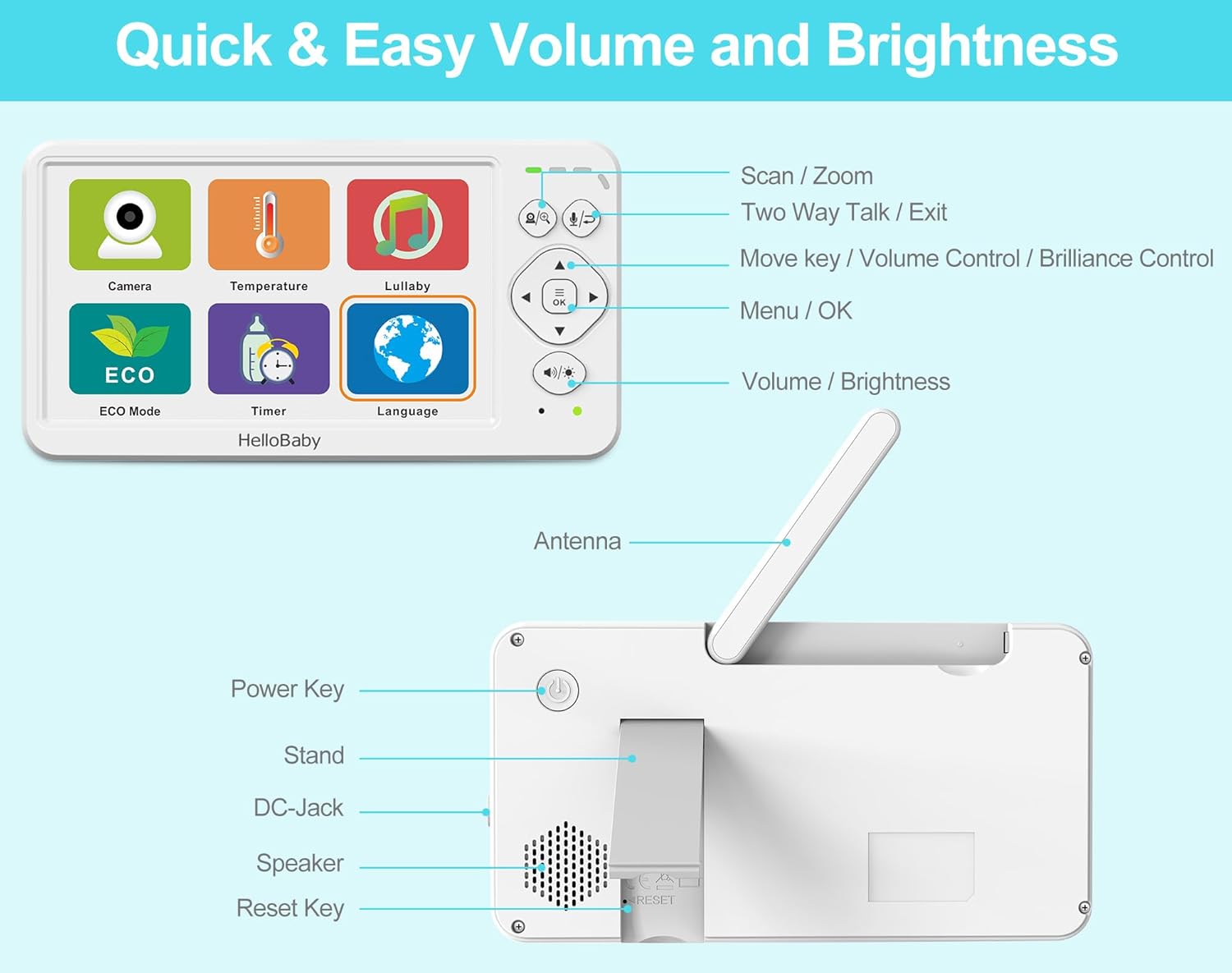
Image: Detailed view of the HelloBaby monitor's front controls (Scan/Zoom, Two-Way Talk/Exit, Move/Volume/Brilliance, Menu/OK, Volume/Brightness) and rear ports (Power Key, Stand, DC-Jack, Speaker, Reset Key, Antenna).
Parent Unit Controls
- Power Key: Press and hold to turn the monitor On/Off.
- Menu / OK Button: Press to access the main menu or confirm a selection.
- Navigation Buttons (Up/Down/Left/Right): Use to navigate through menu options or control camera pan/tilt.
- Volume / Brightness Buttons: Adjust audio volume or screen brightness directly.
- Scan / Zoom Button: Press to activate scan mode (if multiple cameras are paired) or to zoom in/out on the video feed (2x digital zoom).
- Two-Way Talk / Exit Button: Press and hold to speak to your baby through the camera's speaker. Press briefly to exit a menu.
Key Features and Functions
Two-Way Talk
Press and hold the "Two-Way Talk" button on the Parent Unit to speak to your baby. Your voice will be transmitted through the camera's speaker. Release the button to hear your baby again.
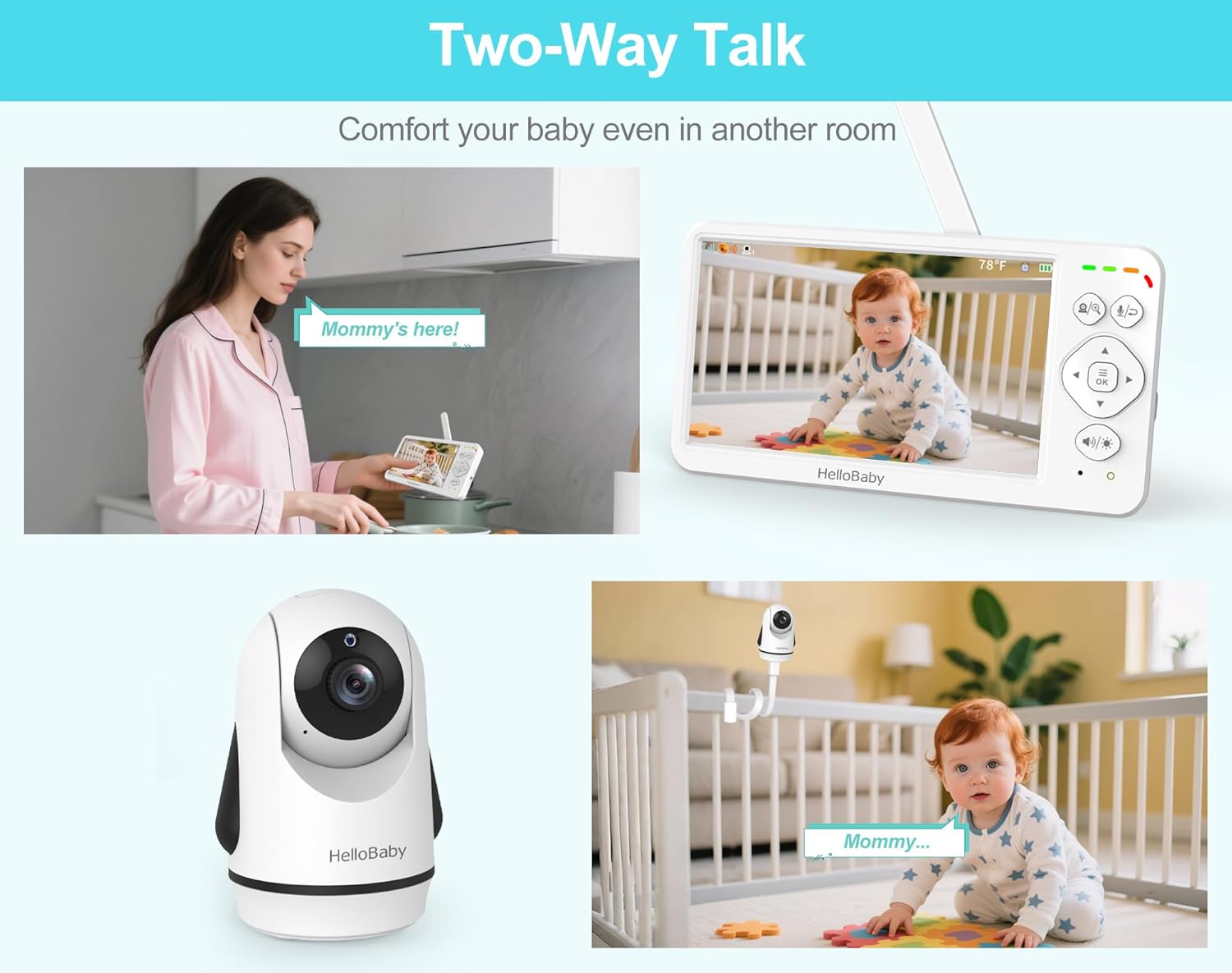
Image: Depicts scenarios of using the two-way talk feature, allowing parents to comfort their baby from another room.
Pan, Tilt, and Zoom (PTZ)
Use the navigation buttons on the Parent Unit to remotely adjust the camera's viewing angle. The camera supports 320° horizontal pan and 120° vertical tilt. Press the "Scan / Zoom" button to activate 2x digital zoom for a closer look.
Automatic Night Vision
The Baby Unit is equipped with infrared LEDs that automatically activate in low-light conditions, providing a clear black and white video feed up to 5 meters away. The monitor will automatically switch between day (color) and night (black and white) modes.

Image: Illustrates the automatic night vision feature, showing how the monitor switches between day and night modes for continuous monitoring of a sleeping baby.
Lullabies
The monitor includes 8 pre-programmed lullabies and natural white noise sounds. Access the Lullaby menu to select a single song or enable loop playback to soothe your baby.

Image: Shows the monitor's interface for selecting from 8 lullabies and choosing from 150 language options, catering to global families.
ECO Mode (Audio Power Saving)
Activate ECO mode to conserve battery life. In this mode, the screen turns off and audio is muted when no sound is detected from the baby's room. The monitor will automatically activate when sound is detected, alerting you to your baby's needs. This extends battery life up to 30 hours.
Temperature Monitoring
The Baby Unit has a built-in temperature sensor that displays the room temperature on the Parent Unit. You can set temperature alerts to be notified if the room becomes too hot or too cold for your baby.
Multi-Camera Expansion
The system supports up to 4 cameras (additional cameras sold separately). You can switch between cameras manually or use the scan mode to cycle through all paired cameras automatically.
Language Options
The monitor supports 150 language options. Navigate to the Language settings in the menu to select your preferred language.
Maintenance
- Cleaning: Disconnect both units from power before cleaning. Use a soft, dry cloth to wipe the surfaces of the monitor and camera. Do not use cleaning sprays or liquid cleaners.
- Battery Care: To prolong battery life, avoid fully discharging the Parent Unit battery frequently. If storing the unit for an extended period, charge it periodically.
- Storage: Store the units in a cool, dry place away from direct sunlight and moisture when not in use.
Troubleshooting
| Problem | Possible Cause | Solution |
|---|---|---|
| No picture/sound on Parent Unit. | Units are not powered on or not paired. Out of range. | Ensure both units are plugged in and powered on. Move Parent Unit closer to Baby Unit. Re-pair if necessary (refer to pairing instructions in full manual, if applicable). |
| Picture is frozen or distorted. | Weak signal or interference. | Move Parent Unit closer to Baby Unit. Avoid placing units near other 2.4GHz devices (e.g., Wi-Fi routers, microwaves). |
| Battery life is short. | Battery not fully charged. ECO mode not enabled. | Charge Parent Unit for at least 4 hours. Enable ECO mode for extended battery life. |
| Two-way talk not working. | Microphone muted or button not pressed correctly. | Ensure microphone is not muted. Press and hold the Two-Way Talk button firmly. |
| Temperature reading seems inaccurate. | Camera placed near a heat source or draft. | Relocate the Baby Unit to an area with stable ambient temperature. |
Specifications

Image: Dimensions of the HelloBaby monitor and camera units, providing measurements in centimeters and inches.
| Feature | Detail |
|---|---|
| Model Name | Hellobaby 6'' Baby Monitor HB6363 |
| Screen Size | 6-inch IPS LCD |
| Video Capture Resolution | 480p |
| Wireless Technology | 2.4GHz FHSS (No WiFi) |
| Transmission Range | Up to 1000ft (outdoor), 165ft (indoor) |
| Camera Pan Angle | 320° Horizontal |
| Camera Tilt Angle | 120° Vertical |
| Digital Zoom | 2x |
| Night Vision Range | Up to 5 meters |
| Parent Unit Battery | 4000mAh (16-30 hours battery life) |
| Power Source | Battery-Powered (Screen) & Corded Electric (Camera) |
| Material | Plastic Electronic Components |
| Item Dimensions (L x W x H) | 13 x 4.6 x 10.2 Centimeters (Monitor) |
| Item Weight | 739 g |
| Max Cameras Supported | 4 |
| Lullabies | 8 |
| Language Options | 150 |
Warranty and Support
This HelloBaby Baby Monitor comes with a 1-year coverage from the date of purchase. This warranty covers manufacturing defects and workmanship under normal use.
For technical support, warranty claims, or any questions regarding your product, please contact the seller or HelloBaby customer service. Refer to your purchase documentation for specific contact details.
For additional cameras (HB6363-2, HB6363TX) or compatible accessories, please contact your seller before purchasing to ensure compatibility.


