Introduction
The CallToU Caregiver Call Button System is designed to provide reliable and convenient assistance for caregivers and individuals requiring support. This system includes multiple receivers and SOS call buttons, enabling quick communication within a home or care environment. It offers peace of mind by ensuring that help is readily available at the push of a button, eliminating the need for shouting or constant supervision.

This image illustrates the benefit of the CallToU system, showing a caregiver assisting an elderly person who has pressed the call button, preventing a potential fall or ensuring quick response if a fall occurs.
Package Contents
Please verify that all items are present in your package:
- 3 x CallToU Receivers (2 plug-in, 1 portable battery-powered)
- 2 x CallToU SOS Call Buttons
- Neck Lanyards for Call Buttons
- Mounting Brackets and Double-Sided Stickers
- AAA Batteries (for portable receiver)
- 12V 23A Alkaline Batteries (pre-installed in call buttons)
- User Manual

The complete CallToU Caregiver Call Button System, including receivers and call buttons, as packaged.
Product Overview
Receivers
The system includes both plug-in and portable receivers. The plug-in receivers are designed for stationary use, while the portable receiver offers flexibility for caregivers to move freely.
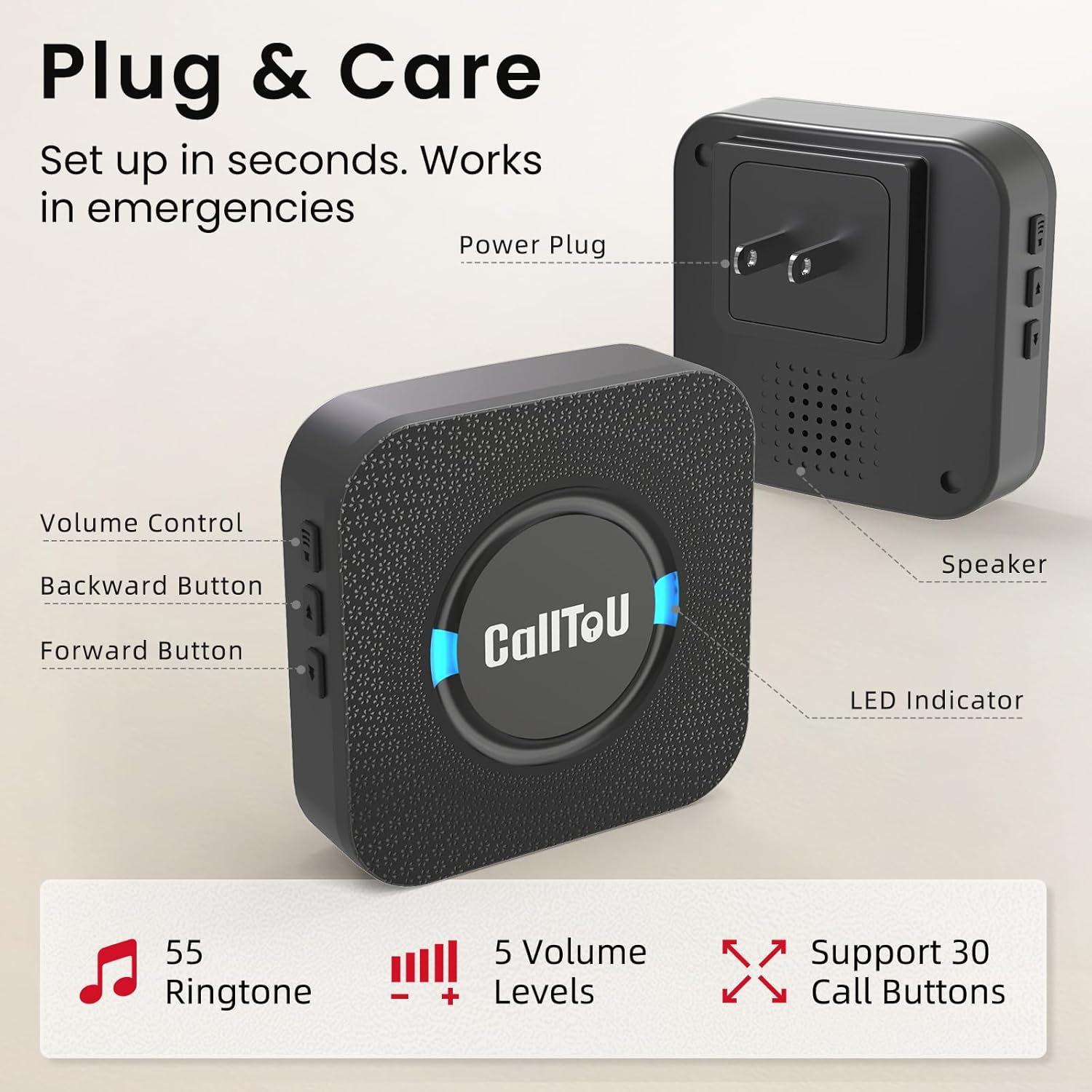
Detailed view of the plug-in receiver, indicating its power plug, speaker, LED indicator, and control buttons for volume and ringtone selection.

Detailed view of the portable receiver, showing its volume control, power button, music selection button, LED indicator, speaker, and the battery compartment for AAA batteries.
SOS Call Buttons
The SOS call buttons are compact and designed for easy access. They can be worn around the neck, carried in a pocket, or mounted on a surface.

Detailed view of the SOS call button, showing its push area, indicator light, and key features including IP55 waterproof rating and battery type.
Setup
1. Install Batteries (Portable Receiver & Call Buttons)
- Portable Receiver: Open the battery compartment on the back of the portable receiver and insert 3 AAA batteries, ensuring correct polarity.
- Call Buttons: The SOS call buttons come with pre-installed 12V 23A alkaline batteries. If replacement is needed, carefully open the button casing and replace the battery.
2. Power On Plug-in Receivers
Plug the wall-mounted receivers into standard electrical outlets in desired locations. The LED indicator will light up, signifying power.

The call button can be placed on a surface, worn with a lanyard, or mounted on a wall, including in wet environments like a shower due to its IP55 waterproof rating.
3. Pairing (If Needed)
The system typically comes pre-paired. If a call button does not trigger a receiver, follow these steps to pair:
- Press and hold the 'Music Button' on the receiver for 3 seconds until the LED indicator flashes.
- Immediately press the SOS call button. The receiver will chime to confirm successful pairing.
- Repeat for all call buttons and receivers as necessary.
Operating Instructions
Using the Call Button
To alert the caregiver, simply press the 'CALL' button on the SOS transmitter. The receiver(s) within range will sound an alarm and flash their LED indicators.
Adjusting Ringtones and Volume
- Ringtone Selection: On the receiver, press the 'Music Button' (or 'Forward'/'Backward' buttons on plug-in models) to cycle through the 55 available ringtones.
- Volume Adjustment: Press the 'Volume Control' button on the receiver to select one of the 5 volume levels (0dB to 110dB).

The system allows the person needing assistance to call from their location, while the caregiver can be in another part of the house and still receive the alert.
Wireless Range
The system operates with a wireless range of over 500 feet (152 meters) in an open area. This allows caregivers significant freedom to move around the house or yard while remaining connected.

An illustration of the system's extensive 500ft wireless range, enabling coverage across a large home and outdoor areas.
Maintenance
Battery Replacement
- Portable Receiver: Replace AAA batteries when the sound becomes weak or the LED indicator fails to light up.
- Call Buttons: The call buttons feature a low battery reminder. Replace the 12V 23A alkaline battery when the indicator light on the button blinks rapidly or fails to activate the receiver.
Cleaning
Wipe the devices with a soft, dry cloth. Do not use abrasive cleaners or immerse the devices in water (except for the waterproof call button).
Waterproof Rating
The SOS call buttons have an IP55 waterproof rating, meaning they are protected against dust ingress and low-pressure water jets from any direction. This makes them suitable for use in bathrooms or outdoors in light rain. However, they should not be submerged in water.
Troubleshooting
| Problem | Possible Cause | Solution |
|---|---|---|
| Receiver does not sound when button is pressed. | Out of range, low battery in call button, receiver not powered, or not paired. | Move closer to receiver, replace call button battery, ensure receiver is plugged in/has fresh batteries, re-pair the devices. |
| Receiver volume is too low or too high. | Volume setting is incorrect. | Adjust the volume using the 'Volume Control' button on the receiver. |
| Interference or false alarms. | Other wireless devices nearby. | Change the ringtone or move the receiver/call button away from other electronic devices. |
| Call button indicator light does not flash. | Call button battery is dead. | Replace the 12V 23A alkaline battery in the call button. |
Specifications
- Model Number: CC05BL 2-3
- Brand: CallToU
- Voltage: 260 Volts (for plug-in receivers)
- Control Method: Touch
- Mounting Type: Wall Mount (for call buttons)
- Maximum Range: 500 Feet (open area)
- Sensor Technology: Contact Sensor (for call button activation)
- Product Dimensions: 1.97 x 1.97 x 1.97 inches (approximate for main units)
- Item Weight: 1.01 pounds (total package)
- Receiver Batteries: 3 AAA batteries required (included for portable receiver)
- Call Button Battery: 12V 23A Alkaline battery (included)
- Waterproof Rating (Call Button): IP55
- Ringtones: 55 options
- Volume Levels: 5 levels (0dB to 110dB)
Warranty and Support
For warranty information or technical support, please refer to the contact details provided on the product packaging or visit the official CallToU website. Keep your purchase receipt for warranty claims.


