
Introduction
This manual provides detailed instructions for the assembly, operation, and maintenance of your FEZIBO 40x24 Inch Electric Height Adjustable Standing Desk. Please read this manual thoroughly before assembly and use to ensure proper function and safety.
Safety Information
- Ensure all components are present and undamaged before assembly.
- Keep children and pets away from the desk during operation, especially during height adjustments. The desk features a child safety lock to prevent accidental use.
- Do not overload the desk. Refer to the specifications for maximum weight capacity.
- Keep hands and fingers clear of moving parts during height adjustments.
- Only use the provided power adapter and ensure it is connected to a properly grounded outlet.
- Do not disassemble or modify the desk's electrical components. Contact customer support for service.
Package Contents
Verify that all parts are included in your package. While a complete list is not provided here, typical components include:
- Desktop sections (splice board)
- Desk legs and feet
- Crossbeam and side wings
- Control panel with memory buttons
- Motor and power adapter
- Hardware kit (screws, tools)
- Instruction manual
Assembly Instructions
The FEZIBO Standing Desk is designed for quick and straightforward assembly, typically completed in under 30 minutes. Follow the step-by-step instructions provided in your physical manual. The general steps are outlined below:

Image: Diagram illustrating the four main steps for quick assembly of the FEZIBO standing desk.
- Attach Crossbeam: Easily attach the crossbeam to the sturdy legs.
- Secure Adjustable Feet: Secure the adjustable feet for stability.
- Assemble Frame: Assemble the crossbeam and side wings to form the frame structure.
- Place Tabletop: Place and secure the tabletop onto the frame for a solid desk.
Ensure all screws are tightened securely before use. Refer to the included paper manual for detailed diagrams and specific hardware for each step.
Operating Instructions
Height Adjustment
Your FEZIBO standing desk features a 7th Gen electric lift system for smooth and quiet height adjustments. The desk can be adjusted from a minimum height of 28.3 inches to a maximum height of 46.5 inches.
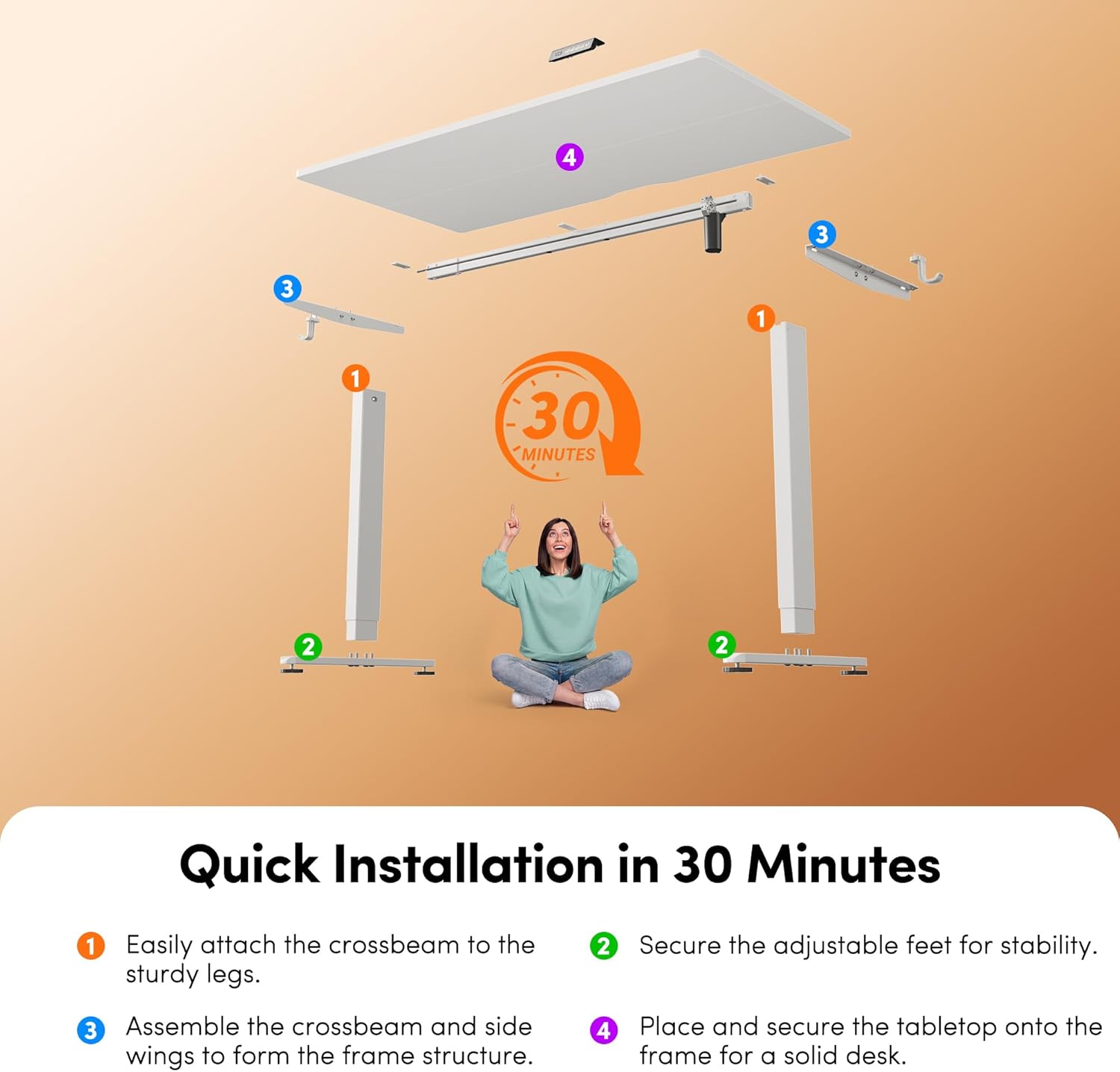
Image: Illustration showing the height adjustment range of the desk, from sitting height (28.3") to standing height (46.5").
- Raise Desk: Press and hold the UP arrow button on the control panel to raise the desk.
- Lower Desk: Press and hold the DOWN arrow button on the control panel to lower the desk.
- Release the button at your desired height.
Memory Presets
The control panel includes four memory presets to save and recall your preferred sitting and standing heights.

Image: Close-up of the intelligent control panel with digital display and memory buttons (1, 2, 3) and up/down arrows.
- Set a Memory Position:
- Adjust the desk to your desired height using the UP or DOWN buttons.
- Press the "M" button (or similar designated memory set button, if present). The display may flash.
- Immediately press one of the numbered memory buttons (1, 2, 3) to save the current height to that preset. The display will confirm the setting.
- Recall a Memory Position:
- Press the desired numbered memory button (1, 2, 3). The desk will automatically move to the saved height.
Child Safety Lock
To prevent accidental operation, especially by children, the desk is equipped with a child safety lock. Consult your physical manual for specific instructions on how to activate and deactivate this feature, as it may vary by control panel design.
Maintenance
- Cleaning: Wipe the desk surface and frame with a soft, damp cloth. Avoid abrasive cleaners or harsh chemicals.
- Inspection: Periodically check all screws and connections to ensure they remain tight.
- Cable Management: Ensure power cables and other cords are managed to prevent entanglement during height adjustments.
Troubleshooting
If you encounter issues with your FEZIBO standing desk, refer to the following common solutions:
| Problem | Possible Cause | Solution |
|---|---|---|
| Desk does not move. | Power cable disconnected, motor error, child lock active. | Check power connections. Unplug and replug the power cable. Deactivate child lock if active. |
| Uneven height adjustment. | Obstruction, uneven load. | Remove any obstructions. Redistribute weight evenly on the desktop. |
| Desk makes unusual noise. | Loose components, motor issue. | Check all assembly screws for tightness. If noise persists, contact customer support. |
| Memory presets not working. | Presets not properly set. | Re-set the memory positions following the operating instructions. |
If these solutions do not resolve the issue, please contact FEZIBO customer support.
Specifications

Image: Diagram illustrating the key dimensions of the FEZIBO standing desk, including width, depth, and height range.
| Feature | Detail |
|---|---|
| Brand | FEZIBO |
| Model | 40x24 Inch Electric Standing Desk with 7th Gen Lift System |
| Color | Moon White |
| Desktop Material | FSC-Certified Wood (Laminated) |
| Frame Material | Alloy Steel |
| Desk Dimensions (L x W) | 39.4 x 23.6 inches (approx. 40 x 24 inches) |
| Height Adjustment Range | 28.3 inches to 46.5 inches |
| Lift System | 7th Gen Electric |
| Noise Level | Below 45 dB during operation |
| Memory Presets | 4 (on control panel) |
| Weight Capacity | Up to 176 lbs (80 kg) |
| Certifications | FSC-certified wood, ISED safety standards, ETL certified |

Image: The desk frame demonstrating its stability and 176 lbs weight capacity with a child and cat sitting on it.
Warranty and Support
FEZIBO provides a limited warranty for this product. For specific warranty terms, registration, or technical support, please refer to the warranty card included in your package or visit the official FEZIBO website. You can also contact customer service via the details provided in your purchase documentation.
For further assistance, please visit the FEZIBO Store on Amazon.


