
1. Introduction
The Elitech DMG-2SE Digital Manifold Gauge is a professional tool designed for precise measurement of pressure and temperature in HVAC and refrigeration systems. It features a clear LCD display, compatibility with 88 refrigerants, and a robust aluminum casing for durability. This manual provides essential information for the safe and effective use of your DMG-2SE.
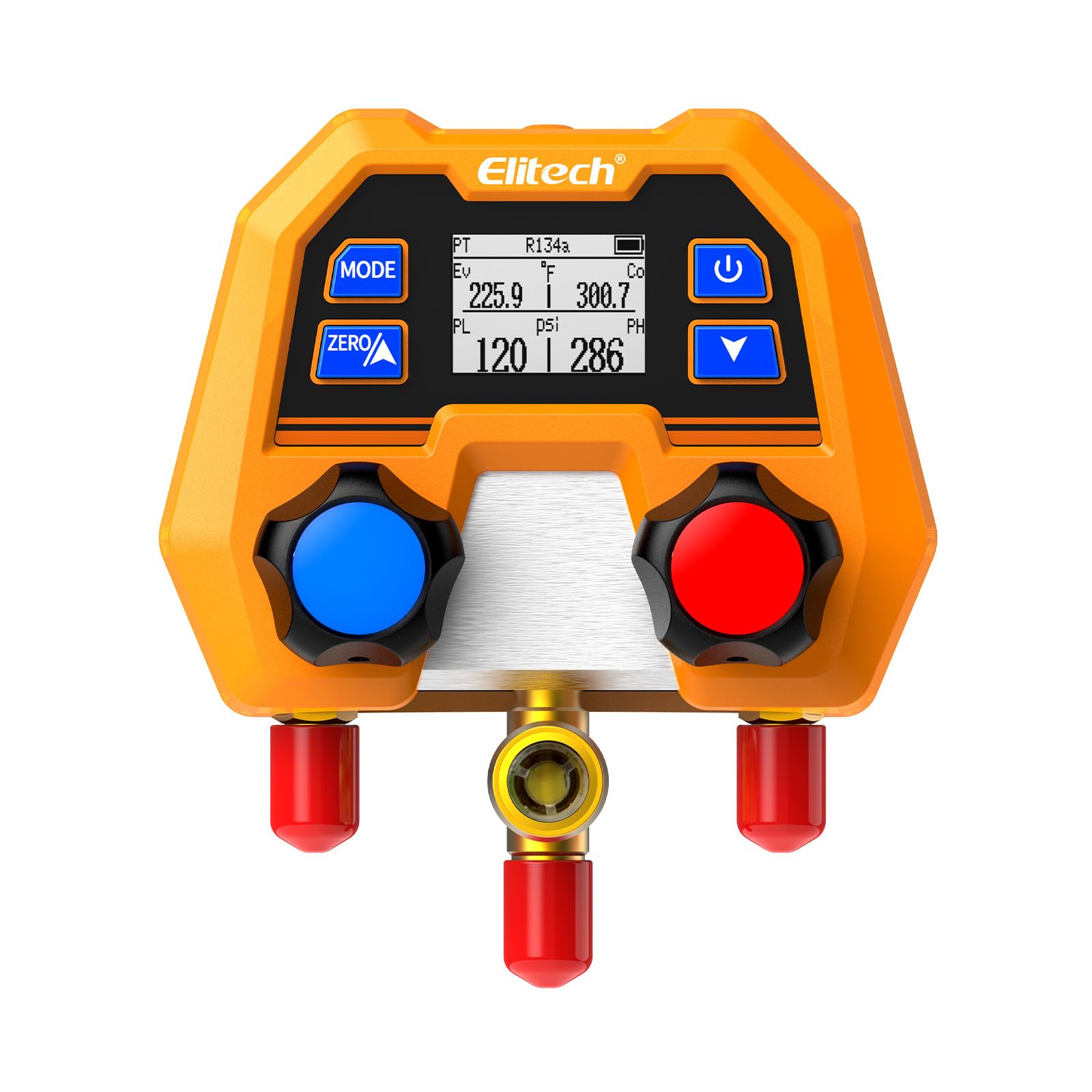
Figure 1: Elitech DMG-2SE Digital Manifold Gauge. This image shows the compact and robust design of the device, highlighting its digital display and control knobs.
2. Safety Information
Always adhere to local safety regulations and guidelines when working with refrigeration systems. Failure to do so may result in injury or equipment damage.
- Ensure proper ventilation when working with refrigerants.
- Wear appropriate personal protective equipment (PPE), including safety glasses and gloves.
- Do not expose the device to extreme temperatures or direct sunlight for prolonged periods.
- Avoid dropping or subjecting the device to severe impacts.
- Only use the device for its intended purpose as a digital manifold gauge for HVAC/R systems.
- Disconnect the device from the system before performing any maintenance or cleaning.
3. Product Components and Overview
Familiarize yourself with the main parts of the DMG-2SE digital manifold gauge:

Figure 2: Labeled diagram of the Elitech DMG-2SE. Key components include the LCD screen, control buttons, high/low pressure ports, valve knobs, battery compartment, and hanging hook.
- LCD Display: Shows pressure, temperature, refrigerant type, and other operational data.
- Control Buttons: For mode selection, zeroing, power, and navigation.
- Valve Knobs: Control the flow of refrigerant through the manifold.
- Refrigerant Hose Connection Ports (1/4" SAE): For connecting high and low-pressure hoses.
- Battery Compartment: Houses 2*AAA replaceable batteries.
- Hanging Hook/Stand: For convenient placement during use.
4. Setup
4.1. Battery Installation
- Locate the battery compartment on the back of the device.
- Open the compartment cover.
- Insert 2 AAA batteries, ensuring correct polarity.
- Close the battery compartment cover securely.
4.2. Initial Power On and Zeroing
- Press the power button (⑂) to turn on the device.
- Before connecting to any system, ensure all ports are open to the atmosphere.
- Press the ZERO button to calibrate the pressure sensors to atmospheric pressure. This ensures accurate readings.
4.3. Connecting Hoses
Connect appropriate refrigeration hoses (not included with this model) to the high and low-pressure ports of the manifold. Ensure connections are tight to prevent leaks.

Figure 3: The DMG-2SE connected to a refrigeration system using standard hoses. This illustrates how the manifold is integrated into an HVAC/R setup for pressure and temperature monitoring.
5. Operation
5.1. Selecting Refrigerant Type
- Press the MODE button to cycle through the available refrigerant types.
- The DMG-2SE is pre-programmed with 88 refrigerants. Select the one corresponding to your system.

Figure 4: The DMG-2SE displaying its wide range of 88 compatible refrigerants, including CFCs, HCFCs, HFCs, HFOs, and Hydrocarbons.
5.2. Reading Pressure and Temperature
Once the correct refrigerant is selected and the manifold is connected to the system, the LCD will display real-time pressure and saturation temperature readings for both high and low sides.

Figure 5: A close-up view of the DMG-2SE's LCD screen, showing pressure (PSI) and temperature (°F) readings for both evaporation (Ev) and condensation (Co) sides, along with the selected refrigerant (R134a).
5.3. Pressure and Temperature Units
The device supports various pressure units (psi, kg/cm², kPa, MPa, bar, inHg) and temperature units (°C/°F). Use the appropriate buttons (refer to the device's interface) to toggle between units as needed.
5.4. Automatic Shut-off
The DMG-2SE features an automatic shut-off function to conserve battery life. The device will power off after a period of inactivity. Press the power button to restart.
6. Maintenance
6.1. Cleaning
Wipe the device with a soft, damp cloth. Do not use abrasive cleaners or solvents. Ensure no moisture enters the ports or battery compartment.
6.2. Battery Replacement
When the battery indicator shows low power, replace the AAA batteries promptly to ensure continuous operation and accurate readings. Refer to section 4.1 for battery installation steps.
6.3. Storage
Store the DMG-2SE in a clean, dry place, away from direct sunlight and extreme temperatures. It is recommended to store it in its original packaging or a protective case when not in use.
7. Troubleshooting
| Problem | Possible Cause | Solution |
|---|---|---|
| Device does not power on. | Low or dead batteries; incorrect battery installation. | Replace batteries with new AAA batteries, ensuring correct polarity. |
| Inaccurate pressure readings. | Device not zeroed; incorrect refrigerant selected; sensor malfunction. | Perform zeroing procedure (Section 4.2); verify refrigerant selection; contact support if issue persists. |
| Display is dim or flickering. | Low battery power. | Replace batteries. |
| No temperature readings. | Incorrect mode selected; sensor issue. | Ensure the device is in a mode that displays temperature; contact support if issue persists. |
8. Specifications
- Model: DMG-2SE
- Pressure Range: -14 to 800 psi
- Accuracy: ±1% FS (Full Scale)
- Resolution: 1 psi
- Refrigerants: 88 types pre-programmed (e.g., R410A, R454B, R134a, R1234yf)
- Pressure Units: psi, kg/cm², kPa, MPa, bar, inHg
- Temperature Units: °C, °F
- Material: Aluminum casing, brass internals
- Dimensions (L x W x H): 8 x 14 x 11 cm (approximately 3.15 x 5.5 x 4.3 inches)
- Weight: 1.6 lbs (approx. 680g)
- Power: 2 x AAA batteries
- Connectivity: None (standalone device)

Figure 6: An illustration highlighting the advanced digital sensing technology within the Elitech DMG-2SE, emphasizing its precision and stability.
9. Warranty & Support
For warranty information and technical support, please refer to the official Elitech website or contact your local distributor. Keep your purchase receipt as proof of purchase.
Manufacturer: Elitech Technology Inc.
Return Policy: 30-day free returns (as per Amazon.com.mx policy at time of data extraction).


