
1. Product Overview
The Blackview Mega8 is a high-performance 13-inch Android tablet designed for a wide range of uses, from entertainment to productivity. It features a large, immersive display, powerful processing capabilities, and extensive storage options, making it suitable for demanding applications, multimedia consumption, and daily tasks.

Figure 1.1: Blackview Mega8 tablet and included accessories.
2. Key Features
- Large 13-inch 90Hz Display: The Blackview Mega8 tablet features an ultra-smooth 13-inch (90Hz) display, ideal for watching movies, gaming, or working with vibrant colors. Its large screen and high refresh rate provide an immersive experience. This Android 2025 tablet offers excellent size-to-quality ratio.
- Android 15 with High Performance: Equipped with the latest Android 15 system, this high-performance Blackview tablet offers smooth and powerful performance thanks to its 36GB of RAM (12GB+24GB). It handles multitasking, demanding games, and intensive applications without slowdowns. It comes with 256GB of storage, expandable up to 2TB via a TF card, making it ideal for users needing ample space for movies, photos, or work.
- Long-Lasting 11000mAh Battery: The 11000mAh battery provides up to 2 days of intensive use, offering hours of reliable performance. With 18W fast charging, you'll spend less time waiting. Designed for extended use on a single charge.
- 5G WiFi & Dual 4G LTE Connectivity: The Mega8 offers ultra-fast navigation with 5G WiFi and dual 4G LTE SIM support, along with GPS/Glonass/Beidou/Galileo. It is perfect for using this tablet as a phone or for travel, work, gaming, and education. Make calls and share data with ease.
- Dual AI Camera & AI Photo Editor: The Blackview Mega8 tablet features a dual AI camera system that captures sharp photos in all lighting conditions, from bright daylight to low-light environments. It also includes advanced AI editing tools to transform your images, offering impressive clarity. AI editing tools like Magic Eraser enhance your photos.
- Lightweight and Portable Design: Weighing only 736g and with a thickness of 7.85mm, the Mega8 is designed for portability, allowing you to use it comfortably anywhere, anytime.
- Elegant and Sophisticated Aluminum Alloy Chassis: The tablet features an aluminum alloy chassis that is anti-smudge and anti-fingerprint, available in Space Gray, Lagoon Green, and Twilight Blue.

Figure 2.1: Immersive visual experience on the 13-inch display.

Figure 2.2: Efficient multitasking and powerful Octa-core processor.

Figure 2.3: Ample and expandable storage for all your content.
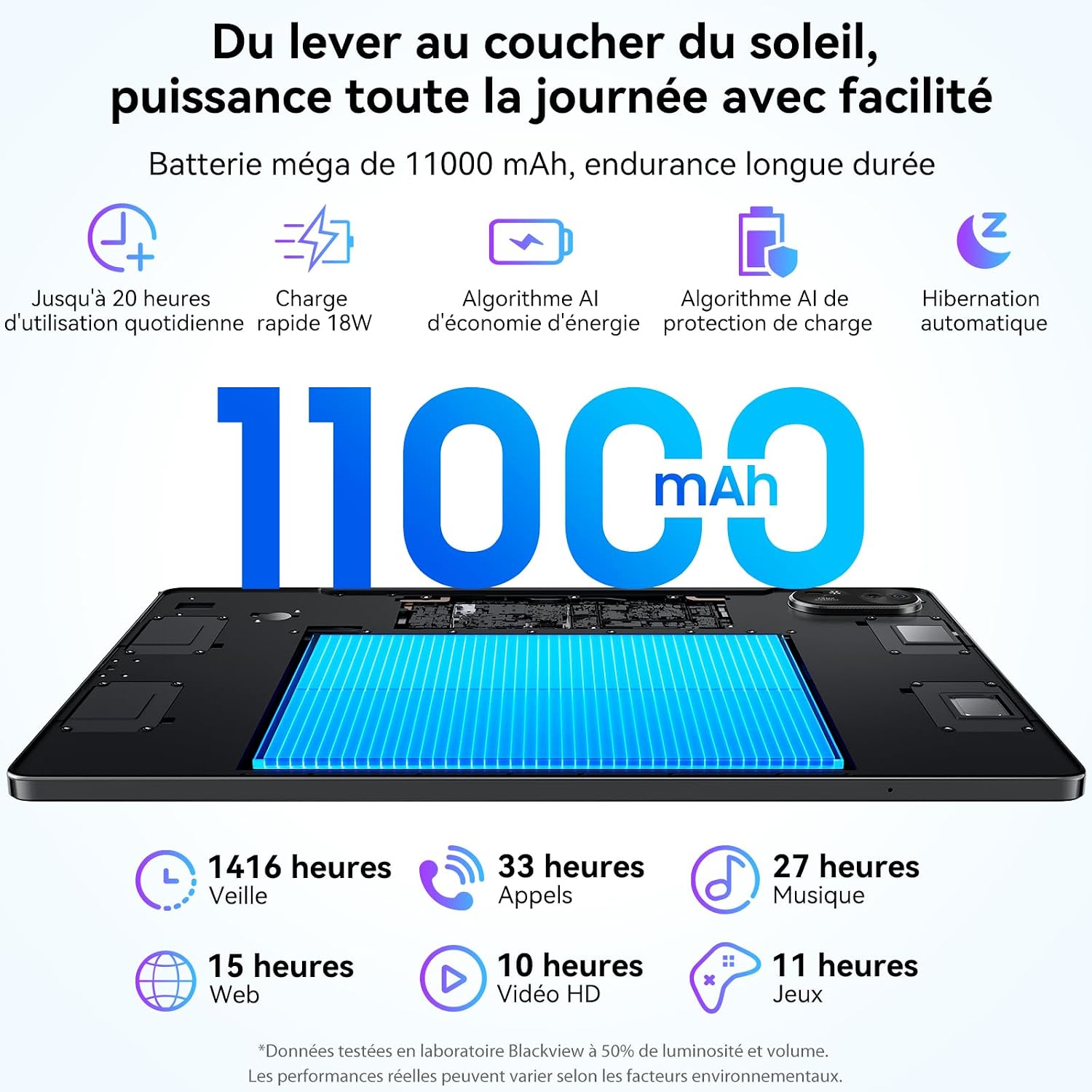
Figure 2.4: Extended battery life and fast charging capabilities.

Figure 2.5: High-definition dual AI cameras with advanced editing features.

Figure 2.6: Lightweight and portable design for on-the-go use.
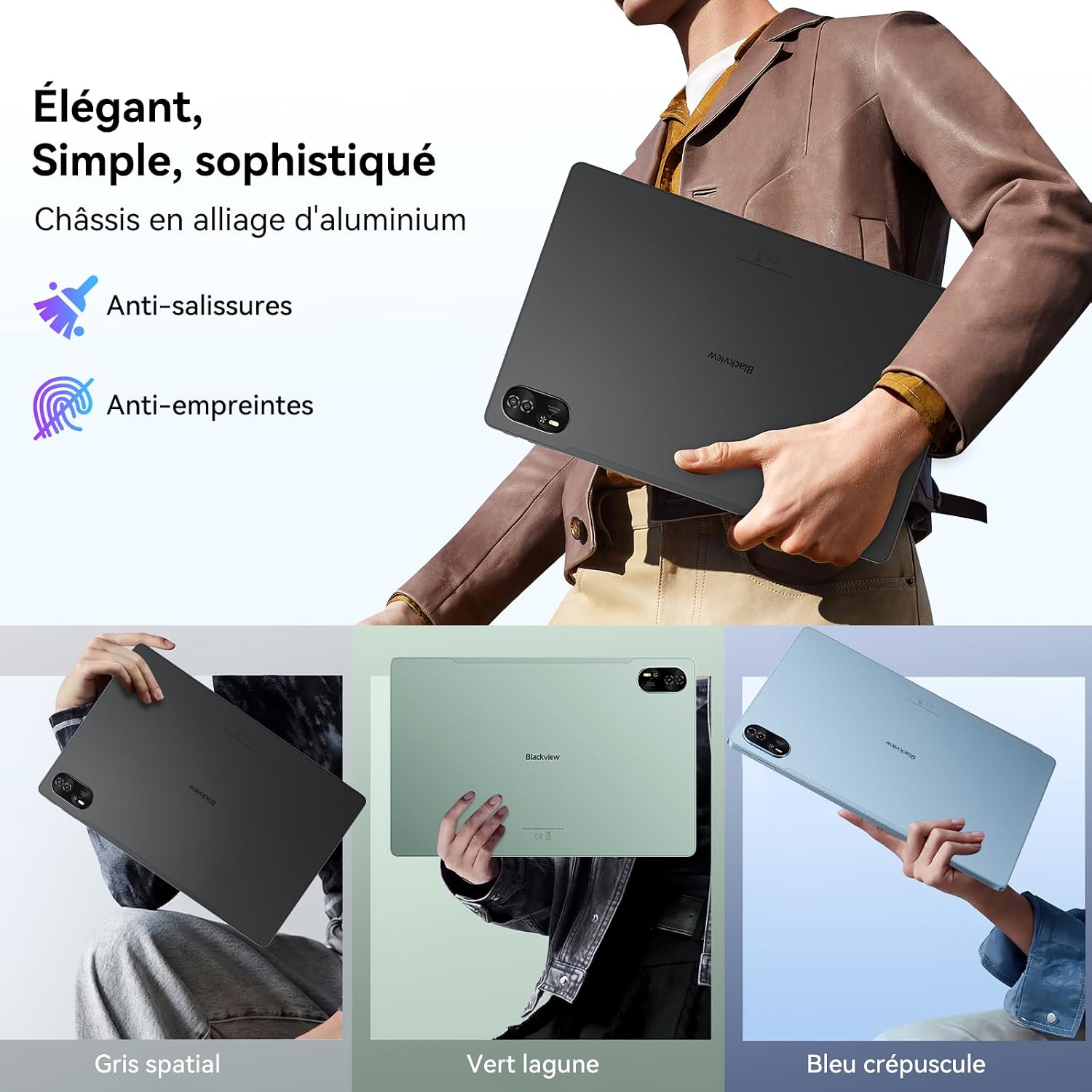
Figure 2.7: Elegant design with durable aluminum alloy chassis.
3. Setup Guide
3.1 Unboxing and Initial Inspection
Carefully remove all contents from the packaging. Verify that all items are present: Blackview Mega8 tablet, protective case, screen protector, optical stylus, USB-C charging cable, and SIM ejector tool. Inspect the tablet for any physical damage before proceeding.
3.2 Charging the Tablet
Before first use, fully charge the tablet. Connect the USB-C cable to the tablet's charging port and the other end to a compatible 18W (or higher) power adapter (not included). The charging indicator will show the charging status. A full charge typically takes a few hours.
3.3 Powering On/Off
- To Power On: Press and hold the Power button (usually located on the side) until the Blackview logo appears on the screen.
- To Power Off: Press and hold the Power button until the power options menu appears. Select "Power off" and confirm.
- To Restart: From the power options menu, select "Restart" and confirm.
3.4 Initial Setup
Upon first power-on, the tablet will guide you through the initial setup process. This includes:
- Selecting your language.
- Connecting to a Wi-Fi network.
- Setting up your Google account (essential for accessing the Play Store and Google services).
- Setting up screen lock (PIN, pattern, password, or Face ID).
- Reviewing and accepting terms and conditions.
Follow the on-screen prompts to complete the setup.
4. Operating Instructions
4.1 Basic Navigation (Android 15)
The Blackview Mega8 runs on Android 15, offering an intuitive user interface. Use touch gestures for navigation:
- Tap: To select an item or open an app.
- Swipe: To scroll through screens, lists, or pages.
- Pinch-to-zoom: To zoom in or out on images or web pages.
- Long press: To access contextual menus or move icons.
4.2 Connecting to Networks
- Wi-Fi: Go to Settings > Network & internet > Wi-Fi. Turn Wi-Fi on and select your desired network. Enter the password if prompted.
- Mobile Data (4G LTE): Insert your SIM card(s) into the tablet's SIM tray using the ejector tool. Go to Settings > Network & internet > Mobile network to configure data settings.
4.3 Using the Optical Stylus
The included optical stylus can be used for precise input, drawing, and note-taking. Simply touch the stylus to the screen to interact with the tablet. Some applications may offer enhanced stylus functionality.
4.4 Productivity Features (PC Mode & Split Screen)
- PC Mode: The Mega8 supports a PC mode, which optimizes the interface for a desktop-like experience, ideal for productivity tasks with an external keyboard (not included). Access this mode from the quick settings panel or system settings.
- Split Screen: To use two apps simultaneously, open the recent apps view, long-press on an app icon, and select the split-screen option. Choose a second app to open in the other half of the screen.
- WPS Suite: The tablet comes with WPS Office pre-installed, allowing you to create, edit, and view documents, spreadsheets, and presentations.
4.5 Camera Usage
The tablet features dual AI cameras. Open the Camera app to take photos or record videos. Utilize AI features like Magic Eraser, Color Focus, AI Sky, and AI Background Changer for enhanced photography. These features are typically accessible within the camera app's settings or editing options.
5. Maintenance and Care
- Cleaning: Use a soft, lint-free cloth to clean the screen and body of the tablet. Avoid abrasive materials or harsh chemicals.
- Battery Care: To prolong battery life, avoid extreme temperatures. Do not let the battery drain completely frequently, and avoid keeping it at 100% charge for extended periods.
- Software Updates: Regularly check for and install system updates (Settings > System > System update) to ensure optimal performance, security, and access to new features.
- Storage Management: Periodically clear unnecessary files and apps to maintain performance. Utilize the expandable storage (up to 2TB via TF card) for large media files.
- Protection: Use the provided protective case and screen protector to guard against scratches and minor impacts.
6. Troubleshooting
6.1 Common Issues and Solutions
- Tablet not powering on: Ensure the battery is charged. Connect to a power adapter and wait a few minutes before attempting to power on again. If unresponsive, try a forced restart by holding the power button for 10-15 seconds.
- Apps crashing or freezing: Close the app and reopen it. Clear the app's cache (Settings > Apps > [App Name] > Storage & cache > Clear cache). If the issue persists, uninstall and reinstall the app.
- Wi-Fi connectivity issues: Restart your Wi-Fi router and the tablet. Forget the network in tablet settings and reconnect. Ensure you are within range of the Wi-Fi signal.
- Slow performance: Close unused apps running in the background. Clear cache and temporary files. Consider uninstalling rarely used apps. Ensure sufficient free storage space.
- Screen unresponsive: Try restarting the tablet. If the issue persists, contact customer support.
7. Technical Specifications
| Feature | Specification |
|---|---|
| Brand | Blackview |
| Model Name | Mega8 |
| Operating System | Android 15 |
| Screen Size | 13 Inches |
| Max Display Resolution | 1920*1200 Pixels |
| Installed RAM Size | 12 GB (expandable to 36GB) |
| Memory Storage Capacity | 256 GB (expandable up to 2TB) |
| Processor Brand | Unisoc |
| Connectivity Type | Cellular (Dual 4G LTE), 5G WiFi |
| Wireless Technology Type | 802.11ac |
| Hardware Interface | Bluetooth 5 |
| Special Features | Stereo Speaker, Face ID, Widevine L1, PC Mode, Split Screen |
| Product Weight | 736 Grams |
| Batteries | 1 D - included |
| Package Dimensions | 34 x 24 x 5.4 cm; 736 grams |
| Manufacturer | blackview |
| Software Updates Guaranteed Until | Information not available |
| Spare Parts Availability | Information not available |
8. Warranty and Support
The Blackview Mega8 comes with a 2-year warranty from the date of purchase, ensuring peace of mind regarding manufacturing defects and performance issues. Blackview is committed to providing reliable products and professional customer service.
In addition to the warranty, Blackview offers lifetime technical support for the Mega8 tablet. If you encounter any issues or have questions regarding the operation, maintenance, or troubleshooting of your device, please contact Blackview customer support.
For further assistance, you may visit the official Blackview store or support page: Blackview Official Store.


