
1. Product Overview
The Veise VE018 Smart Knob Handle Lock offers multiple access methods and smart features for enhanced security and convenience. This manual provides detailed instructions for installation, operation, and maintenance.

Image 1.1: The Veise VE018 Smart Knob Handle Lock, showing the exterior and interior assemblies, two physical keys, two key fobs, and a smartphone displaying the control app interface.
Key Features:
- 7-in-1 Unlocking Methods: Access via the mobile application, fingerprint recognition, user authorization, code sharing, PIN codes, IC cards, and traditional physical keys.
- KK Home App Control: Manage your lock remotely, generate various password types (duration, one-time, recurring, permanent), track activity logs, and manage user permissions.
- Advanced Security: Features include indoor one-touch locking, automatic locking, and rapid 0.2-second fingerprint recognition. The lock is ANSI Grade 3 tested and IP55 weatherproof.
- Extended Battery Life: Operates for up to 16 months on a single set of batteries, with a Type-C emergency power port for backup.
- Smart Home Integration: Compatible with Veise G1 gateway (sold separately) for integration with Alexa and Google Assistant, enabling voice control and real-time notifications.

Image 1.2: A summary of the Veise VE018 Smart Lock's features, including app control, auto-lock, remote access, user management, access records, 16-month battery life, low battery reminder, and 3 language modes.
2. Installation Guide
This section outlines the steps for installing your Veise VE018 Smart Knob Handle Lock. A screwdriver is the only tool required. Ensure your door meets the specified dimensions before beginning.
2.1 Door Compatibility Check
Before installation, verify your door's dimensions and existing hardware. The lock is designed for door thicknesses between 1-3/8" to 2" (35mm to 50mm) and a hole diameter of 2-1/8" (54mm). Ensure a minimum distance of 1-9/16" (40mm) from the door edge to the center of the bore hole. The backset should be 2-3/8" or 2-3/4" (60mm or 70mm).

Image 2.1: Diagram illustrating required door dimensions (thickness, hole diameter, minimum distance, backset) for proper installation of the Veise VE018 Smart Lock. It also shows compatibility with chiseled and not chiseled doors, single cylinder, and incompatibility with mortise/integrated locks.
The lock can be installed on a single hole, below an existing deadbolt, or above an existing deadbolt. If installing with an existing deadbolt, ensure sufficient reserved space: greater than 4.65" (118mm) below the deadbolt or greater than 1.57" (40mm) above the deadbolt.
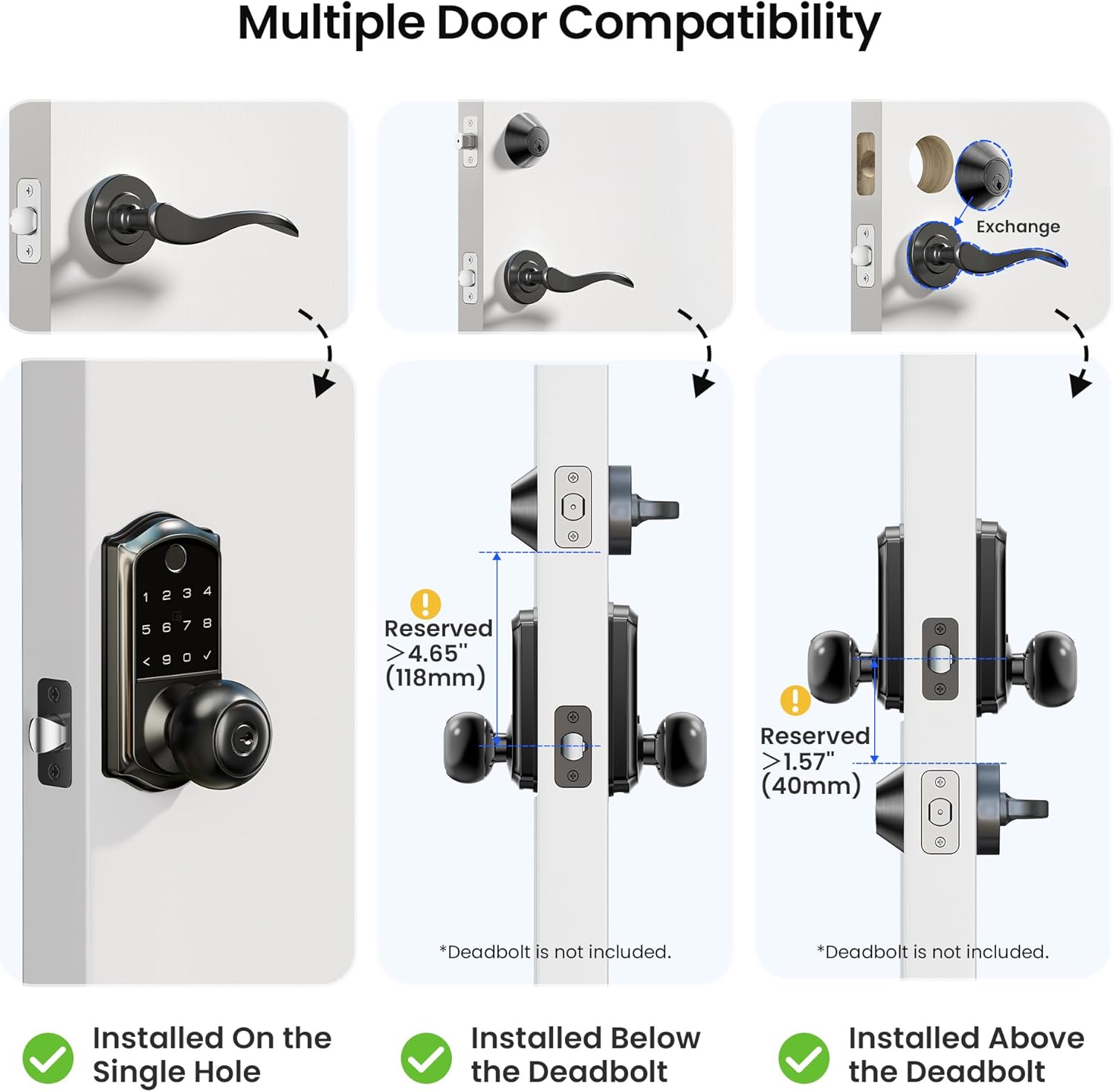
Image 2.2: Visual guide demonstrating how the Veise VE018 Smart Lock can be installed on a single door hole, or positioned below or above an existing deadbolt, with required spacing indicated.
2.2 Installation Steps (General)
- Prepare the Door: Ensure the door is clean and the bore hole is clear.
- Install Latch: Insert the latch into the door edge and secure it with screws. Ensure the latch bolt faces the correct direction.
- Install Exterior Assembly: Place the exterior keypad assembly onto the door, aligning it with the latch.
- Install Mounting Plate: Secure the interior mounting plate to the exterior assembly using screws, ensuring the cable passes through the plate.
- Connect Cables: Connect the cable from the exterior assembly to the interior assembly.
- Install Interior Assembly: Attach the interior knob assembly to the mounting plate, securing it with screws.
- Insert Batteries: Open the battery cover on the interior assembly and insert 4 AA alkaline batteries (not included).
- Test Operation: After installation, test all unlocking methods (key, keypad, fingerprint) to ensure proper function.
For detailed visual instructions, refer to the included installation manual in the product package.

Image 2.3: Illustration showing how to quickly set the direction for left-handed and right-handed doors during installation.
3. Operating Instructions
The Veise VE018 Smart Knob Handle Lock offers multiple convenient ways to secure and access your property.
3.1 Unlocking Methods
- Fingerprint: Place your registered fingerprint on the sensor. The lock will unlock in less than 0.5 seconds.
- PIN Code: Enter your registered PIN code on the keypad, followed by the checkmark button.
- IC Card/Key Fob: Tap the registered IC card or key fob against the designated area on the lock.
- Physical Key: Use the provided physical keys as a traditional backup method.
- KK Home App: Unlock the door remotely via the KK Home application on your smartphone.

Image 3.1: Visual representation of the multiple unlocking methods for the Veise VE018 Smart Lock, including fingerprint, PIN code, key fob, and physical key.

Image 3.2: A hand interacting with the keypad of the Veise VE018 Smart Lock, highlighting the use of diverse passwords and app management.

Image 3.3: A hand inserting a physical key into the Veise VE018 Smart Lock, demonstrating the backup key access method.
3.2 Locking Methods
- Auto-Lock: The lock will automatically engage after a set period (configurable via the app, typically 10 seconds to 3 minutes) once the door is closed.
- Indoor One-Touch Lock: Press the lock button on the interior assembly to secure the door.
- Keypad Lock: Press and hold the checkmark button on the exterior keypad for a few seconds to lock the door.
- App Lock: Lock the door remotely using the KK Home application.
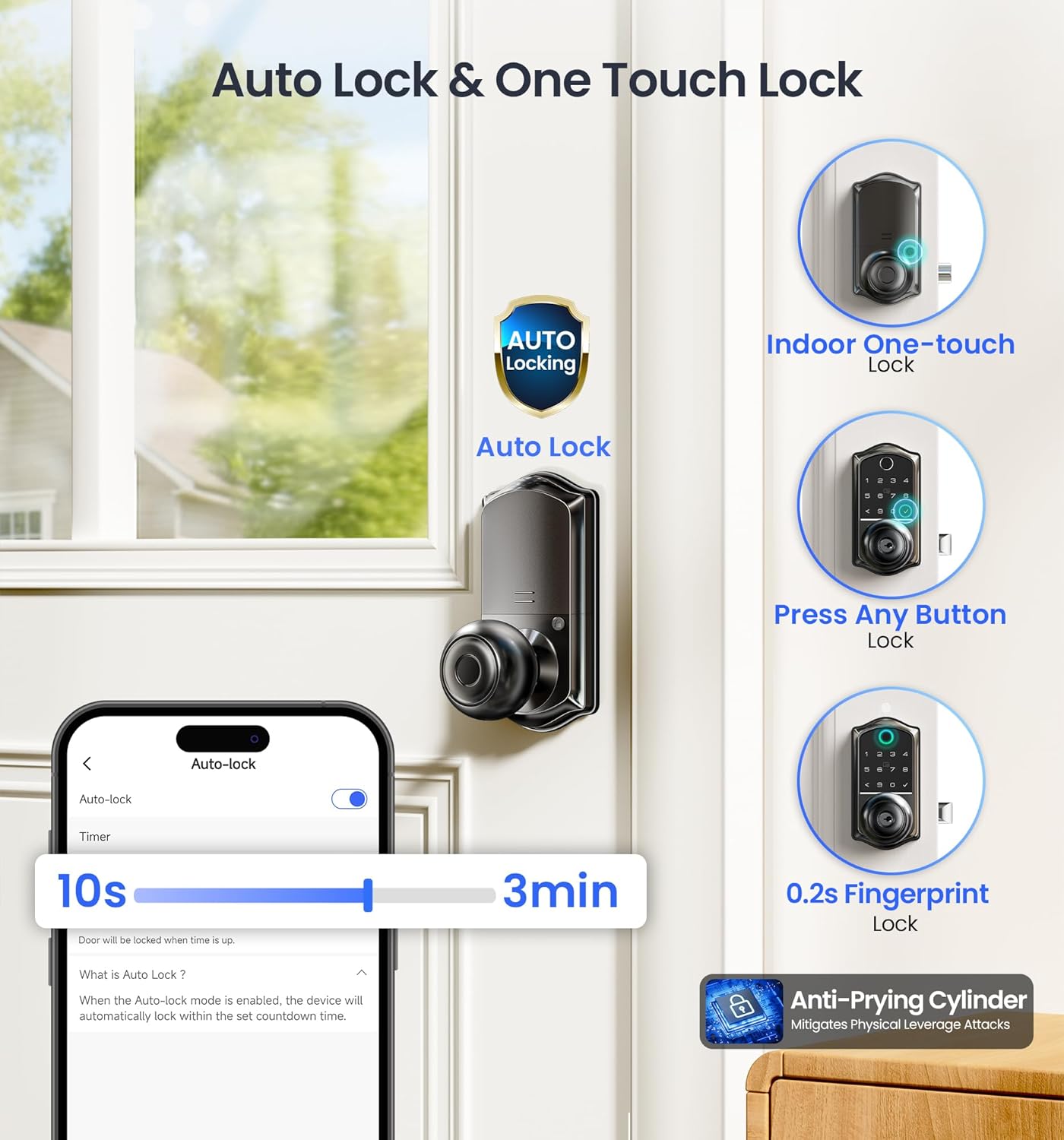
Image 3.4: Illustration of the auto-lock feature with adjustable timer, indoor one-touch lock, press any button lock, and 0.2s fingerprint lock for the Veise VE018 Smart Lock.

Image 3.5: A person receiving a package, with the Veise VE018 Smart Lock on the door, illustrating the convenience of the auto-lock feature.
3.3 KK Home App Control
The KK Home app provides comprehensive control over your Veise VE018 lock. Download the app from your smartphone's app store.
- Remote Access Sharing: Grant temporary or permanent access to family, friends, or service providers.
- User Management: Add, modify, or delete user fingerprints, PIN codes, and IC cards.
- Event Tracking: View a log of all lock activities, including who unlocked the door and when.
- Password Generation: Create various types of PIN codes:
- Permanent Code: For regular users.
- Recurring Code: For scheduled access (e.g., weekly cleaner).
- Duration Code: For specific timeframes (e.g., vacation renters).
- One-time Code: For single-use access.
- Notifications: Receive real-time alerts for lock activity and low battery status (requires Veise G1 gateway).
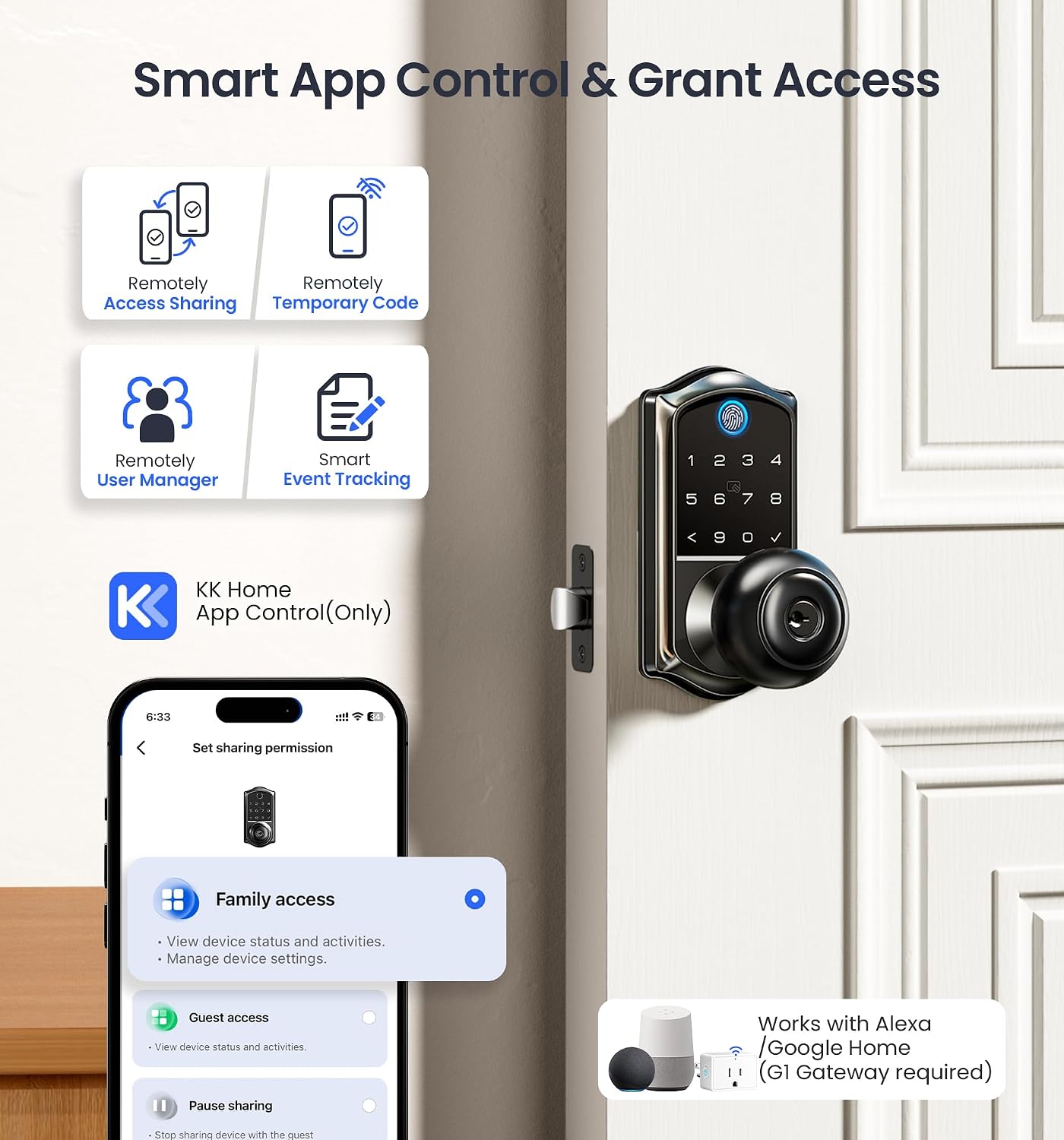
Image 3.6: Overview of the KK Home App control features, including remote access sharing, temporary codes, user management, and event tracking, with an illustration of Alexa/Google Home compatibility (requires G1 Gateway).

Image 3.7: A smartphone screen displaying the KK Home app interface for generating different types of PIN codes: Permanent, Recurring, Duration, and One-time, with options to share them.

Image 3.8: A person using the KK Home app to set sharing permissions for family and guests, demonstrating remote access management.

Image 3.9: A user viewing the activity log within the KK Home app, showing notifications for one-touch locking, fingerprint unlock, and auto-lock events.
3.4 Passage Mode
Passage Mode allows the door to remain unlocked for continuous access without requiring credentials. This is useful for periods when the door needs to be frequently opened and closed.
- Activating Passage Mode: This feature can typically be enabled or disabled through the KK Home app settings. Look for an "Auto-lock" toggle or a specific "Passage Mode" option.
- Disabling Auto-Lock: When Passage Mode is active, the auto-lock function is temporarily disabled.
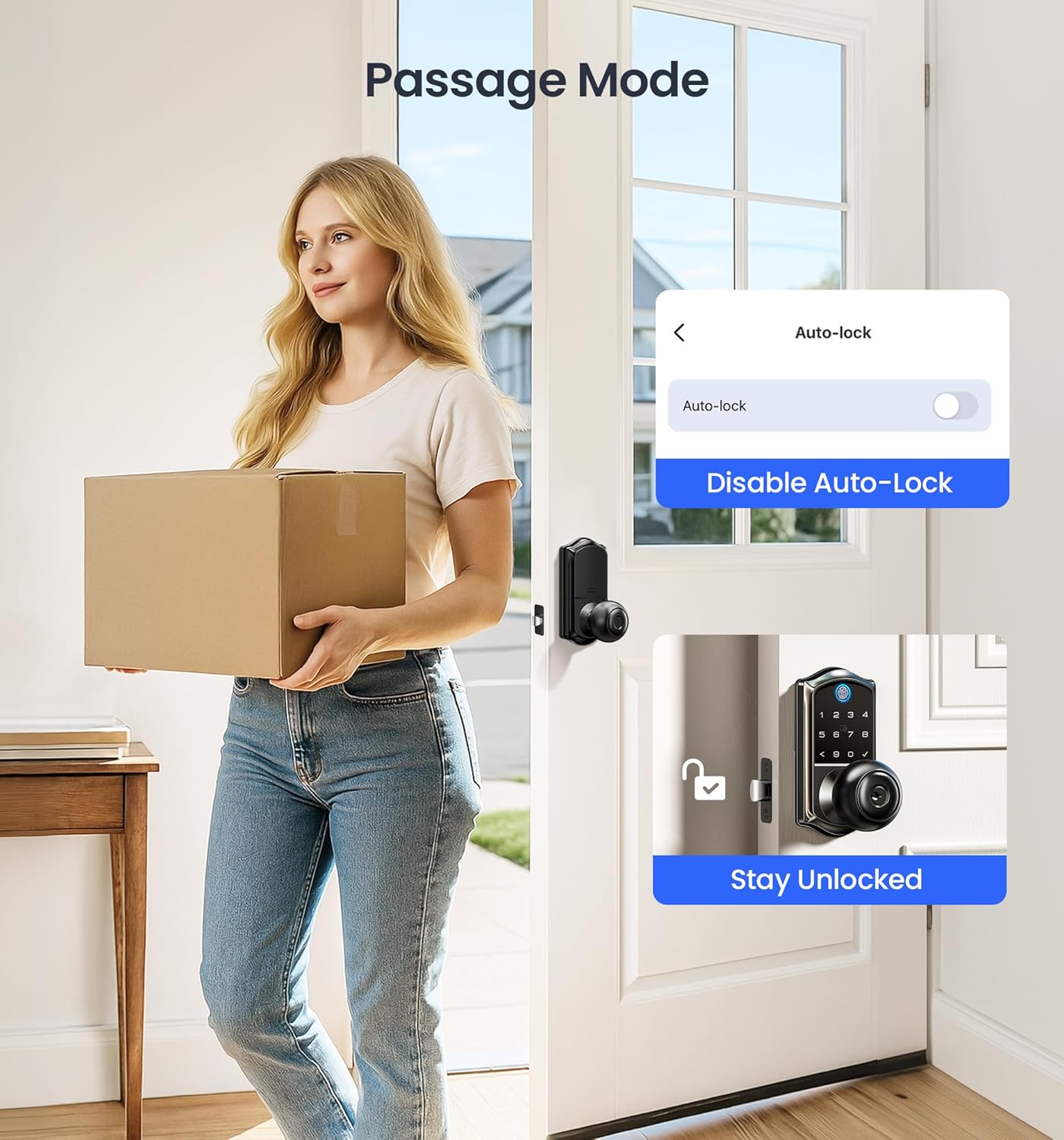
Image 3.10: A person entering a home with a package, illustrating the Passage Mode feature where auto-lock is disabled, allowing the door to remain unlocked.
3.5 Sound Settings
You can adjust or disable the lock's sound prompts via the KK Home app settings. This can be useful for maintaining quiet environments, such as during nighttime.

Image 3.11: A screenshot of the KK Home app's sound settings, showing an option to toggle lock sounds on or off, useful for quiet environments.
4. Maintenance
Proper maintenance ensures the longevity and optimal performance of your Veise VE018 Smart Knob Handle Lock.
- Battery Replacement: The lock requires 4 AA alkaline batteries. Replace them when the low battery alert is received via the app or indicated on the lock.
- Emergency Power: In case of complete battery depletion, use a Type-C cable to connect an external power bank to the emergency port for temporary power to unlock the door.
- Cleaning: Wipe the lock's exterior with a soft, dry cloth. Avoid abrasive cleaners or solvents that could damage the finish or electronic components.
- Weather Resistance: The lock is IP55 weatherproof, designed to withstand various outdoor conditions. However, avoid direct exposure to extreme moisture or prolonged submersion.

Image 4.1: A smartphone displaying a low battery alert for the Veise VE018 Smart Lock, next to the lock being charged via its Type-C emergency port.

Image 4.2: The Veise VE018 Smart Lock installed on a door in snowy conditions, highlighting its IP55 weatherproof rating, temperature resistance, and metal finish.
5. Troubleshooting
This section addresses common issues you might encounter with your Veise VE018 Smart Knob Handle Lock.
| Problem | Possible Cause | Solution |
|---|---|---|
| Lock not responding | Dead batteries, loose cable connection, system error. | Replace batteries. Check cable connections during reinstallation. Use emergency Type-C power. Contact support if issue persists. |
| Fingerprint not recognized | Unregistered fingerprint, dirty sensor, improper placement. | Ensure fingerprint is registered. Clean sensor. Try different finger angle. Re-register fingerprint if needed. |
| PIN code not working | Incorrect code, unregistered code, multiple wrong entries. | Verify the PIN code. Ensure it's registered and active. Wait 5 minutes if locked out due to wrong entries. |
| Auto-lock not engaging | Passage Mode active, auto-lock disabled in app, door not fully closed. | Check app settings to ensure Passage Mode is off and auto-lock is enabled. Ensure door is fully closed. |
| Remote access not working | No Veise G1 gateway, gateway not connected, Bluetooth/Wi-Fi issues. | Ensure you have a Veise G1 gateway and it's properly connected to Wi-Fi. Check Bluetooth connection between phone and lock. Verify app permissions. |

Image 5.1: An illustration of the Veise VE018 Smart Lock's security features, including AES 128 encryption, wrong entry limit (locked for 5 minutes after 10 incorrect attempts), and anti-peeping passcode functionality.
6. Specifications
| Feature | Detail |
|---|---|
| Brand | Veise |
| Model Name | VE018 |
| Lock Type | Biometric, Keypad |
| Special Features | Auto-Lock, Remote Access Sharing, Local Activity Records, Voice Prompts (3 Languages), Back-Lit Keypad, Fingerprint, IP55 waterproof, Smart App Control |
| Material | Aluminum |
| Color | Black |
| Finish Type | Matte Black |
| Product Dimensions (L x W x H) | 8.07 x 6.22 x 3.54 inches |
| Item Weight | 2.97 pounds |
| Recommended Uses | Front door, Back door, Garage, Home, Hotel, Apartment, Office, Rental, Bedroom |
| Power Source | 4 AA batteries (not included) |
| Connectivity Protocol | Bluetooth, WiFi (Veise G1 WiFi Gateway Required for WiFi features) |
| Included Components | Exterior Assembly x1, Interior Assembly x1, Mounting Plate x1, Latch x1, Strike x1, User Card x2, Key Fob x2, Installation Manual, User Manual |

Image 6.1: An overview of the Veise VE018 Smart Lock's durability tests (BHMA/ANSI standards, usage, pressure, humidity, salt spray, impact) and a visual of the included components: exterior and interior assemblies, keys, and key fobs.
7. Warranty and Support
Veise is committed to providing reliable products and excellent customer service.
- Warranty: The Veise VE018 Smart Knob Handle Lock comes with a 1-year warranty.
- Lifetime US-Based Phone Support: Available Monday to Friday, 9 AM to 5 PM PST.
- 24/7 After-Sales Email Assistance: For any inquiries or issues outside of phone support hours.
- Free Replacement: Lifetime service and free replacement for product issues.

Image 7.1: An image depicting a customer service representative, emphasizing the availability of US-based support for Veise products.


