
Introduction
Thank you for choosing the RESTMO Sprinkler Timer. This programmable water timer is designed to automate your garden watering, offering convenience and efficiency. Featuring two independent zones, durable brass inlet and outlet, and smart app control, it provides flexible scheduling options to meet diverse watering needs. Please read this manual carefully before operation to ensure proper setup and optimal performance.
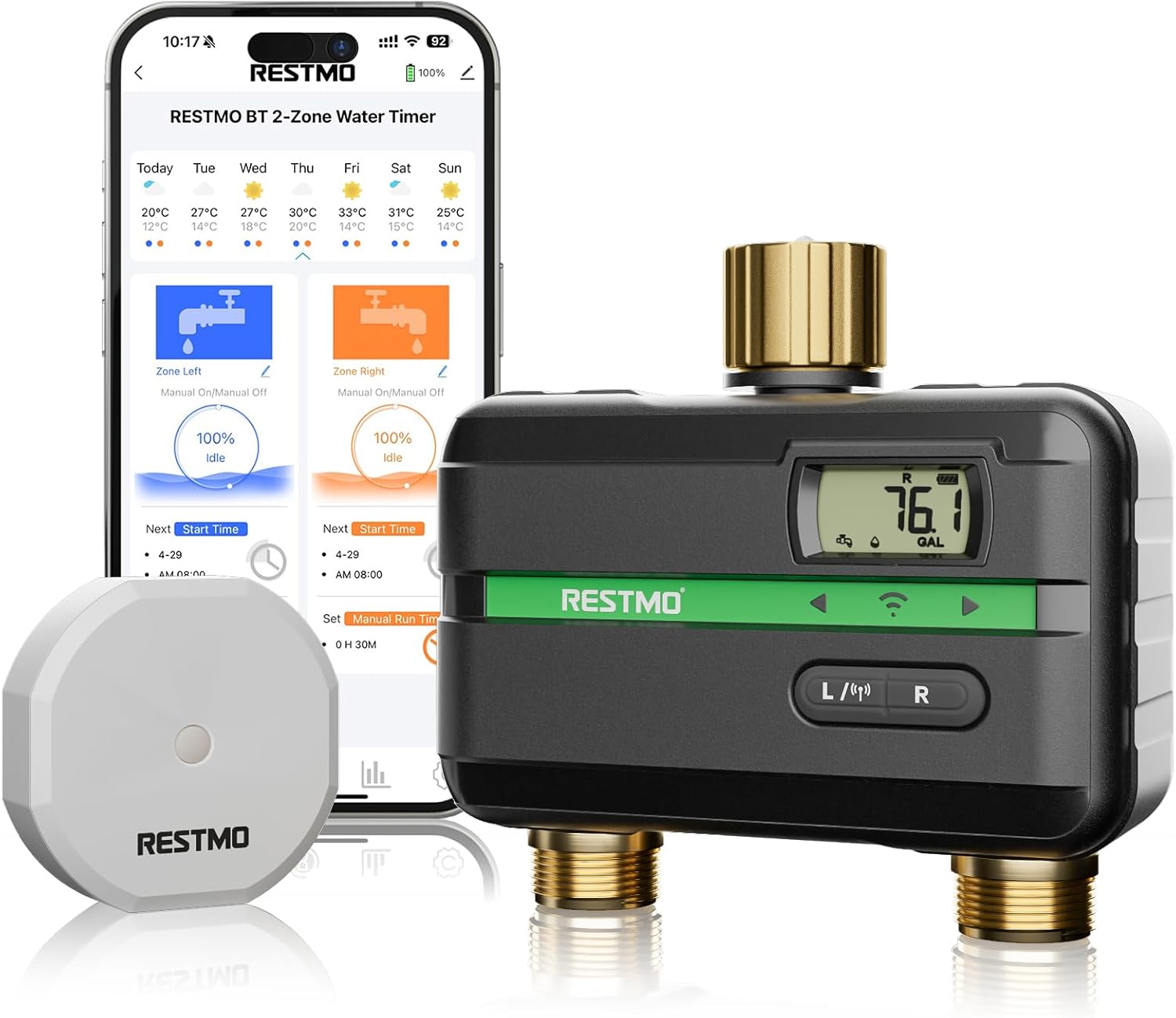
The RESTMO BT 2-Zone Water Timer, shown with its accompanying smartphone application interface, highlights its smart control capabilities.
Key Features
- Programmable Interval & Weekly Watering: Set precise schedules based on time intervals or specific days of the week.
- Two Independent Watering Zones: Control watering for two separate areas simultaneously or independently.
- Durable Brass Inlet & Outlet: Features an upgraded 360° swivel brass inlet and outlet for enhanced durability and leak prevention.
- App Remote Control: Manage and monitor your watering schedules conveniently via a dedicated smartphone application.
- Multiple Watering Frequencies: Supports Interval, Weekly, Odd Dates, and Even Dates for versatile scheduling.
- Custom Volume Watering: Set exact water volumes (e.g., gallons) for precise irrigation based on plant needs.
- Rain Delay Function: Automatically skips watering for 24, 48, or 72 hours to prevent overwatering during rain.
- Leak-Proof and Crack-Resistant Design: Engineered for long-lasting performance in outdoor conditions.

This image illustrates the app remote control feature, allowing users to manage their smart irrigation system from their smartphone.

The timer supports various watering frequencies including interval, weekly, odd dates, and even dates, providing flexible scheduling options.

The timer features an upgraded 360° swivel brass inlet and outlet, designed for leak-proof and crack-resistant performance, ensuring durability.

The rain delay function allows users to automatically skip watering for 24, 48, or 72 hours to prevent overwatering during rainy periods.

Users can set exact water volumes based on plant needs, ranging from 1 gallon to 99,999 gallons, for precise watering.
Package Contents
- RESTMO Sprinkler Timer (1 unit)
- User Manual (This document)
Setup Guide
1. Battery Installation
Locate the battery compartment on the back of the timer. Insert two (2) AA batteries (not included), ensuring correct polarity (+/-). Close the compartment securely to maintain water resistance.
2. Connecting to Water Source
Screw the brass inlet of the timer onto your outdoor faucet or garden hose spigot. Ensure the connection is hand-tight and leak-free. The 360° swivel feature allows for easy adjustment of the timer's position without needing to unscrew it from the faucet.

This image demonstrates the correct way to connect the timer to a water source and attach hoses to its two outlets.
3. Connecting Hoses
Attach your garden hoses to the two independent outlets (labeled L for Left Zone and R for Right Zone) at the bottom of the timer. Tighten connections firmly to prevent leaks. Ensure any quick connectors or hose nozzles are also securely attached.
4. App Pairing
Download the "RESTMO BT" app from your device's app store (available for iOS and Android). Open the app and follow the on-screen instructions to pair your timer via Bluetooth. Ensure your device's Bluetooth is enabled and the timer is within range during the pairing process.
Operating Instructions
Understanding the Display
The timer features a clear digital display that shows current settings, watering status, battery level, and other relevant information. Familiarize yourself with the icons and indicators for easy operation.
Programming Modes
The RESTMO Sprinkler Timer offers multiple programming options, primarily managed through the smartphone app for ease of use.
- Interval Watering: Set the frequency (e.g., every 6 hours, every 2 days) and duration for each zone. Ideal for new plantings or specific soil types requiring frequent, short watering cycles.
- Weekly Watering: Program specific days of the week and start times for watering. Suitable for established gardens with consistent watering needs.
- Odd/Even Date Watering: Schedule watering based on odd or even calendar dates. This can be useful for adhering to local watering restrictions.
- Custom Volume Watering: Instead of duration, set the exact volume of water (e.g., 5 gallons) to be dispensed per watering cycle.
- Manual Watering: Initiate immediate watering for a set duration, bypassing programmed schedules. This is useful for quick spot watering or testing.
Using the App
The RESTMO BT app provides a comprehensive and intuitive interface for setting up, managing, and monitoring your watering schedules. Within the app, you can:
- Create and modify watering programs for each zone.
- Activate the Rain Delay function (24/48/72 hours).
- View watering history and upcoming schedules.
- Check battery status and signal strength.
- Perform manual watering.
Refer to the app's built-in help section or tutorials for detailed instructions on specific features and programming steps.
Maintenance
- Cleaning: Periodically wipe the exterior of the timer with a soft, damp cloth. Do not use harsh chemicals or abrasive cleaners, as they may damage the unit.
- Winterization: In regions prone to freezing temperatures, it is crucial to disconnect the timer from the faucet and hoses before the first frost. Store the timer indoors in a dry, protected area to prevent damage from freezing water expanding inside the unit.
- Battery Replacement: Replace the AA batteries annually or immediately when the low battery indicator appears on the display or in the app. Always use fresh, high-quality alkaline batteries.
- Inlet Filter: Check the inlet filter washer periodically for debris. If clogged, remove and rinse it under running water to ensure unrestricted water flow.
Troubleshooting
| Problem | Possible Cause | Solution |
|---|---|---|
| No water flow from timer. | Faucet is off; low or dead batteries; clogged inlet filter; incorrect programming; manual override active. | Ensure faucet is fully open; replace batteries; clean inlet filter; verify schedule in app; check for active manual watering. |
| Leaking connections. | Loose connections; worn or missing rubber washers. | Tighten all connections securely; inspect and replace rubber washers if damaged or missing. |
| Timer display is blank or unresponsive. | Low or dead batteries; batteries inserted incorrectly. | Replace batteries with fresh ones; ensure batteries are inserted with correct polarity. |
| App cannot connect to the timer. | Bluetooth is off on device; timer is out of range; app needs update. | Ensure Bluetooth is enabled on your smartphone; move closer to the timer; check for app updates. |
For further assistance or issues not listed here, please contact Restmo customer support.
Specifications
- Brand: Restmo
- Colour: Green
- Product Dimensions: 12.7D x 7.6W x 12.7H centimetres
- Manufacturer: Restmo
- Number of Zones: 2
- Inlet/Outlet Material: Brass
- Connectivity: Bluetooth (for app control)
- Power Source: AA Batteries (not included)
Warranty and Support
Restmo products are manufactured to high-quality standards and are designed for reliable performance. For specific warranty terms and conditions, please refer to the warranty card included with your product or visit the official Restmo website. Keep your purchase receipt as proof of purchase for any warranty claims.
For technical support, troubleshooting assistance, or general inquiries, please contact Restmo customer service through the contact information provided on the product packaging or their official website. Our support team is ready to assist you.


