
EF ECOFLOW EF-RV-H02-1
EF ECOFLOW Solar Generator RIVER 3 Plus with 110W Solar Panel
User Manual
Introduction
Thank you for choosing the EF ECOFLOW RIVER 3 Plus Solar Generator. This portable power station, combined with the 110W solar panel, provides a reliable and versatile power solution for both indoor and outdoor use. Featuring a durable LiFePO4 battery, fast charging capabilities, and expandable capacity, the RIVER 3 Plus is designed to meet diverse energy demands with efficiency and quiet operation.

The EF ECOFLOW RIVER 3 Plus power station shown with its accompanying 110W solar panel, ready for use.
Setup
Follow these steps to set up your RIVER 3 Plus Solar Generator:
- Unboxing: Carefully remove all components from the packaging. Verify that you have the RIVER 3 Plus power station, 110W solar panel, and all included cables and accessories.
- Initial Charge (AC): For optimal performance, fully charge the RIVER 3 Plus using an AC wall outlet before first use. The unit supports 1-hour fast AC charging from 0-100%.
- Solar Panel Connection: Unfold the 110W solar panel and place it in direct sunlight. Connect the solar panel to the RIVER 3 Plus using the appropriate cable. The unit features a 23% high conversion rate for efficient solar charging, achieving 0-100% in approximately 3 hours with the 110W panel.
- Expandable Capacity: The RIVER 3 Plus can be expanded by connecting an additional battery (sold separately) to increase its capacity from 286Wh up to 858Wh. This connection is designed to be quick and tool-free.
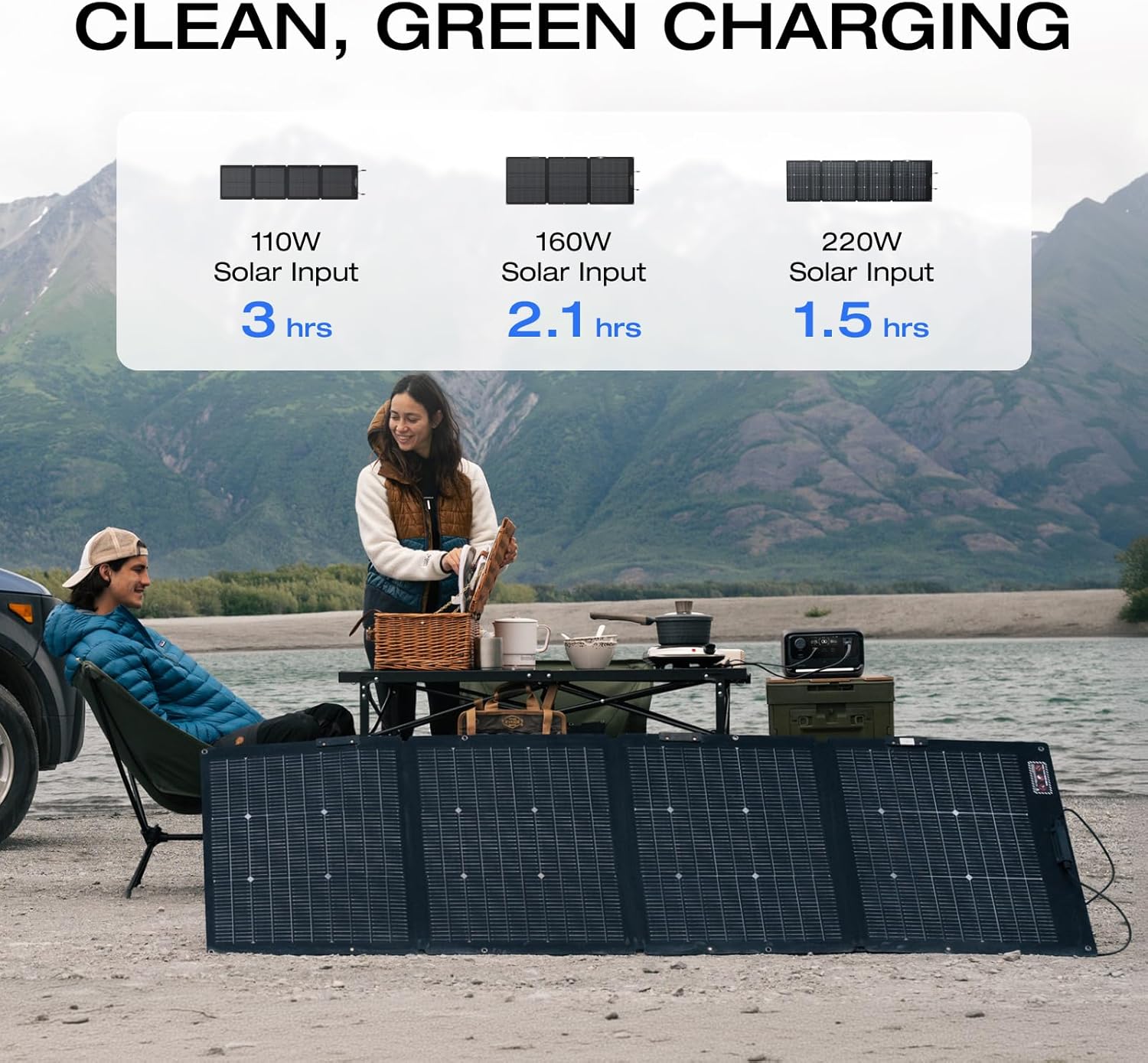
Illustration showing charging times for the RIVER 3 Plus with various solar panel wattages, including the 110W panel.

Visual representation of the RIVER 3 Plus's expandable capacity by adding an extra battery.

Diagram illustrating the rapid charging capabilities of the RIVER 3 Plus from various power sources.
Operating Instructions
The RIVER 3 Plus is designed for intuitive operation:
- Power On/Off: Press and hold the main power button to turn the unit on or off.
- AC Output: Activate the AC output to use the three AC outlets. The unit provides a steady 600W output and can surge up to 1200W with X-Boost technology, allowing it to power a wide range of appliances.
- USB & DC Output: Utilize the two USB-A ports and one 100W USB-C port for charging mobile devices. The DC output (car charging port) is suitable for 12V devices.
- UPS Functionality: The integrated Uninterruptible Power Supply (UPS) features a <10ms automatic switchover time, providing seamless power backup for sensitive electronics during outages.
- Integrated Light: The unit includes a built-in light with multiple modes (low, high, and SOS signal) for emergency or general illumination.
- Quiet Operation: Thanks to X-Quiet technology, the RIVER 3 Plus operates at less than 30 dB, ensuring a quiet environment, especially beneficial for indoor use or camping.
- Smart App Control: Download the EF ECOFLOW app to monitor charging status, battery health, and customize charging settings for personalized power management.

The RIVER 3 Plus demonstrating its capability to power various devices with estimated runtimes.

Visual highlighting the <10ms pro-grade auto-switch for seamless power during outages.

Screenshot of the EF ECOFLOW smart app, showing control and monitoring features for the power station.
Maintenance
Proper maintenance ensures the longevity and optimal performance of your RIVER 3 Plus:
- Battery Care: The LiFePO4 battery is designed for over 3000 cycles, providing a 10-year lifespan. For best results, avoid prolonged storage at extremely low or high charge levels. Recharge the unit every 3-6 months if not in regular use.
- X-Guard Battery Protection: The unit features X-Guard technology with over 40 safety measures to protect against current, voltage, temperature, and circuit risks.
- Cleaning: Use a dry, soft cloth to clean the exterior of the power station and solar panel. Do not use harsh chemicals or abrasive materials.
- Storage: Store the unit in a cool, dry place away from direct sunlight and extreme temperatures.
- Durability: The power station is designed to be sturdy and durable, with an IP54 waterproof-rated battery pack (note: the entire device is not waterproof). The solar panel has an IP68 waterproof rating and an ETFE film for UV protection.

Illustration highlighting the 10-year lifespan and 3000+ cycles of the LiFePO4 battery.

Diagram explaining the X-Guard Battery Protection Technology with its various safety measures.

Image showcasing the IP68 waterproof rating and adjustable kickstand of the solar panel.
Troubleshooting
If you encounter issues with your RIVER 3 Plus, refer to the following common solutions:
- Unit Not Turning On: Ensure the battery is charged. Connect to an AC outlet for at least 10 minutes to see if it powers on.
- No Output from Ports: Verify that the specific output (AC, DC, USB) is enabled on the unit's display. Check cable connections and ensure the device you are trying to power is within the unit's wattage limits.
- Slow Charging: For solar charging, ensure the panel is in direct sunlight and free from obstructions. Check that the solar panel is correctly connected. For AC charging, ensure you are using the original charging cable and a functional wall outlet.
- Overload Protection: If an overload warning appears, disconnect the high-power device immediately. Reduce the load to within the unit's rated output (600W continuous, 1200W X-Boost) before resuming operation.
- Unusual Noise/Smell: Immediately power off the unit and disconnect all devices. Contact customer support for assistance.
For more detailed troubleshooting or issues not listed here, please refer to the official EF ECOFLOW support resources or contact customer service.
Specifications
| Feature | Specification |
|---|---|
| Brand | EF ECOFLOW |
| Model Name | EF-RV-H02-1 |
| Battery Type | LiFePO4 |
| Capacity | 286Wh (Expandable to 858Wh) |
| AC Output | 600W (Pure Sine Wave, 1200W X-Boost) |
| Total AC Outlets | 3 |
| USB-A Output | 2 Ports |
| USB-C Output | 1 Port (100W) |
| DC Output | 1 Car Charging Port |
| UPS Switchover Time | <10ms |
| AC Charging Time | 1 Hour (0-100%) |
| Solar Input | Up to 220W (110W panel included) |
| Noise Level | <30 dB |
| Dimensions (L x W x H) | 9.2"L x 9.1"W x 5.8"H |
| Weight | 10.4 Pounds |
| UPC | 842783143587 |
Warranty and Support
Your EF ECOFLOW RIVER 3 Plus Solar Generator is backed by a manufacturer's warranty. Please refer to the warranty card included in your product packaging for specific terms and conditions.
For technical support, product inquiries, or warranty claims, please contact EF ECOFLOW customer service through their official website or the contact information provided in your product documentation. Keep your purchase receipt and product serial number handy for faster service.
Visit the EF ECOFLOW Store for more information and product accessories.
Related documentsEF-RV-H02-1


Ask a question about this manual
Ask about setup, troubleshooting, compatibility, parts, safety, or missing instructions. Manuals+ will review the question and use this page’s manual context to help answer it.