
Monster S280
Monster S280 Bluetooth Speaker User Manual
Model: S280 | Brand: Monster
Introduction
Thank you for choosing the Monster S280 Bluetooth Speaker. This manual provides detailed instructions for setting up, operating, and maintaining your speaker to ensure optimal performance and longevity. The Monster S280 combines powerful stereo sound with dynamic 3D tunnel lighting, a mirror display, and convenient wireless charging, making it a versatile audio companion for any indoor space.

Image: Front view of the Monster S280 Bluetooth Speaker showcasing its unique 3D tunnel lighting effect.
Package Contents
Upon unboxing your Monster S280, please verify that all the following items are included:
- Monster S280 Portable Bluetooth Speaker
- USB-C Charging Cable
- Audio Cable (AUX)
- Quick-Start Guide
- Warranty Card
Setup and Initial Use
1. Initial Charging
Before first use, fully charge the speaker using the provided USB-C charging cable. Connect the USB-C end to the speaker's charging port and the other end to a compatible USB power adapter (not included) or a computer USB port. The charging indicator will show the charging status.
2. Powering On/Off
To power on the speaker, long press the Power button. To power off, long press the Power button again.
3. Bluetooth Pairing
The Monster S280 features Bluetooth 6.0 for fast and stable connections. Follow these steps to pair your device:
- Ensure the speaker is powered on and in Bluetooth pairing mode (indicated by a flashing LED).
- On your mobile device, navigate to Bluetooth settings and enable Bluetooth.
- Search for "Monster S280" in the list of available devices.
- Select "Monster S280" to connect. Once connected, the speaker will provide an audible confirmation, and the LED indicator will become solid.

Image: A smartphone displaying music playback, wirelessly connected to the Monster S280 speaker, illustrating Bluetooth 6.0 connectivity.
Operating Instructions
Familiarize yourself with the control buttons located on the top panel of the speaker:
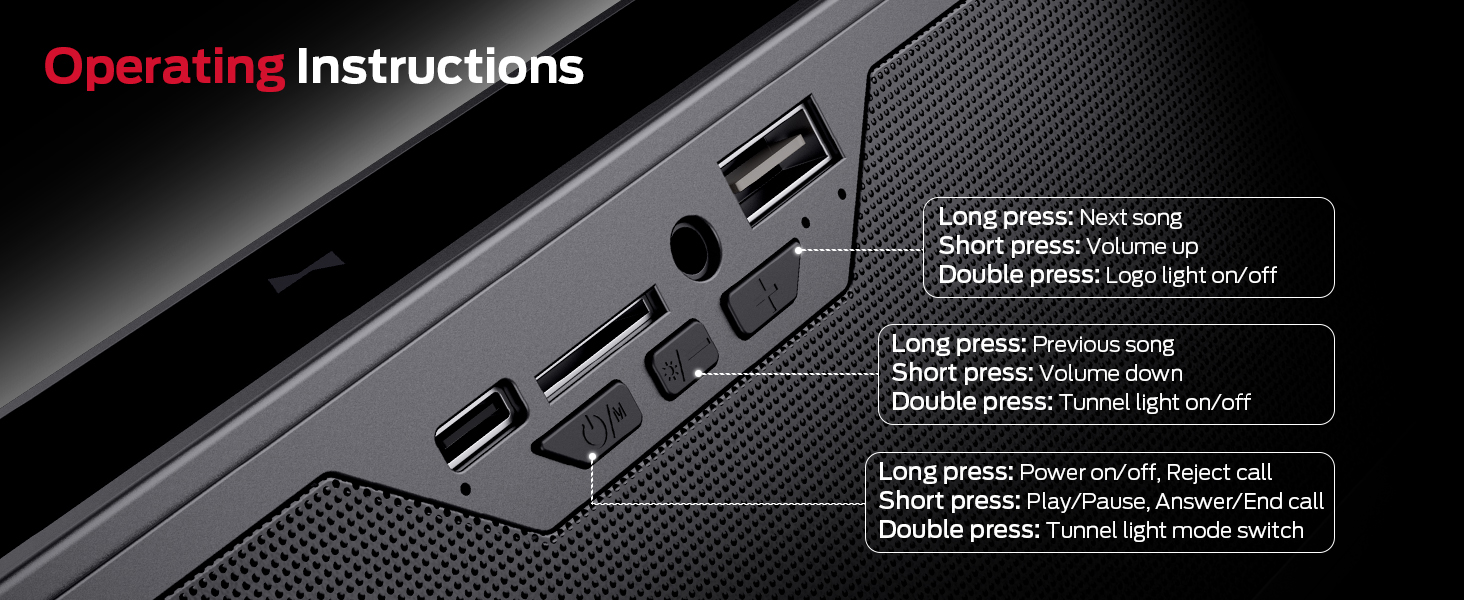
Image: Detailed view of the speaker's control buttons and their corresponding functions.
- Power Button (ⓘ/M):
- Long press: Power on/off, Reject call
- Short press: Play/Pause, Answer/End call
- Double press: Tunnel light mode switch
- Volume Down / Previous Track Button (-/◀◀):
- Long press: Previous song
- Short press: Volume down
- Double press: Tunnel light on/off
- Volume Up / Next Track Button (+/▶▶):
- Long press: Next song
- Short press: Volume up
- Double press: Logo light on/off
Versatile Connectivity Options
Beyond Bluetooth, the Monster S280 offers multiple ways to enjoy your audio:
- AUX Input: Connect external audio devices like MP3 players or computers using the provided 3.5mm audio cable.
- TF-Card Playback: Insert a TF (micro SD) card loaded with your favorite music files for direct playback.
- USB (Audio) Input: Connect a USB drive containing audio files for playback.

Image: A detailed view of the various input ports on the Monster S280 speaker, highlighting its versatile connectivity.
Dynamic Lighting Modes & Mirror Display
Enhance your audio experience with the S280's customizable lighting effects and unique mirror display:
- 6 Dynamic Lighting Modes: Choose from Dark Green, Light Green, Blue, Purple, Breathing, and Circulate to match your mood or environment. Double press the Power button to cycle through modes.
- 3D Tunnel Lighting Effect: When the lights are on, enjoy a mesmerizing 3D tunnel effect that adds visual depth to your audio.
- Mirror Display: When all lights are turned off, the front panel transforms into a sleek, reflective mirror, adding a touch of elegance to your space.

Image: Visual representation of the six distinct lighting modes offered by the speaker.

Image: Side-by-side comparison illustrating the speaker's mirror effect when lights are off and the 3D tunnel lighting when lights are on.
Wireless Charging Pad Function
The Monster S280 doubles as a convenient wireless charging pad for compatible devices. To use this feature:
- Ensure the speaker is connected to a power source via the USB-C charging cable.
- Place your Qi-enabled smartphone, earbuds, or other compatible device on the designated wireless charging area on top of the speaker.
- The device should begin charging automatically. Note that wireless charging only functions when the speaker is plugged into power.

Image: The Monster S280 speaker with a smartphone placed on its top surface, actively charging wirelessly, demonstrating its multi-functional design.
Specifications
| Feature | Detail |
|---|---|
| Brand | Monster |
| Model Name | S280 |
| Connectivity Technology | Wireless (Bluetooth 6.0) |
| Speaker Type | Built-In, Stereo |
| Speaker Size | Dual 45 mm drivers |
| Sound Output | 40W Stereo Sound with Rich Bass |
| Special Features | LED Light (6 modes), Wireless Charger, Mirror Display |
| Input Options | Bluetooth, AUX, TF-Card, USB (Audio) |
| Product Dimensions | 8"D x 2"W x 3"H |
| Item Weight | 1.94 pounds |
| Color | Black |
| Recommended Use | Indoor/Outdoor |
Maintenance
To ensure the longevity and optimal performance of your Monster S280 speaker, follow these maintenance guidelines:
- Cleaning: Use a soft, dry, lint-free cloth to clean the speaker's surface. Do not use abrasive cleaners, alcohol, benzene, or other chemicals, as these may damage the finish or internal components.
- Storage: When not in use for extended periods, store the speaker in a cool, dry place away from direct sunlight and extreme temperatures.
- Water Exposure: This speaker is not waterproof. Avoid exposing it to water, rain, or excessive moisture.
- Handling: Handle the speaker with care. Avoid dropping it or subjecting it to strong impacts.
Troubleshooting
If you encounter any issues with your Monster S280 speaker, please refer to the following common problems and solutions:
- No Power:
- Ensure the speaker is fully charged.
- Verify the USB-C charging cable is securely connected to both the speaker and a working power source.
- No Sound:
- Check if the speaker's volume is turned up.
- Ensure your connected device's volume is also turned up.
- If using Bluetooth, ensure the speaker is properly paired and connected to your device. Try re-pairing.
- If using AUX/TF-Card/USB, ensure the cable/card/drive is properly inserted and the correct input mode is selected.
- Bluetooth Pairing Issues:
- Make sure the speaker is in pairing mode (flashing LED).
- Ensure your device's Bluetooth is enabled and within range (typically 10 meters/33 feet).
- Forget "Monster S280" from your device's Bluetooth list and try pairing again.
- Turn off and on both the speaker and your device.
- Wireless Charging Not Working:
- Ensure the speaker is plugged into a power source. Wireless charging only works when the speaker is powered via its USB-C input.
- Verify your device is Qi-enabled and placed correctly on the charging pad.
- Remove any thick phone cases that might interfere with charging.
- Lights Not Working/Changing:
- Double press the appropriate buttons to turn lights on/off or cycle through modes as described in the "Operating Instructions" section.
Warranty and Support
The Monster S280 portable Bluetooth speaker comes with a warranty card. Please refer to the warranty card for specific terms and conditions regarding your product's warranty coverage.
For any questions, technical assistance, or support inquiries, please refer to the contact information provided on your warranty card or visit the official Monster support website. We are committed to providing excellent customer service.
You can also visit the Monster Store on Amazon for more information and product updates.
Related documentsS280


Ask a question about this manual
Ask about setup, troubleshooting, compatibility, parts, safety, or missing instructions. Manuals+ will review the question and use this page’s manual context to help answer it.