1. Introduction
Thank you for purchasing the AGPTEK MP3 Player. This device is designed to provide a portable and versatile music experience with advanced features. Please read this manual carefully to ensure proper use and to maximize your enjoyment of the product.

Figure 1: AGPTEK MP3 Player with clip and wristband.
The AGPTEK MP3 Player features a wearable clip design, making it ideal for sports and active lifestyles. It combines a 2.4-inch full touch screen with physical buttons for intuitive navigation. Enjoy high-fidelity lossless sound quality, Bluetooth 5.3 connectivity, and a range of multifunctional capabilities including video playback, FM radio, and a pedometer.
Video 1: Overview of the MP3 Player's Bluetooth 5.3 and HiFi Sound features.
2. Package Contents
Please check the package contents upon receipt. If any items are missing or damaged, contact customer support.
- AGPTEK MP3 Player (1 unit)
- USB-C Charging Cable (1 unit)
- Wired Earphones (1 pair)
- User Manual (1 unit)

Figure 2: Included components: MP3 player, wristband, charging cable, earphones, and user manual.
3. Product Overview
The MP3 player features a compact design with a 2.4-inch full touch screen and dedicated physical buttons for ease of use.
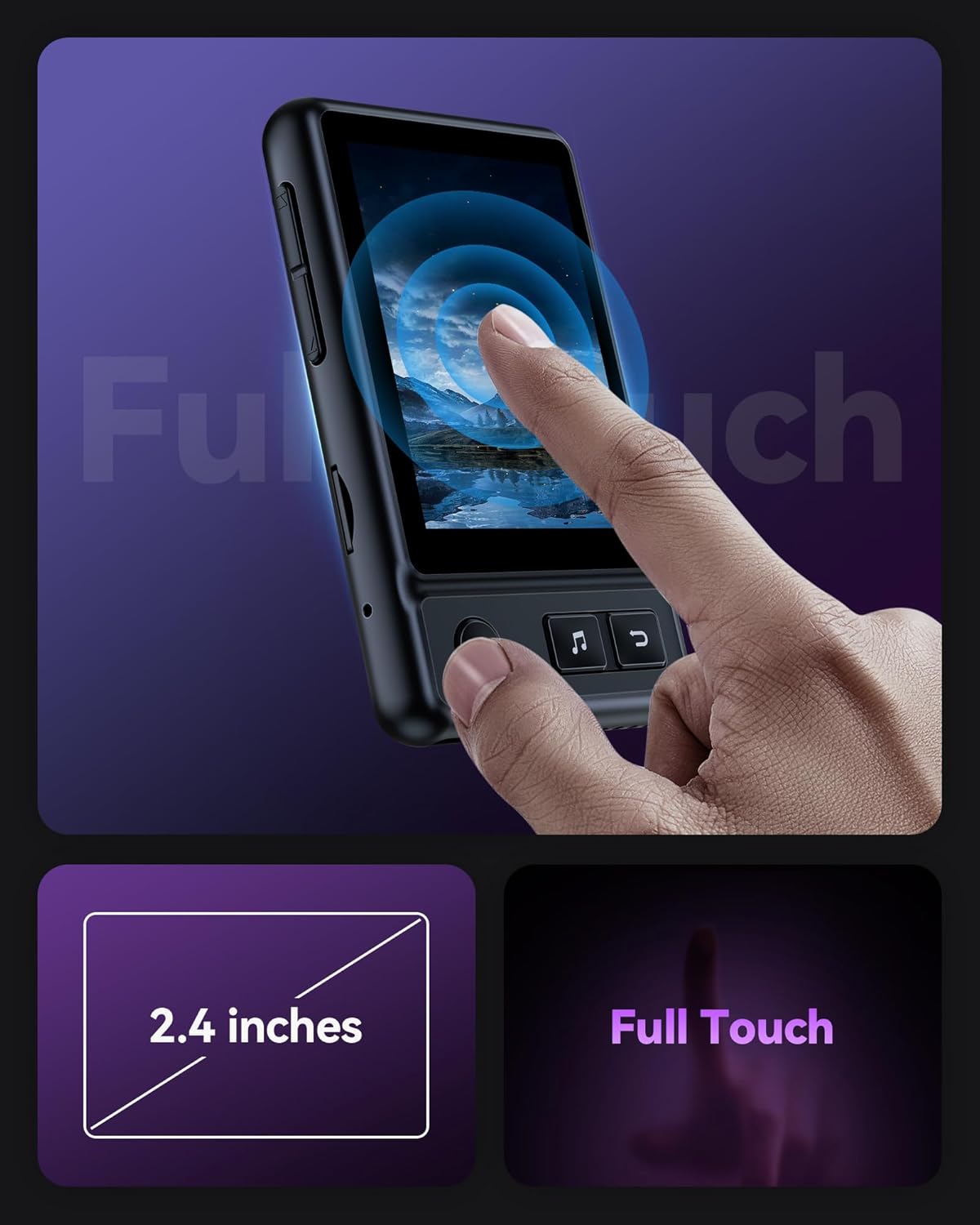
Figure 3: The 2.4-inch full touch screen provides clear visuals and responsive interaction.
3.1 Device Layout
- Front: 2.4-inch Full Touch Screen, Navigation Buttons (Play/Pause, Skip Forward/Backward, Menu, Back).
- Side: Power On/Off button, Volume Up/Down buttons, Micro SD card slot.
- Bottom: USB-C charging port, 3.5mm headphone jack.
- Back: Sports back clip, Built-in speaker.
4. Setup
4.1 Charging the Device
Connect the MP3 player to a computer or a USB wall adapter (not included) using the provided USB-C cable. The battery icon on the screen will indicate charging status. A full charge typically takes approximately 2.5 hours.
4.2 Power On/Off
- To Power On: Press and hold the Power button on the side of the device until the screen lights up.
- To Power Off: Press and hold the Power button until the device powers down.
5. Operating Instructions
5.1 Basic Navigation
Navigate the device using either the 2.4-inch full touch screen or the physical navigation buttons located below the screen.
5.2 Music Playback
The player supports various audio formats including MP3, WMA, APE, FLAC, WAV, DRM, and ACELP. Access the 'Music' icon from the main menu to browse your library by songs, artists, albums, or genres. The device features 6 equalizer modes: Rock, Funk, Hip Hop, Jazz, Classic, and Electric.

Figure 4: Enjoy HiFi Lossless Music with the built-in speaker or connected headphones.
5.3 Bluetooth Connection
The MP3 player features Bluetooth 5.3 for stable and low-latency wireless audio. To pair with Bluetooth headphones or earbuds:
- Go to the 'Bluetooth' menu from the main screen.
- Turn on Bluetooth.
- The player will search for available devices.
- Select your Bluetooth device from the list to pair.

Figure 5: Bluetooth 5.3 ensures a stable connection with lower latency and power consumption.
5.4 File Transfer
To transfer music and other files to your MP3 player:
- Connect the MP3 player to your computer using the provided USB-C cable.
- On the MP3 player screen, select 'Charge & Transfer' (or 'Transfer' if available).
- Your computer should recognize the device as a removable drive.
- Drag and drop your desired audio files (MP3, etc.) into the appropriate folders on the MP3 player.
- For optimal organization, it is recommended to prefix song titles with letters (A-B-C...) or numbers (0001-0002-...) for alphabetical or numerical sorting.
Video 2: Instructions on how to transfer files from a PC to the MP3 Player.
5.5 Other Functions
The AGPTEK MP3 Player offers a variety of additional features:
- Video Playback: Supports video playback.
- Picture Browsing: View images stored on the device.
- FM Radio: Listen to FM radio stations (requires wired earphones as antenna).
- Recorder: Record voice memos.
- E-Book: Read e-books.
- Calendar: View the calendar.
- Pedometer: Track your steps during activities.
- Stopwatch: Use as a stopwatch.
- A-B Repeat: Repeat a specific segment of audio.
- Lyric Synchronization: Display lyrics synchronized with music playback.

Figure 6: The MP3 Player's exclusive UI design showcasing its multifunctionality.
5.6 Screen Lock/Unlock
To prevent accidental presses while the device is in your pocket or during activity, you can lock the screen:
- To Lock: Press and hold the top button on the side of the device for approximately 2 seconds. A lock icon will appear.
- To Unlock: Press and hold the top button again for approximately 2 seconds.
5.7 Volume Control
Adjust the volume using the dedicated Volume Up/Down buttons on the side of the device. If using Bluetooth earbuds with their own volume controls, those may also be used.
6. Maintenance
- Cleaning: Use a soft, dry cloth to clean the device. Avoid liquid cleaners.
- Storage: Store the device in a cool, dry place away from direct sunlight and extreme temperatures.
- Battery Care: To prolong battery life, avoid fully discharging the battery frequently. Charge the device regularly.
7. Troubleshooting
7.1 Computer Not Recognizing MP3 Player
If your computer does not recognize the MP3 player when connected:
- Ensure the USB cable is securely connected to both the player and the computer.
- Try a different USB port on your computer.
- Try a different USB-C cable.
- Restart your computer and try connecting again.
- Ensure the MP3 player is powered on and you have selected 'Charge & Transfer' (or 'Transfer') mode on the device.
Video 3: Guide on how to troubleshoot if your computer is not recognizing the MP3 Player.
7.2 Device Not Powering On
If the device does not power on, ensure it is fully charged. Connect it to a power source for at least 30 minutes before attempting to power it on again.
8. Specifications
| Feature | Detail |
|---|---|
| Model Name | SMPA30X |
| Screen Size | 2.4 Inches |
| Memory Storage Capacity | 32 GB (expandable up to 128 GB via Micro SD) |
| Connectivity Technology | Bluetooth 5.3 |
| Special Feature | Built-In Clip, Full Touch Screen, Built-in Speaker |
| Supported Audio Formats | MP3, WMA, APE, FLAC, WAV, DRM, ACELP |
| Battery Type | 1 Lithium Polymer battery (included) |
| Charging Time | Approx. 2.5 hours |
| Headphone Playback Time | Approx. 48 hours |
| Bluetooth Playback Time | Approx. 6.5 hours |
| Item Weight | 6.4 ounces |
| Package Dimensions | 7.48 x 5.08 x 0.94 inches |

Figure 7: Battery specifications including charging time and playback duration.
9. Warranty & Support
AGPTEK offers a 1-year warranty and lifetime technical support for this product. For any inquiries or assistance, please refer to the contact information provided in your package or visit the official AGPTEK website.

Figure 8: AGPTEK's commitment to customer service and support.


