Introduction
Thank you for choosing the Asidrama Smart Fingerprint Door Lock. This advanced keyless entry system offers multiple unlocking methods including biometric fingerprint recognition, keypad passcodes, mobile application control, traditional keys, and fob cards. Designed for convenience and security, this manual provides detailed instructions for installation, operation, and maintenance to ensure optimal performance and longevity of your smart lock.

Image: The Asidrama Smart Fingerprint Door Lock, showcasing the handle with fingerprint sensor, keypad, and card reader, alongside physical keys and a smartphone displaying the control app.
Safety Information
- Read all instructions carefully before installation and use.
- Do not attempt to disassemble or repair the lock yourself. Contact customer support for assistance.
- Use only specified battery types (4x AAA batteries). Do not mix old and new batteries or different battery types.
- Keep emergency keys in a secure location outside the locked area.
- Protect the keypad from direct exposure to water or extreme temperatures.
Package Contents
Verify that all components are present before beginning installation:
- Smart Fingerprint Door Lock Handle (Interior and Exterior)
- Mortise Latch
- Strike Plate
- Mounting Screws
- 2 x Emergency Keys
- 2 x Fob Cards
- User Manual (this document)
- Installation Template
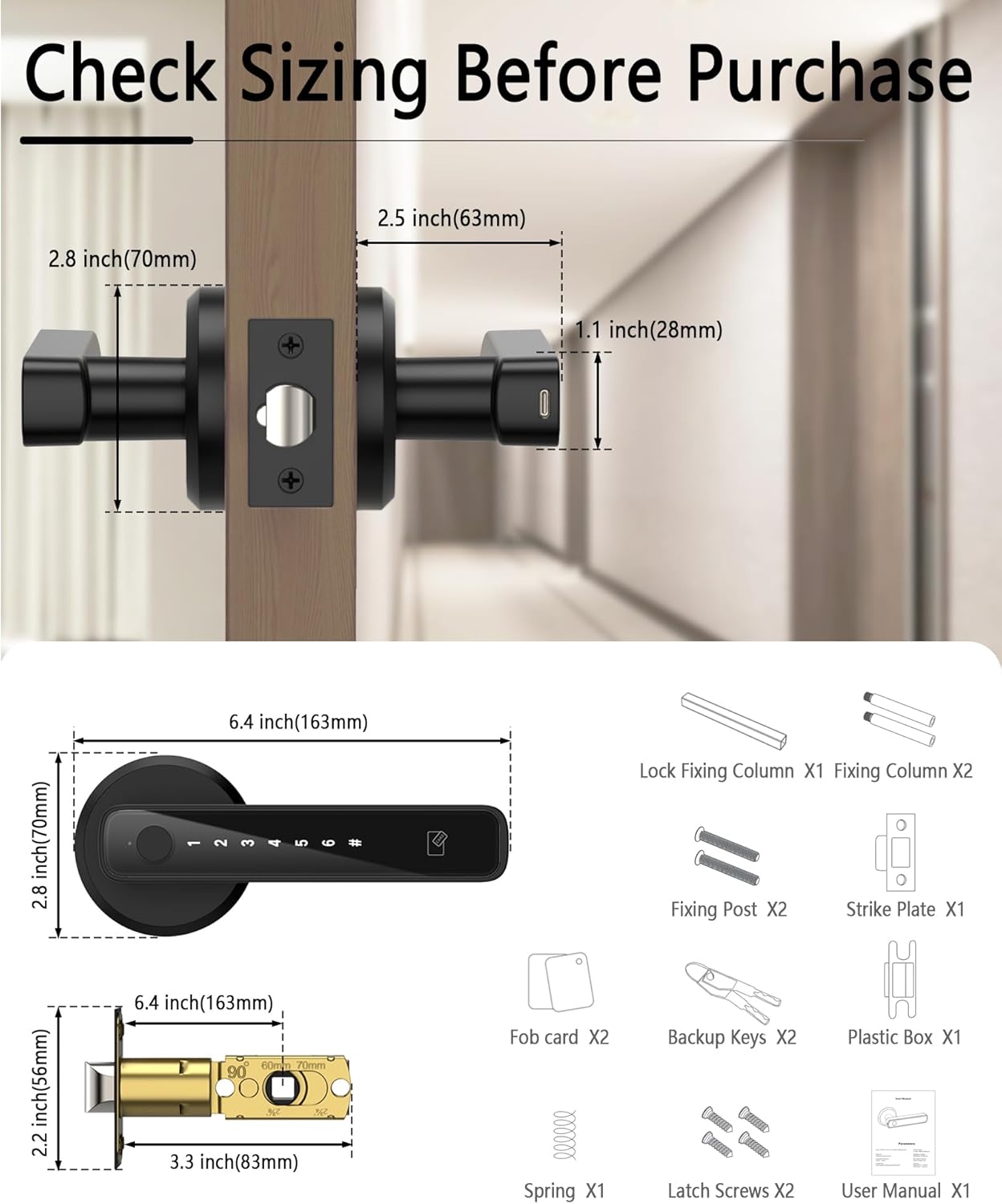
Image: A detailed diagram illustrating the dimensions of the lock components and a list of all included parts such as the lock fixing column, fixing column, fixing post, strike plate, fob cards, backup keys, plastic box, spring, latch screws, and user manual.
Specifications
| Feature | Specification |
|---|---|
| Model Number | ADSL0001MB-1 |
| Material | Aluminum Alloy |
| Color | Black |
| Unlock Methods | Fingerprint, Passcode, App, Keys, Card |
| Fingerprint Capacity | Up to 50 |
| Passcode Capacity | Up to 100 |
| Recognition Speed | <1 second |
| False Recognition Rate (FRR) | <0.01% |
| Power Supply | 4 x AAA Batteries (not included) |
| Battery Life | Up to 10 months (20 operations/day) |
| Emergency Power | Type-C USB Port |
| Door Thickness Compatibility | 1-3/8" to 2-1/8" (35mm-55mm) |
| Backset Compatibility | 2-3/8" and 2-1/8" (60/70mm) |
| Door Handing | Left/Right-handed doors (reversible) |
Setup and Installation
The Asidrama Smart Fingerprint Door Lock is designed for easy installation, typically taking around 20 minutes with basic tools. No wiring is required.
1. Prepare Your Door
- Ensure your door thickness is between 1-3/8" and 2-1/8" (35mm-55mm).
- Verify the backset distance (distance from door edge to center of bore hole) is either 2-3/8" or 2-1/8" (60mm or 70mm).
- The lock is compatible with both left and right-handed doors. Adjust the handle direction as needed during installation.

Image: A visual guide demonstrating the simple installation process, including measurements for door thickness and backset distance, and showing how the lock can be configured for both left-handed and right-handed doors.
2. Install the Latch
Insert the latch into the door edge and secure it with screws. Ensure the latch bolt faces the correct direction for your door swing.
3. Install the Exterior Handle
Feed the cable from the exterior handle through the door bore hole. Align the handle with the latch and secure it.
4. Install the Interior Handle
Connect the cable from the exterior handle to the interior handle. Secure the interior handle to the door using the provided screws.
5. Insert Batteries
Open the battery compartment on the interior handle and insert 4 AAA batteries. Close the compartment.

Image: A visual representation highlighting the quick 15-minute installation process, showing the lock components being assembled on a door, emphasizing its adaptability for various settings.
Operating Instructions
Unlocking Methods
The Asidrama Smart Fingerprint Door Lock offers five convenient ways to unlock:
- Fingerprint: Place your registered finger on the semiconductor fingerprint sensor. The lock will unlock in less than 1 second.
- Passcode: Enter your programmed passcode on the keypad, followed by the '#' key.
- Tuya Smart App: Use the Tuya Smart App on your smartphone to remotely unlock the door via Bluetooth.
- Emergency Keys: Insert and turn one of the provided physical keys into the hidden keyhole.
- Fob Cards: Tap a registered fob card against the card reader area on the exterior handle.

Image: A collage demonstrating the five different unlocking methods: Fingerprint, Keypad, App, Keys, and Cards, showing a hand interacting with each method on the lock.
Tuya Smart App Control
The Tuya Smart App provides comprehensive control and monitoring features for your lock:
- User Management: Add, modify, or delete fingerprints, passcodes, and fob cards for different users.
- Battery Display: Monitor the current battery level of the lock.
- Unlock Record: View a history of all unlock events, including method and timestamp.
- Temporary Passwords: Generate time-limited or one-time passcodes for guests or service providers.
- Bluetooth Unlock: Unlock the door directly from the app when within Bluetooth range.
- Silent Mode: Mute audible alerts and mechanical sounds for quiet operation, ideal for nighttime.

Image: A visual representation of the Tuya Smart App interface on a smartphone, surrounded by icons representing its intelligent control features: User Management, Battery Display, Unlock Record, Temporary Password, Bluetooth Unlock, and Silent Mode.
Advanced Security Features
- Anti-Peeping Virtual Password: When entering your passcode, you can input random digits before or after your actual code to prevent others from guessing it. The lock will still recognize the correct sequence within the longer string.
- Auto-Lock Function: The lock can be configured to automatically re-lock after a set period (e.g., 10 seconds) once unlocked, ensuring your door is always secured. This setting can be adjusted in the Tuya app.
- Real-time Notifications: Receive instant notifications on your smartphone via the Tuya app whenever the lock is accessed, providing a log of entries and exits.

Image: A graphic illustrating the anti-peeping virtual password feature, showing how random numbers can be entered before and after the real password to obscure it from onlookers.

Image: A visual showing the smart lock on a door with a smartphone displaying an "Auto Lock Opened" notification, demonstrating the automatic re-locking feature for enhanced security.
Emergency Power and Battery Life
The lock is powered by 4 AAA batteries, providing approximately 10 months of usage based on 20 operations per day. The Tuya App will provide low-battery alerts. In case of complete battery depletion, the lock features a Type-C emergency charging port on the exterior handle. Connect a portable power bank to temporarily power the lock for entry. Alternatively, use the physical emergency keys.

Image: A visual showing the battery compartment of the smart lock, indicating a 300-day battery life. Below, two smaller images demonstrate the Type-C emergency charging port being used with a power bank and the physical emergency key being inserted into the lock.
Maintenance
- Cleaning: Wipe the lock surface with a soft, dry cloth. Avoid using abrasive cleaners or solvents that may damage the finish or electronic components.
- Battery Replacement: Replace all 4 AAA batteries when the low-battery alert is triggered. Ensure correct polarity.
- Fingerprint Sensor: Keep the fingerprint sensor clean and dry for optimal performance.
- Mechanical Check: Periodically check that all screws are tight and the handle operates smoothly.
Troubleshooting
| Problem | Possible Cause | Solution |
|---|---|---|
| Fingerprint not recognized | Finger dirty/wet, unregistered fingerprint, sensor issue | Clean finger and sensor. Ensure finger is registered. Try re-registering fingerprint. Use alternative unlock method. |
| Keypad not responding | Low battery, keypad malfunction | Replace batteries. Use emergency key or power bank. |
| Tuya App cannot connect to lock | Bluetooth off, app not paired, lock not in pairing mode, app version issue | Ensure phone Bluetooth is on. Tap lock keypad to activate. Follow app pairing instructions. Update app to latest version. |
| Lock does not unlock after successful authentication | Mechanical issue, handle orientation incorrect | Check if handle is properly installed and rotates freely. Ensure correct handle orientation (up/down) for unlocking. Re-install if necessary. |
| Batteries drain quickly | Poor quality batteries, frequent usage, environmental factors | Use high-quality alkaline AAA batteries. Reduce unnecessary operations. |
Warranty and Support
The Asidrama Smart Fingerprint Door Lock comes with a 1-year warranty and replacement service from the date of purchase. This warranty covers manufacturing defects and malfunctions under normal use.
For any questions, technical assistance, or warranty claims, please contact Asidrama customer support. We are committed to providing premium customer support and guarantee a satisfactory response within 24 hours.
Contact Information: Please refer to the contact details provided on the product packaging or the official Asidrama website for the most up-to-date support channels.


