
1. Introduction
Welcome to the user manual for your new roborock Q10 X5 Robot Vacuum and Mop Combo. This advanced cleaning device is designed to provide efficient and thorough cleaning of your home with its powerful 10,000 Pa HyperForce suction, intelligent navigation, and dual anti-tangle system. This manual will guide you through the setup, operation, maintenance, and troubleshooting of your robot vacuum to ensure optimal performance and longevity.
2. Safety Information
Please read this safety information carefully before using the product and save it for future reference. Failure to follow these instructions may result in electric shock, fire, or serious injury.
- Ensure the power voltage matches the product's requirements.
- Do not use the product in wet environments or near water.
- Keep the product away from heat sources and open flames.
- Do not allow children or pets to operate the product without supervision.
- Before cleaning, remove any loose cables, small objects, or fragile items from the floor to prevent entanglement or damage.
- Do not use the product to clean up burning or smoking materials.
- Only use manufacturer-specified attachments and accessories.
- If the power cord is damaged, it must be replaced by the manufacturer, its service agent, or similarly qualified persons to avoid a hazard.
3. Package Contents
Verify that all components are present in your package:
- Robot Vacuum x 1
- Charging Dock x 1
- Adapter x 1
- Mop Module x 1
- Mop x 1
- Moisture-Proof Mat x 1
- User Manual x 1
4. Product Overview
The roborock Q10 X5 is equipped with advanced features for comprehensive home cleaning.

Figure 4.1: Roborock Q10 X5 Robot Vacuum and Mop Combo with companion app on phone and smartwatch.
4.1 Key Features
- Impressive HyperForce 10,000 Pa Suction: Designed to lift hair, dust, and debris from deep carpet fibers and floor crevices.
- Dual Anti-Tangle System: Features a JawScrapers Comb main brush and an anti-tangle arc side brush to minimize hair tangles and reduce maintenance.
- Grande Mop with Auto-Lifting System: Intelligently detects carpets and lifts the mop automatically, also assisting in gliding over thresholds up to 2cm.
- High-Intensity Mopping: Provides a deep, thorough clean, tackling stubborn dirt with enhanced slow-mop action.
- PreciSense LiDAR Navigation & Smart Suggestions: Scans 360° to create detailed maps, stores multiple floor plans, and suggests No-Go Zones.
- Reactive Tech Obstacle Avoidance: Uses structured light technology to detect and navigate around obstacles in cluttered rooms.
- Roborock App Control: Offers customizable cleaning for each room and floor, temporary cleaning, and floor-aligned navigation. Supports 2.4GHz Wi-Fi.
- Intelligent Carpet Cleaning: Automatically boosts suction on carpets and allows customizable settings for carpet cleaning.
- Off-Peak Charging: Smart charging feature to utilize lower electricity rates.

Figure 4.2: The robot vacuum effectively removes debris with its powerful 10,000 Pa suction.
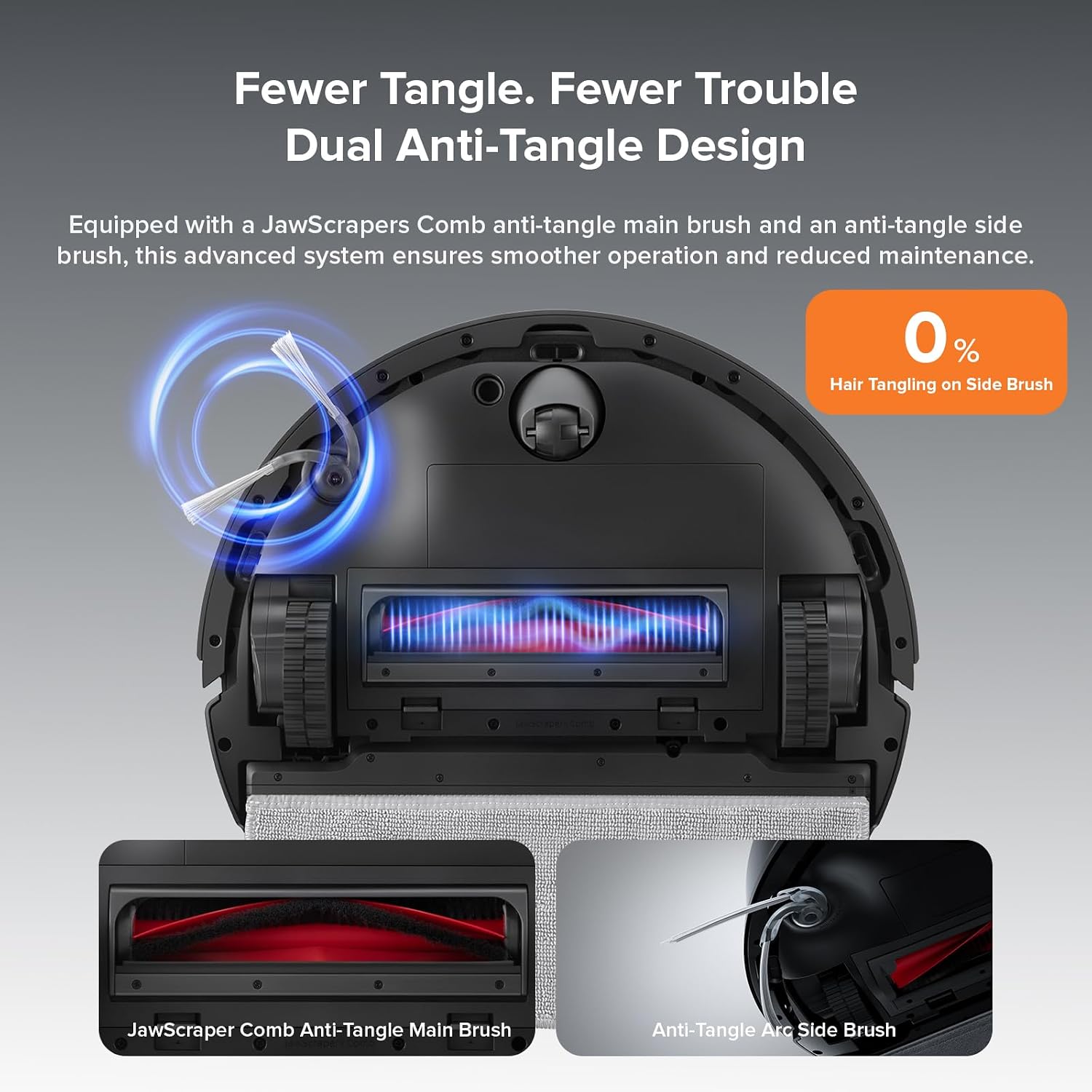
Figure 4.3: Close-up view of the dual anti-tangle system, showing the main brush and side brush designed to prevent hair tangling.

Figure 4.4: The robot vacuum demonstrating its auto-lifting mop system, allowing it to clear obstacles and transition between floor types.

Figure 4.5: The robot vacuum actively mopping a hard floor, effectively removing liquid spills and debris.

Figure 4.6: Visual representation of the robot vacuum's LiDAR navigation system scanning and mapping its environment.

Figure 4.7: The robot vacuum intelligently avoiding common household obstacles like slippers and toys using its reactive tech.

Figure 4.8: The Roborock app interface displaying various cleaning modes and room-specific settings for personalized cleaning.
5. Setup
Follow these steps to set up your roborock Q10 X5 for the first time:
- Unpack the Robot: Carefully remove the robot vacuum and all accessories from the packaging.
- Place the Charging Dock: Position the charging dock against a wall on a hard, level surface. Ensure there is at least 0.5 meters (1.6 feet) of clear space on both sides and 1.5 meters (4.9 feet) in front of the dock. Connect the adapter to the dock and plug it into a power outlet.
- Charge the Robot: Place the robot vacuum on the charging dock. The robot will power on automatically and begin charging. Ensure it is fully charged before the first use.
- Download the Roborock App: Search for "Roborock" in your mobile app store (App Store for iOS or Google Play Store for Android) and download the official app.
- Connect to Wi-Fi: Open the Roborock app and follow the on-screen instructions to add your device. You will need to connect the robot to your home's 2.4GHz Wi-Fi network. If you encounter issues, temporarily disable any VPNs on your router or device.
- Initial Mapping: Once connected, initiate a quick mapping run through the app. The robot will use its LiDAR navigation to create a detailed map of your home. This map is crucial for efficient cleaning and allows for setting up custom cleaning zones and No-Go Zones.
6. Operating Instructions
Control your roborock Q10 X5 using the Roborock app or voice commands.
6.1 Using the Roborock App
- Start/Pause Cleaning: Tap the "Clean" button in the app to start a cleaning cycle. Tap again to pause.
- Cleaning Modes: Select from various cleaning modes such as Quiet, Mild, Balanced, Turbo, and Max suction levels. You can also choose specific mopping intensities.
- Scheduled Cleaning: Set up daily or weekly cleaning schedules for specific rooms or the entire house.
- Zone Cleaning: Draw specific areas on the map for the robot to clean.
- Spot Cleaning: Direct the robot to clean a small, concentrated area.
- No-Go Zones & Invisible Walls: Define areas the robot should avoid, such as pet bowls or fragile items.
- Multi-Level Mapping: If you have a multi-story home, the robot can store maps for different floors.
- Carpet Settings: Customize how the robot handles carpets, including automatic suction boost or avoiding carpets during mopping.
- Temporary Cleaning: Quickly initiate a cleaning task for immediate messes.
6.2 Voice Control
The roborock Q10 X5 is compatible with Amazon Alexa and Google Home. Link your Roborock account in the respective smart home app to enable voice commands.
- Example commands:
- "Alexa, ask Roborock to start cleaning."
- "Google, clean the living room."
7. Maintenance
Regular maintenance ensures your roborock Q10 X5 operates efficiently and extends its lifespan. The Roborock app tracks component lifespan and suggests when maintenance is due.
- Emptying the Dustbin: Empty the dustbin after each cleaning cycle or when prompted by the app.
- Cleaning the Filter: Tap the filter to remove loose dirt. Rinse the filter with water as needed (check app for specific instructions on washable filters) and allow it to air dry completely before reinserting.
- Cleaning the Main Brush: Remove the main brush and use the cleaning tool to cut and remove any tangled hair or debris. Pay attention to the brush ends.
- Cleaning the Side Brush: Remove the side brush and clean any hair or debris wrapped around it.
- Cleaning the Mop Pad: Remove and wash the mop pad after each mopping session.
- Cleaning Sensors: Wipe the cliff sensors, wall sensors, and charging contacts with a soft, dry cloth to ensure proper function.
- Cleaning Wheels: Check the wheels for any trapped hair or debris and clean as necessary.
8. Troubleshooting
If you encounter issues with your roborock Q10 X5, refer to the following common problems and solutions:
| Problem | Possible Cause | Solution |
|---|---|---|
| Robot does not power on or charge. | Battery low; charging contacts dirty; power adapter not connected. | Ensure robot is on the charging dock; clean charging contacts; check power connection. |
| Robot cannot connect to Wi-Fi. | Incorrect Wi-Fi password; 5GHz network selected; router issues (e.g., VPN). | Verify password; ensure 2.4GHz network is used; try temporarily disabling VPN or restarting router. |
| Robot gets stuck frequently. | Obstacles on floor; cliff sensors dirty; robot trying to clean a restricted area. | Clear floor of clutter; clean sensors; set up No-Go Zones in the app. |
| Poor cleaning performance. | Dustbin full; brushes tangled; filter clogged. | Empty dustbin; clean main and side brushes; clean or replace filter. |
| Mop leaves streaks or doesn't clean well. | Mop pad dirty or dry; water tank empty. | Clean or replace mop pad; refill water tank. |
For more detailed troubleshooting, refer to the Roborock app's help section or visit the official Roborock support website.
9. Specifications
| Feature | Detail |
|---|---|
| Brand | roborock |
| Model Name | roborock Q10 X5 |
| Special Features | 10000Pa HyperForce, Dual Anti-Tangle System, Auto-Lifting Mopping System, High-Intensity Mop, Roborock APP Control, Off-Peak Charging, Smart No-Go Zones Suggestions, Quick Mapping, Multi-Level Mapping, Reactive Tech Obstacle Avoidance, PreciSense LiDAR, Intelligent Carpet Cleaning, JawScrapers Comb Anti-Tangle Main Brush, Anti-Tangle Arc Side Brush |
| Color | Black |
| Product Dimensions | 16.14"L x 13.9"W x 3.98"H |
| Included Components | Robot Vacuum, Charging Dock, Adapter, Mop Module, Mop, Moisture-Proof Mat, User Manual |
| Filter Type | Cartridge |
| Battery Life | 150 minutes |
| Voltage | 120 Volts |
| Power Source | Battery Powered |
| Batteries Included | Yes (1 AA batteries required, included) |
| Control Method | App, Touch |
| Compatible Devices | Smartphones, Tablets, Smartwatches |
| Form Factor | Round |
| UPC | 195043007281 |
| Item Weight | 10.36 pounds |
| Manufacturer | roborock |
| ASIN | B0DSP5GTV4 |
| Country of Origin | China |
10. Warranty and Support
For warranty information, please refer to the warranty card included with your product or visit the official Roborock website. If you require technical support or have questions not covered in this manual, please contact Roborock customer service.
You can also visit the official Roborock store for more information and support resources: Roborock Official Store


