
1. Product Overview
The MiBOXER E3-RF 3-in-1 LED Controller is a versatile device designed for controlling RGB, RGBW, and RGB+CCT LED strips. It utilizes 2.4GHz RF wireless technology to provide reliable and responsive control over your lighting. This controller allows for precise adjustment of brightness and color temperature, offering a wide range of lighting possibilities for various applications.
Key features include compatibility with multiple LED strip types, smooth dimming and color mixing capabilities, a wide voltage input range, group control functionality, and a memory function that retains your last settings after power-off.
2. Specifications
| Specification | Value |
|---|---|
| Model No. | E3-RF |
| Input Voltage | DC12V~24V |
| Output Current | 6A/Channel |
| Total Output Max | 12A |
| RF Frequency | 2.4GHz |
| Working Temperature | -10~40°C |
| Control Distance | 30m |
| Package Dimensions | 4 x 1.5 x 1 inches |
| Item Weight | 1.6 ounces |
The controller supports switching between RGB, RGBW, and RGB+CCT output modes. It is compatible with Mi-Light / MiBoxer 2.4GHz series remotes.

Image: MiBOXER E3-RF Controller showing physical dimensions and packaging details.
3. Setup and Installation
Before installation, ensure the power supply is disconnected. The E3-RF controller features tool-free instant wiring terminals for easy connection.
3.1 Wiring Connections
Identify the input and output terminals on the controller. The input side is labeled 'INPUT' and the output side is labeled 'OUTPUT'.
- Input (V+): Connect the positive (+) wire from your DC12V~24V power supply.
- Input (V-): Connect the negative (-) wire from your DC12V~24V power supply.
- Output (V+): Connect the common positive (+) wire of your LED strip.
- Output (R, G, B, W, CW, WW): Connect the corresponding color wires from your LED strip to these terminals based on your LED strip type (RGB, RGBW, or RGB+CCT).
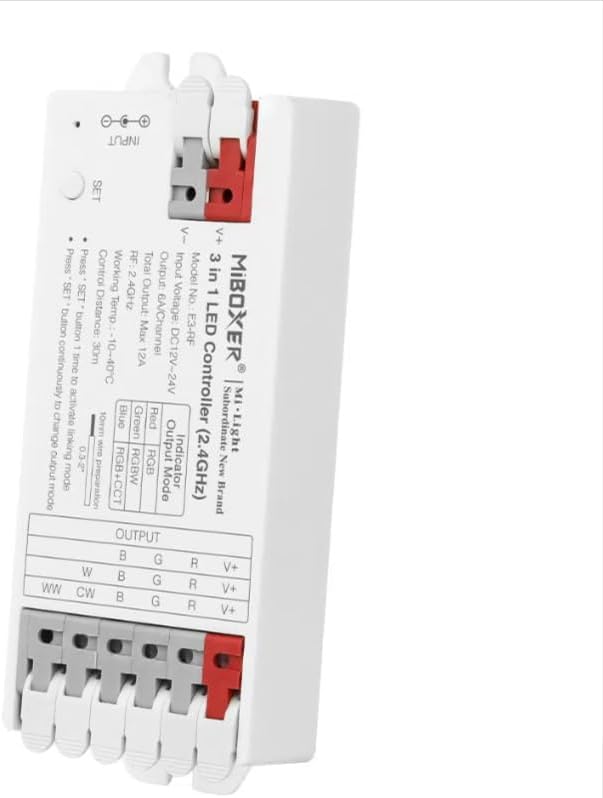
Image: Top view of the MiBOXER E3-RF controller, clearly showing the input and output wiring terminals for power and LED strips.

Image: Detailed view of the controller highlighting the LED light interface, classic PC material, two power interfaces, and the SET button.
3.2 Output Mode Selection
The E3-RF controller supports three output modes: RGB, RGBW, and RGB+CCT. The current output mode is indicated by an LED on the controller:
- Red: RGB Mode
- Green: RGBW Mode
- Blue: RGB+CCT Mode
To change the output mode, press the 'SET' button continuously until the desired mode indicator color is displayed.
4. Operating Instructions
4.1 Linking with a Remote Control
To control the E3-RF controller wirelessly, it must be linked with a compatible Mi-Light / MiBoxer 2.4GHz series remote.
- Ensure the controller is powered on.
- On the controller, press the 'SET' button once to activate linking mode. The indicator light will flash.
- Within 3 seconds of activating linking mode, perform the linking action on your remote control (refer to your remote's specific instructions, typically pressing a 'Link' or 'ON' button for a zone).
- Successful linking is indicated by the controller's light flashing or changing color.

Image: A hand holding a MiBOXER remote control, demonstrating wireless control of LED lighting in a room.
4.2 Brightness and Color Temperature Adjustment
Once linked, you can adjust the brightness and color temperature using your compatible remote control. The E3-RF controller offers smooth dimming and precise color temperature control for customizable ambiance.
- Brightness: Adjust the light intensity from 0% to 100%.
- Color Temperature: Fine-tune the white balance from warm white to cool white (for RGB+CCT mode).
- Color Selection: Access 16 million colors for RGB and RGBW modes.

Image: An infographic illustrating the controller's capabilities, including 16 million color options, adjustable saturation, color temperature, and smooth brightness control.
4.3 Group Control and Memory Function
- Group Control: Multiple E3-RF controllers can be linked to different zones on a single remote, allowing for synchronized control of large-scale lighting setups.
- Memory Function: The controller retains the last settings (brightness, color, mode) even after power is turned off and on, ensuring convenience and consistent lighting.
4.4 Smartphone App and Voice Control (Requires 2.4GHz Gateway)
For advanced control options, the E3-RF controller can be integrated with smartphone apps and third-party voice control systems (e.g., Amazon Alexa, Google Assistant) by using a compatible MiBOXER 2.4GHz gateway (sold separately).
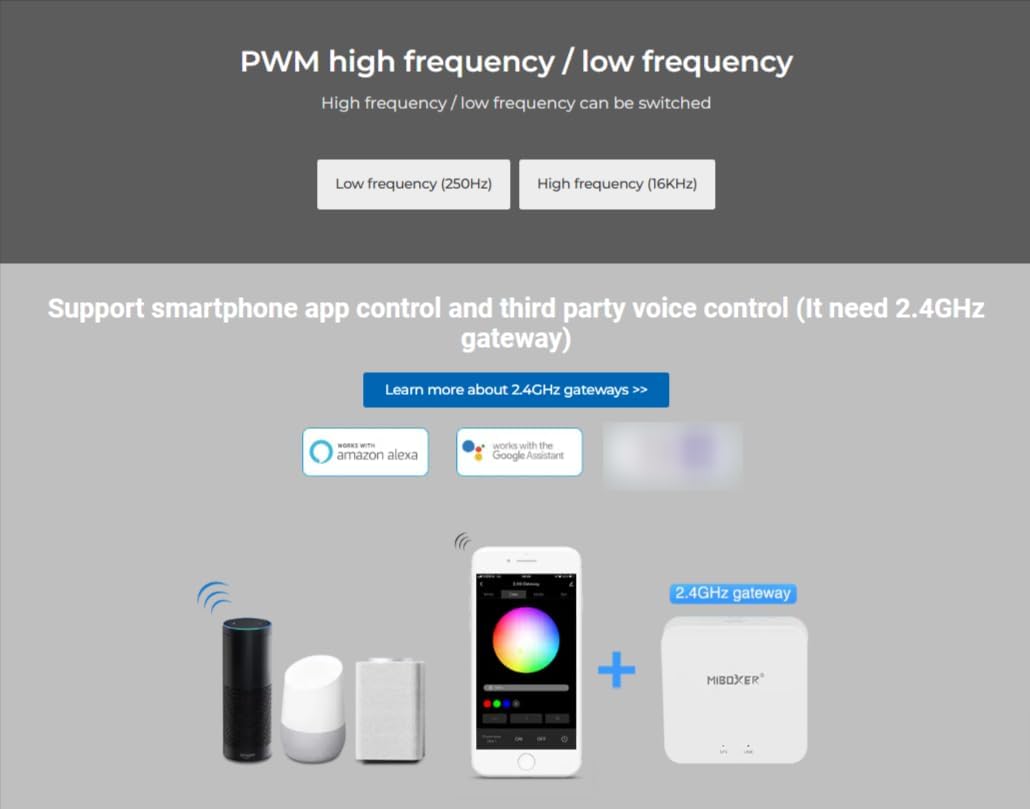
Image: A diagram illustrating how the controller can be integrated with a smartphone app and voice assistants via a 2.4GHz gateway.
5. Maintenance
The MiBOXER E3-RF LED Controller requires minimal maintenance. To ensure optimal performance and longevity:
- Keep the device clean and free from dust. Use a soft, dry cloth for cleaning.
- Avoid exposing the controller to excessive moisture, direct sunlight, or extreme temperatures.
- Do not attempt to open or repair the device yourself, as this may void the warranty and cause damage.
6. Troubleshooting
If you encounter issues with your E3-RF LED Controller, refer to the following common troubleshooting steps:
- No Power/Lights Not Turning On:
- Check all wiring connections to ensure they are secure and correctly polarized (V+ to V+, V- to V-).
- Verify that the power supply is providing the correct voltage (DC12V~24V) and sufficient current for your LED strip.
- Ensure the power outlet is functional.
- Remote Control Not Responding:
- Confirm the controller is properly linked with the remote control (refer to Section 4.1).
- Check the batteries in your remote control and replace if necessary.
- Ensure there are no significant obstructions between the remote and the controller that could interfere with the 2.4GHz signal.
- Incorrect Colors/Modes:
- Verify that the LED strip wires are connected to the correct output terminals (R, G, B, W, CW, WW).
- Ensure the controller's output mode is correctly set for your LED strip type (RGB, RGBW, or RGB+CCT) by pressing the 'SET' button continuously.
- Flickering Lights:
- Ensure the power supply is stable and provides enough power for the entire length of your LED strip.
- Check for loose connections.
If the issue persists after following these steps, please contact customer support.
7. Warranty and Support
The MiBOXER E3-RF 3-in-1 LED Controller is manufactured by Miboxer. For specific warranty information, please refer to the documentation provided with your purchase or contact the seller directly. General support for MiBOXER products can be found through the official MiBOXER website or by contacting their customer service department.
Please retain your proof of purchase for any warranty claims or support inquiries.


