
1. Introduction
Thank you for choosing the Blackview Airbuds 200 Bluetooth Sport Earbuds. These open-ear earbuds are designed to provide a comfortable and immersive audio experience for various activities, from sports to daily commutes. Featuring advanced noise cancellation, long battery life, and robust water resistance, the Airbuds 200 are built for performance and durability.
2. Safety Information
- Hearing Protection: To avoid hearing damage, do not listen at high volume levels for extended periods.
- Driving Safety: Do not use earbuds while driving or cycling, or in any situation where inability to hear surrounding sounds could be dangerous.
- Choking Hazard: Keep earbuds and accessories out of reach of children and pets to prevent accidental ingestion.
- Temperature: Do not expose the product to extreme temperatures (below 0°C or above 45°C).
- Cleaning: Use a soft, dry cloth for cleaning. Do not use harsh chemicals or abrasive materials.
- Disassembly: Do not attempt to disassemble or modify the earbuds or charging case. This will void the warranty.
3. Package Contents
Please check the package for the following items:
- Blackview Airbuds 200 Earbuds (Left and Right)
- Charging Case
- USB-C Charging Cable
- User Manual
4. Setup
4.1. Charging the Earbuds and Case
Before first use, fully charge the earbuds and the charging case.
- Place the earbuds into the charging case. Ensure they are correctly seated.
- Connect the USB-C charging cable to the charging port on the case and the other end to a power source (e.g., USB wall adapter, computer USB port).
- The LED display on the charging case will indicate the battery level. A full charge typically takes approximately 1.5-2 hours.
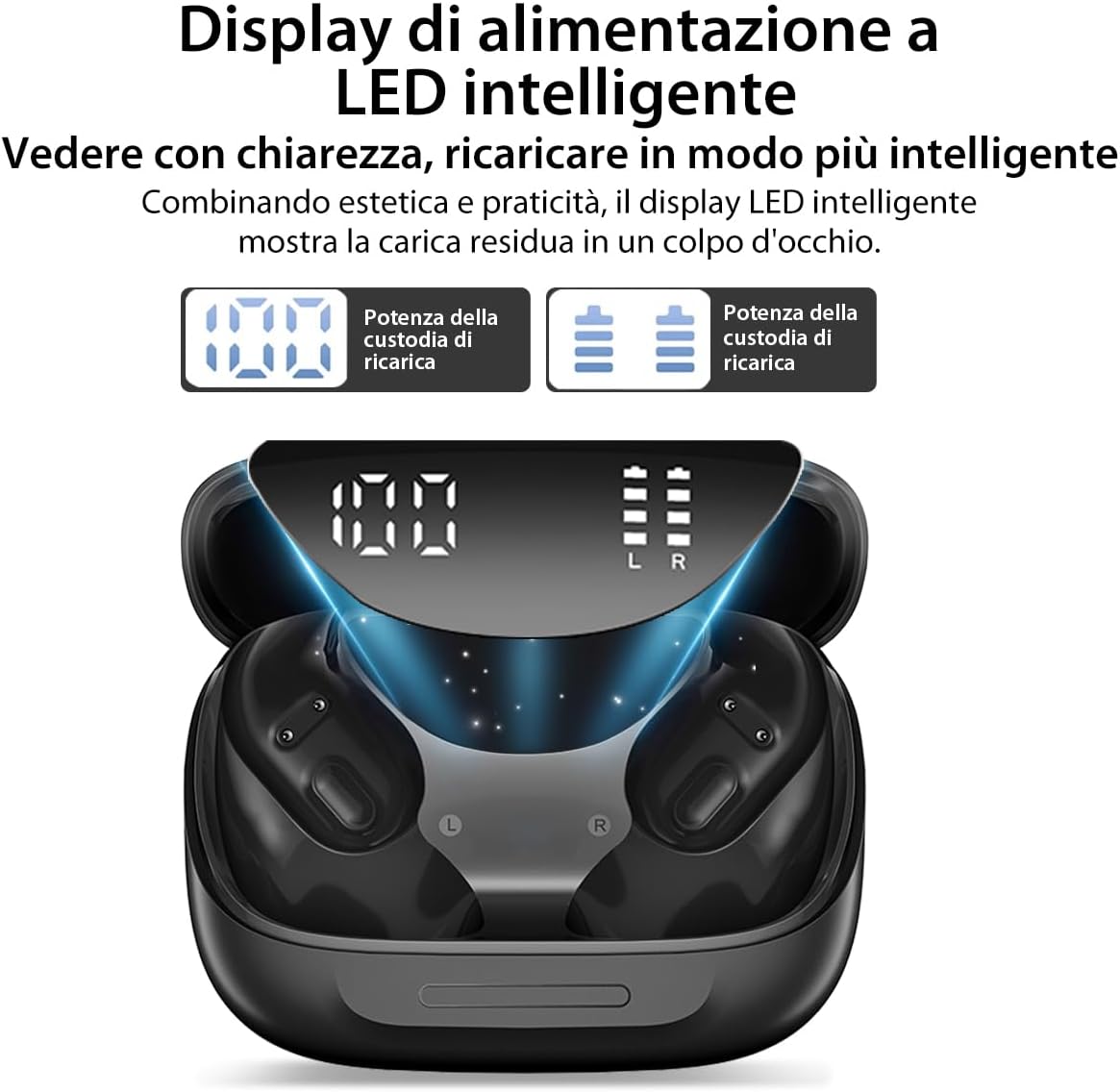
Figure 4.1: The charging case features an intelligent LED display that shows the remaining battery percentage for the case and individual earbud charging status.
4.2. Pairing with Your Device
The Airbuds 200 use Bluetooth 5.4 for a stable and low-latency connection.
- Open the charging case. The earbuds will automatically enter pairing mode, indicated by a flashing light on the earbuds.
- On your device (smartphone, tablet, computer), go to the Bluetooth settings.
- Search for available devices and select "Blackview Airbuds 200" from the list.
- Once connected, the indicator light on the earbuds will turn off or show a steady light, and your device will confirm the connection.

Figure 4.2: The Blackview Airbuds 200 earbuds and their charging case, ready for pairing.
4.3. Wearing the Earbuds
The Airbuds 200 feature an open-ear design with ergonomic ear hooks for a secure and comfortable fit.
- Identify the Left (L) and Right (R) earbuds.
- Gently place the earbud over your ear, ensuring the ear hook rests comfortably behind your ear and the speaker portion is positioned near your ear canal without entering it.
- Adjust for a snug and stable fit. The open-ear design allows you to remain aware of your surroundings.

Figure 4.3: The innovative open-ear design of the Airbuds 200 provides comfort by not blocking the ear canal, allowing for situational awareness.
5. Operating Instructions
The Airbuds 200 feature intuitive touch controls on each earbud.
5.1. Basic Functions
| Action | Left Earbud | Right Earbud |
|---|---|---|
| Play/Pause Music | Single tap | Single tap |
| Next Track | Triple tap | Triple tap |
| Previous Track | N/A | N/A |
| Volume Up | Single tap (after pause) or press and hold | N/A |
| Volume Down | N/A | Single tap (after pause) or press and hold |
| Answer/End Call | Single tap | Single tap |
| Reject Call | Press and hold for 2 seconds | Press and hold for 2 seconds |
| Activate Voice Assistant | Double tap | Double tap |
Note: Specific touch control functions may vary slightly depending on your device and operating system.
5.2. Noise Cancellation (ENC)
The Airbuds 200 feature advanced Environmental Noise Cancellation (ENC) with dual microphones, powered by AI, to ensure clear calls by isolating your voice from background noise. This feature is automatically active during calls.
5.3. Power On/Off
- Power On: Open the charging case, and the earbuds will automatically power on and attempt to connect to the last paired device.
- Power Off: Place the earbuds back into the charging case and close the lid. They will automatically disconnect and power off.
6. Maintenance
6.1. Cleaning
- Regularly clean the earbuds and charging case with a soft, dry, lint-free cloth.
- Do not use abrasive cleaners, alcohol, or chemical solvents.
- Ensure charging contacts on both earbuds and case are clean and free of debris to maintain proper charging.
6.2. Storage
- Store the earbuds in their charging case when not in use to protect them and keep them charged.
- Store in a cool, dry place, away from direct sunlight and extreme temperatures.
6.3. Water Resistance (IP68)
The Airbuds 200 are rated IP68, meaning they are resistant to dust and can withstand immersion in water up to 1.5 meters for 30 minutes. They are suitable for use during intense workouts, in rain, or near water. However, they are not designed for swimming or prolonged underwater use.

Figure 6.1: The IP68 rating ensures the Airbuds 200 are protected against sweat, rain, and dust, making them ideal for various environments.
7. Troubleshooting
| Problem | Possible Cause | Solution |
|---|---|---|
| Earbuds not pairing/connecting | Earbuds not in pairing mode; Bluetooth off on device; Device too far; Interference. | Ensure earbuds are in pairing mode (open case). Turn Bluetooth off/on on your device. Move closer to your device. Clear previous Bluetooth connections on your device. |
| Only one earbud working | Low battery on one earbud; Earbuds not properly synced. | Place both earbuds back in the charging case, close the lid, wait a few seconds, then open again. Ensure both earbuds are charged. |
| No sound or low volume | Volume too low on device/earbuds; Earbuds not connected; Dirty speaker mesh. | Increase volume on both your device and the earbuds. Reconnect earbuds. Gently clean the speaker mesh with a dry cotton swab. |
| Charging issues | Dirty charging contacts; Faulty cable/charger. | Clean the charging contacts on both earbuds and case. Try a different USB-C cable and power adapter. |
| Poor call quality | Environmental noise; Microphone obstruction. | Ensure the ENC feature is active. Check if the microphone ports are clear of debris. |
8. Specifications
| Feature | Specification |
|---|---|
| Model Name | Airbuds 200 |
| Brand | Blackview |
| Connectivity Technology | Wireless (Bluetooth 5.4) |
| Control Type | Touch Control |
| Water Resistance Rating | IP68 |
| Battery Life (Earbuds) | Up to 6 hours (single charge) |
| Total Battery Life (with Charging Case) | Up to 40 hours |
| Charging Case Battery Capacity | 500 mAh |
| Driver Size | 16mm*12mm Dynamic Driver |
| Noise Cancellation | ENC (Environmental Noise Cancellation) with AI |
| Compatibility | iOS, Android, and other Bluetooth-enabled devices |
| Product Dimensions | 1 x 1 x 1 cm (earbuds); 160 grams (total weight) |
| Material | Plastic |
9. Warranty and Support
9.1. Warranty Information
Blackview products typically come with a standard manufacturer's warranty. Please refer to the warranty card included in your product packaging or visit the official Blackview website for detailed warranty terms and conditions specific to your region.
9.2. Customer Support
For technical assistance, troubleshooting, or warranty claims, please contact Blackview customer support through their official website or the contact information provided in your product documentation. When contacting support, please have your product model (Airbuds 200) and purchase details ready.


