
HOMCOM 921-818V00GY
HOMCOM Office Chair User Manual
Model: 921-818V00GY
Introduction
Thank you for choosing the HOMCOM High Back Desk Chair. This manual provides detailed instructions for assembly, operation, maintenance, and troubleshooting to ensure you get the most out of your new office chair. Please read this manual thoroughly before assembly and use, and retain it for future reference.

The HOMCOM High Back Desk Chair, designed for comfort and support.
Important Safety Information
- Ensure all parts are present and undamaged before assembly. Do not use if any parts are missing or broken.
- Follow the assembly instructions carefully. Incorrect assembly can lead to instability and injury.
- Do not stand on the chair. Use it only for its intended purpose of seating one person.
- Do not use the chair on uneven surfaces.
- Keep children away from the chair during assembly. Small parts may be a choking hazard.
- Do not exceed the maximum weight capacity of 265 lbs (120 kg).
- Regularly check all bolts and screws to ensure they are tightened. Retighten if necessary.
Package Contents
Please verify that all components listed below are included in your package. If any parts are missing or damaged, please contact customer support.

Your HOMCOM Office Chair will arrive in one package.
Refer to the assembly diagram provided with your product for a detailed list of all parts and hardware.
Setup and Assembly
Assembly typically takes 20-30 minutes. It is recommended to assemble the chair on a soft, clean surface to prevent scratches.
- Unpack Components: Carefully remove all parts from the packaging and lay them out on a clean, flat surface. Check against the parts list in your included assembly guide.
- Attach Casters to Base: Insert the five casters into the holes at the end of each leg of the chair base. Push firmly until they click into place.
- Insert Gas Lift: Place the gas lift cylinder into the center hole of the chair base.
- Attach Mechanism to Seat: Align the mechanism (the part with levers) to the underside of the seat cushion. Ensure the front of the mechanism faces the front of the seat. Secure with screws.
- Connect Seat to Gas Lift: Carefully place the assembled seat onto the gas lift cylinder, ensuring it is centered and stable.
- Attach Backrest: Secure the backrest to the seat mechanism using the provided screws.
- Install Armrests: Attach the flip-up armrests to the sides of the seat and backrest, securing them with screws.
- Attach Headrest: Slide the headrest into the designated slot at the top of the backrest.
- Final Check: Once assembled, sit on the chair to ensure all components are securely connected and stable.

The assembled chair ready for use in a home office environment.
Operating Instructions
Your HOMCOM Office Chair is designed with several adjustable features to provide personalized comfort and support.
1. Adjustable Seat Height
To adjust the seat height, locate the lever on the right side under the seat. Pull the lever up while taking your weight off the seat to raise it. To lower the seat, pull the lever up while remaining seated.
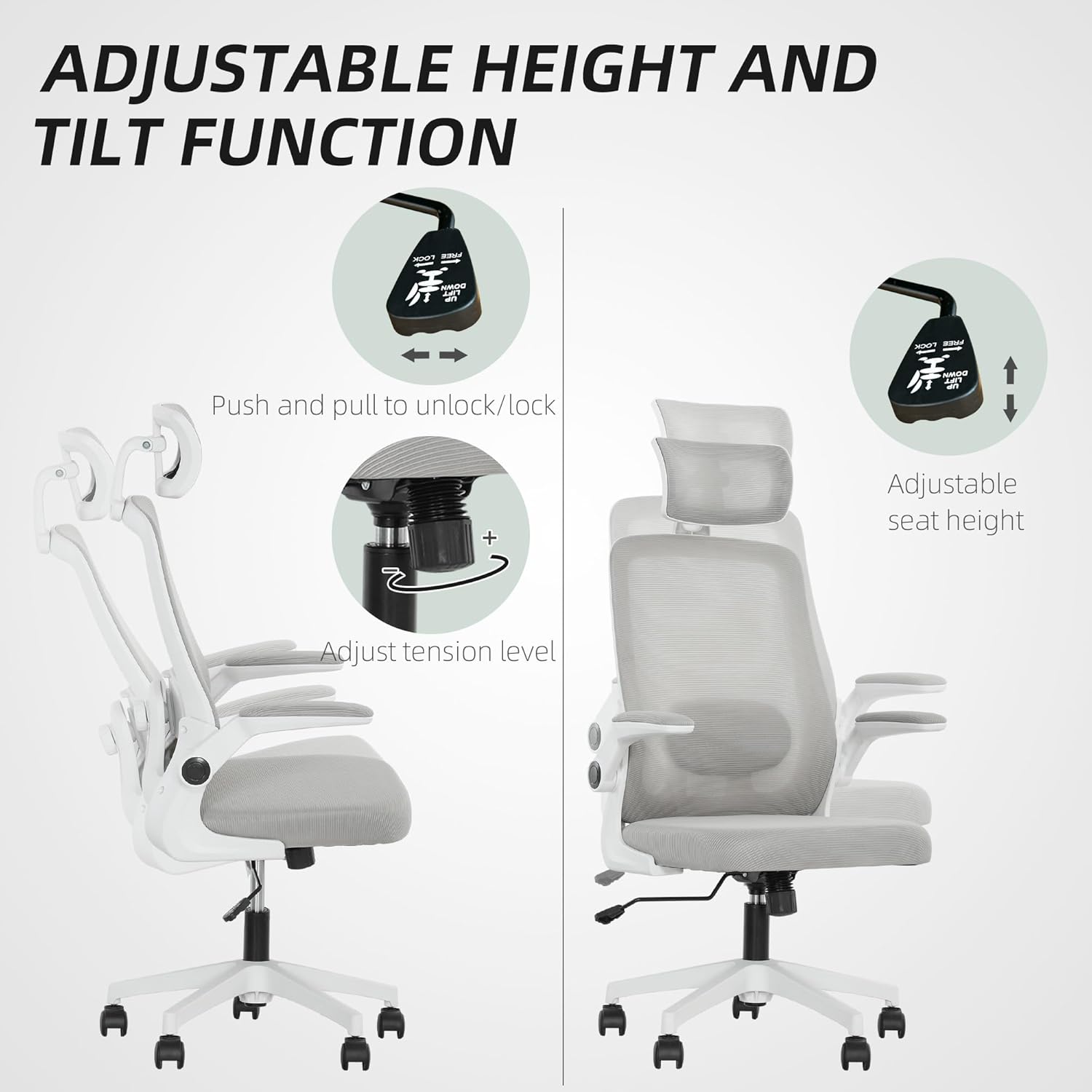
Adjusting seat height and tilt tension for optimal comfort.
2. Tilt Function and Lock
The chair features a tilt function allowing you to rock back and forth. To enable tilting, pull the same lever (on the right side) outwards. To lock the chair in an upright position, push the lever inwards. The tension of the tilt can be adjusted by rotating the round knob located under the seat, at the front of the mechanism.
3. Adjustable Lumbar Support
The lumbar support can be adjusted to fit the curve of your lower back. It can be moved up/down and forward/backward. Locate the adjustment knobs or levers on the backrest to customize the support position.
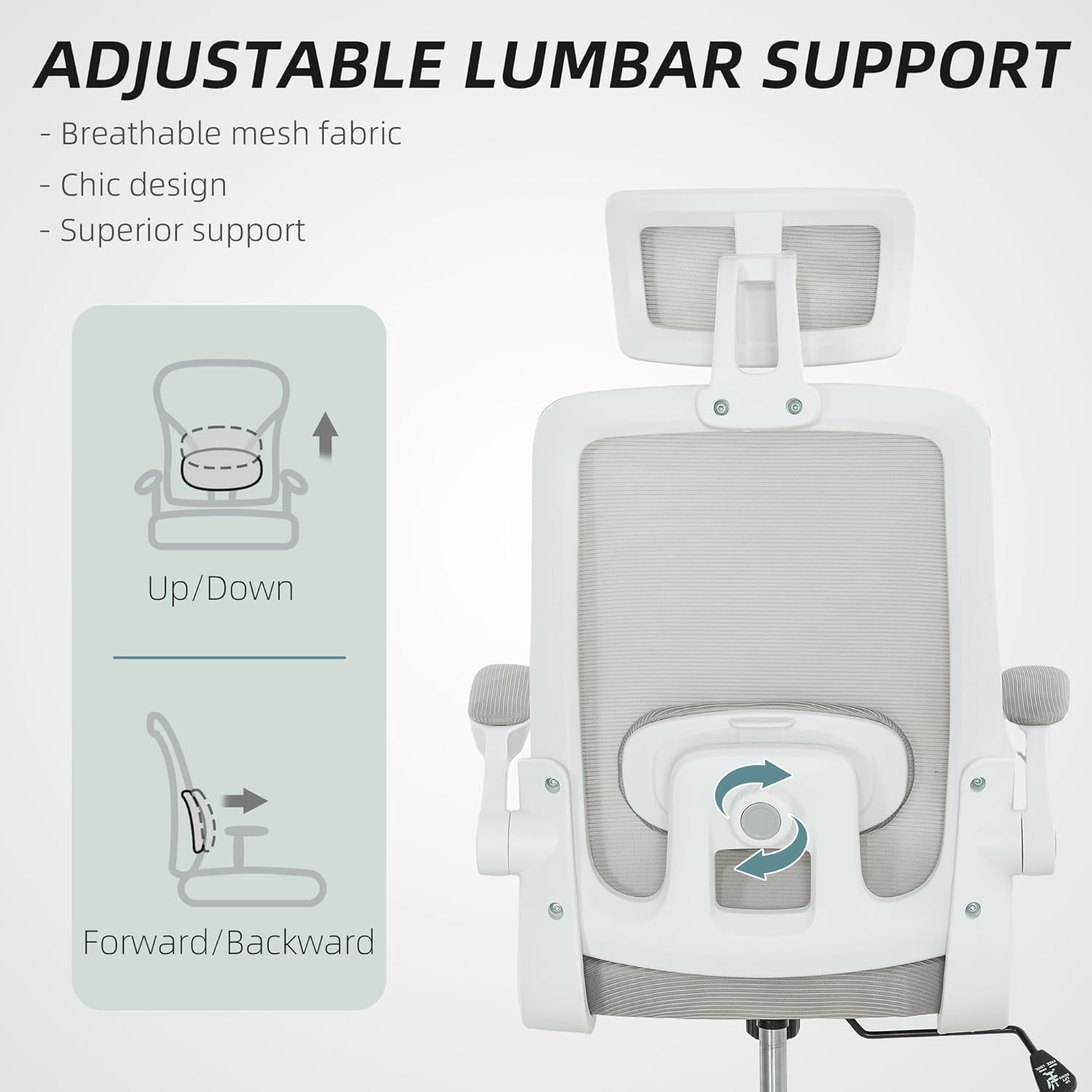
Customize your lumbar support for a healthy spine position.
4. Rotatable and Height-Adjustable Headrest
The headrest can be adjusted in height and rotated to provide optimal neck and head support. Simply grasp the headrest and move it up or down, or rotate it to your desired angle.

Adjust the headrest for personalized neck and head support.
5. Flip-up Armrests
The armrests can be flipped up to allow the chair to be pushed closer to your desk, saving space when not in use. Simply lift the armrests upwards until they lock into the vertical position. To lower them, pull them down.

Flip-up armrests provide versatility and save space.
Maintenance and Care
- Cleaning: Wipe clean with a damp cloth. For mesh and fabric areas, use a mild soap solution if necessary, and blot dry. Avoid harsh chemicals or abrasive cleaners.
- Regular Inspection: Periodically check all screws and bolts to ensure they are tight. Retighten as needed to maintain stability and safety.
- Caster Care: Keep the casters clean from hair and debris to ensure smooth movement.
- Avoid Direct Sunlight: Prolonged exposure to direct sunlight can cause fading of the fabric and mesh.
Troubleshooting
| Problem | Possible Cause | Solution |
|---|---|---|
| Chair wobbles or is unstable | Loose screws or incorrect assembly. | Check all screws and bolts and tighten them securely. Review assembly instructions. |
| Gas lift not adjusting height | Lever not fully engaged or gas lift is faulty. | Ensure the lever is pulled completely. If the issue persists, the gas lift may need replacement. Contact customer support. |
| Casters not rolling smoothly | Debris (hair, dust) caught in casters. | Turn the chair over and remove any debris from the caster wheels. |
| Chair makes squeaking noises | Loose connections or friction between parts. | Tighten all screws. Apply a small amount of silicone lubricant to moving parts if necessary. |
Product Specifications
| Feature | Detail |
|---|---|
| Model Number | 921-818V00GY |
| Color | Grey |
| Overall Dimensions (W x D x H) | 24.4" x 24.4" x 43.3" - 50" |
| Seat Dimensions (W x D) | 19.7" x 19.7" |
| Seat Height Range | 15.7" - 19.7" |
| Maximum Weight Capacity | 265 lbs (120 kg) |
| Material | Mesh fabric, High-density foam, Steel/Plastic base |
| Arm Style | Flip-up |
| Special Features | Adjustable Lumbar, Adjustable Height, Adjustable Headrest, Ergonomic, Tilt Function, Swivel Wheels |

Detailed dimensions of the HOMCOM Office Chair.
Warranty and Support
HOMCOM products are designed for quality and durability. For information regarding warranty coverage, please refer to the warranty card included with your product or visit the official HOMCOM website. Most products come with a standard manufacturer's warranty covering defects in materials and workmanship.
If you encounter any issues with your chair, require replacement parts, or have questions not covered in this manual, please contact HOMCOM customer support. Have your model number (921-818V00GY) and purchase information ready when contacting support.
Customer Service Contact: Please refer to the contact information provided on the HOMCOM official website or your purchase documentation for the most up-to-date support channels.
Return Policy: This product is subject to a 30-day refund/replacement return policy through Amazon. Please refer to Amazon's return policy for full details.
Related documents921-818V00GY


Ask a question about this manual
Ask about setup, troubleshooting, compatibility, parts, safety, or missing instructions. Manuals+ will review the question and use this page’s manual context to help answer it.