1. Introduction
Welcome to the KESIEME YYK Intelligent Touch Screen Open Ear Earbuds user manual. This guide provides detailed instructions on how to set up, operate, maintain, and troubleshoot your new open-ear headphones. Please read this manual thoroughly before using the product to ensure optimal performance and longevity.
Product Overview
The KESIEME YYK earbuds feature an innovative open-ear design for comfort and situational awareness, advanced Bluetooth 5.4 connectivity for stable audio, and a charging case with an intelligent touch screen for intuitive control and real-time information display.
What's in the Box
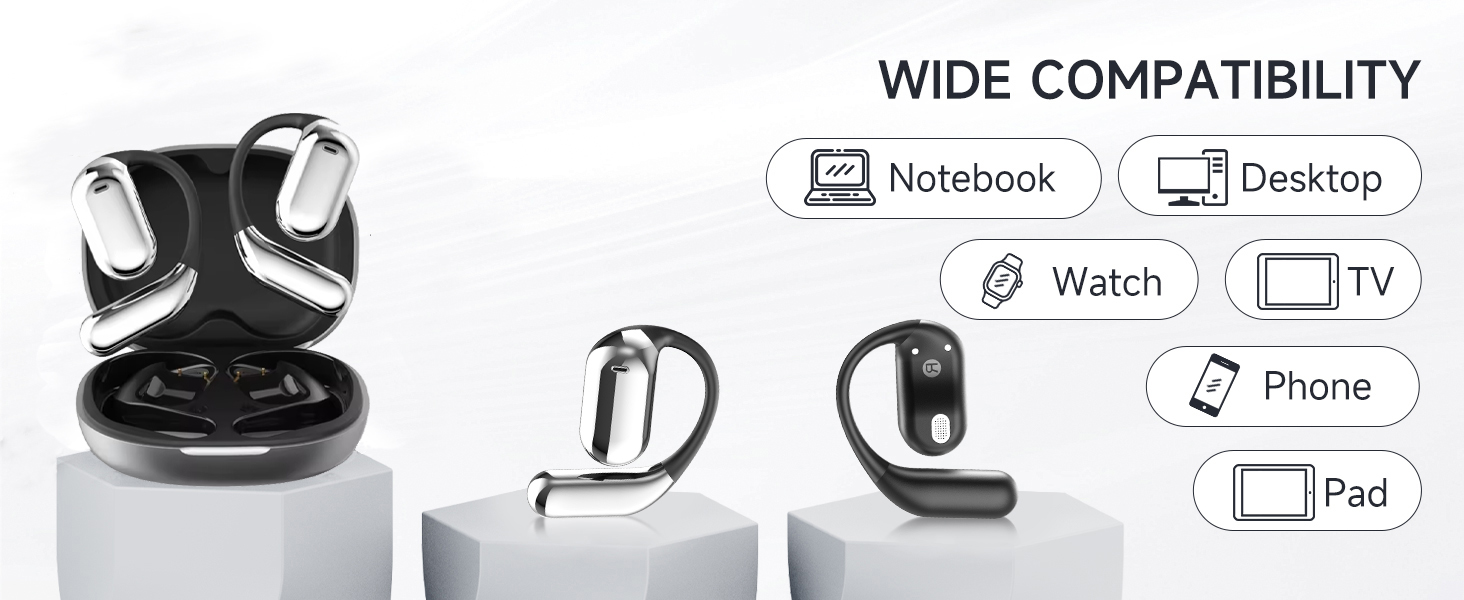
Image: Contents of the KESIEME YYK Earbuds box.
- Open Air Conduction Earphones (2)
- Charging Case (1)
- User Manual (1)
- Type-C Charging Cable (1)
2. Product Features
Open Ear Design

Image: Comparison of open-ear design versus traditional in-ear headphones.
The KESIEME YYK earbuds feature a true open-ear design, resting gently and securely on the top of your ear. This design avoids insertion into the ear canal, reducing pressure and allowing for greater comfort during extended wear. It also enhances situational awareness, allowing you to hear your surroundings while enjoying audio.
Bluetooth 5.4 Connectivity

Image: Benefits of Bluetooth 5.4 technology.
Equipped with the latest Bluetooth 5.4 technology, these earbuds offer a stable and fast wireless connection. This ensures uninterrupted music playback and calls, with a connection range of up to 33 feet (10 meters). The dual-channel transmission improves stability and reduces power consumption.
Premium Sound Quality

Image: 14.2mm dynamic speaker driver for sound quality.
Experience clear and powerful audio with dual 14.2mm air conduction dynamic drivers. These drivers deliver high-fidelity sound with crisp highs and impactful lows, providing an immersive listening experience while minimizing sound leakage.
Extended Playtime & Digital Display
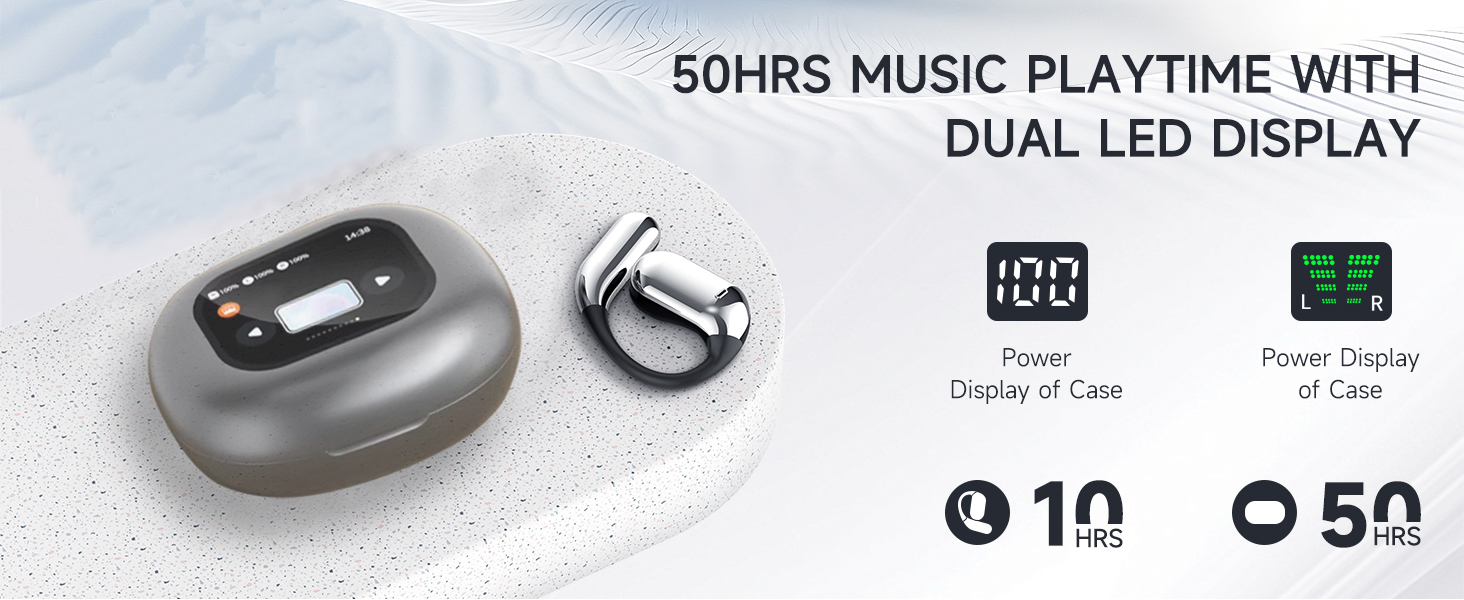
Image: Battery life and LED display features.
The earbuds provide up to 20 hours of playtime on a single charge. The charging case extends the total listening time to approximately 50 hours. The smart LED power display on the case shows the remaining battery level for both the case and individual earbuds in real-time.
Comfortable and Lightweight Fit

Image: Ergonomic design for comfort and fit.
Designed for ultimate comfort, the earbuds feature ergonomic ear hooks made from skin-friendly, ultra-lightweight materials. This ensures a secure fit without discomfort, even during active use like running or fitness activities.
Intelligent Touch Screen Case
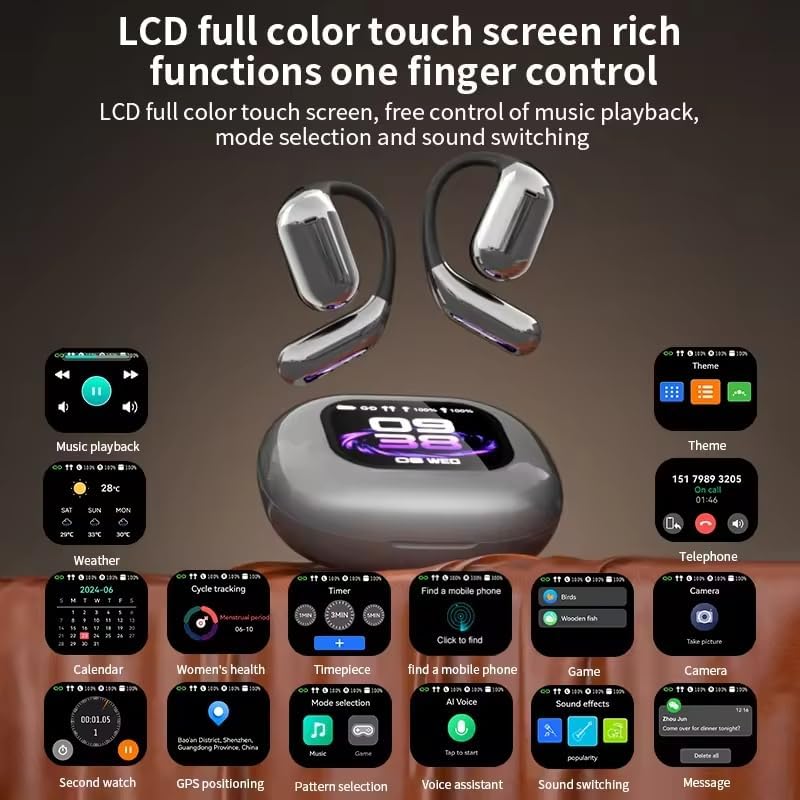
Image: Touch screen case displaying various functions.
The charging case features an LCD full-color touch screen, providing convenient access to various functions. This includes music playback control, mode selection, sound switching, weather information, calendar, timer, and more, all controlled with a single finger.
3. Setup
Charging the Device
Before first use, fully charge the earbuds and the charging case. Connect the provided Type-C charging cable to the charging port on the case and a compatible USB power source. The LED display on the case will indicate the charging status and battery levels.
Pairing Instructions
- Open the charging case. The earbuds will automatically power on and enter pairing mode.
- On your device (smartphone, tablet, computer), enable Bluetooth and search for available devices.
- Select 'KESIEME YYK' from the list of found devices to connect.
- Once connected, a voice prompt will confirm successful pairing. The earbuds will automatically reconnect to the last paired device when taken out of the case.
Wearing Instructions
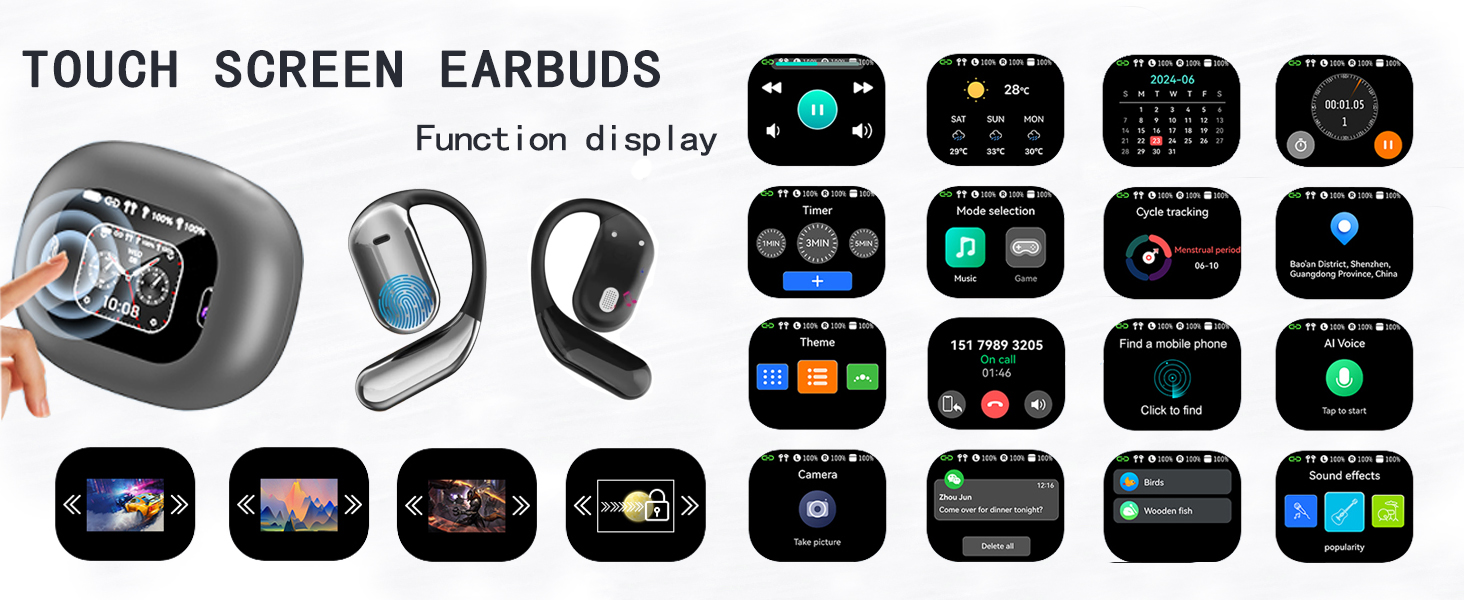
Image: Step-by-step guide for wearing the earbuds.
- Take out both earphones from the charging case.
- Gently hang the end of each earphone onto your ear bone.
- Turn the earphone and slide it behind your ear.
- Adjust the ear hook and pull it down for a secure and comfortable fit.
4. Operating Instructions
Basic Touch Controls
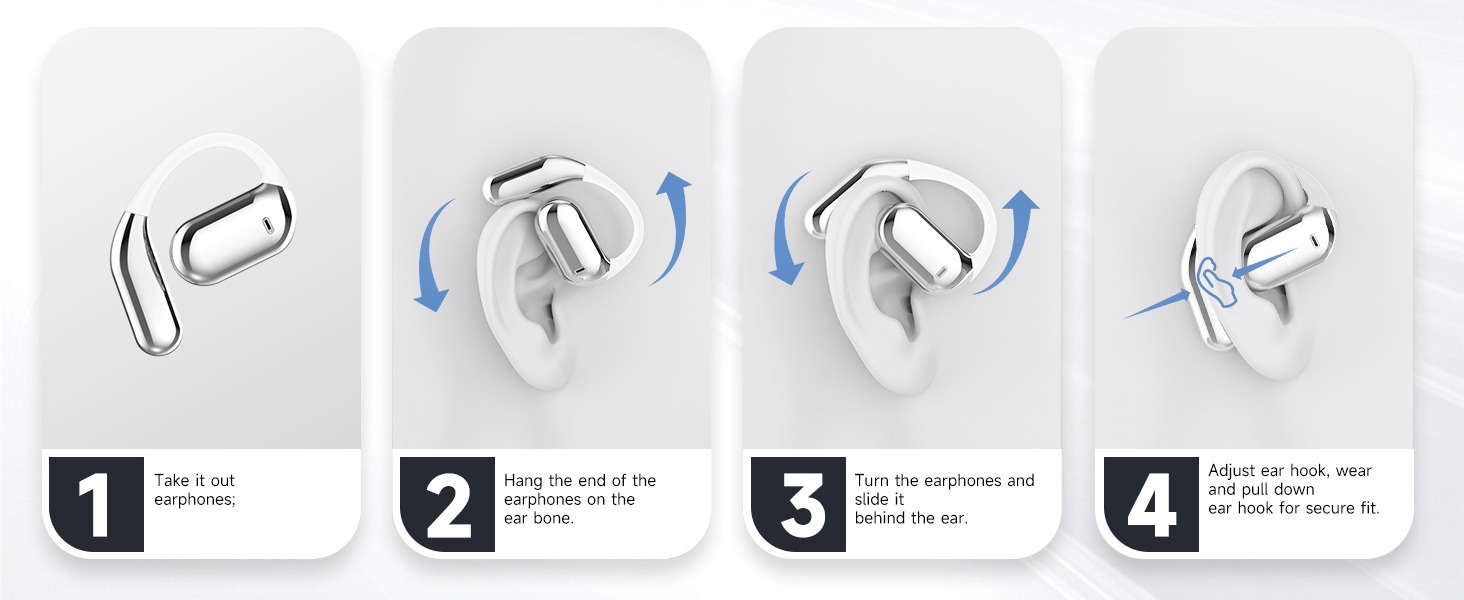
Image: Earbud touch control functions.
| Action | Control | Earbud (L/R) |
|---|---|---|
| Volume Up | Double Tap | Left or Right |
| Volume Down | Double Tap | Left or Right |
| Play/Pause | Single Tap | Left or Right |
| Answer Call | Single Tap | Left or Right |
| Previous Song | Long Press (1s) | Left |
| Next Song | Long Press (1s) | Right |
| Reject Call/Hang Up | Long Press (1s) | Left or Right |
| Activate Voice Assistant (Siri) | Triple Tap | Left or Right |
| Reset Earbuds | Double Tap + Long Press (2s) | Left & Right Simultaneously |
Warming Tips: To reset earbuds, disconnect from the phone and quickly press the left button 5 times at the same time to reset.
Touch Screen Case Operation
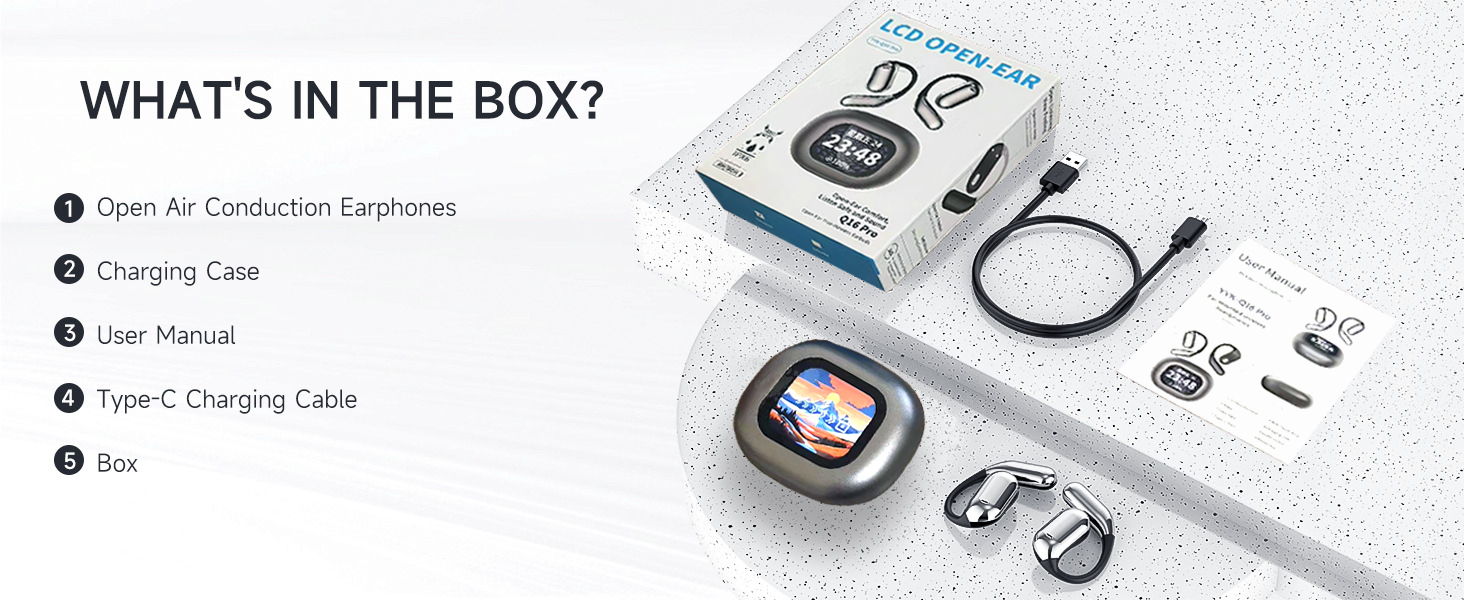
Image: Touch screen case displaying various functions.
The charging case features a responsive touch screen interface. Swipe left or right to navigate through different functions and tap to select. Functions include:
- Music Playback: Control tracks and volume.
- Weather: View current weather conditions.
- Calendar: Access date and time information.
- Cycle Tracking: Monitor fitness data.
- Timer: Set countdowns or use as a stopwatch.
- Mode Selection: Switch between different audio modes.
- Theme: Customize the screen display.
- Telephone: View call history or dial.
- Find a Mobile Phone: Locate your paired phone.
- AI Voice: Activate voice assistant.
- Game: Access simple games.
- Camera: Remote control for your phone's camera.
- Sound Effects: Adjust audio profiles.
- Message: View notifications.
Wide Compatibility
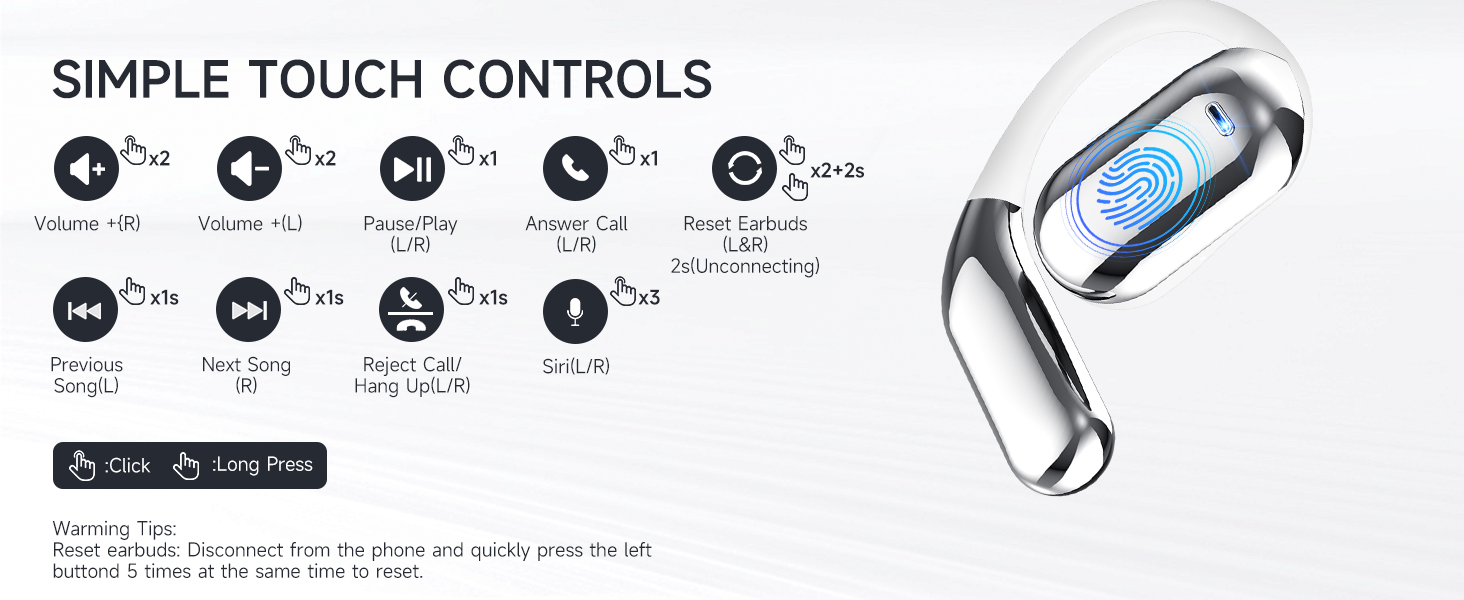
Image: Device compatibility.
The KESIEME YYK earbuds are compatible with a wide range of Bluetooth-enabled devices, including:
- Smartphones
- Tablets
- Laptops
- Desktops
- Smartwatches
- Smart TVs (with Bluetooth audio support)
5. Maintenance
Cleaning
- Regularly wipe the earbuds and charging case with a soft, dry, lint-free cloth.
- Do not use abrasive cleaners, alcohol, or chemical solvents.
- Ensure charging contacts on both earbuds and case are clean and dry.
Storage
- Store the earbuds in their charging case when not in use to protect them and keep them charged.
- Avoid storing in extreme temperatures (hot or cold) or high humidity.
- Keep out of reach of children and pets.
6. Troubleshooting
Common Issues and Solutions
| Problem | Possible Cause | Solution |
|---|---|---|
| Earbuds not pairing | Earbuds not in pairing mode, Bluetooth off on device, out of range. | Ensure earbuds are out of the case and charged. Turn Bluetooth on your device. Move closer to the device. Try resetting the earbuds. |
| Only one earbud working | One earbud not charged, not paired correctly, or connection issue. | Place both earbuds back in the case, close it, then reopen. Ensure both are charged. Try resetting the earbuds. |
| Poor sound quality | Low battery, interference, earbud placement. | Charge earbuds. Move away from sources of interference. Adjust earbud position for optimal sound. |
| Charging case not charging | Cable issue, power source issue, dirty charging port. | Try a different Type-C cable or power adapter. Clean the charging port. |
| Touch controls unresponsive | Temporary software glitch, dirty sensor. | Clean the touch sensor area. Place earbuds back in case and take them out again. Restart your connected device. |
Resetting Earbuds
If you experience persistent connection issues or other malfunctions, you can reset the earbuds:
- Disconnect the earbuds from all paired devices in your device's Bluetooth settings.
- Take both earbuds out of the charging case.
- Quickly tap the touch sensor on the left earbud 5 times simultaneously.
- Place the earbuds back into the charging case and close the lid for a few seconds.
- Open the case and attempt to pair them again with your device.
7. Specifications
| Feature | Specification |
|---|---|
| Model Name | Open Ear Earbuds (YYK) |
| Brand | KESIEME |
| Connectivity Technology | Wireless (Bluetooth) |
| Bluetooth Version | 5.4 |
| Bluetooth Range | 33 Feet (10 meters) |
| Audio Driver Size | 14.2 Millimeters |
| Audio Driver Type | Dynamic Driver |
| Frequency Range | 20 Hz - 20,000 Hz |
| Impedance | 32 Ohm |
| Battery Life (Earbuds) | Up to 20 Hours |
| Total Playtime (with Case) | Up to 50 Hours |
| Control Method | Touch |
| Water Resistance Level | Water Resistant |
| Item Weight | 0.19 Kilograms (6.7 ounces) |
| Product Dimensions | 6 x 4.2 x 1.5 inches |
| Ear Placement | Open Ear |
| Form Factor | Open Ear |
8. Safety Information
- Do not disassemble or modify the product.
- Avoid exposing the product to extreme temperatures, direct sunlight, or fire.
- Do not immerse the earbuds or charging case in water. While water-resistant, they are not waterproof.
- Use only the provided charging cable or a certified equivalent.
- Avoid listening at high volume levels for extended periods to prevent hearing damage.
- Be aware of your surroundings when using open-ear headphones, especially in traffic or hazardous environments.
9. Warranty and Support
KESIEME products are designed for reliability and performance. For warranty information, technical support, or customer service inquiries, please refer to the contact details provided on the product packaging or visit the official KESIEME website. Please retain your proof of purchase for warranty claims.


