
1. Safety Information
Important: This RC model helicopter is not a toy. It is designed for adults and users with experience in remote control helicopters. Inexperienced users must operate under professional guidance to prevent injury or damage.
- Always operate in a spacious, wind-free, and obstacle-free outdoor venue.
- Maintain a safe distance from the helicopter during operation.
- Ensure the battery is fully charged before connecting it to the helicopter.
- Do not allow battery wires to go over the landing gear or touch internal gears.
- Regularly inspect all components for damage before and after each flight.
2. Product Overview
The OMPHOBBY M2 EVO MK2 is a high-performance 6-channel RC helicopter featuring dual brushless motors and direct-drive technology, designed for superior 3D flight capabilities. It incorporates advanced features for enhanced control and durability.
Key Features:
- Smartphone APP adjustable flight controller for parameter tuning.
- Telemetry support for real-time flight data.
- Improved vibration resistance and optimized swashplate geometry.
- Enhanced tail control performance and power upgrade.
- Dual brushless motors for direct drive.
- High precision and low noise operation.
- Compatibility with various radio protocols including FUTABA, Spektrum, JR, and FrSky.
- Three flight modes: Stabilizing Attitude, Soft 3D, and Aggressive 3D.
Components:
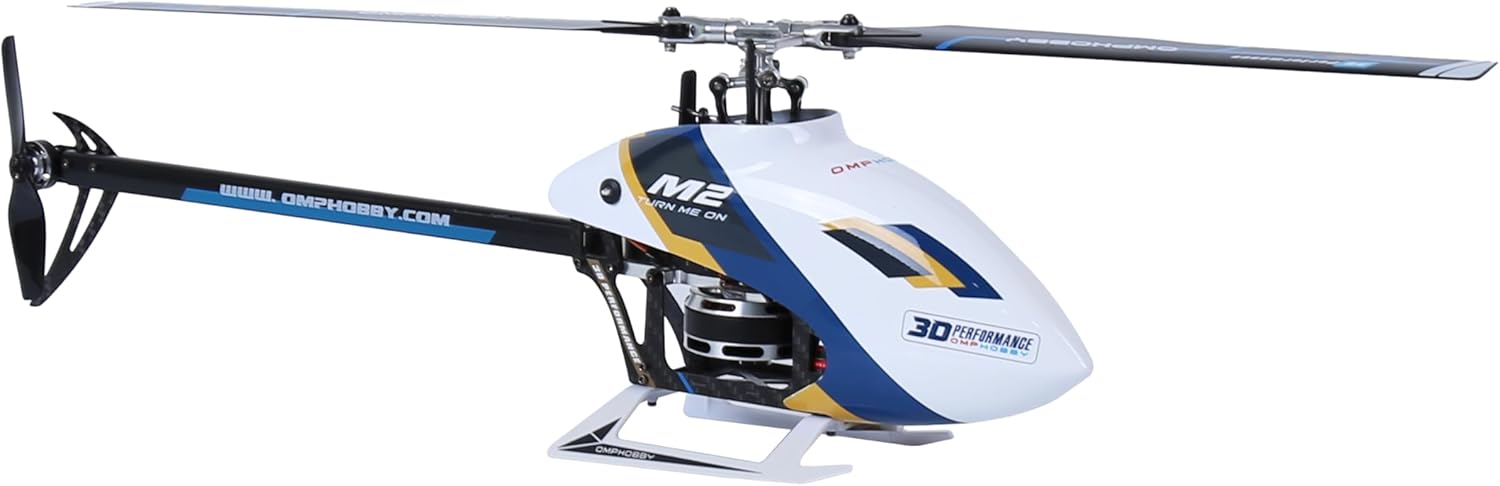
The helicopter features an aluminum frame, carbon fiber tail boom, and high-quality electronic components. The main rotor blades are designed for optimal performance and durability.
3. Setup
3.1 Unboxing and Initial Inspection

Carefully remove the helicopter and all accessories from the packaging. Inspect all components for any signs of damage. The package typically includes the helicopter (with one battery), an EEP box, several spare parts, a Bluetooth module, a swash plate leveler, and a receiver adapter cable.
3.2 Battery Installation and Charging
The helicopter comes with one 750 Milliamp Hours Lithium Ion battery. Ensure the battery is fully charged using a compatible charger before the first flight. Connect the battery securely, ensuring wires do not interfere with moving parts.
3.3 Transmitter Binding and Calibration
The M2 EVO MK2 is compatible with various transmitters. Follow the specific binding procedure for your transmitter (FUTABA, Spektrum, JR, FrSky, etc.).
After binding, calibrate the remote control. Typically, this involves pushing the throttle to the lowest position and setting all switches to the upper position. Then, pull the control sticks to both sides to initiate calibration. The blades will twitch up and down, indicating successful calibration.
4. Operating Instructions
4.1 Flight Modes
The flight controller offers three distinct flight modes:
- Stabilizing Attitude Mode: Ideal for beginners, providing enhanced stability.
- Soft 3D Mode: Offers more agility for basic 3D maneuvers.
- Aggressive 3D Mode: For experienced pilots performing advanced 3D aerobatics.
You can quickly switch between 3D and attitude modes during flight.
4.2 Basic Flight
For beginners, it is recommended to start in Stabilizing Attitude Mode and use small control surfaces. Gently push the throttle to lift the helicopter. Avoid pushing the throttle stick left/right until the helicopter is airborne, as this may cause the tail rotor to stop rotating. After takeoff, gently control the throttle stick to adjust altitude and the right stick for forward/backward and left/right attitude, ensuring stable hover.
4.3 Advanced Flight and App Tuning
For advanced pilots, the smartphone app allows for fine-tuning of flight control parameters, including telemetry support and optimized swashplate geometry. This enables precise adjustments for aggressive 3D flight.

5. Maintenance
The OMPHOBBY M2 EVO MK2 is designed for easy maintenance. Regularly check all screws and connections for tightness. Inspect rotor blades, tail boom, and landing gear for any cracks or damage. Replace any worn or damaged parts immediately using official OMPHOBBY spare parts.
- Ensure all moving parts are clean and free from debris.
- Lubricate bearings and gears as recommended in the detailed product manual (available on the OMPHOBBY website).
- Keep batteries stored at recommended charge levels when not in use.
6. Troubleshooting
If you encounter issues, refer to the comprehensive troubleshooting guide in the full product manual. Common issues may include:
- Loss of Control: Re-check binding, battery charge, and ensure no interference.
- Unstable Flight: Verify calibration, check for bent main or tail rotor blades, and inspect swashplate for proper leveling.
- Motor Issues: Check motor connections and ensure no debris is obstructing the motors.
7. Specifications
| Feature | Detail |
|---|---|
| Brand | OMPHOBBY |
| Model Name | M2 EVO MK2 |
| Age Range (Description) | Adult |
| Color | MK2 white |
| Connectivity Technology | Bluetooth |
| Skill Level | Intermediate |
| Battery Capacity | 750 Milliamp Hours |
| Control Type | Remote Control, App Control |
| Material | Aluminum |
| Item Weight | 1.5 pounds |
| Product Dimensions | 16.85"L x 2.83"W x 5.43"H |
8. Warranty and Support
For detailed warranty information and technical support, please visit the official OMPHOBBY website or contact their customer service. Keep your purchase receipt as proof of purchase.
Official OMPHOBBY Store: OMPHOBBY Store on Amazon


