
DREAME H12 Pro Flex Reach
DREAME H12 Pro FlexReach Wet Dry Vacuum Cleaner
User Manual
Introduction
Thank you for choosing the DREAME H12 Pro FlexReach Wet Dry Vacuum Cleaner. This all-in-one cleaning solution is designed to simplify your floor cleaning routine by vacuuming and mopping simultaneously. With powerful suction, advanced self-cleaning features, and flexible reach, it ensures a spotless home with minimal effort. Please read this manual thoroughly before use to ensure proper operation and maintenance.
Safety Information
Always follow basic safety precautions when using electrical appliances. Keep the appliance away from water. Do not immerse the main unit in water. Ensure the power cord is not damaged. Keep hair, loose clothing, fingers, and all parts of the body away from openings and moving parts. Use only as described in this manual. Use only manufacturer's recommended attachments and cleaning solutions. This appliance is for indoor use only.
What's in the Box
- Charging Dock
- Cleaning Solution
- Roller Brush
- Crevice Tool
- Cleaning Brush
- Replacement Filter
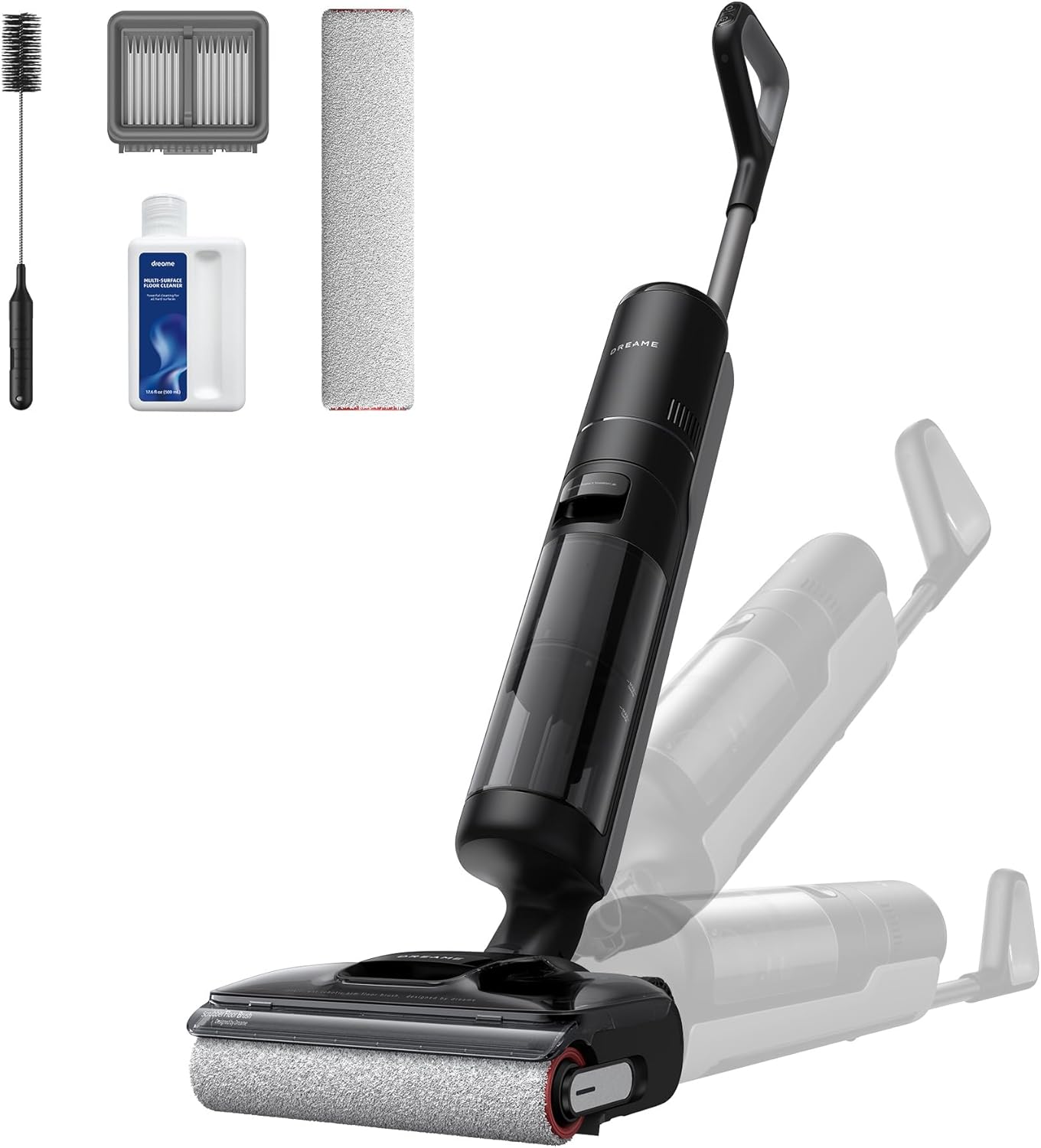
Figure 1: DREAME H12 Pro FlexReach and its standard accessories.
Setup
Assembly
Carefully unpack all components. Insert the handle into the main unit until it clicks into place. Ensure all tanks are securely attached before first use.
Charging
Place the vacuum cleaner on the charging dock. Ensure the power adapter is connected to the dock and a power outlet. The display will indicate charging status. A full charge provides up to 50 minutes of runtime.
Filling Water Tanks
The DREAME H12 Pro FlexReach features separated clean and dirty water tanks. The clean water tank has a capacity of 780ml, and the sewage tank has a capacity of 700ml. Always fill the clean water tank with fresh water and, if desired, the recommended cleaning solution. Ensure the dirty water tank is empty before starting a cleaning session.

Figure 2: Separated water tanks for fresh water cleaning.
Operating the Vacuum Cleaner
Power and Modes
Press the power button to turn on the device. The H12 Pro FlexReach offers multiple cleaning modes to suit various needs:
- Auto Mode: For routine cleaning, automatically adjusts suction based on dirt levels.
- Turbo Mode: For challenging messes, provides maximum suction power.
- Quiet Mode: For low noise level operation.
- Suction Mode: For dry vacuuming only.

Figure 3: Multiple cleaning modes for versatile use.
Smart Dirt Detection
The vacuum cleaner is equipped with smart dirt detection technology that automatically senses the level of mess and adjusts suction power accordingly, optimizing cleaning efficiency and battery life.
180° Lie-Flat Reach
The unique 180° Lie-Flat Reach design allows the vacuum to clean under low furniture and in tight spaces as narrow as 5.51 inches, ensuring no dirt is left behind. The used water tank securely captures dirty water even in a flat position, protecting the main motor.

Figure 4: Cleaning under low furniture with 180° Lie-Flat Reach.
Edge-to-Edge Cleaning
The H12 Pro FlexReach provides edge-to-edge cleaning on both sides, ensuring thorough cleaning along baseboards and in tight corners, leaving no hidden dirt spots.

Figure 5: Effective edge-to-edge cleaning.
Runtime
Enjoy up to 50 minutes of uninterrupted cleaning performance on a single charge, allowing you to clean large areas without needing to recharge frequently.
Video 1: Official product video demonstrating the DREAME H12 Pro FlexReach Wet Dry Vacuum Cleaner's features and capabilities.
Maintenance
Self-Cleaning and Drying
The H12 Pro FlexReach features a 194°F hot wash self-cleaning function for the brush roller. After washing, the brush is dried with hot air at 194°F for 5 minutes, eliminating excess water, preventing odors, and leaving the brush fresh and fluffy for the next use. This hands-free experience simplifies maintenance.

Figure 6: High temperature self-wash and self-dry feature.
Zero Tangle Scraper
Equipped with a TangleCut resilient scraper, the vacuum effectively captures and cuts hair tangles during mopping, preventing clogs and minimizing the need for manual hair removal from the brush roller.

Figure 7: Zero Tangle technology for effortless hair cleaning.
Solid-Liquid Waste Separation
The design allows for easy separation of solid debris from wastewater, making disposal convenient and hygienic.
Filter and Tank Cleaning
Regularly clean the dirty water tank and filter to maintain optimal performance. Refer to the quick start guide for detailed instructions on removing and cleaning these components.
Troubleshooting
If you encounter any issues with your DREAME H12 Pro FlexReach, please refer to the following common troubleshooting tips:
- No Power: Ensure the unit is fully charged and correctly seated on the charging dock. Check the power outlet.
- Poor Suction: Check if the dirty water tank is full or if the filter is clogged. Clean the brush roller and ensure no blockages in the suction path.
- Streaks on Floor: Ensure the clean water tank has sufficient water and cleaning solution. Clean the brush roller thoroughly.
- Unusual Noise: Check for any foreign objects caught in the brush roller or suction inlet.
For more complex issues, please contact DREAME customer support.
Specifications
| Feature | Value |
|---|---|
| Brand | DREAME |
| Model Name | H12 Pro Flex Reach |
| Suction Power | 18,000 Pa |
| Clean Water Tank Capacity | 780 Milliliters |
| Dirty Water Tank Capacity | 700 Milliliters |
| Runtime | Up to 50 minutes |
| Self-Cleaning Temperature | 194°F (Hot Wash & Hot Air Drying) |
| Special Features | Zero Hair Tangle, 180° Lie-Flat Cleaning, Smart Dirt Detection, Edge-to-Edge Cleaning |
| Filter Type | HEPA Filter |
| Item Weight | 16.1 pounds |
| Product Dimensions | 15"L x 48"W x 12.5"H |
| Batteries Required | 1 9V battery (included) |
Warranty and Support
The DREAME H12 Pro FlexReach Wet Dry Vacuum Cleaner comes with a 2-Year Limited Warranty. For warranty claims, technical support, or any product-related inquiries, please contact DREAME customer service through their official website or the contact information provided with your purchase.
- 2-Year Protection Plan: Available for purchase.
- 3-Year Protection Plan: Available for purchase.
Related documentsH12 Pro Flex Reach


Ask a question about this manual
Ask about setup, troubleshooting, compatibility, parts, safety, or missing instructions. Manuals+ will review the question and use this page’s manual context to help answer it.