
1. Introduction
Welcome to the user manual for your Blackview Wave 8 4G Android 14 Smartphone. This guide provides essential information on setting up, operating, maintaining, and troubleshooting your device. Please read this manual thoroughly to ensure optimal performance and longevity of your smartphone.

Image 1.1: Blackview Wave 8 Smartphones in various colors.
2. Package Contents
Upon opening your Blackview Wave 8 package, please verify that all the following items are included:
- 1 x Blackview Wave 8 Unlocked Smartphone
- 1 x USB Cable
- 1 x User Manual
- 1 x Charger
3. Device Overview
The Blackview Wave 8 features a slim design with a thickness of 8.75 mm and a weight of 193 grams. It is equipped with a 6.56-inch HD+ display and a dual camera system on the rear.
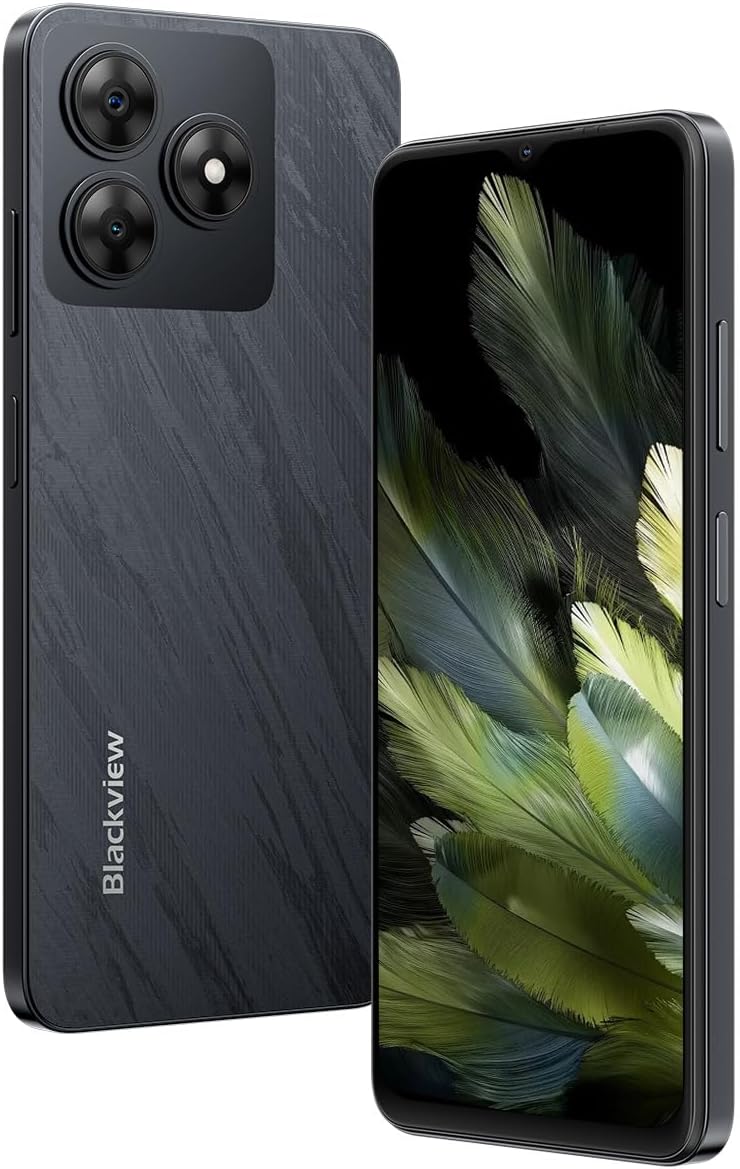
Image 3.1: Front and rear view of the Blackview Wave 8 smartphone.
3.1 Key Physical Features
- Display: 6.56-inch HD+ IPS display with 720x1612 resolution and 90Hz refresh rate.
- Rear Camera: 13MP ISOCELL 4H7.
- Front Camera: 8MP.
- Speaker: Smart-K Box Speaker.
- Ports: USB Type-C.
- Card Slots: Dual SIM (SIM2 / SIM1+TF*1) for two SIM cards or one SIM card and one TF (microSD) card.

Image 3.2: The slim profile and lightweight design of the Blackview Wave 8.

Image 3.3: Detail of the Smart-K Speaker on the Blackview Wave 8.
4. Setup
4.1 SIM and TF Card Installation
- Locate the SIM card tray on the side of your device.
- Insert the SIM ejector tool (not included, typically a paperclip) into the small hole next to the tray and press gently until the tray pops out.
- Place your Nano-SIM card(s) and/or TF (microSD) card into the designated slots on the tray. Ensure the gold contacts are facing down. The device supports two SIM cards or one SIM card and one TF card.
- Carefully reinsert the tray into the phone until it clicks into place.
4.2 Initial Power On
- Press and hold the Power button (usually on the right side) until the Blackview logo appears on the screen.
- Follow the on-screen instructions to complete the initial setup process, which includes selecting your language, connecting to Wi-Fi, and setting up your Google account.
5. Operating Instructions
5.1 Display and Navigation
The Blackview Wave 8 features a 6.56-inch HD+ IPS display with a resolution of 720x1612 pixels and a 90Hz refresh rate for smooth visuals. It also includes a Comfort Eye Mode and Night Light feature to reduce eye strain.
- Touch Gestures: Navigate the interface using standard Android touch gestures (tap, swipe, pinch).
- Comfort Eye Mode: Access this feature in Display Settings to adjust screen color temperature for reduced blue light emission.

Image 5.1: Display specifications of the Blackview Wave 8.
5.2 Camera Usage
Capture moments with the 13MP ISOCELL 4H7 rear camera and the 8MP front camera. The device supports 1080P FHD video recording.
- Taking Photos: Open the Camera app, frame your shot, and tap the shutter button.
- Video Recording: Switch to video mode in the Camera app and tap the record button to start/stop.

Image 5.2: Camera specifications of the Blackview Wave 8.

Image 5.3: Example of 1080P FHD video recording quality.
5.3 Battery Management
The device is powered by a 5000 mAh battery, providing extended usage times. To optimize battery life:
- Adjust screen brightness.
- Close unused applications.
- Enable battery saver mode when needed.
5.4 Performance and Storage
The Blackview Wave 8 is equipped with an Octa-core Unisoc T606 processor (1.6 GHz) and 12GB of RAM (4GB physical + 8GB virtual) for smooth multitasking. It offers 128GB of internal storage, expandable up to 2TB via a TF (microSD) card.

Image 5.4: Representation of 12GB RAM (4GB physical + 8GB virtual).

Image 5.5: Octa-core Unisoc T606 processor details.
5.5 Connectivity
The device supports 4G cellular networks, Wi-Fi, Bluetooth, and a 4-in-1 navigation system (GPS, GLONASS, Beidou, Galileo) for accurate positioning.
- Wi-Fi: Connect to wireless networks via Settings > Network & internet > Wi-Fi.
- Bluetooth: Pair with Bluetooth devices via Settings > Connected devices > Bluetooth.
- Mobile Data: Enable or disable mobile data via Quick Settings or Settings > Network & internet > Mobile network.
5.6 Security
The Blackview Wave 8 includes facial unlock for convenient and secure access to your device.
- Facial Unlock: Set up facial recognition via Settings > Security & privacy > Device unlock.
5.7 Operating System
The smartphone runs on Android 14 Go, offering a secure, fluid, and personalized user experience.
6. Maintenance
6.1 General Care and Cleaning
- Keep your device dry. Moisture can damage electronic circuits.
- Avoid extreme temperatures.
- Clean the screen and body with a soft, lint-free cloth. Avoid harsh chemicals.
6.2 Software Updates
Regularly check for software updates to ensure your device has the latest features and security patches. Go to Settings > System > System update.
6.3 Storage Management
To maintain optimal performance, periodically manage your device's storage:
- Delete unnecessary files and applications.
- Move large files to a TF card or cloud storage.
- Clear cache data for apps.
7. Troubleshooting
If you encounter issues with your Blackview Wave 8, try the following basic troubleshooting steps:
- Device unresponsive: Press and hold the Power button for about 10-15 seconds to force a restart.
- Network issues: Check if Airplane Mode is off. Restart the device. Verify SIM card insertion.
- App not working: Clear the app's cache and data (Settings > Apps > [App Name] > Storage & cache). If the issue persists, uninstall and reinstall the app.
- Battery draining quickly: Review battery usage in Settings > Battery. Close background apps and reduce screen brightness.
- Storage full: Delete unnecessary files, clear app caches, or move data to an external TF card.
For more complex issues, refer to the official Blackview support resources or contact customer service.
8. Specifications
Below are the technical specifications for the Blackview Wave 8 smartphone:
| Feature | Specification |
|---|---|
| Model | WAVE 8 |
| Dimensions | 16.32 x 7.52 x 0.87 cm |
| Weight | 193 grams |
| Operating System | Android 14 Go |
| Processor | Octa-core Unisoc T606 (1.6 GHz) |
| RAM | 12 GB (4 GB physical + 8 GB virtual) |
| Internal Storage | 128 GB |
| Expandable Storage | Up to 2 TB via TF card |
| Display Size | 6.56 inches |
| Display Resolution | 720 x 1612 HD+ |
| Refresh Rate | 90 Hz |
| Rear Camera | 13 MP ISOCELL 4H7 |
| Front Camera | 8 MP |
| Video Recording | 1080P FHD |
| Battery Capacity | 5000 mAh (Lithium Polymer) |
| Connectivity | 4G, Wi-Fi, Bluetooth, GPS |
| SIM Card Support | Dual SIM (SIM2 / SIM1+TF*1) |
| Security Features | Facial Unlock |
9. Warranty and Support
For warranty information, please refer to the warranty card included with your product or visit the official Blackview website. Support resources, including FAQs and contact information, can also be found on the Blackview official website or through your authorized retailer.
Please retain your proof of purchase for warranty claims.


