
1. Introduction
This manual provides detailed instructions for the proper use, setup, and maintenance of your Monster Open Touch Pro 100 Wireless Earbuds. Please read this manual thoroughly before using the product to ensure optimal performance and longevity.
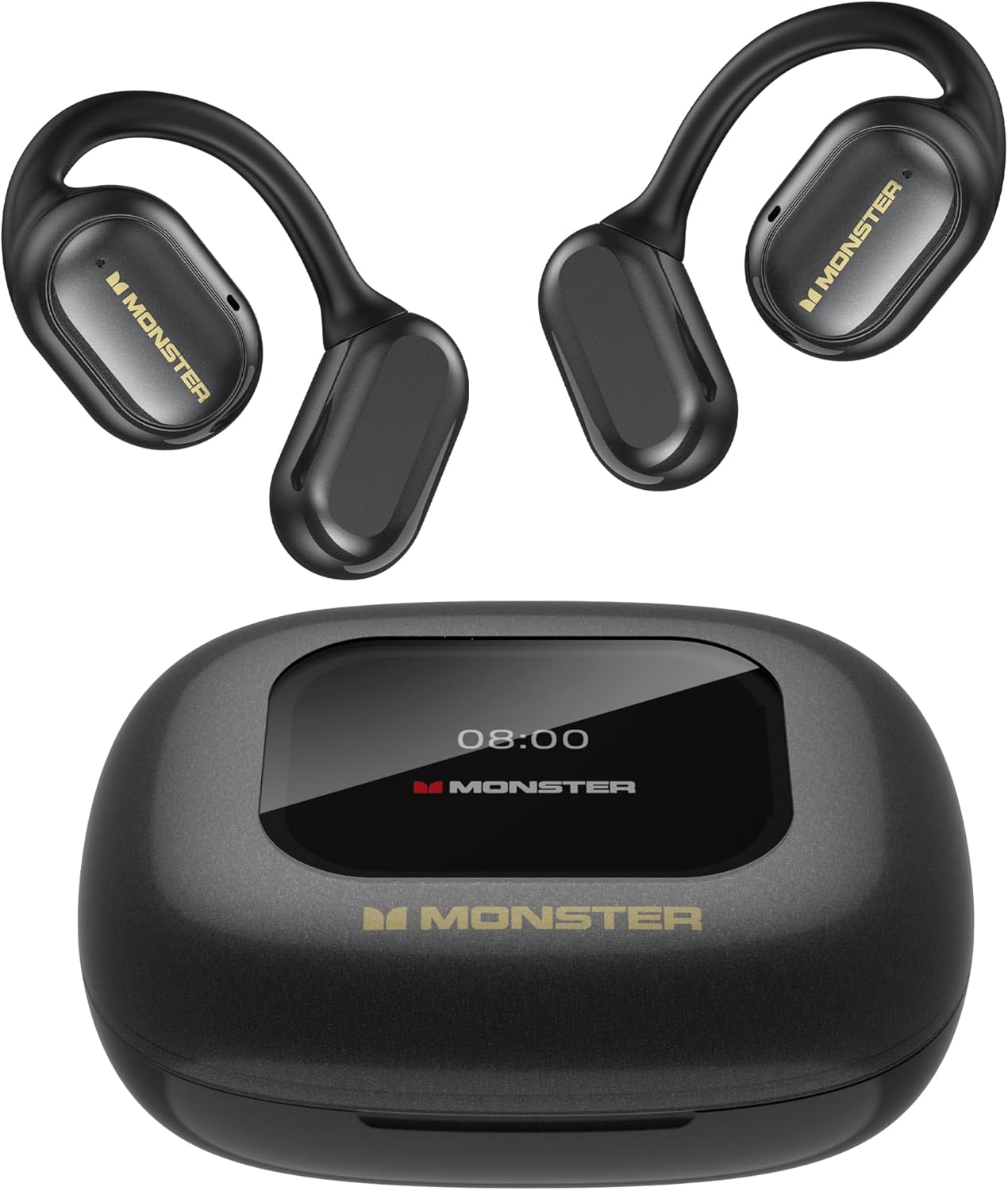
Image 1.1: Monster Open Touch Pro 100 Earbuds and Charging Case. The image displays the two black open-ear earbuds and their compact black charging case, which features a digital display on top.
2. Package Contents
Verify that all items are present in your product packaging:
- Monster Open Touch Pro 100 Wireless Earbuds (Left and Right)
- Charging Case with Touch Screen
- USB Charging Cable
- User Manual
3. Product Overview
The Monster Open Touch Pro 100 earbuds feature an open-ear design for comfort and situational awareness, a smart charging case with a full-color touch screen, and support for TF card playback.

Image 3.1: Overview of Monster Open Touch Pro 100 features. This banner image highlights key features including Open Ear Design, Bluetooth 5.4, 30 hours playtime, and IPX5 water resistance, alongside an image of a person wearing the earbuds and holding the charging case.
3.1. Key Components
- Earbuds: Open-ear design with ear hooks, integrated touch controls, and 16.2mm drivers.
- Charging Case: Features a full-color touch screen for control, a TF card slot, and provides extended battery life.

Image 3.2: Diagram illustrating the 16.2mm driver components of the earbud. The image shows an exploded view of the earbud's internal structure, highlighting the large 16.2mm driver and composite titanium nano diaphragm responsible for sound quality.
4. Setup
4.1. Charging the Earbuds and Case
Before first use, fully charge the earbuds and the charging case. Connect the provided USB charging cable to the charging port on the case and a compatible USB power source. The touch screen on the case will indicate the charging status.
- Charging Time: Approximately 8 hours for a full charge of the case and earbuds.
- Battery Life: Up to 8 hours on a single charge, extending to 30 hours with the charging case.

Image 4.1: Illustration of battery life. The image shows the earbuds and charging case with indicators for 8 hours of playback on a single charge and 30 hours total with the charging case.
4.2. Bluetooth Pairing
To connect your earbuds to a device:
- Ensure the earbuds are in the charging case and the case is open.
- On your device (smartphone, tablet, etc.), enable Bluetooth.
- Search for new Bluetooth devices and select "Monster Open Touch Pro 100" from the list.
- Once connected, the earbuds will automatically pair with this device in the future when taken out of the case.

Image 4.2: Illustration of Bluetooth 5.4 technology. The image depicts a stylized microchip with the Bluetooth 5.4 logo, representing the advanced connectivity of the earbuds.
4.3. TF Card Installation (Independent MP3 Mode)
The charging case features a TF card slot, allowing the earbuds to function as an independent MP3 player without a connected phone.
- Locate the TF card slot on the charging case.
- Gently insert a TF card (not included) into the slot until it clicks into place.
- The touch screen will display options for playing music from the TF card.
Note: Hot-swapping of the TF card is not supported. Ensure the device is powered off or in a safe state before inserting or removing the card.

Image 4.3: TF card input on the charging case. The image shows a TF card being inserted into the charging case, highlighting its independent MP3 playback capability.
5. Operating Instructions
5.1. Touch Controls (Earbuds)
The earbuds feature touch-sensitive areas for controlling playback and calls:
- Play/Pause: Click 1 time (L/R earbud).
- Answer Call: Click 2 times (L/R earbud).
- Hang Up Call: Hold for 3 seconds (L/R earbud).
- Next Song: Click 2 times (R earbud).
- Previous Song: Click 3 times (L/R earbud).
- Voice Assistant: Hold for 2 seconds (L/R earbud).

Image 5.1: Diagram of earbud touch control gestures. This image visually explains the various touch commands for playback, calls, and voice assistant functions on the earbuds.
5.2. Charging Case Touch Screen Functions
The full-color touch screen on the charging case provides advanced control and settings:
- Music Playback Control: Navigate tracks, adjust volume.
- EQ Modes: Select from multiple equalizer presets (e.g., Rock and Roll, Pop, Normal, Jazz, Classic) for a personalized listening experience.
- Language Switch: Change the system language of the case interface.
- Find My Earphone: Locate misplaced earbuds.
- Shutter Button: Use the case as a remote shutter for your phone's camera.

Image 5.2: Charging case touch screen interface. The image displays the charging case with its touch screen showing various menu options and controls, including music playback, EQ settings, and language selection.

Image 5.3: EQ modes selection on the charging case. This image shows the earbuds and case alongside various equalizer presets like Rock and Roll, Pop, Normal, Jazz, and Classic, indicating customizable sound profiles.

Image 5.4: Language switch function on the charging case. The image illustrates how to change the display language on the charging case's touch screen from Chinese to English.

Image 5.5: Remote camera shutter function. This image shows the charging case being used to remotely trigger a smartphone camera, allowing for easier group photos.
6. Maintenance
6.1. Cleaning
Regular cleaning helps maintain the performance and hygiene of your earbuds and charging case.
- Use a soft, dry, lint-free cloth to wipe the earbuds and charging case.
- Do not use abrasive cleaners, alcohol, or chemical sprays.
- Gently clean the charging contacts on both the earbuds and the case with a dry cotton swab if necessary.
6.2. Water Resistance
The earbuds are rated IPX5 water resistant, meaning they can withstand splashes and sweat. This makes them suitable for workouts and light rain.
Important: The charging case is not waterproof. Do not expose the charging case to water or moisture.

Image 6.1: IPX5 Waterproof Performance. The image shows a person exercising, indicating the earbuds' resistance to sweat and splashes, suitable for active use.
6.3. Storage
When not in use, store the earbuds in their charging case to protect them and ensure they are charged for your next use. Store the product in a cool, dry place away from extreme temperatures.
7. Troubleshooting
If you encounter issues with your Monster Open Touch Pro 100 earbuds, refer to the following common solutions:
| Problem | Possible Solution |
|---|---|
| Earbuds not pairing with device |
|
| No sound or low volume |
|
| Charging case not charging |
|
| TF card music not playing |
|
8. Specifications
Detailed technical specifications for the Monster Open Touch Pro 100 Wireless Earbuds:
| Feature | Detail |
|---|---|
| Model Name | Open Touch Pro 100 |
| Connectivity Technology | Wireless (Bluetooth 5.4) |
| Ear Placement | Open Ear |
| Driver Size | 16.2mm |
| Noise Control | ENC Adaptive Noise Cancellation |
| Water Resistance Level | IPX5 (Earbuds only) |
| Battery Life (Single Charge) | Up to 8 Hours |
| Total Playback Time (with Case) | Up to 30 Hours |
| Charging Time | Approximately 8 Hours |
| Battery Type | Lithium Ion |
| Frequency Range | 20 Hz to 20,000 Hz |
| Compatible Devices | Cellphones, Tablets, Desktops, Laptops, Smart Speakers |
| Headphones Jack | No Jack |
| Color | Black |
| Item Model Number | RM |
9. Warranty and Support
Monster products are designed and manufactured to the highest quality standards. For warranty information and customer support, please refer to the warranty card included in your product packaging or visit the official Monster website. If you experience any issues not covered in this manual, please contact Monster customer service for assistance.


