
LIGE FV4-G
LIGE Smart Watch User Manual
Model: FV4-G
Brand: LIGE
1. Introduction
Welcome to your new LIGE Smart Watch! This elegant and functional smartwatch is designed to enhance your daily life with its advanced features and stylish design. It offers seamless connectivity, comprehensive health monitoring, and diverse sports tracking capabilities. This manual provides detailed instructions to help you set up, operate, and maintain your device for optimal performance.

Image: The LIGE Smart Watch featuring a rose gold band and a diamond-studded bezel, showcasing its elegant design and digital display.
2. Package Contents
Please verify that all items are present in your package:
- LIGE Smartwatch
- Changer Cable (USB charging cable)
- Smartwatch Manuals (this guide)
- Watch Setting Tools (for band adjustment)
- Watch Straps (includes the attached strap and two additional straps)

Image: A visual representation of the LIGE Smart Watch and its included accessories, such as the charging cable, extra straps, and adjustment tools, presented in its packaging.
3. Setup Guide
3.1 Charging the Smart Watch
Before first use, fully charge your smartwatch. Connect the magnetic charging cable to the charging points on the back of the watch and plug the USB end into a standard USB power adapter (not included). A full charge typically takes about 2 hours.
3.2 App Installation
To unlock all features and synchronize data, download the Dafit app on your smartphone. Scan the QR code provided in the manual or search for 'Dafit' in your device's app store (compatible with Android 4.4+ and iOS 8.0+).
3.3 Bluetooth Pairing
- Ensure Bluetooth is enabled on your smartphone.
- Open the Dafit app and follow the on-screen instructions to add your device.
- The app will search for available devices. Select 'FV4-G' or the corresponding device name to connect.
- Confirm the pairing request on both your watch and smartphone.
- For call functionality, you may need to connect to the watch's Bluetooth audio profile separately in your phone's Bluetooth settings (usually appears as 'FV4-G_CALL' or similar).
4. Operating Instructions
4.1 Basic Navigation
- Touch Screen: Swipe left/right, up/down to navigate through menus and features. Tap to select.
- Side Button: Press to wake the screen, return to the main dial, or access the app list.
4.2 Making and Answering Calls
With its built-in microphone and speaker, your smartwatch allows you to make and answer calls directly from your wrist after connecting via Bluetooth.
- Making Calls: Access the 'Dial' or 'Contacts' feature on your watch to initiate a call.
- Answering Calls: When a call comes in, the watch will vibrate and display the caller ID. Tap the green icon to answer.

Image: The LIGE Smart Watch displaying call and message notifications, illustrating its Bluetooth connectivity for communication.
Video: Demonstrates the LIGE Smart Watch's ability to answer and make calls directly from the wrist, compatible with Android and iOS devices.
4.3 Message Notifications
Receive real-time alerts for messages and app notifications (e.g., Facebook, WhatsApp, Twitter) directly on your watch. Configure notification settings within the Dafit app.
4.4 Multifunctional Features
Your smartwatch includes a variety of useful tools:
- Music Control: Play, pause, skip tracks on your phone.
- Remote Camera Control: Use your watch as a remote shutter for your phone's camera.
- Voice Assistant: Access your phone's voice assistant directly from the watch.
- Weather Forecasts: Get real-time weather updates.
- Stopwatch & Timer: For precise timekeeping.
- Calculator: Perform basic calculations on the go.
- Find Phone: Locate your misplaced phone by making it ring.
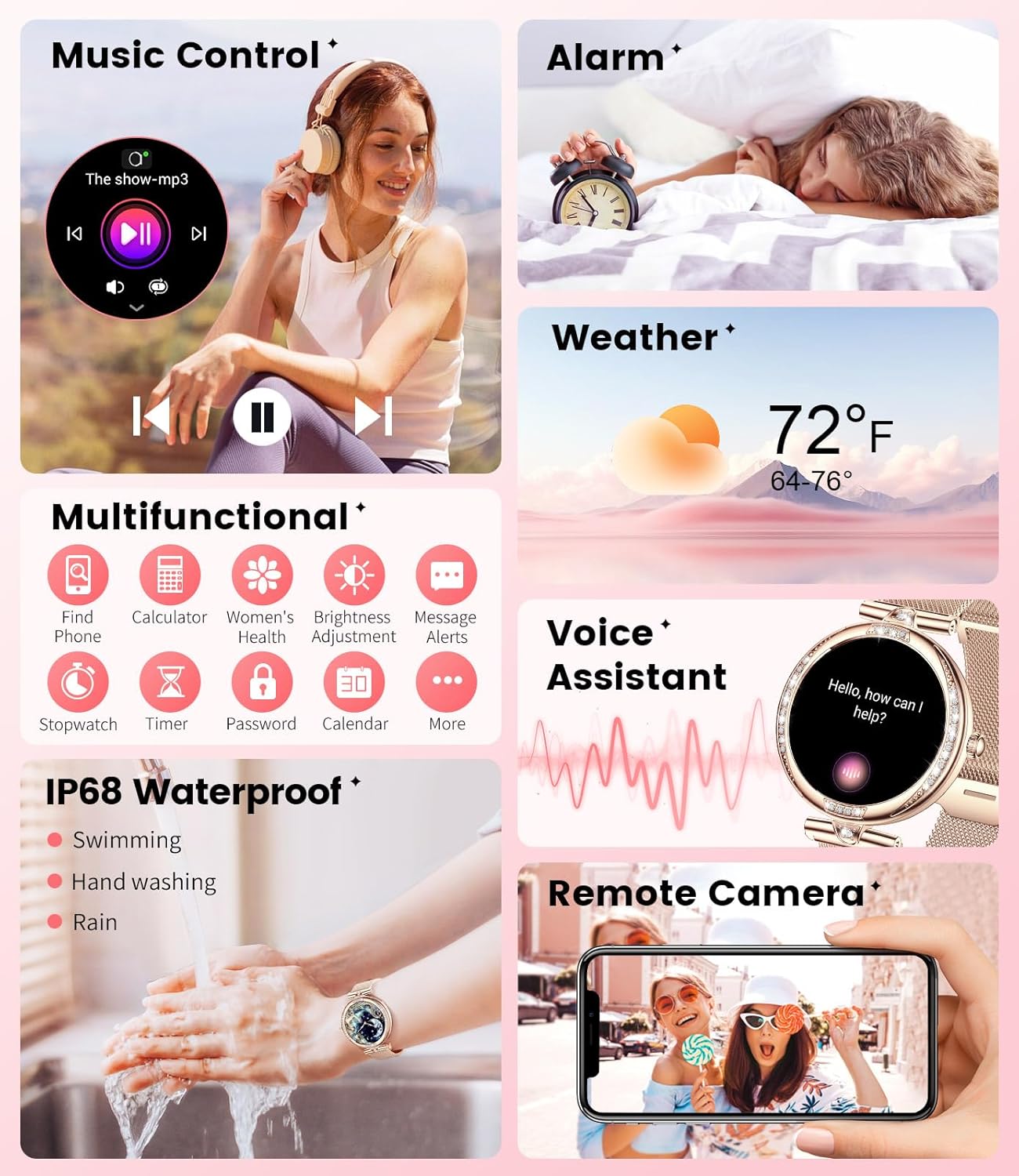
Image: A visual overview of the LIGE Smart Watch's various functions, including music control, alarm, weather, remote camera, and other utility features.
5. Health Monitoring
The LIGE Smart Watch is equipped with advanced sensors to help you monitor your health. Note: This device is not a medical device and should not be used for medical diagnosis or treatment.
- Heart Rate Monitoring: Provides 24/7 continuous heart rate tracking.
- Sleep Monitoring: Tracks your sleep stages (deep sleep, light sleep, wake periods) to provide insights into your sleep quality.
- Blood Pressure Monitoring: Estimates blood pressure levels.
- Blood Oxygen (SpO2) Monitoring: Measures your blood oxygen saturation.
- Women's Health Management: Features for tracking menstrual cycles and other related health data.

Image: The LIGE Smart Watch displaying various health metrics such as heart rate, blood pressure, blood oxygen, and sleep patterns, indicating its comprehensive health monitoring capabilities.
Video: A detailed look at the LIGE Women's Smart Watch, highlighting its 1.19" AMOLED display and various health tracking features.
6. Sports Modes
With over 100 sports modes, your smartwatch is a versatile fitness companion. It accurately tracks your steps, distance, calories burned, and active time. Connect to the Dafit app for detailed maps of your outdoor activities.
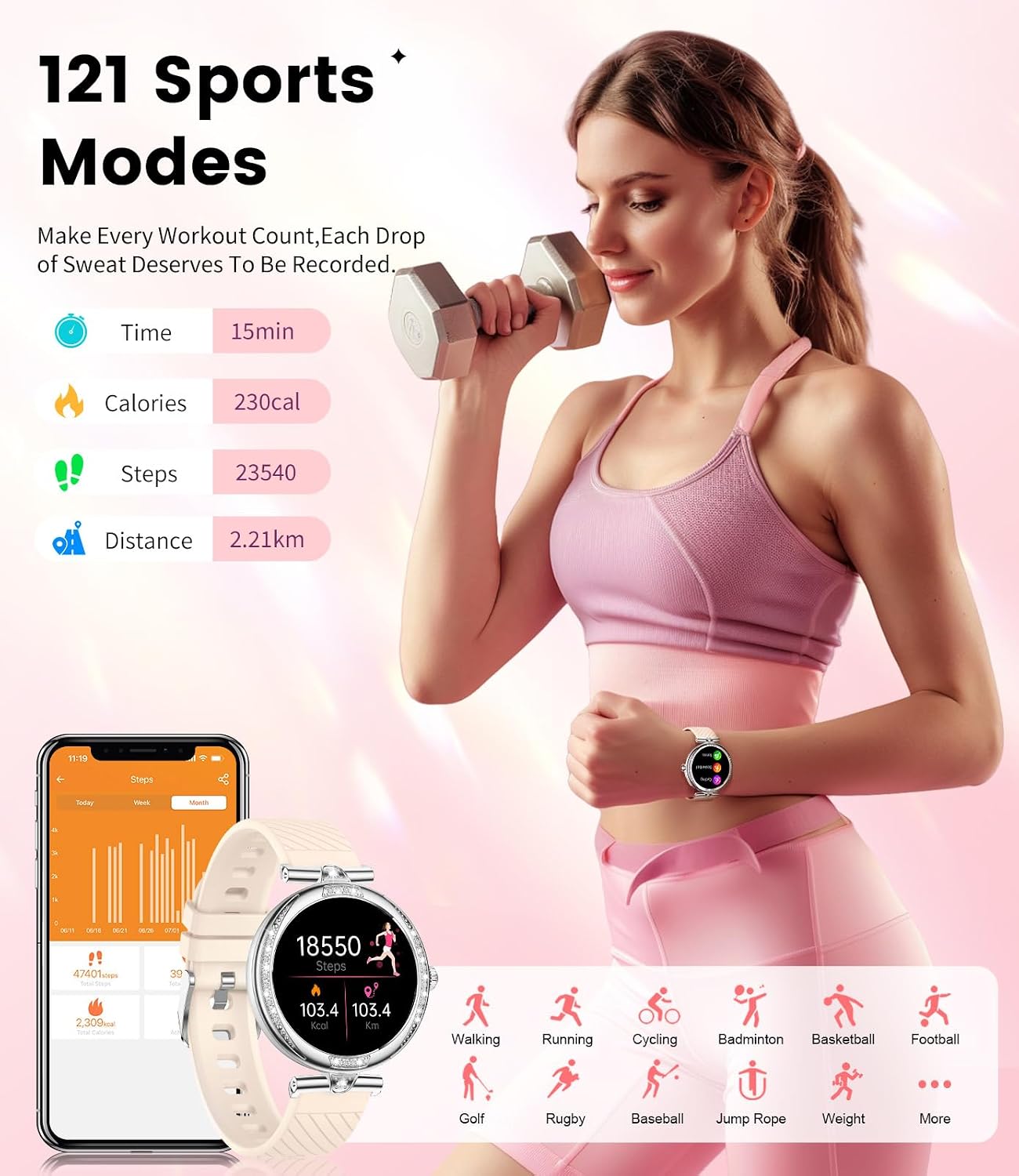
Image: The LIGE Smart Watch displaying its 121 sports modes, showing how it tracks various activities like walking, running, cycling, and more.
7. Water Resistance (IP68)
Your LIGE Smart Watch is IP68 water-resistant, meaning it can withstand splashes, hand washing, and brief immersion in shallow water. It is suitable for everyday use and light swimming.
Important:
- Do not use the watch in hot water, saunas, or steam rooms.
- Avoid prolonged immersion or high-pressure water jets.
- Water resistance is not a permanent condition and may decrease over time with normal wear.

Image: The LIGE Smart Watch being used during handwashing, illustrating its IP68 water resistance for daily activities.
8. Battery Life
The watch is equipped with a 300mAh Li-Polymer battery. A full charge provides approximately:
- Up to 30 days of standby time.
- About 5 days of operating time (depending on usage).
Recharge time is approximately 2 hours.
9. Customization
9.1 Display
The watch features a stunning 1.19-inch AMOLED display with a resolution of 390x390 pixels and brightness up to 600 lumens, ensuring clear visibility in various lighting conditions.

Image: A close-up of the LIGE Smart Watch's delicate 1.19-inch AMOLED screen, highlighting its clear display and customizable wallpaper options.
9.2 Watch Faces
Personalize your watch with a wide selection of watch faces available through the Dafit app. You can also upload your favorite photos to create unique custom dials.
9.3 Interchangeable Straps
The watch comes with three interchangeable straps (Rose 3 Straps variant) allowing you to match your style for any occasion.

Image: A close-up view of the LIGE Smart Watch, emphasizing its diamond-studded bezel and intricate design details.
10. Maintenance
- Cleaning: Wipe the watch and straps regularly with a soft, dry cloth. For stubborn dirt, use a slightly damp cloth and dry thoroughly.
- Storage: Store your watch in a cool, dry place away from direct sunlight and extreme temperatures.
- Avoid Chemicals: Do not expose the watch to strong chemicals, detergents, or solvents, as these can damage the materials.
11. Troubleshooting
11.1 Connectivity Issues
- Watch not connecting to phone: Ensure Bluetooth is on for both devices. Try restarting both the watch and your phone. Re-pair the devices through the Dafit app. Check app permissions on your phone to ensure it can access Bluetooth.
- Call function not working: Verify that the watch's audio Bluetooth profile (e.g., 'FV4-G_CALL') is connected in your phone's Bluetooth settings.
11.2 Display Issues
- Screen unresponsive: Restart the watch by pressing and holding the side button. Ensure the screen is clean and dry.
- Display too dim/bright: Adjust brightness settings on the watch or through the Dafit app.
11.3 Battery Issues
- Short battery life: Reduce screen brightness, disable unnecessary notifications, and limit continuous heart rate monitoring if not needed. Ensure the watch is fully charged.
- Watch not charging: Check that the charging cable is securely connected to the watch's magnetic points and the USB power source. Ensure the charging points are clean.
11.4 Water Damage
While the watch is IP68 water-resistant, it is not designed for prolonged submersion or high-pressure water activities like diving or hot tubs. If the watch experiences water damage beyond its rated protection, it may cease to function. Refer to the water resistance section for detailed guidelines.
12. Specifications
| Feature | Detail |
|---|---|
| Model Number | FV4-G |
| Display | 1.19" AMOLED, 390x390 Resolution |
| Connectivity | Bluetooth 5.0 |
| Operating System | Compatible with Android 4.4+ and iOS 8.0+ |
| Battery Capacity | 300mAh Lithium Polymer |
| Battery Life (Operating) | Approx. 5 days |
| Battery Life (Standby) | Up to 30 days |
| Charging Time | Approx. 2 hours |
| Water Resistance | IP68 |
| Product Dimensions | 2.36 x 0.79 x 1.18 inches |
| Item Weight | 7 ounces |
| Manufacturer | LIGE |
13. Warranty and Support
LIGE is committed to providing high-quality products and customer satisfaction.
- Guarantee: Your LIGE Smart Watch comes with a 2-year guarantee.
- Returns Service: Enjoy a 6-month returns service for eligible issues.
- Online Support: 24-hour online service is available for your convenience.
For detailed information regarding warranty claims, returns, or technical support, please refer to the contact information provided with your purchase or visit the official LIGE support channels.

Image: Icons representing 24-hour online service, 6-month returns service, and a 2-year guarantee, highlighting LIGE's commitment to customer support.
Additionally, protection plans are available for purchase to extend coverage:
- 2-Year Protection Plan
- 3-Year Protection Plan
- Complete Protect (monthly renewal)
Ask a question about this manual
Ask about setup, troubleshooting, compatibility, parts, safety, or missing instructions. Manuals+ will review the question and use this page’s manual context to help answer it.