1. Product Overview
The JINJUNYE Upgraded Nugget Ice Maker is a countertop appliance designed to produce soft, chewable nugget ice. This machine is ideal for home and kitchen use, offering efficient ice production and convenient features.
Key Features:
- Chewable Nugget Ice: Produces soft, chewable pellet ice, offering a different texture compared to traditional cube or bullet ice.
- Efficient Ice Making: Capable of producing up to 38 pounds of ice per day, with a 1.5L water tank and 2.3 LB ice basket capacity. The first batch of ice may take slightly longer.
- Self-Cleaning Function: Features an automatic self-cleaning cycle activated by a dedicated "clean" button, ensuring fresh ice in a clean environment.
- Easy Operation: Simple to use with an ON/OFF button. Intelligent infrared sensor technology indicates when to add water or when the ice basket is full.
- Portable & Compact Design: With dimensions of 8.66"W x 11.6"D x 13"H, it is designed for portability and fits well on countertops. Constructed from food-grade materials and stainless steel for durability and easy cleaning. Operates quietly.

Figure 1: JINJUNYE Nugget Ice Maker with a refreshing drink and ice scoop.
2. Setup and Installation
Before first use, please read all instructions carefully. Ensure the ice maker is placed on a stable, level surface away from direct sunlight and heat sources.
Initial Setup Steps:
- Unpack the Ice Maker: Carefully remove the ice maker and all accessories from its packaging. Retain packaging for future storage or transport.
- Clean Before First Use: It is recommended to clean the interior of the ice maker before its first use. Refer to the "Maintenance and Cleaning" section for detailed instructions.
- Positioning: Place the ice maker on a flat, stable surface. Ensure there is adequate ventilation around the unit (at least 4 inches of space on all sides).
- Secure Drain Plug: Ensure the bottom drain plug is firmly in place to prevent any water leakage.
- Add Water: Open the water reservoir lid and fill with clean, potable water up to the MAX fill line. Do not overfill.
- Connect Power: Plug the power cord into a grounded electrical outlet.

Figure 2: Visual guide for initial setup, including securing the drain plug and adding water.
3. Operating Instructions
The JINJUNYE Nugget Ice Maker is designed for simple and intuitive operation.
Making Ice:
- Power On: Press the ON/OFF button to start the ice making process. The "Making" indicator light will illuminate.
- Ice Production: The machine will begin producing nugget ice. The first batch typically takes longer (10-13 minutes for 250ml cup, 15-20 minutes for 350ml cup). Subsequent batches will be faster.
- Ice Full Indicator: When the ice basket is full, the "Full" indicator light will illuminate, and the machine will automatically stop ice production. Remove ice to resume operation.
- Add Water Indicator: If the water level in the reservoir is too low, the "Add Water" indicator light will illuminate, and the machine will pause operation. Refill the water reservoir to continue.
- Power Off: Press the ON/OFF button again to turn off the ice maker.

Figure 3: Control panel with indicator lights and function buttons.

Figure 4: Internal view illustrating water tank and ice basket capacity.
4. Maintenance and Cleaning
Regular cleaning and maintenance will ensure optimal performance and longevity of your ice maker.
Self-Cleaning Function:
- Ensure there is water in the reservoir.
- Press the "Clean" button. The machine will automatically perform a 5-minute cleaning cycle.
- After the cycle, remove the bottom drain plug and drain the water.
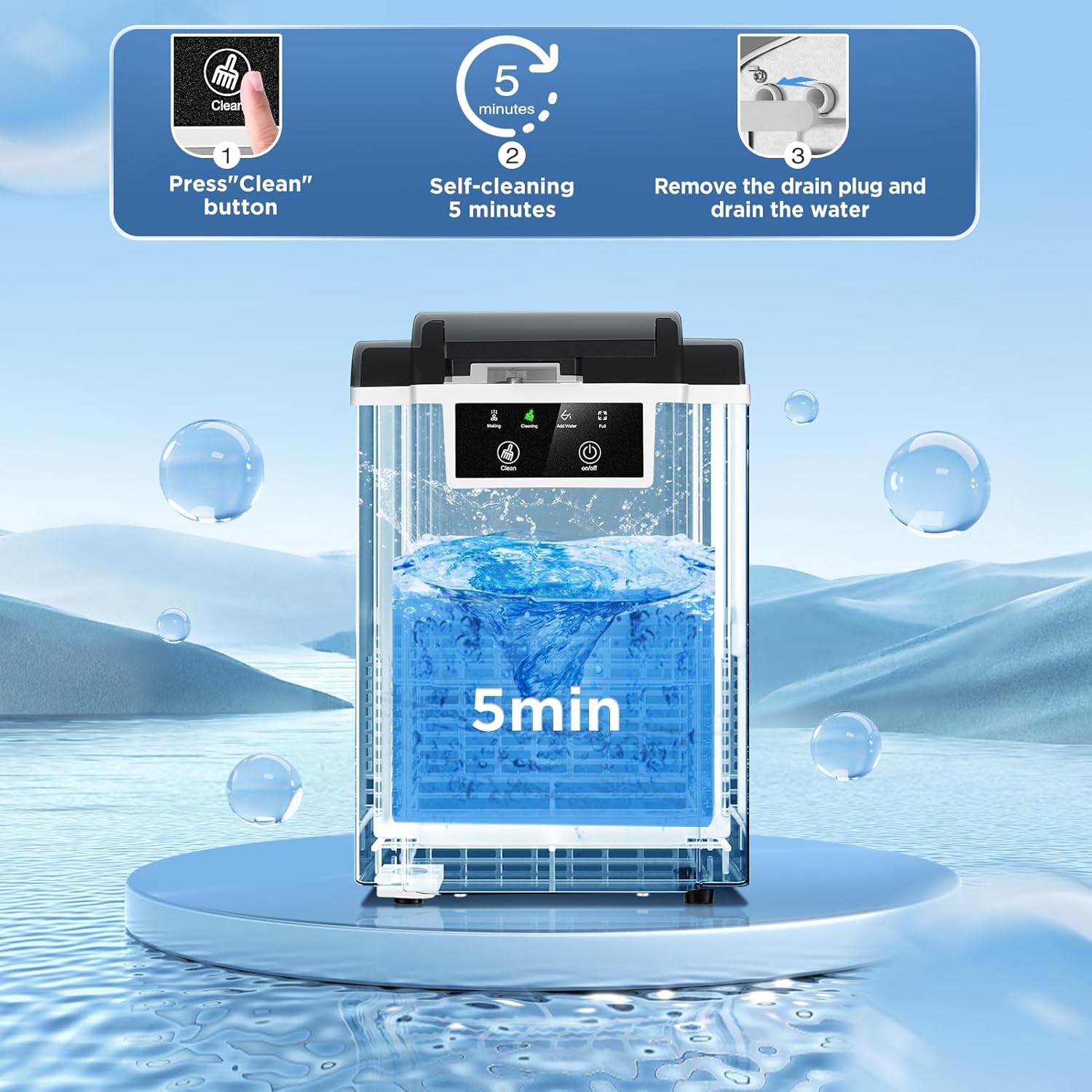
Figure 5: Steps for utilizing the self-cleaning function.
Manual Cleaning:
- Unplug the ice maker before cleaning.
- Remove the ice basket and clean it with mild detergent and warm water. Rinse thoroughly.
- Wipe the interior and exterior surfaces of the ice maker with a soft cloth dampened with mild detergent. Do not use abrasive cleaners or solvents.
- For descaling (especially in hard water areas), use a descaling solution suitable for ice makers or a mixture of water and vinegar. Refer to the descaling product's instructions.
- Ensure all parts are completely dry before reassembling and storing or using the machine.

Figure 6: Hard water can affect ice maker performance and may require more frequent descaling.
5. Troubleshooting
If you encounter issues with your ice maker, refer to the following common problems and solutions:
| Problem | Possible Cause | Solution |
|---|---|---|
| Ice maker not producing ice. | No water in reservoir; power not connected; ambient temperature too high. | Fill water reservoir; ensure power cord is securely plugged in; operate in a cooler environment. |
| "Add Water" indicator light is on. | Water level is low. | Add water to the reservoir up to the MAX fill line. |
| "Full" indicator light is on. | Ice basket is full. | Remove ice from the basket. |
| Ice tastes strange or has an odor. | Machine needs cleaning; water quality is poor. | Perform a self-cleaning cycle or manual clean; use filtered or distilled water. |
| Machine is noisy. | Normal operation sounds; unit not level. | Ensure the unit is on a stable, level surface. Some operational noise is normal. |
6. Specifications
| Feature | Detail |
|---|---|
| Model Number | KF440038-02 |
| Product Dimensions | 11.61"D x 8.66"W x 13"H |
| Weight | 19.2 Pounds |
| Ice Production Capacity | Up to 38 LBS/Day |
| Water Tank Capacity | 1.5 Liters |
| Ice Basket Capacity | 2.3 LBS |
| Power Supply | 110V-120V~ 60Hz |
| Wattage | 110 watts |
| Refrigerant | R600a/16g |
| Housing Material | Stainless Steel |

Figure 7: Product dimensions and key specifications.
7. What's in the Box
The following items are included with your JINJUNYE Nugget Ice Maker:
- JINJUNYE Nugget Ice Maker Unit
- Ice Scoop
- Ice Basket
- User Manual (this document)

Figure 8: The ice maker comes with a convenient ice scoop and basket.
8. Warranty and Support
JINJUNYE stands behind the quality of its products. This ice maker comes with a standard manufacturer's warranty covering defects in materials and workmanship under normal use.
Warranty Information:
- Please refer to the warranty card included in your product packaging for specific terms, conditions, and duration of coverage.
- Keep your purchase receipt as proof of purchase for warranty claims.
Customer Support:
For technical assistance, troubleshooting beyond this manual, or warranty inquiries, please contact JINJUNYE customer support:
- Website: Visit the official JINJUNYE website (if available) for FAQs and support resources.
- Email: Refer to your product packaging or warranty card for customer service email address.
- Phone: Refer to your product packaging or warranty card for customer service phone number.
When contacting support, please have your model number (KF440038-02) and purchase date ready.


