
MCombo 6160-R7410
MCombo Power Lift Recliner Chair User Manual
Model: 6160-R7410 | Brand: MCombo
Introduction
This manual provides essential information for the safe and effective use of your MCombo Small-Wide Power Lift Recliner Chair with Massage and Heat. Please read these instructions carefully before assembly, setup, and operation to ensure proper function and longevity of your chair. Keep this manual for future reference.

Image: The MCombo Power Lift Recliner Chair in beige faux leather, shown in a slightly lifted position, highlighting its power lift mechanism and integrated remote control.
Safety Information
WARNING: This is an electrical device. Adherence to the following safety guidelines is crucial to prevent injury or damage.
- Always unplug the chair when not in use or before cleaning.
- Do not use the chair if the power cord is damaged. Contact customer support for replacement.
- This chair is designed for adults only. Keep children and pets away from the chair when it is in use or reclined. Do not leave children unattended near the chair.
- The maximum weight capacity for this chair is 350 pounds. Do not exceed this limit.
- Always assemble the chair strictly according to the provided instructions.
- Do not attempt to repair or modify the chair yourself. Unauthorized modifications can void the warranty and pose safety risks.
- If you experience any issues or unusual operation, immediately unplug the chair and contact the manufacturer for assistance.
Package Contents
Before beginning assembly, ensure all components are present and undamaged. The package should contain:
- Backrest
- Base
- Left armrest
- Right armrest
- Accessories box (containing power adapter, remote control, and other small parts)
- User Manual (this document)
Note: The chair is shipped in 3 separate boxes. Ensure all boxes are received before proceeding.
Assembly Instructions
Detailed, step-by-step assembly instructions are provided in a separate assembly manual included with your chair. Please refer to that document for specific guidance on connecting the backrest, armrests, and base. Ensure all connections are secure before plugging in the chair.
Setup
- Placement: Position the chair on a flat, stable surface, ensuring there is sufficient clearance behind and in front of the chair for full recline and lift functions.
- Power Connection: Locate the power cord from the accessories box. Connect the power cord to the chair's power input port, typically located at the rear or underside of the base. Plug the other end into a standard wall outlet (110-120V AC).
- Remote Control: The remote control is pre-connected. Ensure its cable is not pinched or tangled.
Operating Instructions
Power Lift and Recline Functions
The chair features a counter-balanced power lift mechanism and offers three primary positions controlled by the wired remote.
- UP Position: Press and hold the UP arrow button on the remote. The chair will slowly tilt forward and lift, assisting you in standing up.
- TV Position: Press and hold the DOWN arrow button until the chair reaches a comfortable upright sitting position with the footrest retracted. This is ideal for watching television or reading.
- Reclined Position: Continue pressing the DOWN arrow button from the TV position. The backrest will recline further, and the footrest will extend, allowing for a relaxed, nearly flat position (maximum recline angle: 140°).

Image: Illustration of the three chair positions (Reclined, TV, UP) and the simple two-button remote control for power lift and recline functions.
Massage and Heat Functions
The chair is equipped with a full-body vibration massage system and a lumbar heating function, controlled by a separate wired remote.
- Vibration Massage: The remote allows you to select massage intensity (L/M/H), mode and vibrating points (Back, Lumbar, Thigh, Leg). There are 8 vibrating nodes distributed throughout the chair.
- Lumbar Heating: Press the "HEAT" button on the massage remote to activate the lumbar heating function. This can be used independently or in conjunction with the vibration massage.
- Timer: Set a timer for 10, 20, or 30 minutes for the massage and heat functions.
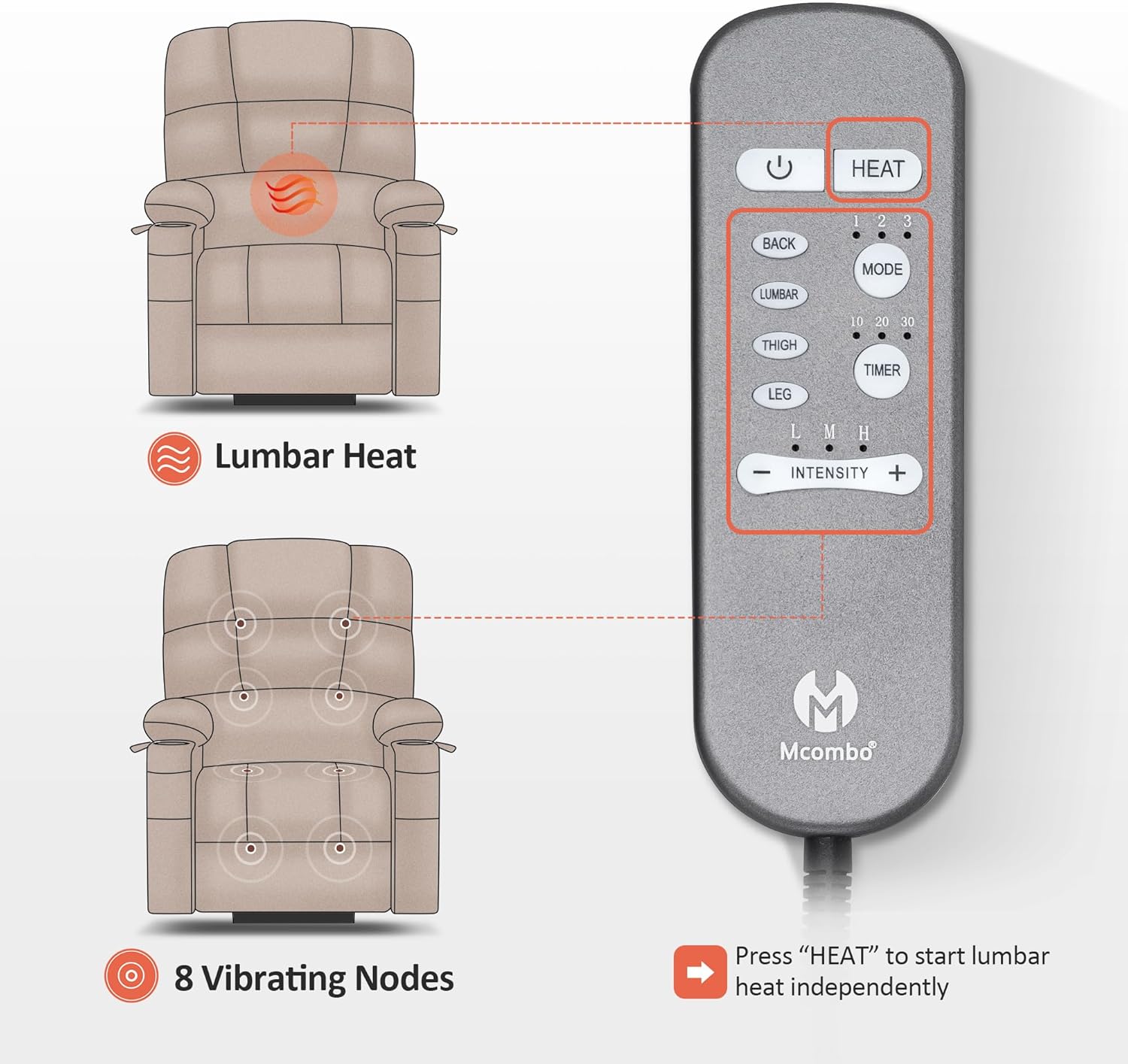
Image: Diagram showing the lumbar heat area and the location of 8 vibrating nodes, along with a detailed view of the massage and heat remote control with various settings.
USB Charging Ports and Side Pockets
The chair includes convenient features for user comfort and utility.
- USB Ports: Two USB charging ports are integrated into the side of the chair, allowing you to charge your electronic devices while relaxing.
- Side Pockets: Two side pockets provide storage for the remote controls, magazines, or other small items.

Image: Close-up view of the chair's armrest area, highlighting the two USB charging ports and the two side pockets for convenient storage.
Maintenance
To ensure the longevity and appearance of your MCombo recliner, follow these simple care instructions:
- Cleaning: Wipe clean with a damp cloth. For faux leather, use a mild soap solution if necessary, then wipe dry immediately. Avoid harsh chemicals or abrasive cleaners.
- Spills: Blot spills immediately with a clean, dry cloth. Do not rub.
- Power Cord: Regularly inspect the power cord for any signs of damage. If damaged, discontinue use and contact customer support.
- Moving the Chair: When moving the chair, lift it rather than dragging to prevent damage to the base or flooring.
Troubleshooting
If you encounter issues with your MCombo Power Lift Recliner Chair, please refer to the following common troubleshooting tips:
- Chair Not Responding:
- Ensure the power cord is securely plugged into both the chair and a working wall outlet.
- Check if the wall outlet is receiving power (test with another appliance).
- Inspect the power cord for any visible damage.
- Motor Noise:
- A slight humming sound from the motor during operation is normal.
- If the noise is excessive or unusual, discontinue use and contact customer support.
- Massage/Heat Not Working:
- Ensure the chair is powered on.
- Check the connections of the massage/heat remote to the chair.
For issues not covered here, or if problems persist, please contact MCombo customer support.
Specifications
| Feature | Detail |
|---|---|
| Model Name | 6160-R7410 |
| Color | Beige |
| Product Dimensions (D x W x H) | 37.8"D x 41.3"W x 42.9"H |
| Maximum Weight Recommendation | 350 Pounds |
| Seat Width | 27.2 Inches |
| Seat Depth | 17.3 Inches |
| Seat Height | 19.7 Inches |
| Backrest Height | 28.5 Inches |
| Arm Height | 26 Inches |
| Ideal User Height | 4'6" - 5'2" |
| Material | Faux Leather, Foam Filling |
| Item Weight | 112 pounds |
| Reclining Positions | 3 Positions (Up, TV, Reclined) |
| Special Features | Power Lift, Massage, Heat, USB Ports, Side Pockets |
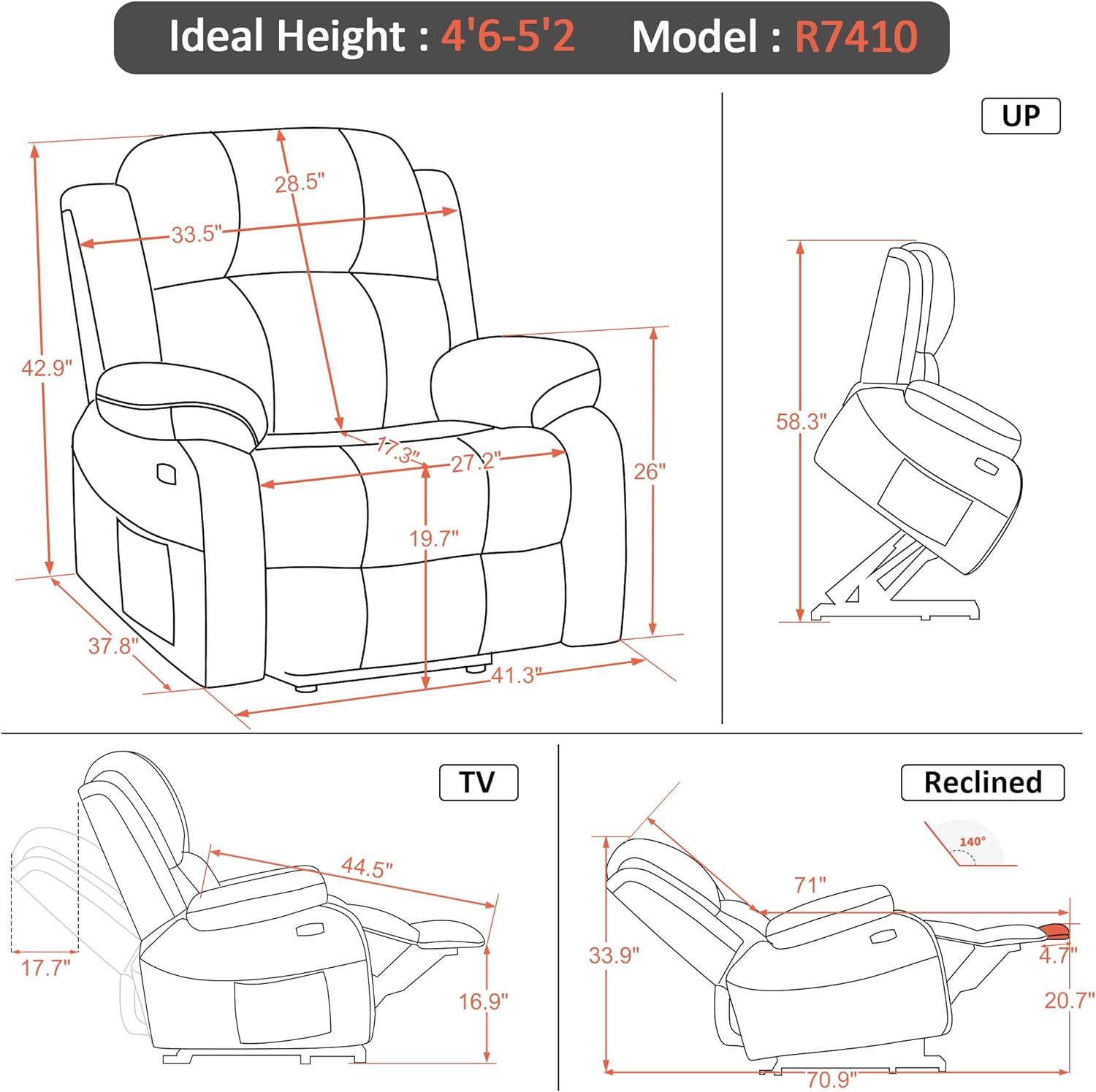
Image: Technical drawing illustrating the detailed dimensions of the MCombo recliner in various positions (Up, TV, Reclined), including seat width, backrest height, and overall length.
Warranty and Support
For information regarding product warranty, please refer to the warranty card included with your purchase or visit the official MCombo website. If you require technical assistance, have questions about operation, or need to report a damaged part, please contact MCombo customer support directly. Contact information can typically be found on the manufacturer's website or on the packaging.
You can visit the MCombo Store for more information: MCombo Official Store
Additional Product Views

Image: The MCombo recliner chair positioned comfortably in a living room setting, demonstrating its aesthetic integration into home decor.
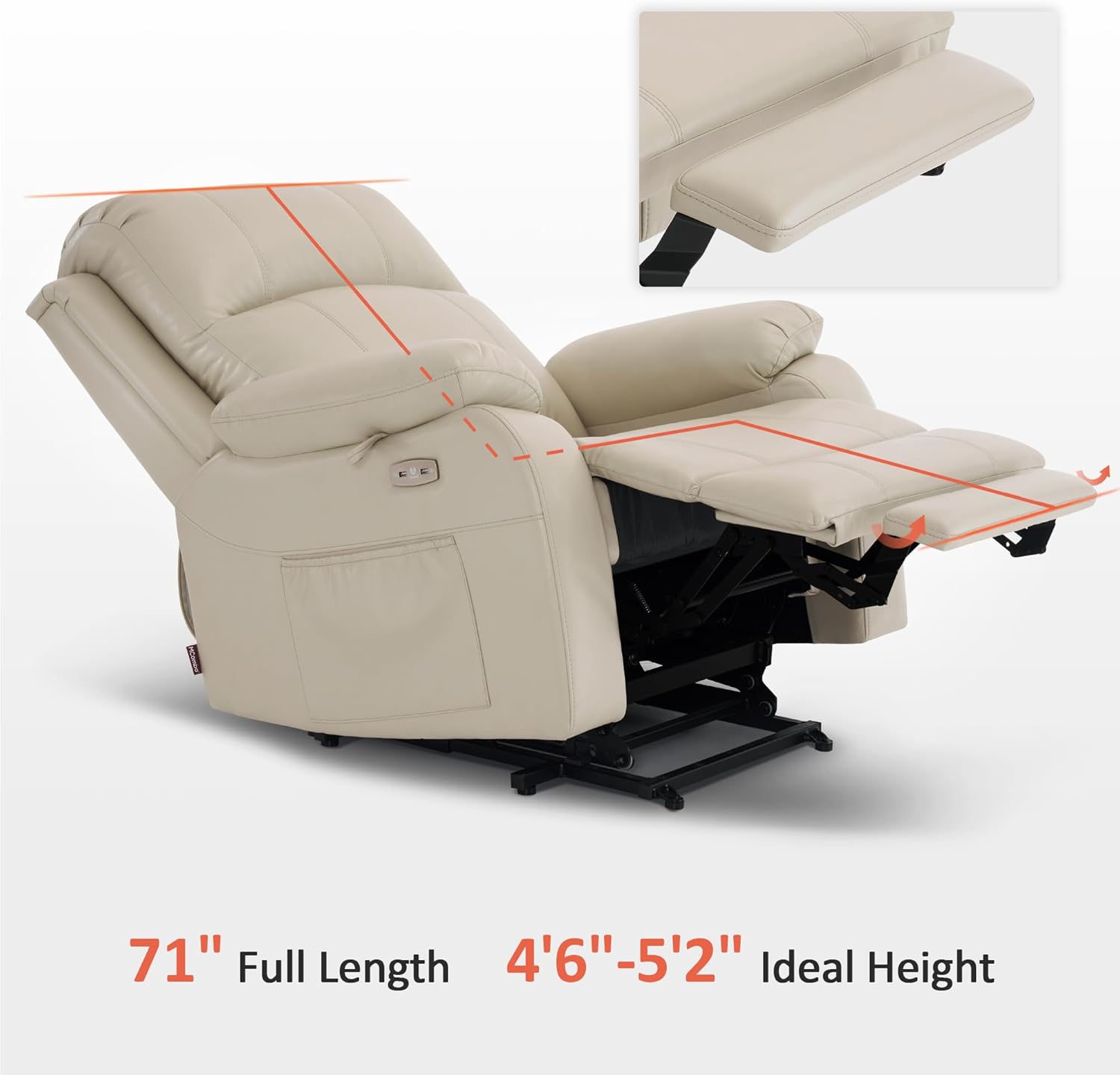
Image: The recliner shown with an overlay indicating its full length when reclined (71 inches) and the recommended ideal user height range (4'6" - 5'2").

Image: A close-up view of the faux leather material, showcasing its texture and finish.
Official Product Videos
No official seller videos were found with relevant content for embedding in this manual. Please refer to the product page on Amazon or the manufacturer's website for any available video demonstrations.
Related documents6160-R7410


Ask a question about this manual
Ask about setup, troubleshooting, compatibility, parts, safety, or missing instructions. Manuals+ will review the question and use this page’s manual context to help answer it.