1. Introduction
This user manual provides detailed instructions for the setup, operation, and maintenance of your Thomson 50-inch 4K Ultra HD Smart Android TV (Model: 50UA5S13W). Please read this manual thoroughly before using the television to ensure proper and safe operation. Keep this manual for future reference.

Image: Front view of the Thomson 50-inch 4K Ultra HD Smart Android TV, showcasing its slim bezels and white finish.
2. Important Safety Information
Always adhere to the following safety precautions to prevent electric shock, fire, damage to the device, or personal injury.
- Do not expose the TV to rain or moisture.
- Do not open the TV casing; refer all servicing to qualified personnel.
- Ensure proper ventilation; do not block ventilation openings.
- Protect the power cord from being walked on or pinched.
- Unplug the TV during lightning storms or when unused for long periods.
- Keep the TV away from heat sources and direct sunlight.
- Use only attachments/accessories specified by the manufacturer.
3. Package Contents
Before proceeding with the setup, please verify that all items listed below are included in your package:
- Thomson 50-inch 4K Ultra HD Smart Android TV
- Remote Control (with backlit buttons)
- Batteries for Remote Control
- TV Stands (2 pieces)
- Screws for TV Stands
- Power Cord
- Quick Start Guide
- User Manual (this document)
4. Setup
4.1 Physical Installation
You can either place the TV on a flat surface using the provided stands or mount it on a wall (wall mount not included).
Attaching the Stands:
- Carefully place the TV face down on a soft, clean surface to prevent screen damage.
- Align each stand with the corresponding screw holes on the bottom of the TV.
- Secure the stands using the provided screws.
Wall Mounting:
This TV supports VESA 200x200 wall mounts. Please refer to the wall mount's instructions for proper installation. Ensure the wall can support the weight of the TV (approximately 12.22 kg).

Image: Front view of the Thomson TV, illustrating its dimensions: 112 cm width, 69 cm height, and 8 cm depth.

Image: Side view of the Thomson TV, showing its slim profile.
4.2 Connecting Peripherals
Connect your external devices to the appropriate ports on the TV's rear panel.
- HDMI (4x HDMI 2.0): For connecting Blu-ray players, game consoles, set-top boxes, etc.
- USB (2x USB 2.0): For connecting USB storage devices to play media or for software updates.
- LAN: For wired internet connection.
- Audio Out (Digital Optical): For connecting to soundbars or home theater systems.
- Satellite (DVB-S2): For satellite antenna connection.
- Antenna (DVB-T2/C): For terrestrial or cable antenna connection.
- AV In: For connecting older devices with composite video/audio outputs.
- Common Interface (CI+): For inserting a CAM module and smart card for encrypted channels.

Image: Rear view of the Thomson TV, detailing the various input and output ports including HDMI, USB, LAN, Audio Out, Satellite, Antenna, AV In, and Common Interface.
4.3 Initial Setup and Network Connection
After connecting the power cord and turning on the TV, you will be guided through the initial setup process.
- Power On: Plug in the power cord and press the power button on the remote control or TV.
- Language Selection: Choose your preferred language.
- Network Connection: Connect to your Wi-Fi network or use a wired LAN connection. This is essential for Smart TV features.
- Google Account Setup: Sign in with your Google account to access the Google Play Store, Google Assistant, and other Android TV features.
- Channel Scan: The TV will guide you through scanning for available channels via the Triple-Tuner (DVB-S2, DVB-T2, or DVB-C).
5. Operating Your Thomson Smart Android TV
5.1 Android TV Interface and Streaming
Your Thomson TV runs on Android TV, providing access to a vast library of content and applications. The home screen offers personalized recommendations and quick access to your favorite streaming services like Netflix, Prime Video, YouTube, and Disney+.

Image: The Android TV home screen, displaying popular streaming applications and content recommendations.
5.2 Google Assistant
The integrated Google Assistant allows you to control your TV and smart home devices using voice commands. Simply press the Google Assistant button on your remote and speak your command.
- "Play [Movie Title] on Netflix."
- "Open YouTube."
- "What's the weather like?"
- "Dim the lights." (Requires compatible smart home devices)

Image: A user interacting with the TV using Google Assistant voice commands via the remote control.
5.3 Chromecast built-in
With Chromecast built-in, you can easily cast movies, shows, photos, and more from your compatible smartphone, tablet, or laptop directly to your TV screen.

Image: Illustration of Google Cast functionality, demonstrating how content can be streamed wirelessly from various smart devices to the Thomson TV.
5.4 Audio and Visual Enhancements (Dolby Atmos & Dolby Vision)
Experience immersive sound and stunning visuals with Dolby Atmos and Dolby Vision technologies.
- Dolby Atmos: Creates a multi-dimensional sound experience, making audio flow around you. (Compatible sound device needed)
- Dolby Vision: Delivers incredible brightness, contrast, and color, bringing entertainment to life.

Image: An illustration depicting the immersive, multi-dimensional sound experience provided by Dolby Atmos, with sound waves emanating from the TV and surrounding viewers.

Image: A side-by-side comparison illustrating the enhanced visual quality of Dolby Vision 4K UHD compared to standard SDR, highlighting improved brightness, contrast, and color.
5.5 Remote Control Features
The included remote control is designed for ease of use, featuring backlit buttons for visibility in low light and a dedicated favorites button.

Image: The Thomson TV remote control, showcasing its ergonomic design, a dedicated button for favorite apps, backlit buttons for use in the dark, and integrated voice control functionality.
6. Maintenance
Proper maintenance ensures the longevity of your TV.
- Cleaning the Screen: Gently wipe the screen with a soft, lint-free cloth. For stubborn marks, use a specialized screen cleaner applied to the cloth, not directly to the screen.
- Cleaning the Casing: Use a soft, dry cloth to wipe the TV casing. Do not use abrasive cleaners or solvents.
- Ventilation: Ensure the ventilation openings are not blocked by dust or objects.
- Power Off: Always unplug the TV from the power outlet before cleaning or when not in use for extended periods.
7. Troubleshooting
Here are solutions to common issues you might encounter:
| Problem | Possible Cause | Solution |
|---|---|---|
| No Power | Power cord not connected; no power from outlet. | Check power cord connection; test outlet with another device. |
| No Picture/Sound | Incorrect input source; loose cable connection. | Select correct input source; check all cable connections. |
| Remote Control Not Working | Dead batteries; obstruction between remote and TV. | Replace batteries; remove any obstructions. |
| Cannot Connect to Wi-Fi | Incorrect password; router issue; TV too far from router. | Verify password; restart router; move TV closer or use wired connection. |
| Apps Crashing/Slow Performance | Too many apps running; low storage; software glitch. | Close unused apps; clear cache; restart TV; check for software updates. |
8. Technical Specifications
| Feature | Specification |
|---|---|
| Model Number | 50UA5S13W |
| Screen Size | 50 inches (126 cm) |
| Display Technology | UHD (A+ Panel Quality) |
| Resolution | 3840 x 2160 (4K Ultra HD) |
| Refresh Rate | 60 Hz |
| Operating System | Android TV |
| Connectivity | Wi-Fi, Bluetooth, 4x HDMI 2.0, 2x USB 2.0, LAN, Digital Optical Audio Out, AV In, CI+ |
| Tuners | Triple-Tuner (DVB-S2, DVB-T2, DVB-C) |
| Audio Technology | Dolby Digital, Dolby Atmos (compatible sound device needed) |
| Video Technology | Dolby Vision, 4K UHD |
| Dimensions (W x H x D) | 112 x 69 x 8 cm (without stand) |
| Weight | 12.22 kg |
| Energy Efficiency Class (SDR) | E (53 kWh/1000h) |
| Energy Efficiency Class (HDR) | E (54 kWh/1000h) |
| VESA Wall Mount | 200x200 (not included) |

Image: Official product data sheet for the Thomson 50UA5S13W television, detailing technical specifications and energy consumption.
For more details, refer to the EPREL Product Database.
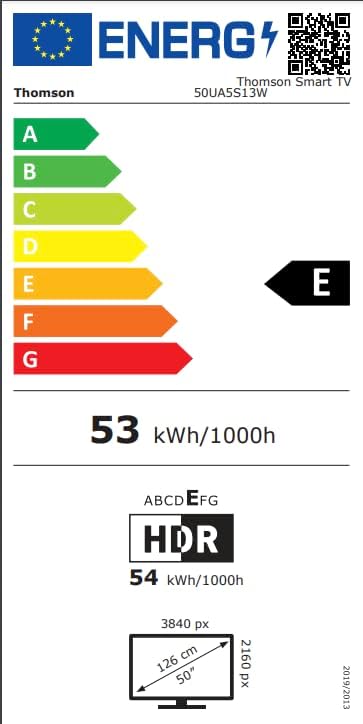
Image: Energy efficiency label for the Thomson 50UA5S13W TV, showing its 'E' rating for both SDR and HDR content.
9. Warranty and Support
Thomson offers a 3-year warranty on your television, ensuring peace of mind and reliable performance. For technical support, service, or warranty claims, please contact the manufacturer's authorized service center or refer to the contact information provided in your product documentation.
Manufacturer: THOMSON (StreamView GmbH)
Website: www.streamview.com
Email: contact@streamview.com
Telephone: +4318900066
Address: Franz-Josefs-Kai 1, 1010 Vienna, Austria


