
1. Introduction
This manual provides essential information for the safe and effective operation of your Behringer PROTON Analog Paraphonic Semi-Modular Synthesizer. Please read this manual thoroughly before using the device to ensure proper setup and functionality. Retain this manual for future reference.
2. Important Safety Instructions
- Power Supply: Use only the specified power adapter. Ensure the voltage matches your local power supply.
- Water and Moisture: Do not expose this appliance to rain or moisture. Do not use near water or in damp locations.
- Ventilation: Ensure adequate ventilation. Do not block any ventilation openings.
- Heat: Do not install near any heat sources such as radiators, heat registers, stoves, or other apparatus (including amplifiers) that produce heat.
- Cleaning: Clean only with a dry cloth.
- Servicing: Refer all servicing to qualified service personnel. Servicing is required when the apparatus has been damaged in any way, such as power-supply cord or plug is damaged, liquid has been spilled or objects have fallen into the apparatus, the apparatus has been exposed to rain or moisture, does not operate normally, or has been dropped.
3. Product Overview
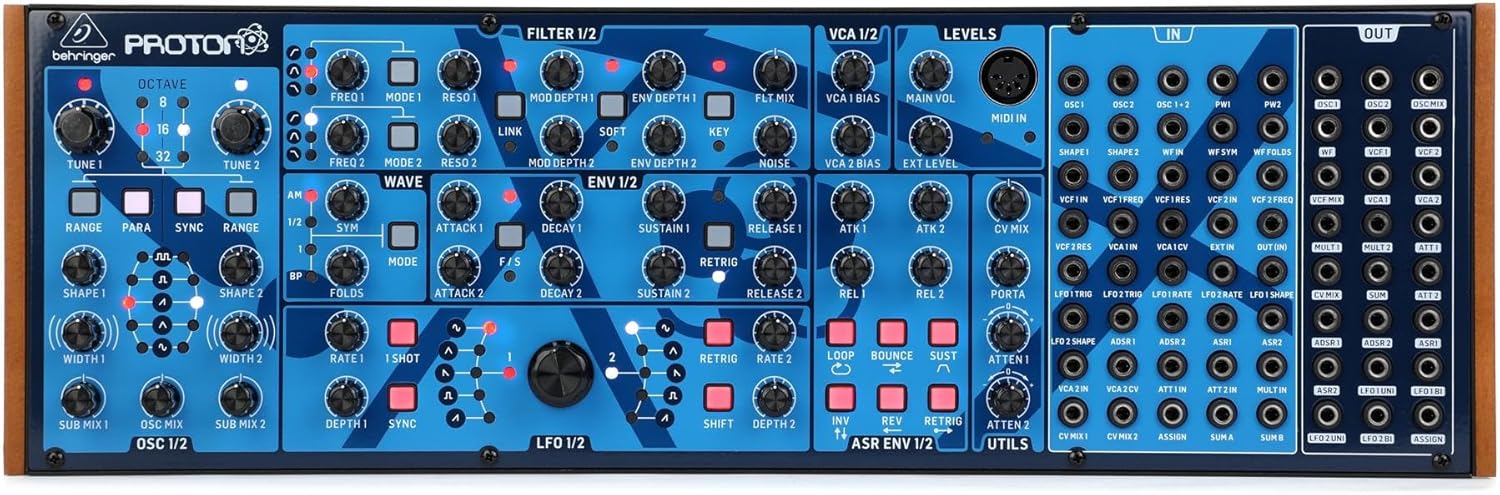
The Behringer PROTON is an analog paraphonic semi-modular synthesizer designed for versatile sound creation. It features a comprehensive set of modules for generating and shaping sounds, all within a compact Eurorack-compatible format.
Key Components:
- 2 Voltage Controlled Oscillators (VCOs): Generate the primary sound waves.
- 2 Multi-Mode Voltage Controlled Filters (VCFs): Shape the timbre of the sound.
- 2 Voltage Controlled Amplifiers (VCAs): Control the amplitude (volume) of the sound.
- 4 Envelope Generators: Provide dynamic control over various parameters (e.g., Attack, Decay, Sustain, Release).
- Wave Folder: Adds harmonic complexity and unique textures to waveforms.
- Extensive Patch Bay: Allows for flexible routing and modulation.

4. Setup
4.1 Power Connection
- Connect the provided power adapter to the DC input jack on the rear panel of the PROTON.
- Plug the power adapter into a suitable electrical outlet.
- Ensure the power switch is in the 'OFF' position before connecting or disconnecting power.
4.2 Audio Connections
- Main Audio Output: Connect the 'OUT' jack to your mixer, audio interface, or amplifier using a standard 3.5mm TS cable.
- MIDI Input: Use the MIDI IN port to connect a MIDI controller or sequencer for note and control data.
4.3 Eurorack Integration (Optional)
The PROTON is designed to be Eurorack compatible. It can be mounted into a Eurorack case and powered via the Eurorack power bus. Refer to your Eurorack case manual for specific installation instructions.
5. Operating Instructions
The PROTON offers extensive sound design capabilities through its semi-modular architecture. This section provides an overview of its main modules and how to interact with them.
5.1 Oscillators (OSC 1/2)
- OCTAVE: Adjusts the pitch range (8', 16', 32').
- TUNE: Fine-tunes the pitch of each oscillator.
- RANGE/PARA/SYNC: Controls oscillator behavior, including paraphonic mode for playing multiple notes.
- SHAPE/WIDTH: Selects and modifies the waveform (e.g., square, saw, triangle).
- SUB MIX: Blends the sub-oscillator into the main mix.
5.2 Filters (FILTER 1/2)
- FREQ: Controls the filter cutoff frequency.
- RESO: Adjusts the filter resonance.
- MODE: Selects different filter modes (e.g., low-pass, high-pass).
- MOD DEPTH/ENV DEPTH: Controls the amount of modulation applied to the filter.
5.3 Amplifiers (VCA 1/2)
- VCA BIAS: Sets the initial gain of the VCA.
- MAIN VOL: Controls the overall output volume.
- EXT LEVEL: Adjusts the level of external audio input.
5.4 Envelopes (ENV 1/2)
- ATTACK: Controls the time it takes for the sound to reach its peak level.
- DECAY: Controls the time it takes for the sound to fall from its peak to the sustain level.
- SUSTAIN: Sets the level at which the sound is held as long as a key is pressed.
- RELEASE: Controls the time it takes for the sound to fade out after the key is released.
5.5 Low Frequency Oscillators (LFO 1/2)
- RATE: Adjusts the speed of the LFO.
- SHAPE: Selects the LFO waveform (e.g., sine, square, saw).
- DEPTH: Controls the intensity of the LFO modulation.
5.6 Wave Folder
The Wave Folder module introduces non-linear distortion to the waveform, creating complex harmonics and unique timbres. Experiment with the 'FOLDS' control to explore different sonic characteristics.
5.7 Patch Bay
The extensive patch bay allows for re-routing internal connections and integrating with other modular synthesis equipment. Use 3.5mm patch cables to connect inputs ('IN') and outputs ('OUT') to create custom signal flows and modulation paths.
5.8 Official Product Video
Watch this video for an overview of the Behringer PROTON's features and sound capabilities.
6. Maintenance
- Cleaning: Use a soft, dry cloth to clean the exterior of the synthesizer. Avoid abrasive cleaners or solvents.
- Storage: Store the device in a cool, dry place away from direct sunlight and extreme temperatures. If not in use for extended periods, disconnect the power supply.
- Patch Cables: Keep patch cables organized and free from kinks or damage.
7. Troubleshooting
- No Sound: Check all audio connections, ensure the main volume is up, and verify that oscillators and VCAs are active.
- No Power: Ensure the power adapter is securely connected to both the device and the power outlet. Try a different outlet if necessary.
- Unexpected Behavior: Disconnect all patch cables and reset the device. Reconnect cables one by one to identify the source of the issue.
- MIDI Issues: Verify MIDI cable connections and ensure your MIDI controller is sending data correctly. Check MIDI channel settings.
8. Specifications
| Brand | Behringer |
| Model Name | Proton |
| Item Model Number | 0718-AAO |
| UPC | 787790548355 |
| Product Dimensions (L x W x H) | 20.95 x 7.5 x 5.15 inches |
| Item Weight | 5.61 pounds |
| Body Material | Metal |
| Material Type | Plastic |
| Connector Type | USB |
9. Warranty and Support
For warranty information and technical support, please refer to the official Behringer website or contact your local distributor. Keep your proof of purchase for any warranty claims.


