
1. Introduction and Overview
The Haloview Byte Tango BT7 TPMS is a comprehensive safety system designed for RVs, trucks, trailers, and campers. It integrates a high-definition 1080P wireless observation and backup camera with an advanced Tire Pressure Monitoring System (TPMS). This dual functionality provides real-time monitoring of tire pressure and temperature, alongside a clear view of the vehicle's rear, significantly enhancing driving safety and convenience. The system features an advanced alert mechanism for various tire conditions, ensuring the driver is promptly informed of potential issues.
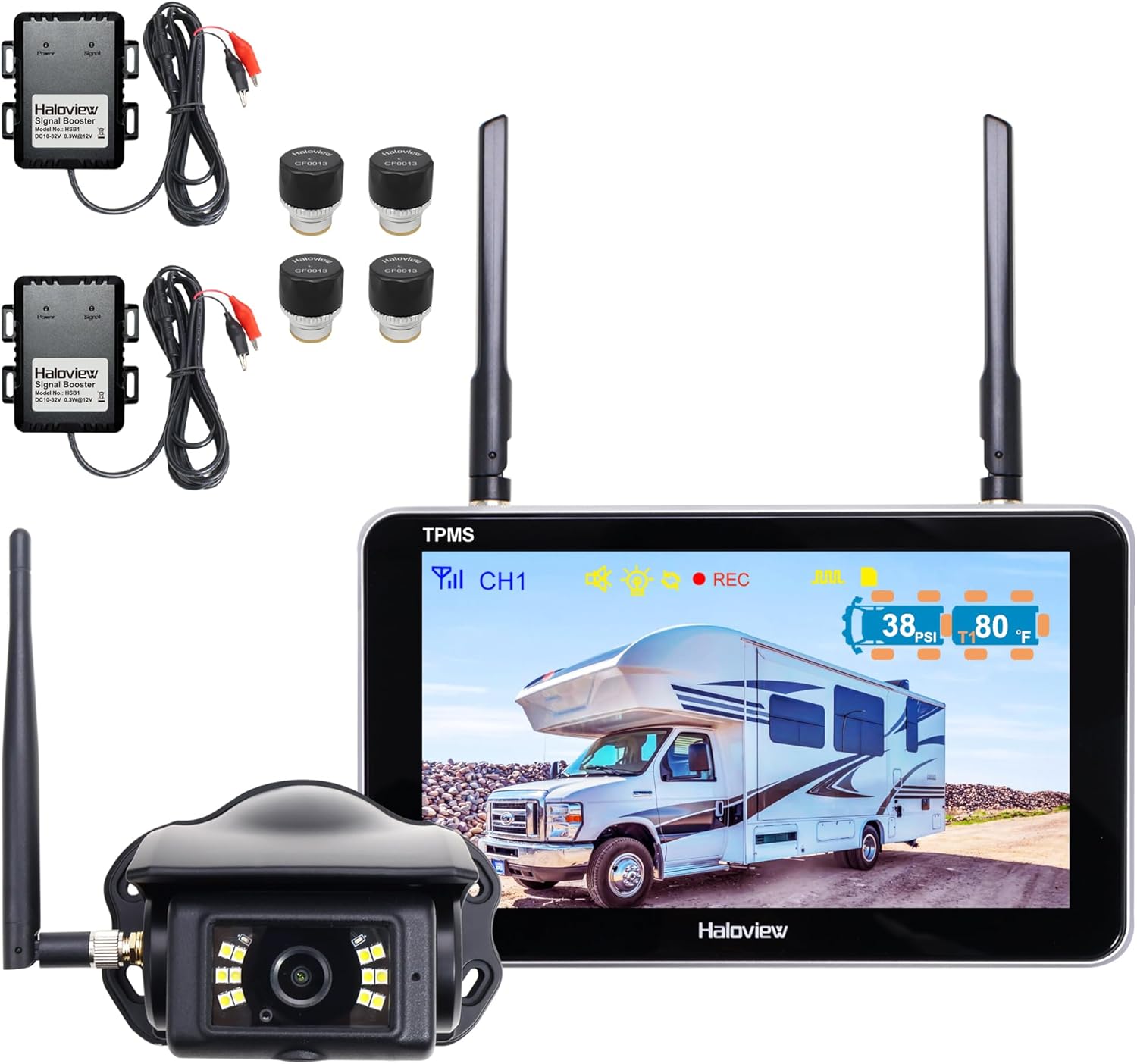
Figure 1.1: The Haloview Byte Tango BT7 TPMS system, showing the monitor, camera, and four tire pressure sensors.
2. What's in the Box
The Haloview Byte Tango BT7 TPMS package includes the following components:
- 1 x BT7 TPMS Monitor
- 1 x BT7 TPMS Camera
- 4 x BT7 TPMS Sensors
- 2 x Booster
- Type-C Cable
- Camera Conversion Cable
- Power Adapter for Pre-wired RV
- Pairing Cable
- Cigarette Lighter Adapter
- Gasket
- Suction Cup Mount Bracket
- 3M Mount Bracket
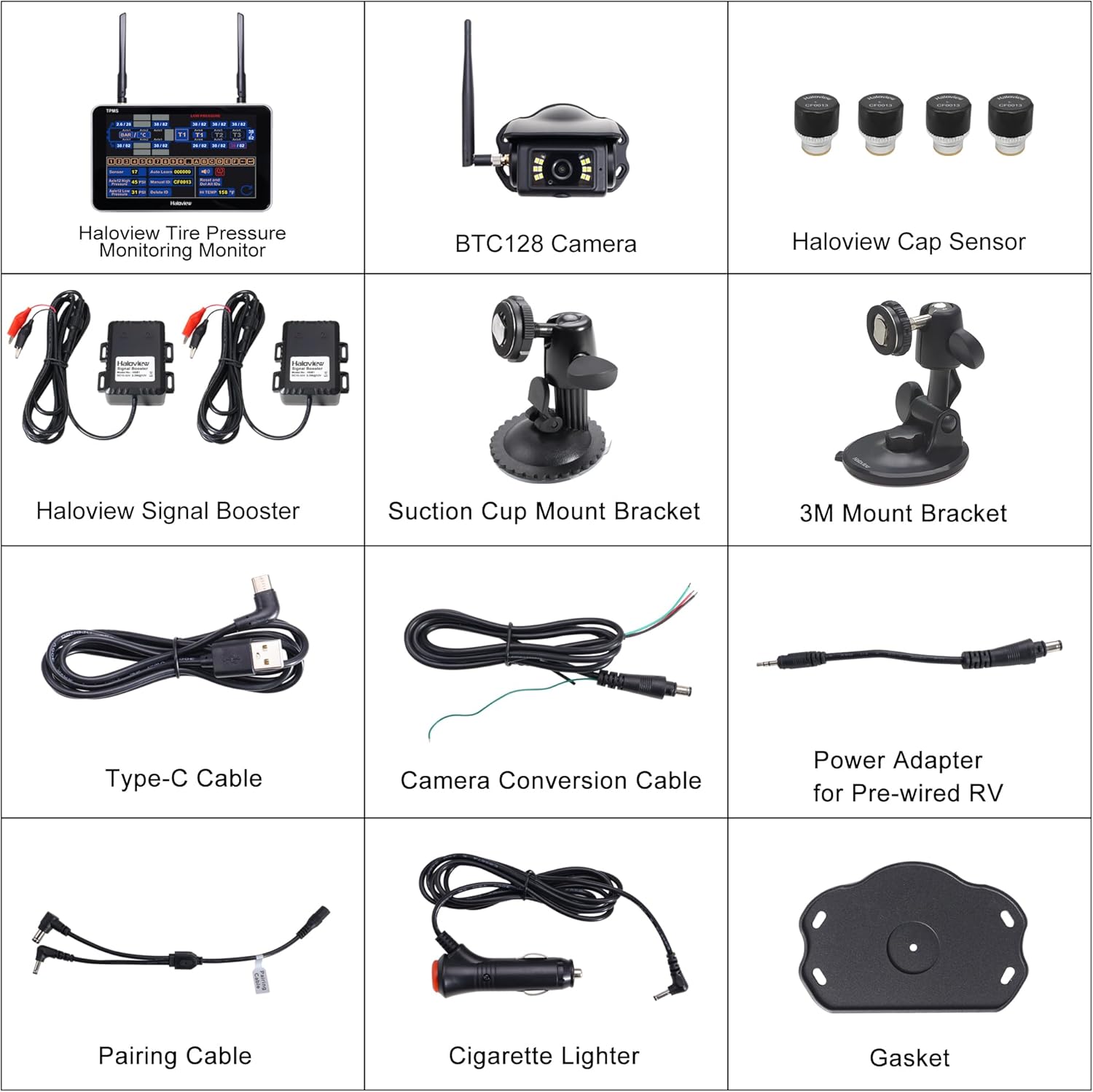
Figure 2.1: Contents of the Haloview BT7 TPMS product box.
3. Setup
Follow these steps to set up your Haloview Byte Tango BT7 TPMS:
- Mounting the Monitor: Choose a suitable location in your vehicle's cabin for the monitor. The system supports surface mount installation. Use either the provided suction cup mount or the 3M mount bracket to securely attach the monitor. Ensure the monitor is positioned for clear visibility without obstructing your view of the road.
- Camera Installation: Install the BT7 TPMS camera at the rear of your RV, truck, or trailer. Ensure it has a clear, unobstructed view. Connect the camera using the provided cables. For pre-wired RVs, use the specific power adapter.
- Sensor Installation: Attach the four BT7 TPMS sensors to the valve stems of your tires. These sensors are made of aluminum alloy and include anti-theft features. Ensure they are securely tightened to prevent air leaks.
- Power Connection: Connect the monitor to your vehicle's power source, typically via the cigarette lighter adapter or a direct wired connection using the Type-C cable.
- Pairing Sensors: The system offers two pairing methods for the TPMS sensors:
- AUTO Learn: This method allows for one-click pairing, simplifying the setup process.
- Manual ID Input: You can manually input sensor IDs for precise control. The TPMS menu provides a clear interface with code buttons and a keyboard for this purpose.
- Booster Installation: For longer trailers, it is recommended to install the two provided boosters to ensure consistent and reliable signal transmission between the sensors and the monitor.

Figure 3.1: Real-time monitoring display on the Haloview BT7 TPMS monitor.
4. Operating Instructions
The Haloview Byte Tango BT7 TPMS provides intuitive operation for both camera and TPMS functionalities:
- Real-Time Tire Data Display: Tire pressure and temperature readings are displayed directly within the camera views on the monitor. The display automatically cycles through the data for each monitored tire every 5 seconds. This allows for continuous monitoring without needing to navigate through separate TPMS menus.
- Adjustable TPMS Overlay: The TPMS readings overlay can be enabled or disabled, and its transparency is adjustable. This feature allows you to customize the display to prevent obstruction of the camera's field of vision.
- Advanced Alert System: The system is equipped with an advanced alert system that provides visual and audio warnings for various conditions:
- High/Low Tire Pressure
- High Temperature
- Fast/Slow Leaks
- Lost Sensor Signal
- Low Sensor Battery
- Camera View Management: The monitor supports up to four camera views, compatible with Haloview Byte Tango cameras (BTC128/BTC129/BTC126/BTC133/BTC125). This helps eliminate blind spots and allows for monitoring cargo during transport.
- Parking Line Adjustment: The monitor allows for adjustment of parking lines. You can slide them vertically or horizontally by touching the screen. Holding the respective icons provides quick adjustments.
- Recording Functionality: The system functions as a 1080P recording device. Recordings can be accessed and played back directly on the monitor. A micro SD card is used for storage, and recordings can also be viewed on a computer.

Figure 4.1: Seven alert modes displayed on the Haloview BT7 TPMS monitor.

Figure 4.2: Example of a low pressure alert on the monitor, prompting the driver to pull over.

Figure 4.3: Adjusting parking lines on the monitor's touchscreen interface.
5. Maintenance
To ensure the longevity and optimal performance of your Haloview Byte Tango BT7 TPMS, consider the following maintenance guidelines:
- Sensor Care: The TPMS sensors are constructed from durable aluminum alloy and are designed to be waterproof, corrosion-resistant, and explosion-proof. They are suitable for various climates and weather conditions. Periodically inspect the sensors for any physical damage or signs of wear. Ensure they remain tightly secured to the valve stems to prevent air leakage.
- Cleaning: Clean the monitor screen and camera lens regularly with a soft, dry cloth to maintain clear visibility. Avoid using harsh chemicals or abrasive materials that could damage the surfaces.
- Battery Replacement: The sensors operate on internal batteries. If a low sensor battery alert is triggered, replace the affected sensor's battery promptly to ensure continuous monitoring.
- Software Updates: Check the Haloview official website periodically for any available firmware or software updates for your BT7 TPMS system. Updates can improve performance, add new features, or resolve known issues.

Figure 5.1: Durability features of the Haloview TPMS sensors.
6. Troubleshooting
This section provides solutions to common issues you might encounter with your Haloview Byte Tango BT7 TPMS:
| Problem | Possible Cause | Solution |
|---|---|---|
| No Camera Signal / Blank Screen | Loose cable connection, power issue, camera malfunction, signal interference. | Check all cable connections (power, camera). Ensure the monitor is receiving power. Verify the camera is properly installed and powered. If signal interference is suspected (e.g., in heavily populated areas), try moving the vehicle or checking for strong external wireless signals. |
| Inaccurate TPMS Readings / False Alerts | Sensor not tightened correctly, sensor battery low, signal interference, incorrect pairing. | Ensure all sensors are securely tightened on the valve stems. Check for low sensor battery alerts and replace batteries if necessary. Re-pair the sensors using either AUTO Learn or manual ID input. Signal interference can sometimes cause temporary false readings; these usually self-correct. |
| No TPMS Data Displayed | TPMS overlay disabled, sensors not paired, sensor malfunction. | Check the monitor settings to ensure the TPMS view is enabled and transparency is adjusted as desired. Confirm that all sensors are correctly paired to the system. If a specific sensor is not transmitting, check its battery and re-pair it. |
7. Specifications
Key technical specifications for the Haloview Byte Tango BT7 TPMS:
| Feature | Detail |
|---|---|
| Product Dimensions | 10 x 7 x 7 inches (Monitor) |
| Item Weight | 4.71 pounds |
| Screen Size | 7 Inches |
| Video Capture Resolution | 1080p |
| Optical Sensor Technology | CMOS |
| Real Angle of View | 120 Degrees |
| Pressure Range Detection | 0 to 218 PSI (0-15 Bar) |
| Compatible Devices | Haloview BTC128/BTC129/BTC125/BTC126/BTC130/BTC131 |
| Installation Type | Surface Mount |
| Other Display Features | Wireless |

Figure 7.1: Haloview BT7 TPMS pressure precision compared to other systems.

Figure 7.2: Wide range compatibility of the Haloview BT7 TPMS.
8. Warranty and Support
For detailed warranty information, please refer to the warranty card included with your product or visit the official Haloview website. For technical support, troubleshooting assistance, or any inquiries regarding your Haloview Byte Tango BT7 TPMS, please contact Haloview customer support through their official channels.
Manufacturer: Haloview
Date First Available: September 26, 2024


