
1. Introduction
This manual provides detailed instructions for the assembly, operation, maintenance, and troubleshooting of your new Tribesigns 63-inch Computer Desk. Please read this manual thoroughly before assembly and use to ensure proper setup and longevity of your product.

Image 1.1: Tribesigns 63-inch Computer Desk with key dimensions.
2. Safety Information
- Anchoring: To prevent tipping and ensure stability, it is highly recommended to anchor the desk to the wall. Wall anchoring hardware may be sold separately or included with the product.
- Assembly: Always follow assembly instructions carefully. Ensure all parts are correctly installed and tightened before use.
- Weight Capacity: Do not exceed the recommended weight capacity for the desktop. Distribute weight evenly.
- Placement: Place the desk on a flat, stable surface. Avoid placing it in areas with excessive moisture or direct sunlight.
3. Package Contents
Before beginning assembly, verify that all components listed below are present and undamaged. If any parts are missing or damaged, please contact customer service.
- Desktop Panels (Oak Karo & White finish)
- Metal Frame Legs (White)
- Connecting Hardware (Screws, bolts, etc.)
- Assembly Tools (Allen wrenches, etc.)
- Instruction Manual
4. Setup and Assembly Instructions
Assembly of the Tribesigns 63-inch Computer Desk is designed to be straightforward. It is recommended that two people participate in the assembly process for ease and safety. All necessary tools are included in the package.
- Unpack Components: Carefully remove all parts from the packaging and lay them out on a clean, soft surface to prevent scratches. Identify each part using the provided parts list.
- Attach Legs to Desktop: Align the metal frame legs with the pre-drilled holes on the underside of the desktop panels. Secure them using the provided screws and Allen wrench. Ensure all connections are firm but do not overtighten.
- Connect Desktop Panels: If the desktop comes in multiple sections, align them and secure them together using the designated connectors and screws.
- Final Tightening: Once all parts are assembled, gently tighten all screws and bolts to ensure maximum stability.
- Positioning: Carefully lift and place the assembled desk in its desired location.
Assembly Tips:
- Refer to the detailed diagrams in the included paper manual for visual guidance.
- Do not use power tools for assembly, as this may damage the components.
Assembly Video:
Video 4.1: Overview of the Tribesigns 63-inch Executive Desk. This video demonstrates the desk's design and features, providing a visual aid for understanding its structure and potential uses.
Video 4.2: Tribesigns Executive Desk demonstration. This video highlights the desk's overall appearance and functionality in an office setting.
5. Operating Instructions (Usage)
Your Tribesigns 63-inch Computer Desk is designed for versatile use in home and office environments. Its spacious surface provides ample room for various activities.
- Workstation: Utilize the generous desktop space for computers, monitors, keyboards, and other office essentials.
- Meetings & Collaboration: The large surface can accommodate multiple individuals for collaborative work or small meetings.
- Writing & Study: Provides a comfortable and expansive area for writing, drawing, or studying.

Image 5.1: Multiple Tribesigns 63-inch desks arranged in an office setting.
6. Maintenance and Care
To maintain the appearance and longevity of your Tribesigns Computer Desk, follow these simple care instructions:
- Cleaning: Wipe the desk surface with a damp cloth. Avoid harsh chemicals or abrasive cleaners, which can damage the finish.
- Spills: Clean up spills immediately to prevent staining or damage to the engineered wood surface.
- Heat & Moisture: Use coasters for drinks and protective pads under hot items to prevent marks.
- Inspection: Periodically check all screws and connections to ensure they remain tight. Retighten if necessary.
7. Troubleshooting
If you encounter any issues with your Tribesigns Computer Desk, please refer to the following common solutions:
- Wobbling: Ensure the desk is placed on a level surface. Check and tighten all assembly screws and bolts. Adjust the leveling feet if present.
- Scratches/Dents: Minor scratches can sometimes be minimized with furniture repair kits. For significant damage, contact customer service for advice.
- Missing Parts: If any parts were missing upon delivery, please contact Tribesigns customer service immediately with your purchase details.
8. Specifications
| Feature | Detail |
|---|---|
| Brand | Tribesigns |
| Model Number | YQR-F1810-AXX-Desk |
| Product Dimensions (D x W x H) | 31"D x 63"W x 29.52"H |
| Color | Oak Karo & White |
| Top Material Type | Engineered Wood |
| Base Material | Metal |
| Item Weight | 66 Pounds |
| Assembly Required | Yes (2 people recommended) |
| Tools Included | Yes |
| Product Care Instructions | Wipe with Damp Cloth |
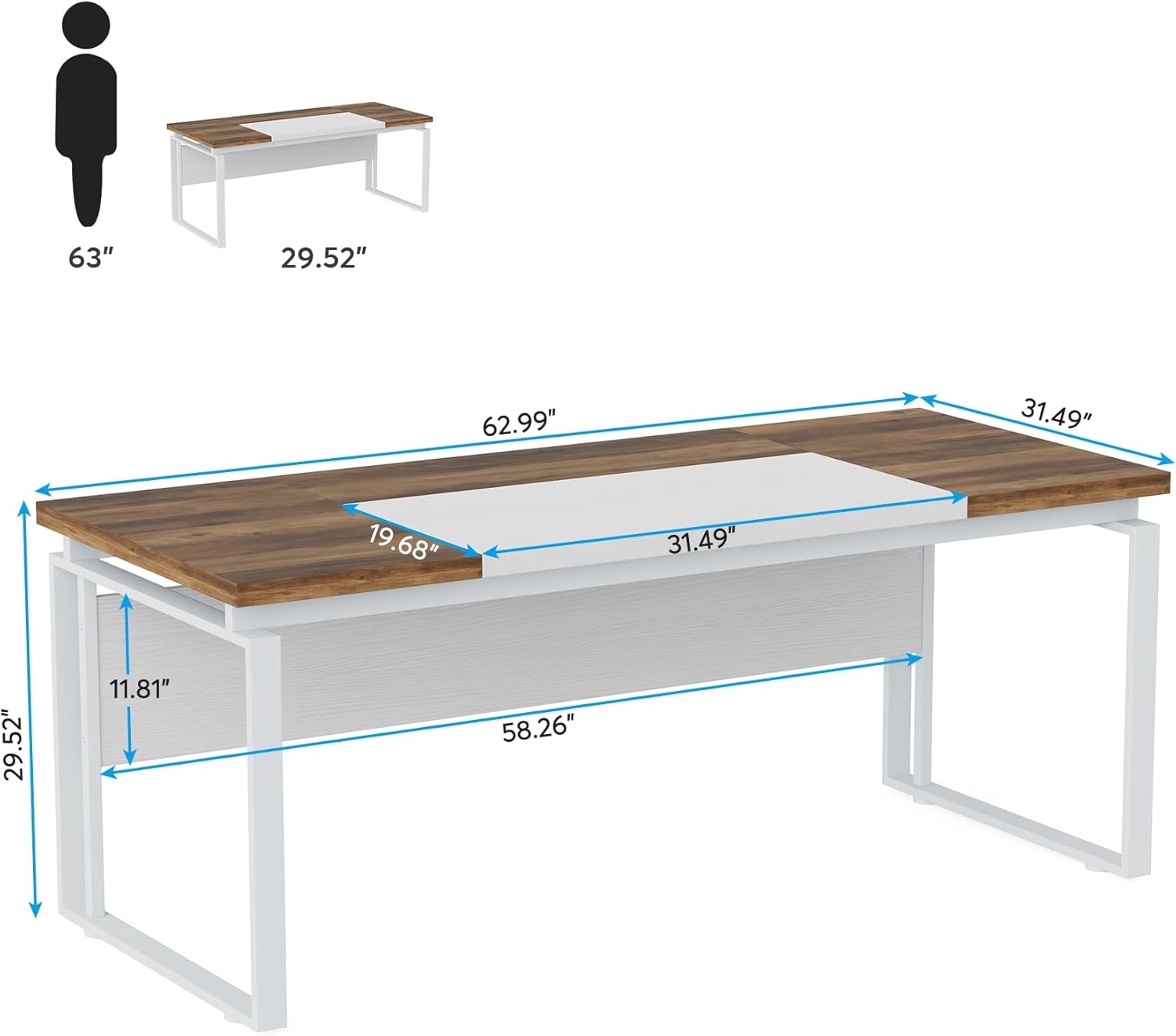
Image 8.1: Detailed dimensions of the Tribesigns 63-inch Computer Desk.

Image 8.2: Close-up view highlighting the 1.25-inch thick tabletop.
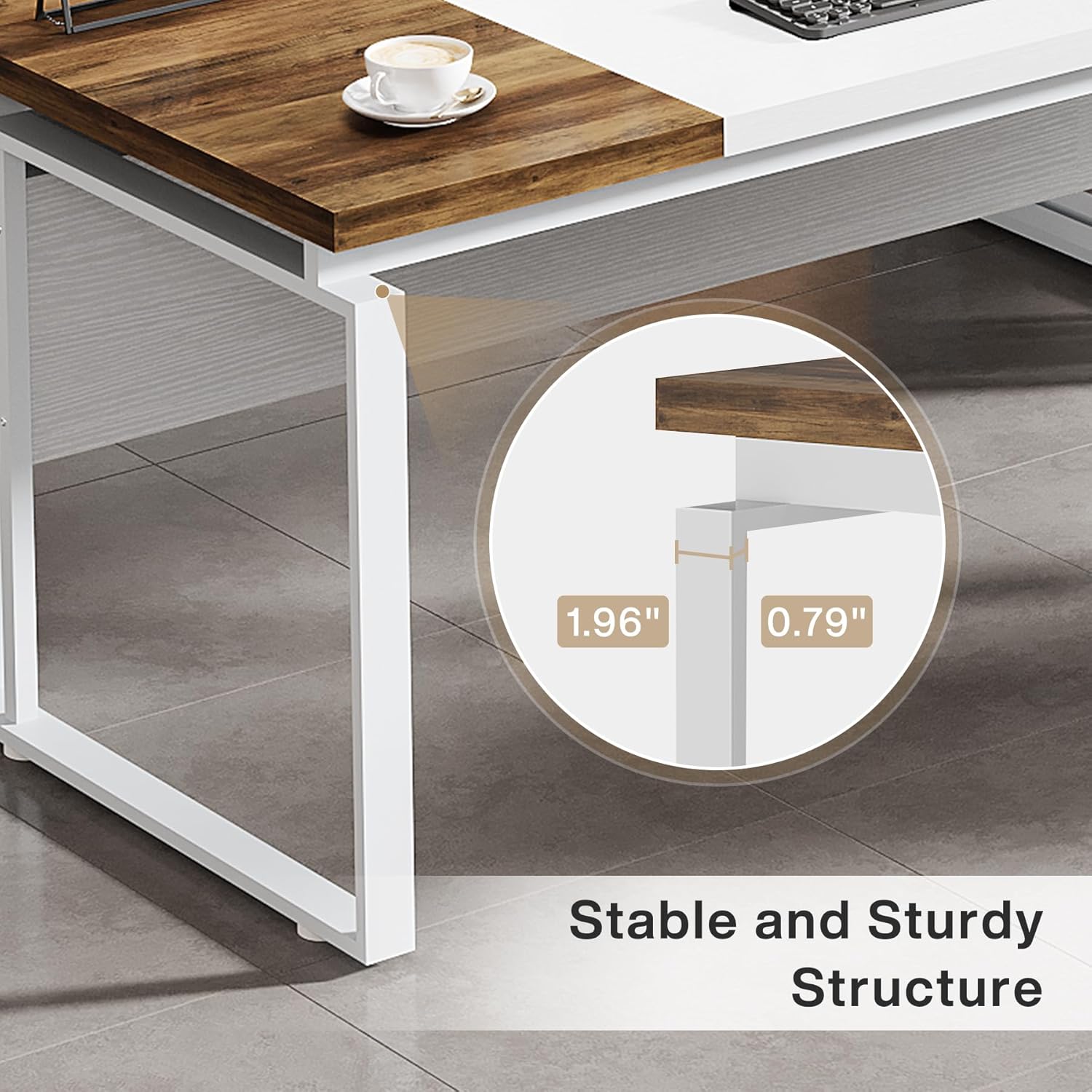
Image 8.3: Close-up view demonstrating the stable and sturdy metal frame structure.
9. Warranty and Support
Tribesigns is committed to providing high-quality products and excellent customer service.
- Warranty: Your Tribesigns Computer Desk comes with a 1-year worry-free warranty from the date of purchase. This warranty covers manufacturing defects and material flaws under normal use.
- Customer Service: For any pre-purchase inquiries, assembly assistance, or post-purchase support, our professional customer service team is ready to respond within 24 hours. Please have your model number and purchase details available when contacting support.
Thank you for choosing Tribesigns.


