
Introduction
The KEF Q8 Meta speaker is designed to deliver immersive audio for home theater systems. Featuring KEF's advanced technologies, it can function as a high-fidelity surround, rear, or Dolby Atmos elevation speaker. This manual provides essential information for setup, operation, and maintenance of your Q8 Meta speakers.

Image: A pair of KEF Q8 Meta Dolby Atmos/Surround Speakers in a white finish, showcasing their angled design and Uni-Q driver array.
Key Features
- Metamaterial Absorption Technology (MAT): Absorbs 99% of unwanted sound from the rear of the driver, ensuring pure and natural sound reproduction.
- 12th Generation Uni-Q Driver Array: Acts as a single point source, dispersing sound evenly throughout the room for an immersive and cohesive soundstage with enhanced clarity.
- Refined Crossover: A critical component that ensures seamless integration of all speaker parts, optimized for the best possible performance.
- Versatile Placement: Can be wall-mounted or placed on top of other speakers for Dolby Atmos sound without custom installation.
- Contemporary Design: Minimalist design with a satin finish, available in various colors to blend with any interior.

Image: A visual representation of KEF's Metamaterial Absorption Technology (MAT), showing its intricate maze-like structure designed to absorb rearward sound.

Image: An exploded view diagram of the Uni-Q driver array, highlighting its integrated tweeter and midrange cone design.

Image: A detailed view of a KEF speaker's refined crossover board, showing the electronic components responsible for signal distribution.
Setup
Unpacking
Carefully remove the speakers from their packaging. Ensure all components, including the warranty card, are present. Retain packaging for future transport or storage.
Placement Options
The KEF Q8 Meta speakers offer flexible placement for optimal home theater integration:
- Wall Mount: Utilize the integrated wall mount for use as high-fidelity surround or rear speakers. Ensure secure mounting to a suitable wall structure.
- Dolby Atmos Elevation: Place the speakers on top of compatible floorstanding speakers to project Dolby Atmos sound upwards, creating an immersive overhead effect without in-ceiling installation.

Image: KEF Q8 Meta speakers positioned on top of larger floorstanding speakers, demonstrating a Dolby Atmos elevation setup in a living room.

Image: KEF Q8 Meta speakers mounted on a wall, serving as surround sound speakers in a home theater environment.
Connections
Connect the speakers to your amplifier or AV receiver using high-quality speaker wire. Ensure correct polarity (positive to positive, negative to negative) for optimal sound performance.
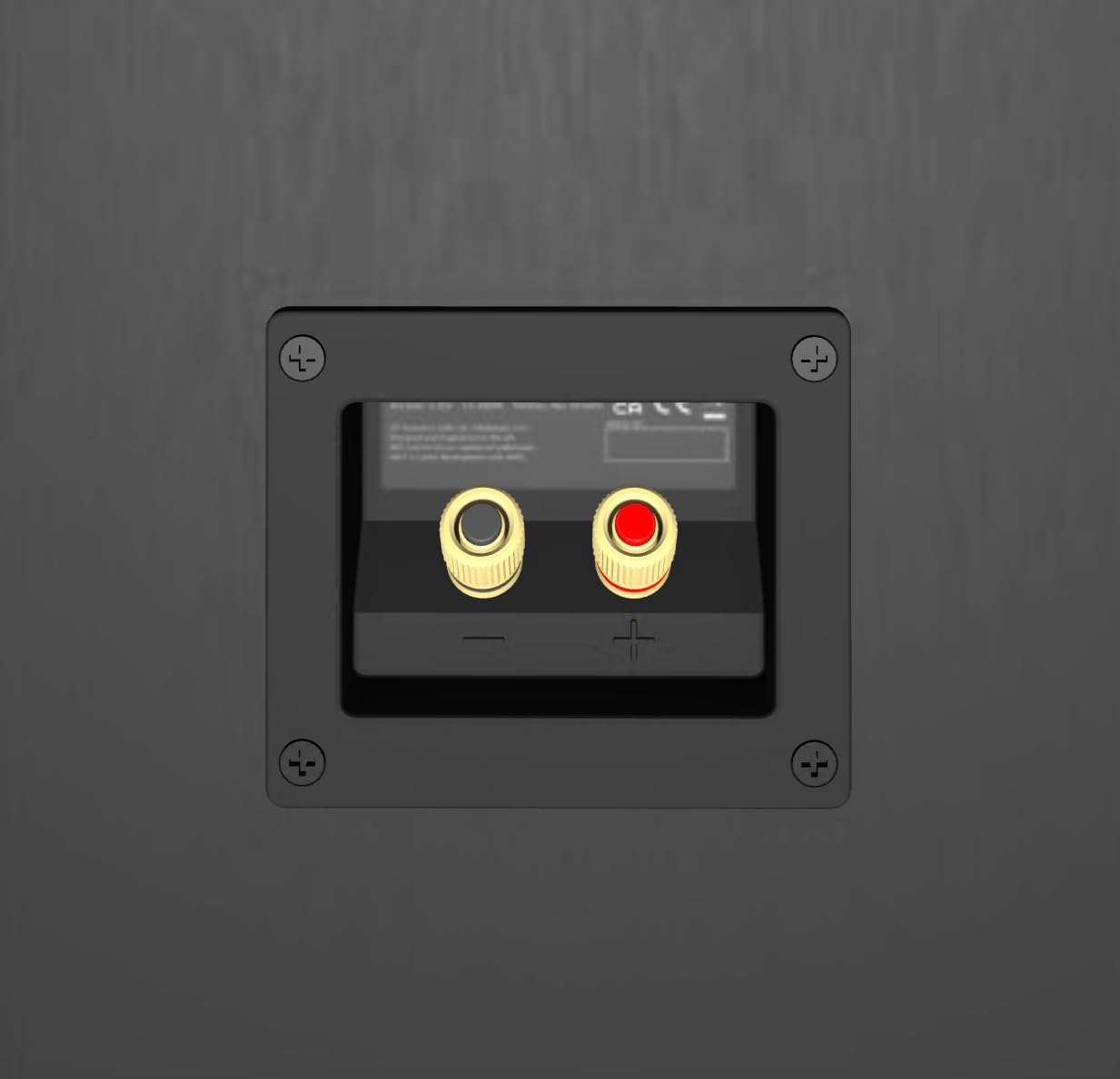
Image: The rear panel of a KEF Q8 Meta speaker, highlighting the speaker wire input terminals for connection to an amplifier.
Operating Instructions
Once connected, the KEF Q8 Meta speakers will reproduce audio from your connected source. For optimal performance, ensure your amplifier or AV receiver is configured correctly for a surround sound or Dolby Atmos setup.
- Dolby Atmos: When used as Dolby Atmos elevation speakers, ensure your AV receiver supports Dolby Atmos and is configured to send the appropriate height channel signals to the Q8 Meta.
- Sound Optimization: The Uni-Q driver and Metamaterial Absorption Technology work together to provide a wide, clear soundstage. Experiment with speaker placement to find the ideal listening position in your room.

Image: A diagram showing how Dolby Atmos speakers project sound to create an immersive, three-dimensional audio experience.
Maintenance
To ensure the longevity and performance of your KEF Q8 Meta speakers, follow these general maintenance guidelines:
- Cleaning: Gently wipe the speaker cabinets with a soft, dry cloth. Avoid using abrasive cleaners or solvents.
- Placement: Avoid placing speakers in direct sunlight or near heat sources. Ensure adequate ventilation around the speakers.
- Handling: Handle speakers with care. Avoid touching the driver cones directly.
Troubleshooting
If you encounter issues with your KEF Q8 Meta speakers, consider the following:
- No Sound: Check all speaker wire connections at both the speaker and the amplifier/receiver. Ensure the amplifier is powered on and the correct input is selected.
- Distorted Sound: Verify that the speaker wires are securely connected and not frayed. Reduce the volume level on your amplifier. Ensure your amplifier's power output is within the recommended range for the Q8 Meta speakers.
- Imbalanced Sound: Check the balance settings on your amplifier/receiver. Ensure both speakers are connected with correct polarity.
If problems persist, consult a qualified audio technician or contact KEF customer support.
Specifications (Per Speaker)

Image: Side view of a KEF Q8 Meta speaker, highlighting its compact and angled design.
| Feature | Detail |
|---|---|
| Brand | KEF |
| Model Name | Q8 Meta |
| Item Model Number | SP4094A0AA |
| Speaker Type | Atmospheric (Dolby Atmos/Surround) |
| Special Features | Dolby Atmos, Metamaterial Absorption Technology |
| Mounting Type | Wall Mount |
| Color | White |
| Product Dimensions (D x W x H) | 10.2" x 7.1" x 6.9" (25.9cm x 18.0cm x 17.5cm) |
| Item Weight | 10.7 Kilograms (23.5 pounds) |
| Audio Driver Type | Dynamic Driver (Uni-Q) |
| Audio Driver Size | 5.25 Inches |
| Impedance | 4 Ohm |
| Speaker Maximum Output Power | 150 Watts |
| Frequency Response (Upper Limit) | 20 KHz |
| Connectivity Technology | Speaker Wire |
| Indoor/Outdoor Usage | Indoor |
| UPC | 637203218972 |
Warranty and Support
Your KEF Q8 Meta speakers come with a Limited Warranty. Please refer to the included Warranty Card for detailed terms and conditions.
For technical support, service, or further inquiries, please visit the official KEF website or contact KEF customer service directly. Keep your purchase receipt and product serial number handy for warranty claims.
Included Components: Warranty Card


