
1. Introduction
Thank you for choosing Blackview Smart Glasses. These innovative sunglasses combine stylish design with advanced audio technology, allowing you to enjoy music, make calls, and interact with your voice assistant while staying aware of your surroundings. This manual provides detailed instructions for setup, operation, and maintenance to ensure optimal performance and longevity of your device.

Figure 1: Front view of Blackview Smart Glasses.
2. Product Features
- Bluetooth 5.3 Technology: Ensures faster and more stable signal transmission with low latency, offering a connection range of up to 12 meters.
- IP65 Waterproof Rating: Protects against sweat and small raindrops, suitable for outdoor activities and gym use.
- One-Step Pairing: After initial pairing, the glasses automatically reconnect to the last paired device upon opening.
- Wide Compatibility: Compatible with various devices including smartphones and computers.
- Immersive Open Ear Sound: Features an open headphone speaker design, dynamic drivers, and ultra-sensitive polymer diaphragms for rich, balanced audio without isolating you from your environment.
- Unparalleled Call Clarity: Advanced microphone design with noise reduction technology suppresses up to 90% of background noise for clear communication.
- Intuitive Touch Controls: Manage playback, volume, calls, and voice assistant activation directly from the glasses.
- Extended Working Hours: Equipped with 80mAh+80mAh rechargeable batteries, providing approximately 7 hours of communication, 6 hours of music playback, and 160 hours of standby time.
3. Product Overview
Familiarize yourself with the components of your Blackview Smart Glasses:

Figure 2: Key components of the Smart Glasses.
- Lens: TAC+UV400 (UV resistant)
- Nose Bridge: Provides comfortable fit.
- Touch Button: For various control functions.
- Stereo-speaker: Delivers open-ear audio.
- Built-in Mic: For clear call quality.
- Charging Indicator Port: For magnetic charging.
- Mirror Frame: PC+light steel construction.
4. Specifications
Refer to the following specifications for your Blackview Smart Glasses:
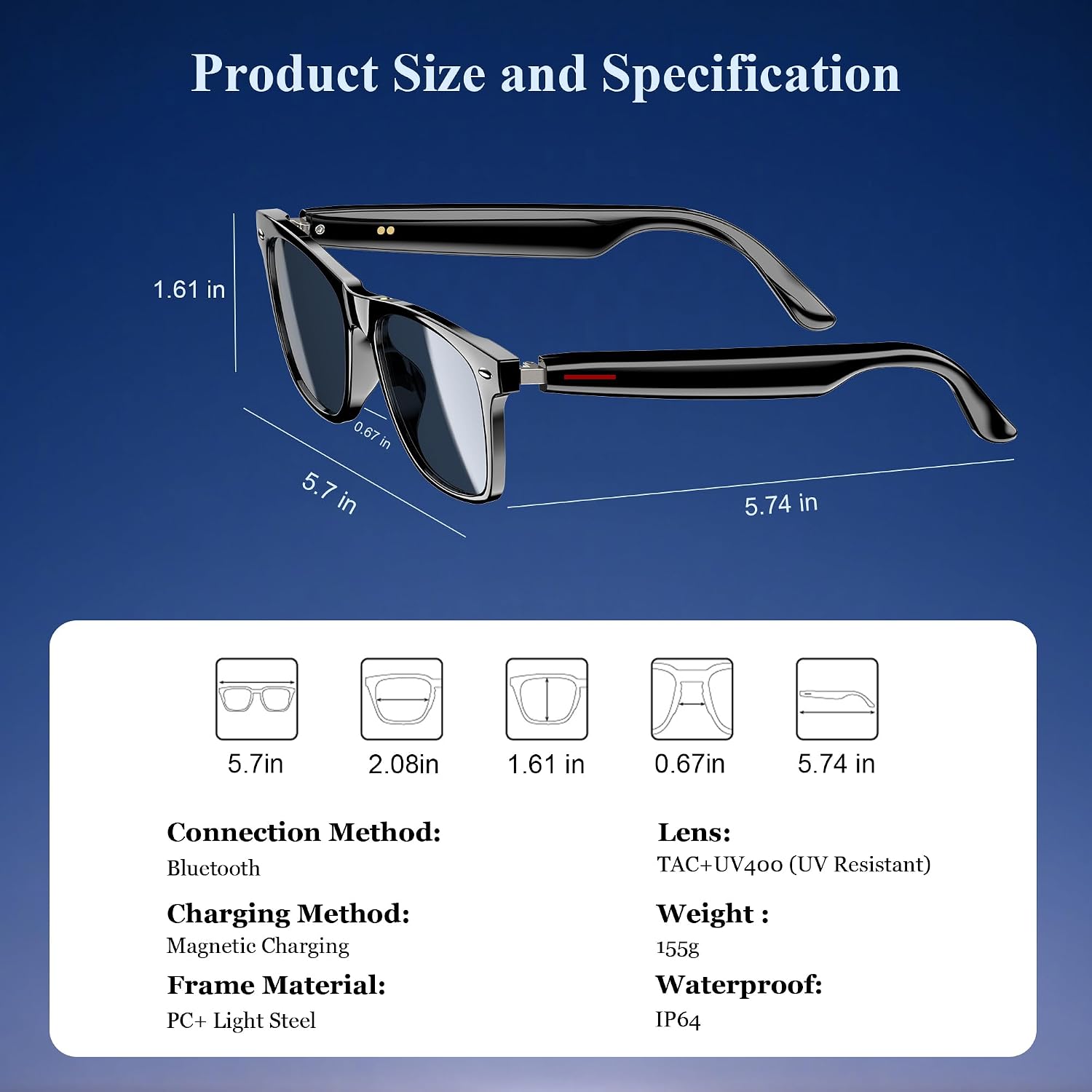
Figure 3: Product dimensions and key specifications.
| Specification | Value |
|---|---|
| Bluetooth Version | 5.3 |
| Waterproof Rating | IP65 |
| Battery Capacity | 80mAh+80mAh |
| Communication Time | Approx. 7 hours |
| Music Playback Time | Approx. 6 hours |
| Standby Time | Approx. 160 hours |
| Charging Time | Approx. 1.2 hours (magnetic charge) |
| Lens Type | TAC+UV400 (UV Resistant) |
| Frame Material | PC + Light Steel |
| Item Weight | 4.6 ounces |
| Package Dimensions | 6.65 x 2.36 x 1.93 inches |
5. What's in the Box
Your Blackview Smart Glasses package includes:
- Smart Sunglasses
- Magnetic Charging Cable
- Cleaning Cloth
- User Manual
6. Setup
6.1. Charging the Glasses
Before first use, fully charge your Blackview Smart Glasses. Use the provided magnetic charging cable.
- Connect the magnetic charging cable to the charging port on the temple of the glasses.
- Connect the other end of the cable to a USB power source (e.g., computer, wall adapter).
- The charging indicator light will illuminate (usually red) during charging and turn off or change color (usually blue/green) when fully charged.
- A full charge takes approximately 1.2 hours.

Figure 4: Magnetic charging connection.
6.2. Power On/Off
- Power On: Long touch the touch button on the temple for 5 seconds until you hear a power-on prompt.
- Power Off: Long touch the touch button for 5 seconds until you hear a power-off prompt.
6.3. Bluetooth Pairing
- Ensure the glasses are charged and powered on.
- On your smartphone or device, enable Bluetooth and search for available devices.
- Select "Blackview Smart Glasses" (or similar name) from the list to pair.
- Once paired, the glasses will automatically reconnect to your device when powered on and within range.
7. Operating Instructions
Your Blackview Smart Glasses feature intuitive touch controls located on the temples:

Figure 5: Touch control functions.
- Play/Pause Music: One-tap the touch button on either temple.
- Next Track: Twice-tap the touch button on the right temple.
- Previous Track: Twice-tap the touch button on the left temple.
- Volume Up/Down: (Specific gesture not detailed in image, typically long press or swipe, refer to quick start guide if included).
- Answer/Hang Up Call: One-tap the touch button on either temple.
- Activate Voice Assistant: Long touch the touch button for 2 seconds.
- Remote Photography: Double click the touch button to trigger your phone's camera shutter.

Figure 6: Voice assistant activation example.
8. Care and Maintenance
To ensure the longevity and optimal performance of your smart glasses, follow these care guidelines:
- Cleaning: Use the provided cleaning cloth to gently wipe the lenses and frame. Avoid using abrasive materials or harsh chemicals.
- Water Resistance: The glasses have an IP65 rating, meaning they are resistant to sweat and light splashes of water. Do not submerge them in water or expose them to heavy rain.
- Storage: Store the glasses in a protective case when not in use to prevent scratches and damage. Avoid exposing them to extreme temperatures.
- Avoid Impact: While the lenses are strong, avoid dropping the glasses or subjecting them to strong impacts.

Figure 7: Smart Glasses demonstrating water resistance.
9. Troubleshooting
If you encounter any issues with your Blackview Smart Glasses, refer to the following common solutions:
- No Power: Ensure the glasses are fully charged. Connect them to the magnetic charger and check the indicator light.
- Cannot Pair:
- Ensure Bluetooth is enabled on your device and the glasses are in pairing mode (usually indicated by a flashing light).
- Make sure the glasses are not already connected to another device. Turn off Bluetooth on other nearby devices.
- Restart both the glasses and your device, then attempt pairing again.
- No Sound/Low Volume:
- Check the volume levels on both the glasses and your connected device.
- Ensure the glasses are properly positioned on your ears for optimal open-ear audio.
- Verify that the glasses are correctly paired and selected as the audio output device on your phone.
- Call Quality Issues:
- Ensure the microphone is not obstructed.
- Move to an area with less background noise.
- Check your phone's signal strength.
- Unresponsive Touch Controls:
- Ensure your fingers are clean and dry.
- Restart the glasses.
If these steps do not resolve the issue, please contact Blackview customer support for further assistance.
10. Official Product Video
Watch the official product video for an overview of the Blackview Smart Glasses features and usage:
Video 1: Blackview Polarized Sport Smart Sunglasses for Men and Women. This video highlights the design and features of the smart sunglasses, including their polarized lenses and smart capabilities.


