
1. Introduction
Thank you for choosing the Gloryfit T10 Smart Watch. This device is designed to be a rugged and versatile companion for your daily life and outdoor adventures. Featuring a vibrant AMOLED display, military-grade durability, and extensive health and fitness tracking capabilities, the T10 keeps you connected and informed. This manual provides detailed instructions to help you get the most out of your new smartwatch.
2. What's in the Box
Please check the contents of your package to ensure all items are present:
- Smart Watch T10 x 1
- Black Silicone Strap x 1
- Charger Cable x 1
- User Manual x 1
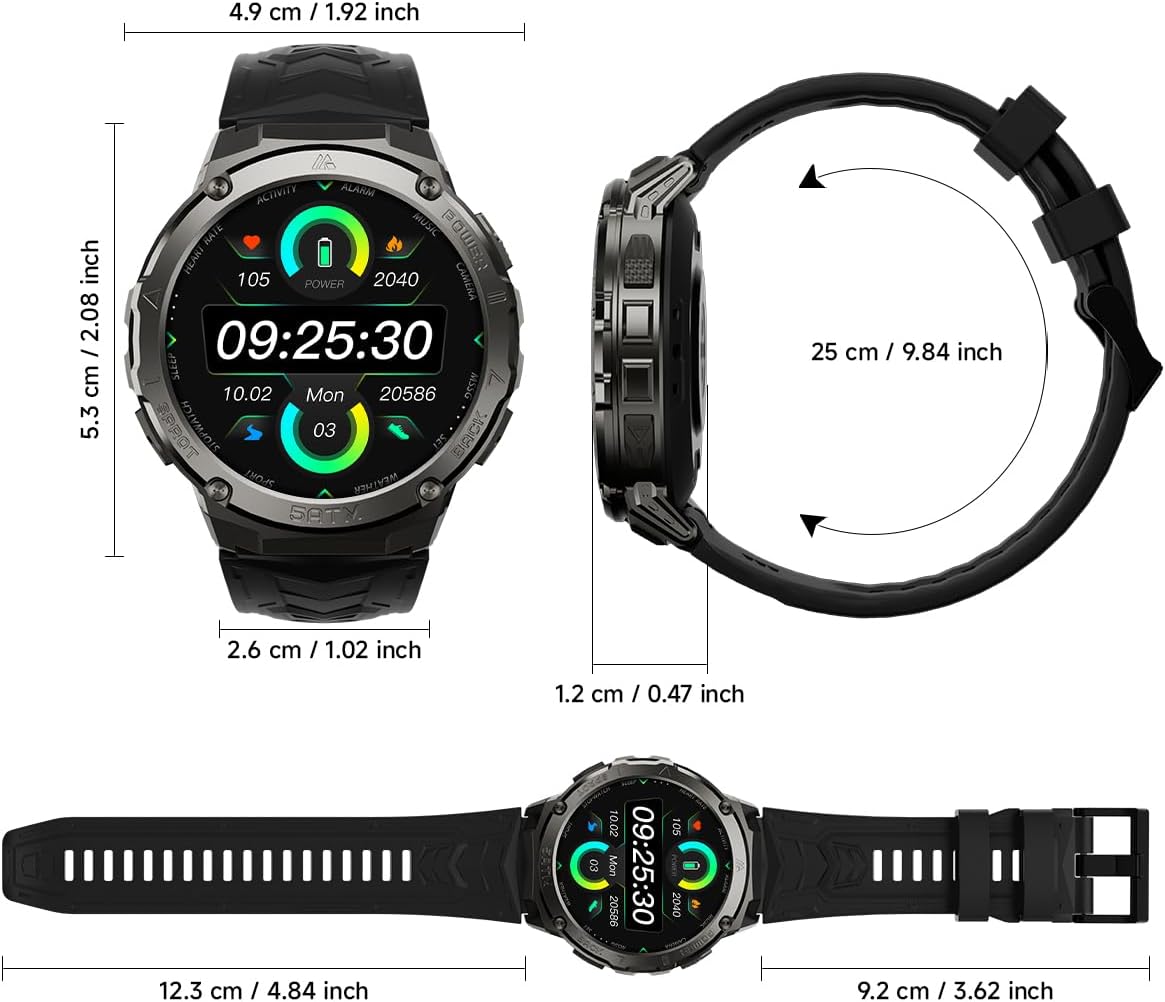
3. Product Overview
3.1 Display and Design
The Gloryfit T10 features a 1.43-inch AMOLED HD display with a resolution of 466x466 pixels, providing vivid colors and clear visuals even in direct sunlight. The watch is built with a robust metal frame and Corning Gorilla-certified glass for enhanced durability.

3.2 Durability
Engineered for resilience, the T10 Smart Watch boasts 5ATM waterproofing, impact resistance, and dustproof capabilities. It is designed to withstand extreme temperatures ranging from -20°C to 50°C, making it suitable for various challenging environments.

3.3 Battery Life
Equipped with a 480mAh large battery, the Gloryfit T10 offers extended usage. A single charge can provide approximately 15 days of typical use and up to 50 days in standby mode. Intelligent algorithms optimize energy consumption for prolonged battery life.

4. Setup
4.1 App Installation
To begin using your Gloryfit T10 Smart Watch, you need to install the companion app, GloryFitPro, on your smartphone. You can download it by scanning the QR code below or searching for "GloryFitPro" in your device's app store (App Store for iOS, Google Play for Android).

Download GloryFitPro App: https://app.uteasy.com/app-download/GloryFitPro/download/index.html
4.2 Pairing Your Smart Watch
- Scan the QR code or search for "GloryFitPro" in your app store to download and install the app.
- Allow the app to access necessary permissions on your phone.
- Register and sign in to the GloryFitPro app.
- Navigate to the "Device" section within the app and tap "Add a new device".
- The app will search for nearby devices. Select "T10" from the list to initiate pairing.
- Confirm the pairing request on both your smartphone and the watch screen.
5. Operating Instructions
5.1 Bluetooth Calling & Notifications
The Gloryfit T10 allows you to answer and make calls directly from your wrist using its built-in speaker and microphone. Synchronize contacts and call logs for convenience. Receive instant notifications from popular apps like Facebook, WhatsApp, Instagram, and Twitter, ensuring you never miss important messages.

Video: An overview of the Gloryfit T10 Smart Watch, highlighting its 1.43-inch AMOLED screen and various features.
5.2 Sports Modes
The fitness watch supports over 110 sports modes, including walking, running, cycling, rock climbing, yoga, skiing, and football. It uses AI to automatically detect five types of activities. Track real-time data such as steps, distance, and calories burned through the GloryFitPro app to enhance your workout plans.

5.3 Health Tracking
The Gloryfit T10 continuously monitors your heart rate, blood oxygen, and stress levels. It also provides accurate sleep analysis, breaking down sleep stages into deep, light, and REM sleep to help you understand and improve your sleep quality and recovery.

5.4 Custom Dials
Personalize your watch with a wide range of customizable dials available through the GloryFitPro app. Choose from various designs to match your style or upload your own photos to create unique watch faces.

Video: Demonstration on how to change the watch face on the Gloryfit T10 Smart Watch.
5.5 Additional Features
The T10 Smart Watch integrates several convenient functions for daily use, including music control, camera remote, calculator, alarms, timers, weather updates, and sedentary reminders. It seamlessly combines fitness, entertainment, and health monitoring.
Video: A brief overview of the Gloryfit T10 Waterproof Smart Watch, highlighting its water resistance.
6. Maintenance
To ensure the longevity and optimal performance of your Gloryfit T10 Smart Watch, follow these maintenance guidelines:
- Cleaning: Regularly wipe the watch screen and strap with a soft, dry cloth. For stubborn dirt, use a slightly damp cloth and then dry thoroughly.
- Water Resistance: While the watch is 5ATM waterproof, avoid exposing it to hot water, soap, or seawater, as these can compromise the seals over time. Do not operate buttons underwater.
- Charging: Use only the provided charger cable. Ensure the charging contacts on the watch and cable are clean and dry before charging.
- Storage: Store the watch in a cool, dry place when not in use. Avoid extreme temperatures.
7. Troubleshooting
If you encounter issues with your Gloryfit T10 Smart Watch, please refer to the following common solutions:
| Problem | Possible Solution |
|---|---|
| Watch does not turn on | Ensure the watch is fully charged. Connect it to the charger for at least 30 minutes. If it still doesn't turn on, try a soft reset by pressing and holding the power button for 10-15 seconds. |
| Cannot pair with smartphone | Ensure Bluetooth is enabled on your phone and the watch. Make sure the watch is within range. Restart both the watch and your phone. Clear the Bluetooth cache on your phone if necessary. Ensure the GloryFitPro app has necessary permissions. |
| Inaccurate data (steps, heart rate) | Ensure the watch is worn snugly on your wrist, about one finger's width above the wrist bone. Calibrate the app if there's an option. Ensure the app is updated to the latest version. |
| Notifications not received | Check notification settings in the GloryFitPro app and on your phone. Ensure the app is running in the background and not restricted by battery optimization settings. Verify Bluetooth connection is stable. |
| App syncing issues | Force close the GloryFitPro app and reopen it. Disconnect and reconnect the watch in the app. Ensure your phone's operating system is compatible (iOS 9.0+, Android 4.4+). |
8. Specifications
| Feature | Detail |
|---|---|
| Model Number | T10 |
| Display Size | 1.43 Inches AMOLED |
| Resolution | 466x466 pixels |
| Battery Capacity | 480 mAh Lithium Ion |
| Typical Usage Battery Life | Up to 15 days |
| Standby Battery Life | Up to 50 days |
| Water Resistance | 5ATM & IP68 |
| Operating Temperature | -20°C to 50°C |
| Connectivity | Bluetooth |
| Compatible OS | iOS 9.0+, Android 4.4+ |
| Item Weight | 74.4 Grams (2.62 ounces) |
| Dimensions (Watch Face) | 4.9 cm / 1.92 inch (width) x 5.3 cm / 2.08 inch (height) |
9. Warranty and Support
Gloryfit products are manufactured with high standards of quality. For any product-related inquiries, technical support, or warranty claims, please refer to the contact information provided with your purchase or visit the official Gloryfit website. Please retain your proof of purchase for warranty purposes.


