
Introduction
Welcome to the user manual for your Redragon K688 Wireless Mechanical Keyboard. This guide provides detailed instructions on setting up, operating, maintaining, and troubleshooting your keyboard. The K688 features a versatile tri-mode connection, gasket-mounted design, hot-swappable switches, vibrant RGB lighting, and a convenient volume knob, designed for an enhanced typing and gaming experience across multiple devices.

A front-facing view of the Redragon K688 wireless mechanical keyboard, showcasing its full RGB backlighting and compact 98-key layout. The keyboard features a black and gray color scheme.
Package Contents
Please verify that all items are present in your package:
- 1 x Redragon K688 Gasket Bluetooth Wireless Mechanical Keyboard
- 1 x USB Cable (Type-C)
- 1 x Keycap Puller
- 1 x English Manual
- 4 x Extra Gasket Pre-Lubed Linear Switches

An overhead view of the Redragon K688 keyboard and its included accessories: USB cable, keycap puller, and four extra pre-lubed linear switches.
Product Overview
The Redragon K688 is engineered for performance and versatility. Key features include:
- Multi-Device Connection: Supports Bluetooth 5.0, 2.4GHz wireless, and USB-C wired modes, allowing connection to up to 5 devices.
- Hot-Swappable & Pre-lubed Cream Switches: Equipped with linear cream switches for a smooth typing experience, and a PCB compatible with 3-pin/5-pin switches for customization.
- Gasket Structure & PCB Single Key Slotting: Enhances typing feel with improved resilience and stability, reducing cavity noise.
- Programmable RGB Backlighting: Features 16 RGB lighting effects and supports macro customization via software.
- MDA Profile Keycaps: Designed for a comfortable tactile experience.
- Multi-function Knob: Controls volume and backlight settings.

An aerial view of the K688 mechanical keyboard on a desk mat, highlighting key features such as 90% layout, knob design, gasket structure, full RGB, MDA profile, and hot-swappable cream switches.
Setup
Connection Modes
The Redragon K688 supports three connection methods:
- USB-C Wired Mode: Connect the keyboard directly to your device using the provided USB-C cable. This mode offers plug-and-play functionality and charges the keyboard.
- 2.4GHz Wireless Mode:
- Locate the 2.4GHz USB dongle (usually stored in a slot on the keyboard).
- Plug the dongle into an available USB port on your computer.
- Switch the keyboard to 2.4G mode by pressing FN + 4. The keyboard will automatically connect.
- Bluetooth 5.0 Mode:
- Ensure Bluetooth is enabled on your device (PC, tablet, smartphone).
- On the keyboard, press FN + 1, FN + 2, or FN + 3 to select one of the three Bluetooth channels. The corresponding key will flash, indicating pairing mode.
- On your device, search for Bluetooth devices and select "Redragon K688" to pair.
- Once paired, the key will stop flashing and remain lit. You can switch between paired Bluetooth devices using FN + 1/2/3.

A visual representation of the three connection modes: Type-C (wired), 2.4GHz wireless (with dongle), and Bluetooth. The image shows the keyboard connected to a laptop via 2.4GHz and a tablet via Bluetooth.
Battery Charging and Level Check
The keyboard is powered by a 4000mAh battery. Connect the USB-C cable to the keyboard and a power source (e.g., computer USB port, wall adapter) to charge.

A visual indicating the battery life of the K688 keyboard: up to 200 hours with backlight off and 30 hours with backlight on, powered by a 4000mAh battery.
To check the current battery level, press FN + DEL. The number row keys (1-0) will illuminate to indicate the charge percentage. For example, if keys 1 through 5 are lit, it indicates approximately 50% charge.

An illustration showing how to check the battery level on the K688 keyboard by pressing FN+DEL. The number row keys illuminate to indicate the charge percentage (e.g., 1-0 for 100%, 1-3 for 30%).
Operating Instructions
Volume Knob Functions
The multi-function knob located on the top right of the keyboard provides quick control over audio and lighting:
- Rotate clockwise: Increase volume.
- Rotate counter-clockwise: Decrease volume.
- Short press: Mute/Unmute audio.
- Press FN + Knob: Enter keyboard backlight adjustment mode. Rotate the knob to adjust backlight brightness. Short press the knob to cycle through lighting modes.
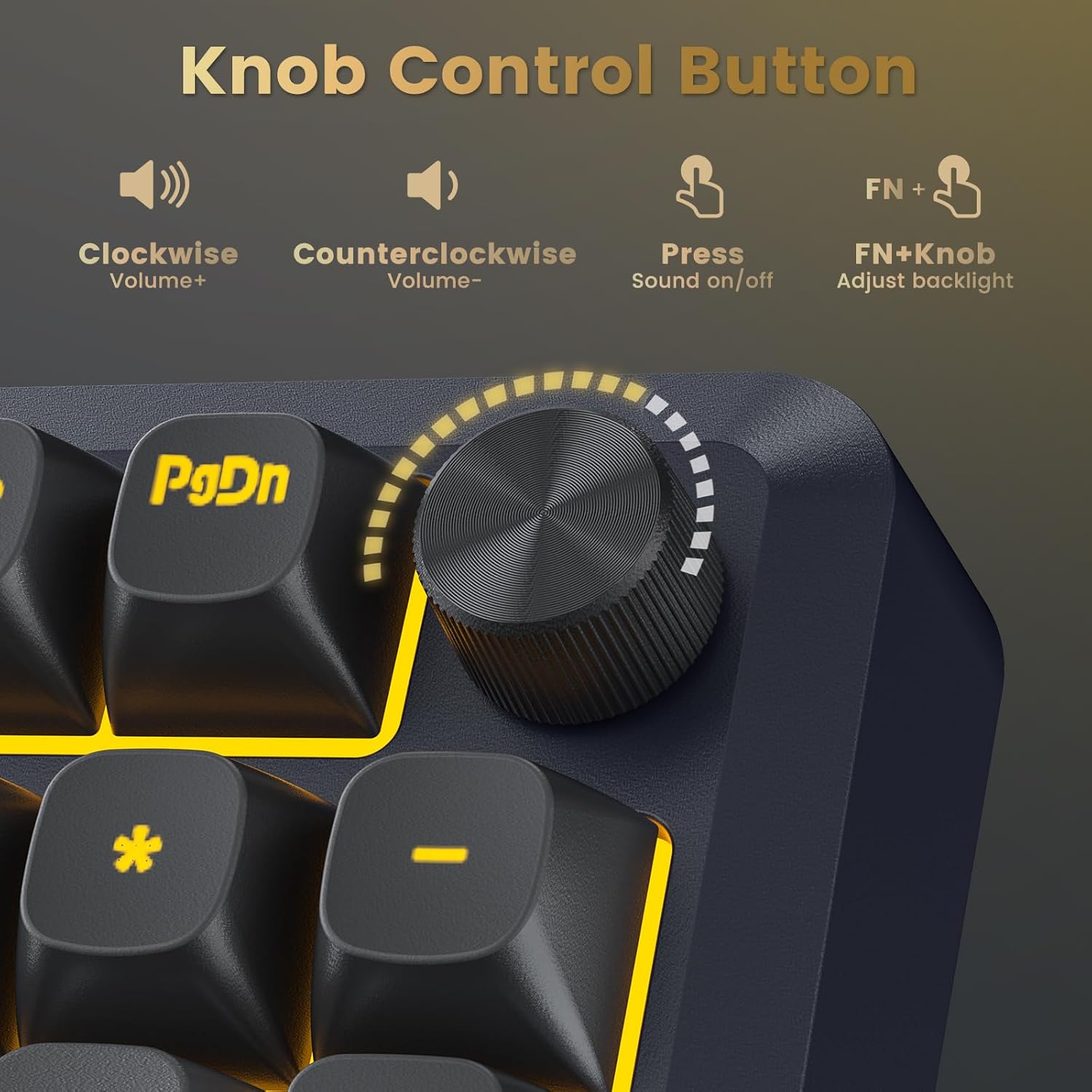
A close-up of the multi-function knob on the keyboard, detailing its controls: clockwise for Volume+, counter-clockwise for Volume-, press for Sound on/off, and FN+Knob for adjusting backlight.
RGB Lighting Control
The K688 features customizable RGB backlighting with 16 distinct lighting effects, 7 single light colors, and 6 brightness levels. These can be adjusted directly on the keyboard using FN key combinations or through the dedicated software for more advanced customization, including music rhythm lighting effects.

A split image showcasing the programmable RGB backlighting of the K688 keyboard, displaying various color modes and brightness levels. The keyboard supports 16 RGB modes and 7 single light colors.
Software Customization
For advanced customization, including macro recording, key function remapping, and detailed RGB lighting adjustments, download the Redragon software from the official website. Note that the software currently supports Windows operating systems and functions in 2.4G wireless or wired modes only.

A screenshot of the Redragon software interface, demonstrating options for light effects, macro editing, RGB backlight settings, and key assignment customization.
Hot-Swappable Switches
The K688 features a hot-swappable PCB, allowing you to easily change switches without soldering. It is compatible with both 3-pin and 5-pin mechanical switches, offering a high degree of customization for your typing preference.

An image demonstrating the hot-swappable feature of the K688 keyboard, showing a switch being removed from the PCB using a switch puller. The image also highlights the slotted PCB design compatible with 3-pin/5-pin switches.
Compatibility
The Redragon K688 keyboard is widely compatible with various devices and operating systems, including PC, Tablet, Xbox, PS4, PS5, Windows, Android, and Mac.
Maintenance
Cleaning
To maintain optimal performance and appearance, regularly clean your keyboard:
- Disconnect the keyboard from all devices before cleaning.
- Use a soft brush or compressed air to remove dust and debris from between the keycaps.
- For keycap cleaning, use a damp cloth with a mild cleaning solution. Avoid excessive moisture.
- Do not use harsh chemicals or abrasive materials, as these can damage the keycaps or finish.
Switch and Keycap Replacement
Utilize the included keycap puller and switch puller (if applicable) to safely remove and replace keycaps and switches. Exercise caution to avoid damaging the switch pins or PCB sockets.
Troubleshooting
- Keyboard not responding: Ensure the keyboard is charged and properly connected (wired, 2.4GHz dongle, or Bluetooth paired). Try switching between connection modes.
- Bluetooth connection issues: Ensure the keyboard is in pairing mode (FN+1/2/3 flashing). Remove previous pairings from your device and try re-pairing. Ensure your device's Bluetooth is enabled.
- 2.4GHz wireless issues: Ensure the USB dongle is securely plugged in and the keyboard is set to 2.4G mode (FN+4). Try plugging the dongle into a different USB port.
- RGB lighting not working: Check brightness settings using the FN+Knob combination. Ensure the keyboard is not in a low power state. If using software, verify settings there.
- Keys not registering or double-typing: This could indicate a faulty switch. Utilize the hot-swappable feature to replace the affected switch with one of the spares or a new compatible switch.
Specifications
| Feature | Detail |
|---|---|
| Model Number | K688 |
| Connectivity Technology | 2.4G Wireless, Bluetooth 5.0, USB-C Wired |
| Keyboard Description | Tri Mode Gasket Mounted Wireless Mechanical Keyboard |
| Switches | Pre-lubed Linear Cream Switches (Hot-Swappable 3-pin/5-pin) |
| Keycaps | MDA-Profile PBT Keycaps |
| Backlighting | RGB (16 modes, 7 single colors, 6 brightness levels) |
| Battery Capacity | 4000mAh |
| Compatible Devices | Gaming Console, Laptop, PC, Smartphone, Tablet |
| Operating Systems | Windows, Android, Mac |
| Item Weight | 2.57 pounds (1.17 kg) |
| Package Dimensions | 16.61 x 7.72 x 2.44 inches (42.19 x 19.61 x 6.2 cm) |

A detailed image showing a single cream switch and a force-travel diagram. The diagram illustrates the switch's total travel of 3.6mm, conduction stroke of 2.0±0.6mm, and operating force of 40±10gf.

An exploded diagram illustrating the internal layers of the K688 keyboard's gasket structure, including PBT keycaps, pre-lubed linear switch, upper cover, slotted PC positioning plate, PORON cotton, spacer under axle, PET voice acting pad, single key slotted PCBA board, silencing shaft seat cotton, silicone bottom pad, interlayer, and bottom case.
Warranty and Support
For warranty information and technical support, please refer to the warranty card included with your product or visit the official Redragon website. Redragon provides customer support for product inquiries and assistance with any issues you may encounter.


