
Introduction
Thank you for choosing the BOBLOV A23Pro Body Camera. This compact and versatile device is designed to capture high-quality video and photos in various environments, from daily activities to outdoor adventures. Featuring a 180-degree rotatable lens, 2K/48MP resolution, and advanced night vision, the A23Pro ensures you never miss a moment. This manual provides detailed instructions on how to set up, operate, and maintain your camera to ensure optimal performance.
What's in the Box

Image: The package contents include the A23Pro Video Camera, a USB-C Cable, a User Manual, and a Helmet Mount.
- 1x A23Pro Video Camera
- 1x USB-C Cable
- 1x User Manual
- 1x Helmet Mount
Product Overview
Key Features
- 180° Rotatable Lens: Manually adjust the lens to capture footage from various angles, offering flexibility for different recording scenarios.
- 2K/48MP Resolution: Records ultra-clear video at 2K resolution and captures high-quality 48MP photos, ensuring crisp detail.
- Four Night Vision Lights: Equipped with powerful IR lights for enhanced visibility and clarity in low-light or nighttime conditions.
- Extended Recording Time: A built-in 2200mAh battery provides up to 7 hours of continuous recording (at 1080P with screen and IR off).
- USB-C Connectivity: Modern USB-C port for fast data transfer and efficient charging.
- Compact and Portable: Small and lightweight design makes it easy to carry and discreetly record.
- Loop Recording: Automatically overwrites the oldest files when the memory card is full, ensuring continuous recording.
- Expandable Storage: Supports Micro SD cards up to 256GB (C10 TF card and above recommended).
Product Components

Image: The BOBLOV A23Pro Body Camera shown with its 180-degree rotatable lens, display screen, control buttons, and included accessories like a 64GB Micro SD card, USB drive, and helmet mount.

Image: A visual representation of the camera's 180-degree rotating lens, highlighting its flexibility for capturing various angles. A small inset shows the down button used to change lens direction.

Image: A comparison demonstrating the clarity of 2K resolution versus 1080P, showcasing the superior detail captured by the A23Pro camera.

Image: A graphic illustrating the camera's built-in 2200mAh battery, emphasizing its capacity for up to 7 hours of recording time.

Image: The camera's advanced night vision capability is shown with four IR lights, designed for clear recording in dark environments.

Image: This graphic illustrates the loop recording feature, showing options for video clip durations (5, 10, 15, 20 minutes) and the maximum duration of 20 minutes.

Image: The camera's expandable storage is depicted, showing support for Micro SD cards up to 256GB, with a note to use C10 TF cards or above.
Setup
- Charge the Camera: Before first use, fully charge the camera using the provided USB-C cable and a compatible power adapter. The charging indicator will show the charging status.
- Insert Micro SD Card: Open the Micro SD card slot cover. Insert a Class 10 or higher Micro SD card (up to 256GB) into the slot with the gold contacts facing down. Gently push until it clicks into place.
- Power On: Press and hold the Power button for a few seconds until the screen lights up and the camera powers on.
- Initial Settings: Upon first power-on, you may be prompted to set the date, time, and language. Navigate using the control buttons and confirm your selections.
Operating Instructions
Recording Video
- Ensure the camera is powered on.
- Press the Record button (usually marked with a red dot or camera icon) to start video recording. A red indicator light will typically flash, and a recording icon will appear on the screen.
- Press the Record button again to stop recording. The video file will be saved to the Micro SD card.
Taking Photos
- In standby mode, press the Photo button (usually marked with a camera icon) to take a still photo.
- The screen may briefly flash, indicating a photo has been captured.
Activating Night Vision
- While recording or in standby mode, locate the Night Vision button (refer to your camera's specific button layout).
- Press the button to activate the infrared (IR) lights. The screen will switch to a monochrome view, indicating night vision is active.
- Press the button again to deactivate night vision.
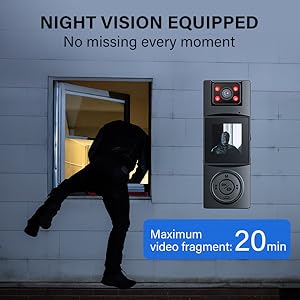
Image: A demonstration of the camera's night vision capability, showing a clear view of a person walking in a dimly lit parking garage.
Playback
- From the main menu, navigate to the Playback or Gallery option.
- Use the navigation buttons (up/down/left/right) to browse through your recorded videos and photos.
- Press the OK/Confirm button to view a selected file.

Image: The camera's 1.3-inch display screen, highlighting its ease of use for reviewing recorded footage and photos directly on the device.
Using the Helmet Mount

Image: The BOBLOV A23Pro Body Camera securely attached to a helmet using the included mount, demonstrating its use as a riding camera.
The included helmet mount allows for hands-free recording during activities like cycling or other outdoor sports. Attach the camera to the mount using the 1/4 nut, then secure the mount to your helmet. Ensure the camera is firmly attached before beginning any activity.
Official Product Video
Video: An official product video showcasing the key features and uses of the BOBLOV A23Pro 2K Body Camera, including its 2K/48MP resolution, 180-degree rotatable lens, 7-hour recording time, and night vision capabilities.
Maintenance
- Cleaning: Use a soft, dry cloth to clean the camera body. For the lens, use a specialized lens cleaning cloth and solution to avoid scratches.
- Storage: Store the camera in a cool, dry place away from direct sunlight and extreme temperatures. Remove the Micro SD card if storing for extended periods.
- Battery Care: To prolong battery life, avoid fully discharging the battery frequently. Charge the camera regularly, even if not in use, to maintain battery health.
Troubleshooting
| Problem | Possible Cause | Solution |
|---|---|---|
| Camera does not power on | Low battery; System crash | Charge the camera; Press and hold the Power button for 10 seconds to reset. |
| Cannot record video/take photos | No Micro SD card; SD card full/corrupted; Incorrect mode | Insert/replace SD card; Format SD card (backup data first); Switch to video/photo mode. |
| Poor video/photo quality | Dirty lens; Low light conditions (night vision off); Incorrect resolution setting | Clean the lens; Activate night vision; Check resolution settings in menu. |
| Camera freezes | Software issue; SD card error | Press and hold the Power button to force restart; Try a different SD card. |
Specifications
| Feature | Detail |
|---|---|
| Brand | BOBLOV |
| Model Number | A23PRO |
| Video Capture Resolution | 2K |
| Photo Sensor Technology | CMOS |
| Lens Rotation | 180° Rotatable (Manual) |
| Battery Capacity | 2200mAh Lithium Polymer (included) |
| Recording Time | Up to 7 hours (1080P, Screen & IR Off) |
| Special Features | Night Vision (Four IR Lights) |
| Flash Memory Type | Micro SD (Supports up to 256GB, C10 and above) |
| Screen Size | 1.3 Inches |
| Connectivity Technology | USB-C |
| Item Weight | 8.1 ounces |
| Package Dimensions | 4.92 x 2.99 x 2.32 inches |
Warranty and Support
BOBLOV products are designed for reliability and performance. This product comes with a standard manufacturer's warranty. For specific warranty details, please refer to the warranty card included in your product packaging or visit the official BOBLOV website. If you encounter any issues or require technical assistance, please contact BOBLOV customer support through their official channels. Keep your purchase receipt as proof of purchase for warranty claims.


