
Introduction
Thank you for purchasing the Pyle PDA29BUEU Wireless Bluetooth Stereo Audio Amplifier. This compact and powerful system is designed to enhance your audio experience, offering versatile connectivity options for home cinema, studio, or personal listening. Please read this manual carefully to ensure proper operation and to maximize the performance of your new amplifier.
Key Features
- Compact and Powerful Audio Amplifier System
- Wireless Bluetooth Receiver for Audio Streaming (Version 5.0, Range: 12+ meters)
- Multiple Inputs: RCA (L/R) Audio, USB, SD Card, FM Radio
- Dual 6.35mm Microphone Inputs
- Push-Type L/R Speaker Terminals
- Front Panel Rotary Controls for Treble, Bass, Mic Volume, and Master Volume
- LED Display and ON/OFF Switch
- Includes Remote Control and FM Antenna
Package Contents
Please ensure all items are present in the box:
- Pyle PDA29BUEU Stereo Audio Amplifier System
- Remote Control (requires 1 x CR-2025 button cell battery, included)
- FM Antenna
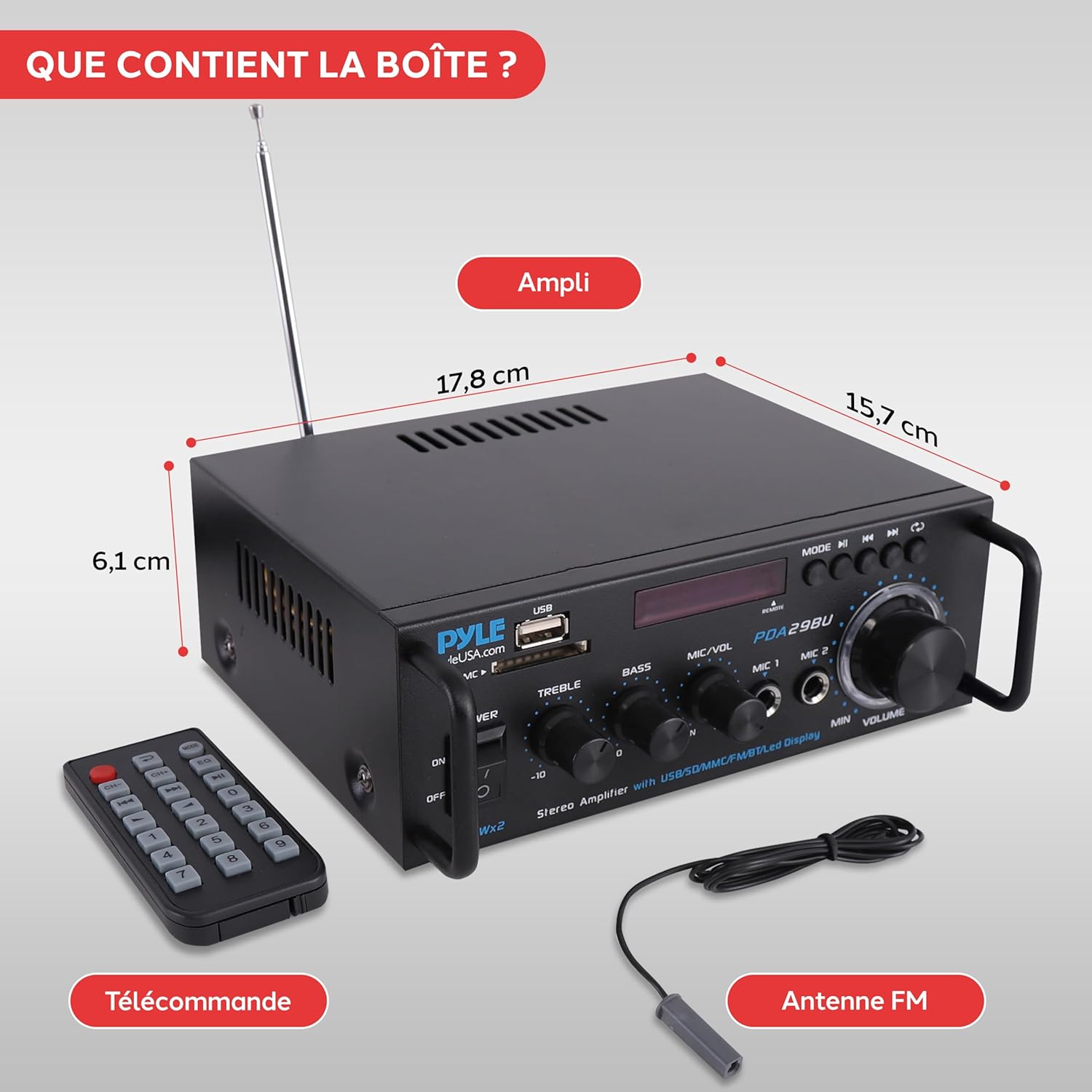
Image: Contents of the box, including the amplifier, remote control, and FM antenna, with dimensions of the amplifier (17.8 cm L x 15.7 cm D x 6.1 cm H).
Controls and Connections

Image: Front panel of the Pyle PDA29BUEU amplifier, displaying the power switch, treble and bass controls, microphone volume, master volume knob with blue LED, USB and SD card slots, LED display, and mode/playback buttons.
Front Panel
- Power ON/OFF Switch: Toggles the unit on or off.
- Treble Control: Adjusts the high-frequency output.
- Bass Control: Adjusts the low-frequency output.
- MIC/VOL: Adjusts the volume level for the microphone inputs.
- MIC 1 / MIC 2 Inputs: 6.35mm jacks for connecting microphones.
- USB Port: For connecting USB flash drives for audio playback.
- SD/MMC Card Slot: For inserting SD/MMC memory cards for audio playback.
- LED Display: Shows current mode, track information, or FM frequency.
- Mode Button: Cycles through input modes (Bluetooth, USB, SD, FM, RCA).
- Playback Controls: Play/Pause, Previous Track, Next Track.
- Volume Knob: Master volume control for overall audio output.

Image: Rear panel connection diagram, illustrating how to connect speakers, RCA audio input from devices like a PC, turntable, or CD/DVD player, and the power input.
Rear Panel
- Audio Input (RCA L/R): For connecting external audio sources such as CD players, DVD players, turntables (with a pre-amp), or computers.
- Speaker Output (L/R Push Terminals): For connecting passive speakers. Ensure correct polarity (+ to + and - to -).
- FM Antenna Input: For connecting the included FM antenna to improve radio reception.
- Power Input: Connect the power adapter here.
Setup
- Placement: Place the amplifier on a stable, flat surface, ensuring adequate ventilation around the unit.
- Connect Speakers: Connect your passive speakers to the L/R speaker terminals on the rear panel. Ensure the positive (+) terminal on the amplifier connects to the positive (+) terminal on the speaker, and similarly for the negative (-) terminals.
- Connect Audio Source (Optional): If using an external audio source (e.g., CD player, PC), connect its RCA audio output to the RCA L/R input on the amplifier.
- Connect FM Antenna: Attach the included FM antenna to the FM antenna input on the rear panel for radio reception.
- Connect Power: Plug the power adapter into the amplifier's power input, then plug the adapter into a suitable wall outlet.
- Initial Power On: Turn the Power ON/OFF switch to the 'ON' position. The LED display will illuminate.
Operating Instructions
General Operation
- Use the Mode button on the front panel or remote control to switch between input sources: Bluetooth, USB, SD, FM, and RCA (AUX).
- Adjust the Master Volume knob to control the overall sound level.
- Use the Treble and Bass knobs to fine-tune the audio's high and low frequencies.

Image: A hand adjusting the master volume knob on the Pyle PDA29BUEU amplifier, highlighting the precision controls.
Bluetooth Pairing
- Press the Mode button until 'Bluetooth' or 'BT' appears on the LED display. The unit will enter pairing mode automatically.
- On your Bluetooth-enabled device (smartphone, tablet, computer), search for available Bluetooth devices.
- Select 'PyleUSA' from the list of devices.
- Once connected, the amplifier will indicate successful pairing, and you can now stream audio wirelessly from your device.

Image: The Pyle PDA29BUEU amplifier connected to two speakers, with a smartphone displaying a music app, illustrating easy Bluetooth pairing and wireless audio streaming.
USB/SD Card Playback
- Insert a USB flash drive or SD card containing audio files into the respective slot on the front panel.
- The amplifier will automatically switch to USB or SD mode and begin playing audio. If not, press the Mode button to select the correct input.
- Use the Play/Pause, Previous Track, and Next Track buttons to control playback.
FM Radio Operation
- Press the Mode button to select FM radio mode.
- Press and hold the Play/Pause button to initiate an automatic scan for available FM stations. The amplifier will save detected stations.
- Use the Previous Track and Next Track buttons to navigate through the saved stations.
Microphone Use
- Connect one or two 6.35mm microphones to the MIC 1 and MIC 2 inputs on the front panel.
- Adjust the MIC/VOL knob to control the microphone volume independently.
- Ensure the Master Volume is set to a comfortable listening level.
Troubleshooting
| Problem | Possible Cause | Solution |
|---|---|---|
| No power | Power cable not connected; Power switch off; Blown fuse | Ensure power cable is securely connected; Turn power switch ON; Check and replace fuse if necessary (1A, 250V fast-acting) |
| No sound output | Incorrect input mode; Volume too low; Speakers not connected correctly; Faulty audio source | Press Mode button to select correct input; Increase Master Volume; Check speaker connections and polarity; Test with a different audio source |
| Bluetooth not connecting | Not in Bluetooth mode; Device too far; Interference; Already connected to another device | Select Bluetooth mode; Move device closer (within 12m); Reduce interference; Disconnect from other devices and try again |
| USB/SD playback issues | Unsupported file format; Corrupted files; Incorrect mode | Ensure files are in supported format (e.g., MP3); Try different files; Select USB/SD mode |
| Poor FM reception | Antenna not connected; Weak signal | Ensure FM antenna is securely connected; Adjust antenna position for better reception |
Specifications
| Parameter | Value |
|---|---|
| Power Output | 200W Max (100W x 2 RMS @ 8 Ohms) |
| Impedance | 8 Ohms x 2 |
| Signal/Noise Ratio | 75 dB |
| Input Sensitivity | 200 mV |
| Total Harmonic Distortion (T.H.D.) | 0.1% |
| Tone Controls (Bass & Treble) | +/-10 dB (100 Hz / 10 kHz) |
| Bluetooth Version | 5.0 |
| Wireless Range | 12 meters and more |
| Power Cable Length | 1.5 meters |
| Fuse | 1 A, 250 V fast-acting (5 x 20 mm) |
| Dimensions (L x H x D) | 17.8 x 6.1 x 15.7 cm (7.0 x 2.4 x 6.2 inches) |
| Weight | 1.36 Kilograms (3 lbs) |
Maintenance
- Cleaning: Use a soft, dry cloth to clean the exterior of the unit. Do not use liquid cleaners or aerosols.
- Ventilation: Ensure the ventilation openings are not blocked to prevent overheating.
- Storage: If storing the unit for an extended period, disconnect it from power and store in a cool, dry place.
Warranty and Support
For warranty information and technical support, please contact Amazon customer service or refer to the warranty details provided at the time of purchase. Pyle products are designed for quality and reliability. For further assistance, visit the official Pyle website or contact their support channels.


