
Introduction
Thank you for choosing the TREBLAB C7-Pro Wireless Bluetooth Headset. This manual provides detailed instructions for setting up, operating, and maintaining your headset to ensure optimal performance and longevity. Designed for clear communication and extended comfort, the C7-Pro is ideal for professional use, home office, calls, and gaming.
What's Included
- TREBLAB C7-Pro Headphones
- Charging Stand
- USB / Type-C Charging Cable
- User Manual
- Quick Start Guide
- Warranty Card
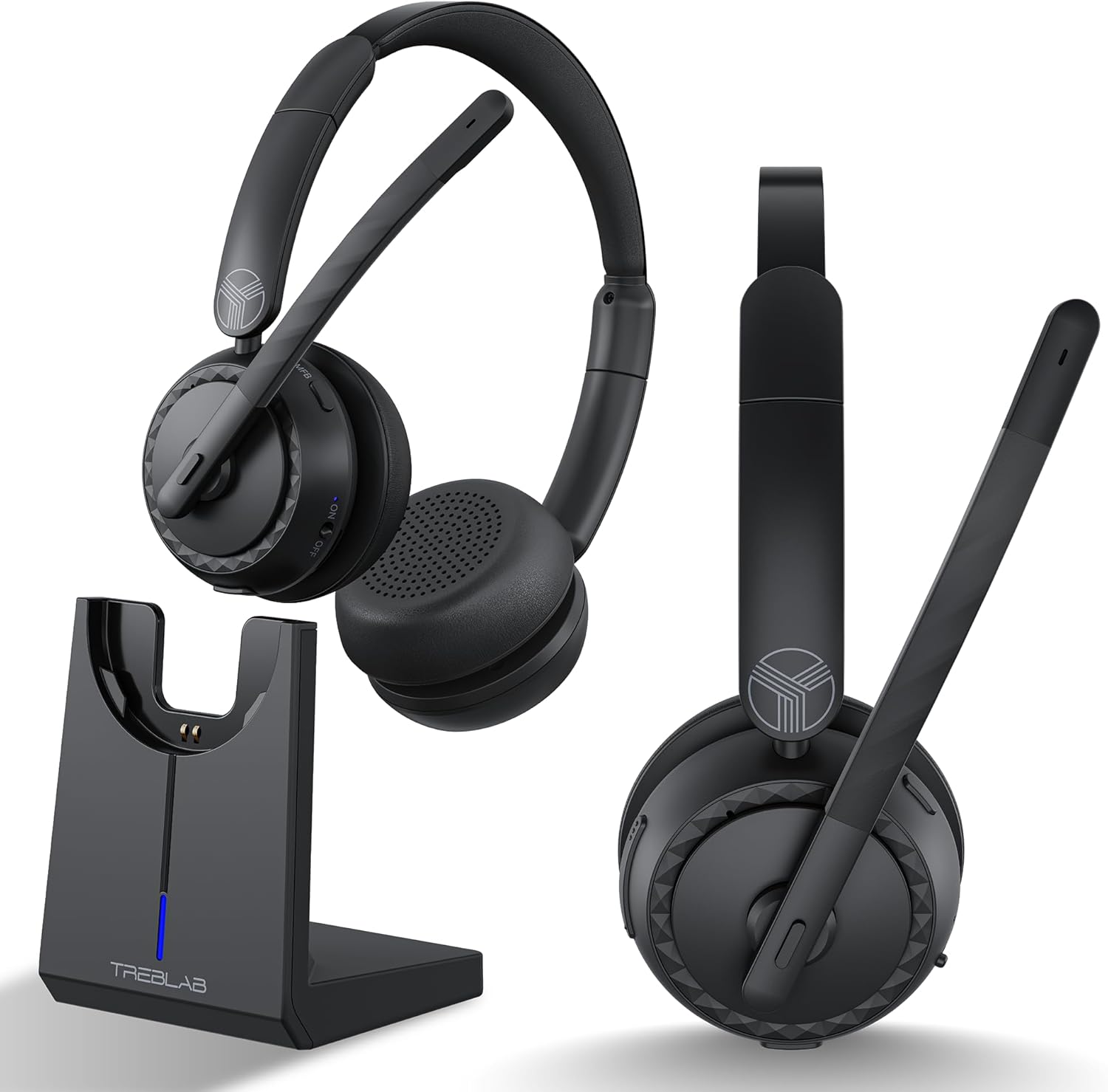
Product Overview
Headset Components and Features
The TREBLAB C7-Pro headset is designed for comfort and clear audio. It features plush memory foam cushions, an adjustable headband, and a flexible microphone boom with noise-cancelling capabilities.


Setup
Charging the Headset
Before first use, fully charge your TREBLAB C7-Pro headset. The included magnetic charging stand provides a convenient way to charge and store your headset.
- Connect the USB Type-C charging cable to the charging stand and a power source (e.g., computer USB port, wall adapter).
- Place the TREBLAB C7-Pro headset onto the magnetic charging stand. Ensure the charging contacts align.
- The LED indicator on the stand will show charging status. A full charge takes approximately 2.5 hours.

Powering On/Off
To power on: Press and hold the Power button until the LED indicator lights up.
To power off: Press and hold the Power button until the LED indicator turns off.
Bluetooth Pairing
The TREBLAB C7-Pro uses Bluetooth 5.3 for stable wireless connectivity.
- Ensure the headset is powered off.
- Press and hold the Power button for approximately 5 seconds until the LED indicator flashes blue and red, indicating pairing mode.
- On your device (smartphone, laptop, PC), enable Bluetooth and search for available devices.
- Select "TREBLAB C7-Pro" from the list of devices.
- Once connected, the LED indicator on the headset will flash blue slowly.

Operating Instructions
Call Management
- Answer/End Call: Press the Multi-function Button (MFB) once.
- Reject Call: Press and hold the MFB for 2 seconds.
- Mute/Unmute Microphone: Press the Mute button on the microphone boom.
Music Playback
- Play/Pause: Press the MFB once.
- Next Track: Press and hold the Volume Up button.
- Previous Track: Press and hold the Volume Down button.
Volume Control
- Increase Volume: Press the Volume Up button.
- Decrease Volume: Press the Volume Down button.
Gaming Mode
The TREBLAB C7-Pro features a 65ms low-latency Gaming Mode for synchronized audio and visuals. To activate/deactivate Gaming Mode, please refer to the Quick Start Guide for specific button combinations.
Compatibility
The TREBLAB C7-Pro headset is widely compatible with various platforms and devices, including Zoom, Microsoft Teams, Skype, macOS, Windows, Android, and Apple devices.

Maintenance
Cleaning
Regularly clean your headset to maintain hygiene and performance.
- Use a soft, dry, lint-free cloth to wipe the ear cushions and headband.
- For stubborn dirt, slightly dampen the cloth with water. Avoid using harsh chemicals or abrasive materials.
- Ensure no liquid enters the speaker grilles or microphone opening.
Storage
When not in use, store the headset on its charging stand or in a cool, dry place away from direct sunlight and extreme temperatures.
Troubleshooting
| Problem | Possible Cause | Solution |
|---|---|---|
| Headset does not power on. | Low battery. | Charge the headset fully. |
| Cannot pair with device. | Headset not in pairing mode; Device Bluetooth off; Too far from device. | Ensure headset is in pairing mode (flashing blue/red); Turn on Bluetooth on your device; Move headset closer to device (within 35 ft). |
| No sound or poor sound quality. | Volume too low; Incorrect audio output selected; Interference. | Increase volume on headset and device; Select TREBLAB C7-Pro as audio output; Move away from other wireless devices. |
| Microphone not working. | Microphone muted; Incorrect input device selected. | Unmute microphone; Select TREBLAB C7-Pro as audio input device in your system settings. |
Specifications
| Feature | Detail |
|---|---|
| Model Name | C7-Pro |
| Connectivity Technology | Wireless (Bluetooth 5.3) |
| Bluetooth Range | 10 Meters (35 Feet) |
| Audio Driver Size | 40 Millimeters |
| Battery Life | Up to 45 Hours |
| Charging Time | 2.5 Hours |
| Audio Latency | 65 Milliseconds (Gaming Mode) |
| Microphone Sensitivity | -38 dB |
| Water Resistance Level | IPX4 Water Resistant |
| Item Weight | 185 Grams (6.5 ounces) |
| Material | Plastic |
| Compatible Devices | Cellphones, Gaming Consoles, Telephones, Laptops, Desktops |
| Recommended Uses | Office Meetings, Calling, Gaming |
Warranty and Support
For warranty information and technical support, please refer to the included Warranty Card or visit the official TREBLAB website. You can also contact TREBLAB customer service for assistance.
Official TREBLAB Store: TREBLAB Amazon Store


